


Introduction
Secure Socket Layer (SSL) and its successor, Transport Layer Security (TLS), are critical cryptographic protocols that secure internet communications. However, they are not immune to threats. Threat modeling helps identify potential risks in SSL/TLS implementations, ensuring better security for online transactions, communications, and data exchanges.
This blog explores various SSL/TLS security threats and effective mitigation strategies, focusing on modern implementations like TLS 1.3. We will also look at threat modeling to understand how these threats can be represented using OWASP threat dragon.
1. Trust (PKI – Public Key Infrastructure)
PKI is the foundation of SSL/TLS security, involving certificates, Certificate Authorities (CAs), and validation mechanisms. However, various threats can compromise trust:
1.1 Certificate Validation Threats
Threats:
Errors in the validation process can allow attackers to bypass security measures:
Trust path validation bugs: Issues in verifying the certificate chain, leading to trusting an invalid certificate.
NUL-byte certificates: Exploit where a NUL character in a certificate’s name tricks software into trusting an incorrect domain.
Leaked CA Certificates: When a CA’s private key is leaked, attackers can forge certificates.
Mitigations:
Use a modern TLS library (e.g., OpenSSL 3.x, BoringSSL, wolfSSL)
Enable strict hostname validation (RFC 6125)
Implement Certificate Transparency (CT) to detect rogue certificates
Use Expect-CT HTTP header to enforce transparency
1.2 Attacks Against Sysadmins and Site Certificate Theft
Threats:
Errors in the validation process can allow attackers to bypass security measures:
Validation software subversion: Injecting vulnerabilities into certificate validation tools.
Forgery: Creating fake certificates by exploiting validation weaknesses.
Theft: Stolen certificates allow attackers to intercept and decrypt traffic.
Server compromise: Attackers gain access to a web server and steal private keys.
Backup compromise: If SSL private keys are stored in backups, an attacker can steal them.
Mitigations:
Use Hardware Security Modules (HSMs) to protect private keys
Implement multi-factor authentication (MFA) for CA access
Use short-lived certificates (e.g., automated renewal via Let’s Encrypt)
Use Elliptic Curve Cryptography (ECC) for smaller, more secure keys
2. Protocols (SSL/TLS)
SSL/TLS has inherent limitations that can be exploited. Older SSL versions and flawed implementations also have known weaknesses which can lead to unintended attacks from a hacker.
Threats:
No IP layer protection: SSL/TLS does not encrypt source/destination IPs.
Not end-to-end: SSL terminates at intermediate servers (e.g., load balancers), exposing traffic.
Hostname leakage via SNI (Server Name Indication): SNI exposes the target domain before encryption starts.
Downgrade attack (SSLv2): Forces a connection to use an older, weaker SSL version.
Domain Name Spoofing: Attackers can misues the similarities in domain names (e.g., “g00gle.com”).
Mitigations:
Use VPNs, IPsec, or WireGuard to encrypt traffic at the network layer.
Implement Encrypted Client Hello (ECH) (successor to ESNI) to encrypt SNI.
Use Mutual TLS (mTLS) to secure traffic inside internal networks.
Enforce TLS passthrough at proxies/load balancers.
Use IDN homograph detection tools (e.g., browser security settings).
Implement Unicode normalization to prevent phishing.
Use DMARC, DKIM, and SPF to verify emails from legitimate domains.
3. Server-Side and Client-Side Threats
Threats:
Failure to Enforce TLS(HTTP connections allowed): Using self-signed certificates, invalid hostname can lead to such types of threats.
Expired / Misconfigured Certificates: Clients reject expired certificates, causing service disruptions.
Private Key Theft (Server Compromise): Losing your private key in threat is a sure shot way to increase attack surface for hackers.
Weak TLS Configurations on Clients: Using outdated versions of SSL/TLS or using weak cyphers.
Mitigations:
Use HTTP Strict Transport Security (HSTS) to force HTTPS
Implement automated certificate renewal with Let’s Encrypt
Store keys in HSMs or use ephemeral key exchange (ECDHE)
Disable outdated TLS versions (TLS 1.0, 1.1) on clients
Force strong cipher suites in browser settings
4. TLS Attacks
These are real-world threats exploiting SSL/TLS weaknesses.
Threats:
DNS Cache Poisoning: An attacker injects malicious DNS entries, redirecting users to a fake website.
Man-in-the-Middle (MITM): Intercepts communication between client and server. It can happen on LAN or wireless networks.
Route Hijacking (BGP): Attackers manipulate Border Gateway Protocol (BGP) to reroute traffic to malicious servers.
Corporate TLS Interception (e.g., SSL Inspection by ISPs): Companies or ISPs inspect encrypted traffic using SSL/TLS proxies
Phishing Sites Using TLS: Attackers use SSL on fake websites to trick users into trusting them.
Mitigations:
Use DNSSEC to prevent forged DNS records
Use Certificate Pinning (HPKP is deprecated, use Expect-CT)
Regularly check TLS fingerprints to detect MITM proxies
Implement RPKI (Resource Public Key Infrastructure) to validate BGP routes
Use DNS-over-TLS (DoT) or DNS-over-HTTPS (DoH) to prevent DNS leaks
Use domain reputation services (e.g., Google Safe Browsing)
Summary: Key Security Best Practices for TLS 1.3
For Servers:
1. Enforce TLS 1.3 only (disable TLS 1.0, 1.1, and weak ciphers)
2. Use HSTS to prevent downgrade attacks
3. Deploy Certificate Transparency (CT) monitoring
4. Implement DANE with DNSSEC to reduce CA dependence
5. Enable Encrypted Client Hello (ECH) to hide SNI
For Clients and Browsers:
1. Validate certificates using strict hostname checks
2. Use DNS-over-TLS (DoT) or DNS-over-HTTPS (DoH)
3. Detect suspicious CA certificates (e.g., corporate proxies)
4. Enable Forward Secrecy (PFS) and Elliptic Curve Cryptography (ECC)
Creating Threat Model With OWASP Threat Dragon
OWASP Threat Dragon – An Overview
OWASP Threat Dragon is an open-source threat modeling tool designed to help security teams and developers visualize, analyze, and mitigate security risks in their applications. It provides an intuitive way to create data flow diagrams (DFDs) and associate threats with system components.
Key Features of OWASP Threat Dragon
Data Flow Diagram (DFD) Based Modeling: Uses a graphical interface to visualize system components, including
- External Entities (Users, Attackers, Third-Party Systems)
- Processes (Applications, APIs, Gateways)
- Data Stores (Databases, Certificate Authorities)
- Data Flows (Communications between components)
STRIDE Threat Categorization: Threat Dragon helps model threats using the STRIDE methodology
| Threat Type | Description |
|---|
| Spoofing | Attacker impersonates an entity (e.g., MITM attack) |
| Tampering | Modifying data in transit or storage (e.g., protocol downgrade) |
| Repudiation | Denying an action without proof (e.g., lack of logging) |
| Information Disclosure | Leaking sensitive data (e.g., SNI leakage in TLS) |
| Denial of Service (DoS) | Disrupting services (e.g., TLS handshake flooding) |
| Elevation of Privilege | Gaining unauthorized access (e.g., exploiting weak authentication) |
Threat Management
- Automatically suggests threats based on elements in the diagram.
- Allows users to define custom threats, categorize them, and provide mitigations.
Integration with Development Workflows
- Can be used in DevSecOps pipelines to include security threat modeling in CI/CD.
- Supports exporting threat models for sharing within teams.
How to Use OWASP Threat Dragon
Step 1: Install or Open the Web App
- Web Version:https://threatdragon.org
- Desktop Version: Download from GitHub Releases
Step 2: Create a New Threat Model
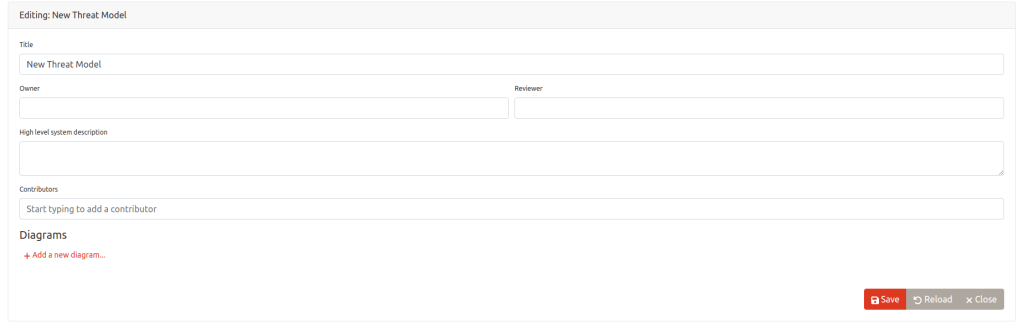
- Open OWASP Threat Dragon
- Click Create New Model
- Enter Title: SSL/TLS Threat Model
- Enter Owner: Security Team
- Click “Save”
Step 3: Add Elements

Click on the DFD (Data Flow Diagram) editor and add the following elements:
- External Entities
a. User (Represents a client accessing a secure website)
b. Attacker (Represents a malicious actor attempting various attacks) - Processes
a. Web Application (Represents the target web application that serves users)
b. API Gateway (Represents the secure backend API gateway that processes requests) - Data Stores
a. Certificate Authority (CA) (Represents the certificate provider ensuring authenticity)
Step 4: Add Data Flows

- HTTPS Request (TLS 1.3): From User → Web Application
- Certificate Validation: From Web Application → Certificate Authority
- Secure API Request (TLS): From Web Application → API Gateway
- MITM Attack Attempt: From Attacker → Web Application
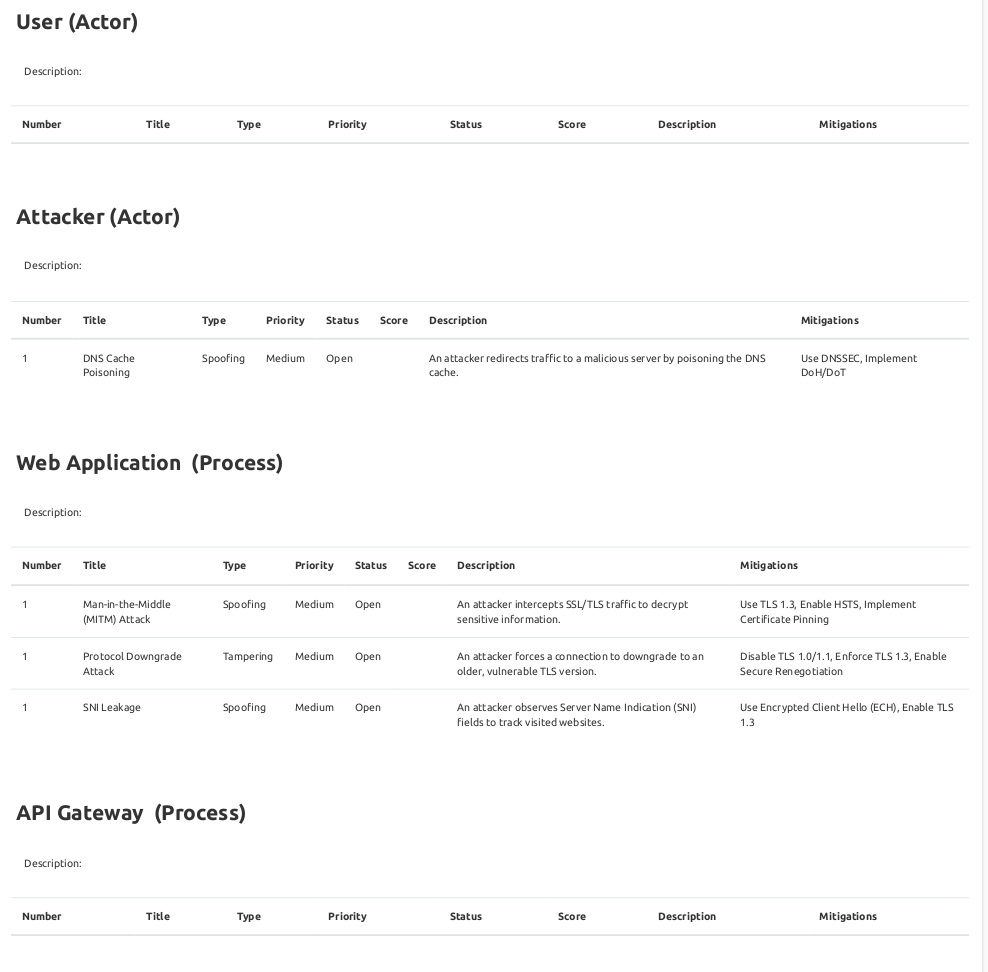
Step 5: Add Threats
Click on each element and add threats based on STRIDE categories:
1. Man-in-the-Middle (MITM) Attack
- Element: Web Application
- Category: Spoofing
- Description: An attacker intercepts SSL/TLS traffic to decrypt sensitive information.
- Mitigations: Use TLS 1.3, Enable HSTS, Implement Certificate Pinning
2. Certificate Authority Compromise
- Element: Certificate Authority
- Category: Tampering
- Description: A rogue CA issues fraudulent certificates, allowing impersonation of secure websites.
- Mitigations: Enforce Certificate Transparency, Monitor OCSP Responses, Use DNSSEC
3. Protocol Downgrade Attack
- Element: Web Application
- Category: Tampering
- Description: An attacker forces a connection to downgrade to an older, vulnerable TLS version.
- Mitigations: Disable TLS 1.0/1.1, Enforce TLS 1.3, Enable Secure Renegotiation
4. DNS Cache Poisoning
- Element: Attacker
- Category: Spoofing
- Description: An attacker redirects traffic to a malicious server by poisoning the DNS cache.
- Mitigations: Use DNSSEC, Implement DoH/DoT
5. SNI Leakage
- Element: Web Application
- Category: Information Disclosure
- Description: An attacker observes Server Name Indication (SNI) fields to track visited websites.
- Mitigations: Use Encrypted Client Hello (ECH), Enable TLS 1.3
Step 6: Finalizing the Diagram
- Ensure all flows, elements, and threats are linked properly.
- Save the model in Threat Dragon.
- Export the diagram as a PNG/PDF if needed.
Conclusion
SSL/TLS security is a cornerstone of modern internet communications, but it is not without its risks. Threat modeling plays a crucial role in identifying vulnerabilities and implementing proactive security measures. By understanding the various threats—ranging from certificate validation flaws and protocol weaknesses to real-world attacks like MITM and DNS poisoning—organizations can strengthen their defenses.
Adopting best practices such as enforcing TLS 1.3, using Certificate Transparency, implementing DNSSEC, and leveraging security tools like OWASP Threat Dragon helps mitigate risks and ensure robust protection. As cyber threats evolve, continuous monitoring, updating security configurations, and integrating threat modeling into DevSecOps workflows will be key to maintaining a secure digital ecosystem.
By prioritizing strong cryptographic implementations and proactive risk management, businesses and users can safeguard their communications and data, ensuring trust and security in an increasingly connected world.