


While automating web application testing, we usually depend on static scripts. They are excellent at executing predefined paths but are at a loss when the user journey is dynamic or nonlinear. What if we could train an agent to learn to navigate a web interface by exploring it? That is where Reinforcement Learning (RL) comes into play.
In this, we can observe how I implemented a Java RL agent using Q-learning to automate multi-step operations in a web application. We will train the agent to search, click results, scroll, and go back automatically.
Why use Reinforcement Learning in UI testing?
Much of the UI automation is checking whether pre-defined sequences function properly. The method can, however, break down if the UI is slightly changed or if there is some other likely means of completing a task.
Reinforcement Learning provides ways through which an agent learns to try various sequences of actions. It gets feedback in the form of a reward or a penalty through trial and error. With experience, it gets better at performing its purpose.
With RL, the agent chooses an action at each step depending on what it has learned so far.
What is Q-learning?
Q-learning is a type of model-free RL algorithm. It approximates the value of taking an action in a state. They are stored in what is known as a Q-table.
These are the key points:
- State: The current UI screen or state.
- Action: A possible user action, like a click or a scroll.
- Reward: A numerical value indicating how well an action was done.
- Policy: The action-selection strategy with Q-values.
The agent’s goal is to acquire a policy that optimises long-term reward.
Web Workflow Example
Let’s walk through a simple scenario of a user navigating through an application on the web:
- Start from the Home page
- Do a Search
- Go to the Search Results page
- Click on a result to link to an External page
- Scroll back or otherwise go back. Here is a basic diagram of the process:
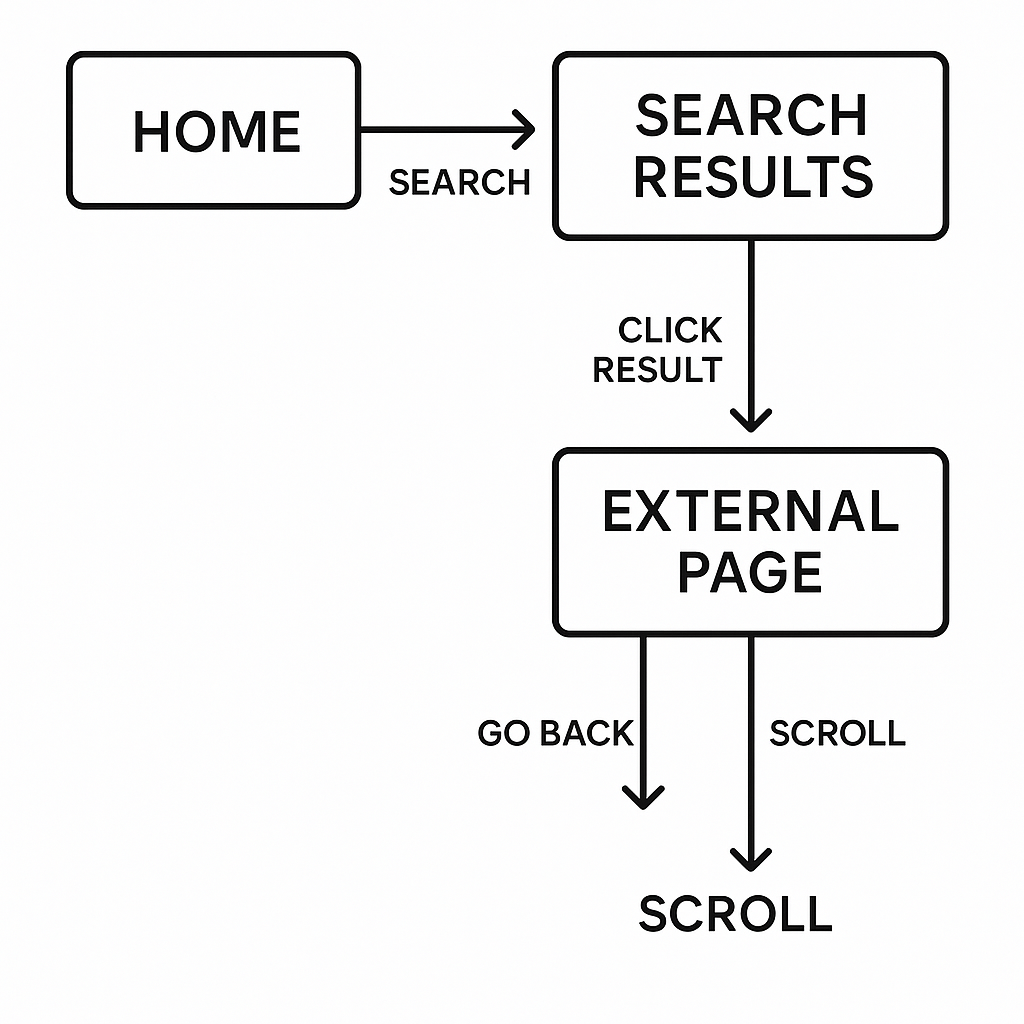
Each state allows a particular set of operations, and each operation changes the state.
Q-learning Agent in Java
We start by building the agent class that holds and maintains Q-values.
package com.techhub.rl;

import java.util.*;
import java.util.concurrent.ThreadLocalRandom;

public class SimpleRLAgent {
    private Map<String, Double> qTable = new HashMap<>();
    private double learningRate = 0.1;
    private double discount = 0.9;
    private double epsilon = 0.8;

    public String selectAction(String state, String[] actions) {
        if (ThreadLocalRandom.current().nextDouble() < epsilon) {
            return actions[ThreadLocalRandom.current().nextInt(actions.length)];
        }

        String bestAction = actions[0];
        double bestValue = getQValue(state, bestAction);

        for (String action : actions) {
            double value = getQValue(state, action);
            if (value > bestValue) {
                bestValue = value;
                bestAction = action;
            }
        }

        return bestAction;
    }

    public void updateQValue(String state, String action, double reward, String nextState, String[] nextActions) {
        double currentQ = getQValue(state, action);
        double maxNextQ = 0;

        for (String nextAction : nextActions) {
            maxNextQ = Math.max(maxNextQ, getQValue(nextState, nextAction));
        }

        double newQ = currentQ + learningRate * (reward + discount * maxNextQ - currentQ);
        qTable.put(state + "-" + action, newQ);

        epsilon = Math.max(0.01, epsilon * 0.995);
    }

    private double getQValue(String state, String action) {
        return qTable.getOrDefault(state + "-" + action, 0.0);
    }

    public void printStats() {
        System.out.println("Q-Table size: " + qTable.size() + ", Epsilon: " + String.format("%.3f", epsilon));
    }
}
This class selects an action and updates the Q-table upon receiving a reward. It also uses the epsilon-greedy policy to balance exploration and exploitation.
Simulating the Web Environment
The second is to simulate the environment. The environment supplies states, actions, and rewards. It also tracks if the goal has been met.
package com.techhub.rl;
import com.techhub.config.SimpleWebDriver;

public class TestEnvironment {
    private SimpleWebDriver webDriver;
    private int stepCount = 0;
    private final int maxSteps = 20;

    public TestEnvironment() {
        this.webDriver = new SimpleWebDriver();
    }

    public String reset() {
        stepCount = 0;
        webDriver.initDriver();
        webDriver.goToGoogle();
        return webDriver.getCurrentState();
    }

    public TestResult executeAction(String action) {
        stepCount++;
        boolean success = false;
        double reward = -0.1;

        switch (action) {
            case "SEARCH":
                success = webDriver.performSearch("selenium testing");
                reward = success ? 5.0 : -2.0;
                break;
            case "CLICK_RESULT":
                success = webDriver.clickFirstResult();
                reward = success ? 3.0 : -1.0;
                break;
            case "SCROLL":
                webDriver.scrollDown();
                success = true;
                reward = 0.5;
                break;
            case "GO_BACK":
                webDriver.goBack();
                success = true;
                reward = 1.0;
                break;
        }

        String newState = webDriver.getCurrentState();
        boolean done = stepCount >= maxSteps || "EXTERNAL".equals(newState);

        if ("EXTERNAL".equals(newState) && stepCount <= 10) {
            reward += 10.0;
        }

        return new TestResult(newState, reward, done, success);
    }

    public String[] getAvailableActions(String state) {
        switch (state) {
            case "HOME": return new String[]{"SEARCH"};
            case "SEARCH_RESULTS": return new String[]{"CLICK_RESULT", "SCROLL"};
            case "EXTERNAL": return new String[]{"GO_BACK", "SCROLL"};
            default: return new String[]{"SEARCH"};
        }
    }

    public void cleanup() {
        webDriver.quit();
    }

    public static class TestResult {
        public final String state;
        public final double reward;
        public final boolean done;
        public final boolean success;

        public TestResult(String state, double reward, boolean done, boolean success) {
            this.state = state;
            this.reward = reward;
            this.done = done;
            this.success = success;
        }
    }
}
Training the Agent
With this, we can now create a training loop. This allows the agent to learn from each episode through interaction with the environment.
public class RLTrainer {
    public static void main(String[] args) {
        SimpleRLAgent agent = new SimpleRLAgent();
        TestEnvironment env = new TestEnvironment();

        for (int episode = 1; episode <= 1000; episode++) {
            String state = env.reset();
            boolean done = false;

            while (!done) {
                String[] actions = env.getAvailableActions(state);
                String action = agent.selectAction(state, actions);
                TestEnvironment.TestResult result = env.executeAction(action);

                String[] nextActions = env.getAvailableActions(result.state);
                agent.updateQValue(state, action, result.reward, result.state, nextActions);

                state = result.state;
                done = result.done;
            }

            if (episode % 100 == 0) {
                System.out.println("Episode " + episode + " completed.");
                agent.printStats();
            }
        }

        env.cleanup();
    }
}
Conclusion
Reinforcement Learning brings intelligence into automation. Instead of following hardcoded steps, the agent learns and discovers how to continue through workflows. This comes in handy when you’re testing applications with dynamic flows or multiple user actions. If you’re researching more sophisticated methods of automating, then you should begin with Q-learning. It’s simple enough to include in your arsenal and solid enough to withstand actual world interaction patterns. Ready to build your own RL-based testing agent? Try out using this format with your own web workflows and observe how the agent behaves.
References
https://www.geeksforgeeks.org/machine-learning/q-learning-in-python