


Variables enable you to store and reuse values. Postman is a powerful API development tool that offers a feature known as environment variables. These variables help you work efficiently, collaborate with teammates in testing and development by allowing users to easily manage dynamic values across requests.
1. Understanding variables in Postman
A variable is a symbolic representation of data that enables you to access a value without entering it manually whenever you need it. Variables in Postman can change or need to be reused across multiple requests. These variables allow to hold and repeat parameters in the requests, collections, scripts, etc. If we need to modify a value, we only do it in one place.
2. Initial and current values
Initial value is a value that’s set in the element where the variable is defined. This value is synced to Postman’s server. and is useful to share with your team when you share that element. Note that data in an inial value will also be shared with others, and potentially with the world
Current value is used when sending a request. These are local values and aren’t synced to Postman’s servers. If you change a current value, it won’t be persisted in the original shared collection, environment, or globals
Tips: You can put particular text in “Initial value”. When the collection is exported and shared with your team. They will be able to see the text put in “Initial value”, and they can go ahead to put their value (e.g: password) in the “Current value”, because the current value will be empty by default from the exported collection

3. How to use variables in Postman Script
In Postman, there are many types of variables with different purposes. You should know the basic functions with these types of variables to write scripts faster and more professionally
3.1 Global variable
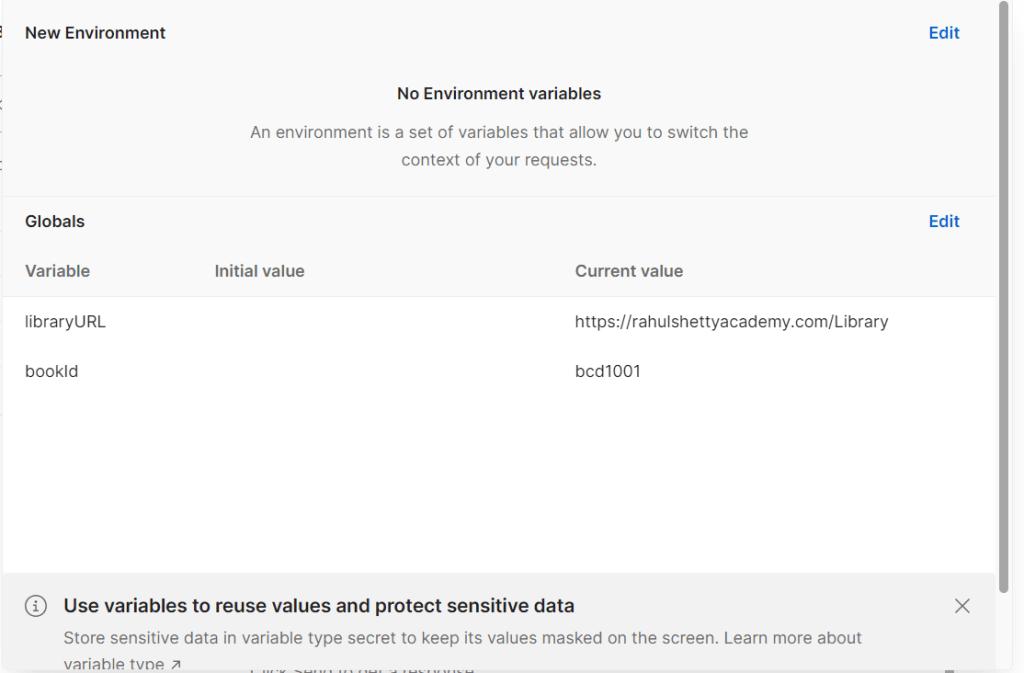
| Goals | It can be accessed from every place in a particular workspace |
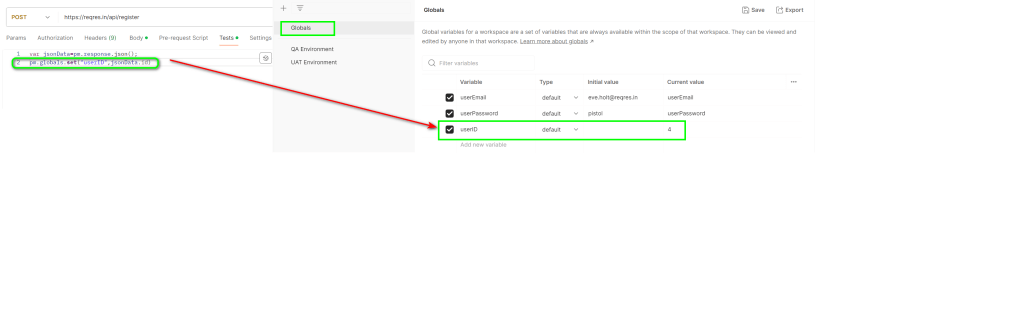
| Set | pm.globals.set(‘libraryURL’, MY_VALUE); |
| Get | pm.globals.get(‘libraryURL’); |
| Remove | pm.global.unset(‘libraryURL’); |
| Clear | pm.globals.clear(); |
Global variables’ scope
Global variables are available to all requests available in the Postman console regardless of which collection they belong to.
For example: We can call and use the global variables in any test environment, any collection or any request as long as they belong to a workplace where the global variable is defined

3.2 Collection variable
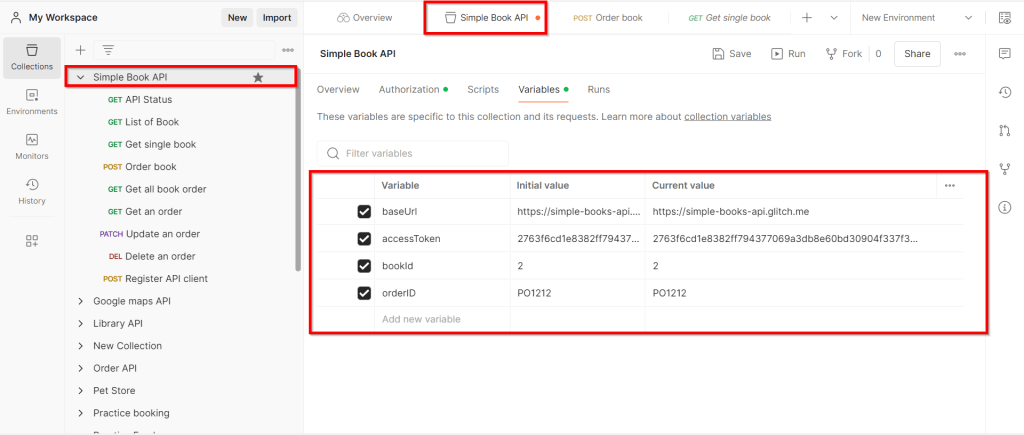
| Goals | Only used with requests in a collection, used to store variables that will be used during the test run without differences between environments: dev, test, staging |
| Set | pm.collectionVariables.set(‘baseURL’, MY_VALUE); |
| Get | pm.collectionVariables.get(‘baseURL’); |
| Remove | pm.collectionVariables.unset(‘baseURL’); |
| Clear | pm.collectionVariables.clear(); |
Collection variables’ scope
A collection is a group of Postman requests that are related to each other. Collection variables are used to define variables at – guess where – the collection scope.
For example: Collection variables are available throughout the requests in a collection and are independent of environments, so do not change based on the selected environment.
3.3. Environment variable
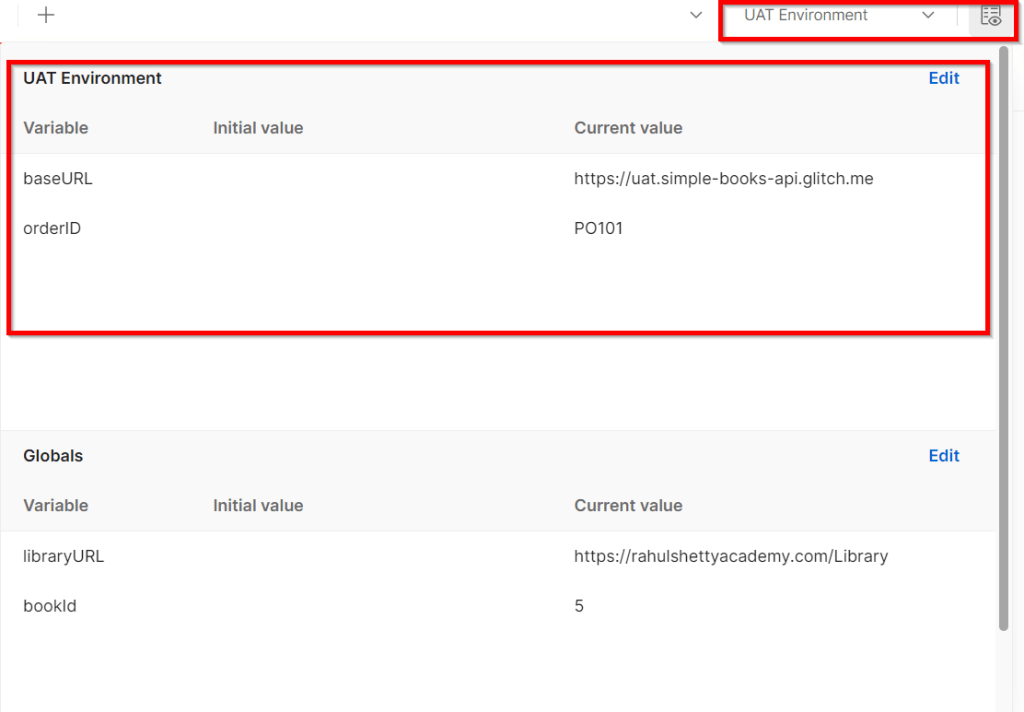
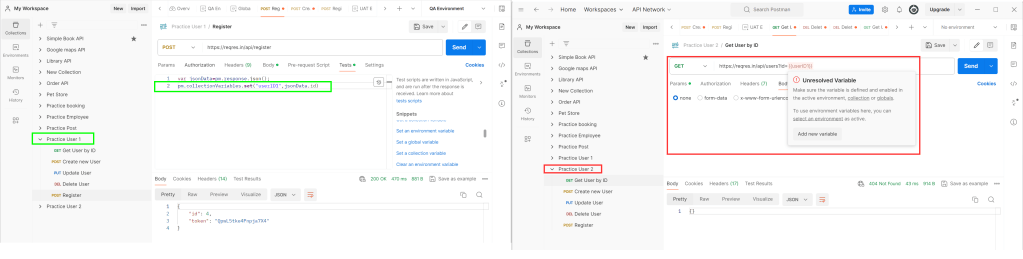
| Goals | Used specifically for different environments of the app, it is possible to store variables that are different in each environment such as URL, username/password, or data that is used for subsequent requests |
| Set | pm.environment.set(‘baseURL’, MY_VALUE); |
| Get | pm.environment.get(‘baseURL’); |
| Remove | pm.environment.unset(‘baseURL’); |
| Clear | pm.environment.clear(); |
Collection variables’ scope
Environment variables have narrower scope than global variables. If your collection needs to run against different servers, such as localhost, test server, pre-prod and prod, you can easily switch environments. Even if you have one server / API only, it might still be useful to use environment variables as it would keep the variables away from global namespace otherwise it can get crowded. In this case, however, you can choose to use collection variables too but environment variables give you different access levels when working as a team. You can assign the same role in the workspace or configure roles, such as viewer, editor etc on an individual basis.
Environment variables should be used for environment specific information such as URLs, username and password. You should avoid mixing them with global variables, stick to environment variables and not to use one variable as a global variable and the other one as an environment variable because your scripts will be very confusing especially if you share them with teammates.


3.4. Data variable
| Goals | When we are doing data-driven testing, read information from csv or json data files |
| Get | pm.interationData.get(‘orderID’); |
Data variables’ scope
Data variables come in the context of request execution through the collection runner.
Postman allows us to execute requests in a collection through the collection runner and we can provide a data set in the form of JSON or CSV that are used while running the requests inside the collection so the source of data variables is the user-supplied data file in the format of JSON or CSV. During the request execution, the data variables can only be fetched but not updated/modified or added.
3.5. Local variable
| Goals | Local variable will be utilized when the requests start and is completely cleared when the requests ends |
| Set | pm.variables.set(‘baseURL’, MY_VALUE); |
| Get | pm.variables.get(‘baseURL’); |
| Remove | pm.variables.unset(‘baseURL’); |
| Clear | pm.variables.clear(); |
Local variables’ scope
Local variables are temporary and only accessible in your request scripts. Local variable values are scoped to a single request or collection run, and are no longer available when the run is complete.
One important use case of local variables is that they can be used when you want to override the values of a variable that is defined in any other scope like global, collection or environment but you don’t want the value to persist when the execution ends.
Note:
If a variable with the same name is declared in two different scopes, the value stored in the variables with the narrowest scop will be used
Postman stores variables as strings. If you store objects or arrays, remember to JSON.stringify() them before storing, and JSON.parce() them when you retrieve them
4. Conclusion
You can define variables in a variety of ways, depending on if you need global, environment, or collection scope.
Understing variables types and scopes that will allow you initialized efficiently in URIs, request body, and headers. This lets us save time and space by not initializing the same values multiple times.
Remember to delete variables you are no longer using.