


Umbraco 17 LTS (released December 5, 2025) is the most significant release in Umbraco’s recent history. Built on .NET 10 LTS, this Long-Term Support version introduces revolutionary features like load-balanced backoffice, consistent UTC date handling, the new Developer MCP for AI integration, and a completely modernized backoffice architecture.
Combined with Umbraco Engage, organizations now have a powerful platform for analytics, A/B testing, personalization, and 360° customer profiling—all integrated directly into the CMS backoffice with full Deploy support.
This document outlines how to leverage Umbraco 17 for marketing projects, with practical implementation guidance for developers and capability explanations for marketers.
What’s New in Umbraco 17 LTS
Why Umbraco 17 Matters
Umbraco 17 is not just another release—it’s a milestone LTS version that finalizes a two-year journey of modernization:
- 3 years of support (until Q4 2028): 2 years full support + 1 year security patches
- Direct LTS-to-LTS upgrade: Migrate from Umbraco 13 → 17 with automatic migrations
- Future-proofed: Both Umbraco 17 and .NET 10 are LTS versions
Key Features Overview
| Feature | Description & Benefit |
|---|---|
| .NET 10 LTS Foundation | Microsoft’s latest LTS framework with improved performance, security, and C# 14 enhancements. Future-proofed until Q4 2028. |
| Load-Balanced Backoffice | NEW! Finally, the backoffice can run across multiple servers—no more single-server bottleneck for editorial teams. |
| UTC Date Handling | All system dates stored in UTC with timezone support. Consistent scheduling across global teams. |
| Modern Backoffice | Completely new architecture with Web Components + TypeScript. AngularJS is gone. Faster, cleaner, easier to extend. |
| Developer MCP | Model Context Protocol integration for AI-powered development workflows. |
| Content Delivery MCP | AI tools can read your published content safely for content-aware features. |
| TipTap Rich Text Editor | New open-source RTE replacing TinyMCE. Better editing experience, no license issues. |
| HybridCache | Layered caching system (from v15) for optimal performance. |
| Block-Level Variants | Language-specific content blocks within the same page structure. |
| Client Credentials | OpenID Connect for secure API authentication in headless implementations. |
| Umbraco Engage Deploy | Transfer segments, personas, journey steps, and goals between environments. |
System Architecture
Architecture Overview
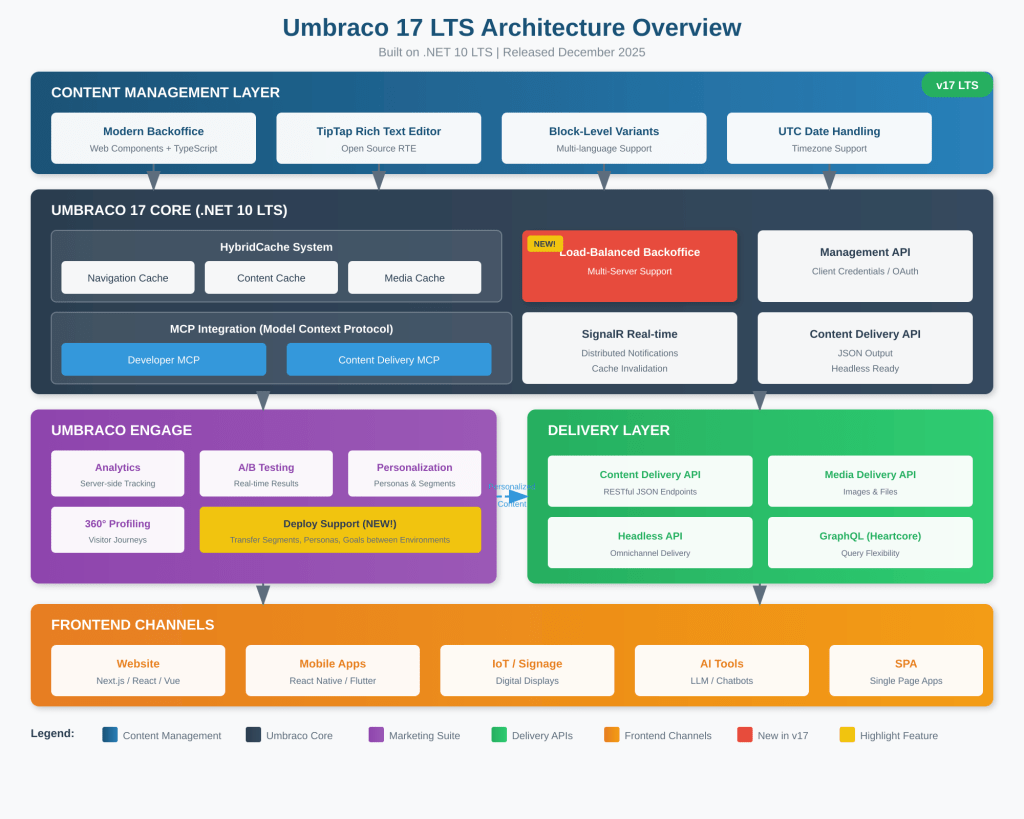
What’s Revolutionary in v17
1. Load-Balanced Backoffice
For the first time, the entire Umbraco application (both frontend AND backoffice) can scale horizontally:
- Better performance for large editorial teams
- No single point of failure
- Simplified infrastructure
- SignalR-based real-time updates across servers
2. Consistent UTC Date Handling
- All dates stored in UTC
- Built-in migration updates existing data automatically
- New DateTime Picker with timezone selection
- Perfect for global teams scheduling content
3. MCP (Model Context Protocol) Integration
- Developer MCP: Full API parity with Management API for AI-assisted development
- Content Delivery MCP: AI tools can read published content safely
- Foundation for AI-powered editorial workflows
Umbraco Engage: The Marketing Suite
Umbraco Engage is now fully aligned with the new backoffice architecture in v17, with full Deploy support for transferring configurations between environments.
Core Capabilities
| Capability | For Marketers | For Developers |
|---|---|---|
| Server-side Analytics | Real-time dashboards, heatmaps, conversion tracking—all within Umbraco. | GDPR-compliant first-party data. No third-party dependencies. API access. |
| A/B Testing | Create tests in CMS. Test headlines, layouts, CTAs. Real-time statistical results. | Server-side variant rendering. Headless API support for SPA/React. |
| Personalization | Create personas and segments. Define rules based on behavior and demographics. | Server-side rule evaluation. Content Delivery API returns personalized content. |
| 360° Profiling | Rich visitor profiles tracking interactions and journey across touchpoints. | Local data storage. CRM integration via APIs. External profile data import. |
| Deploy Support (NEW!) | Transfer segments, personas, journey steps, goals between environments. | Analytics data remains safely in each environment. |
Marketing Optimization Workflow
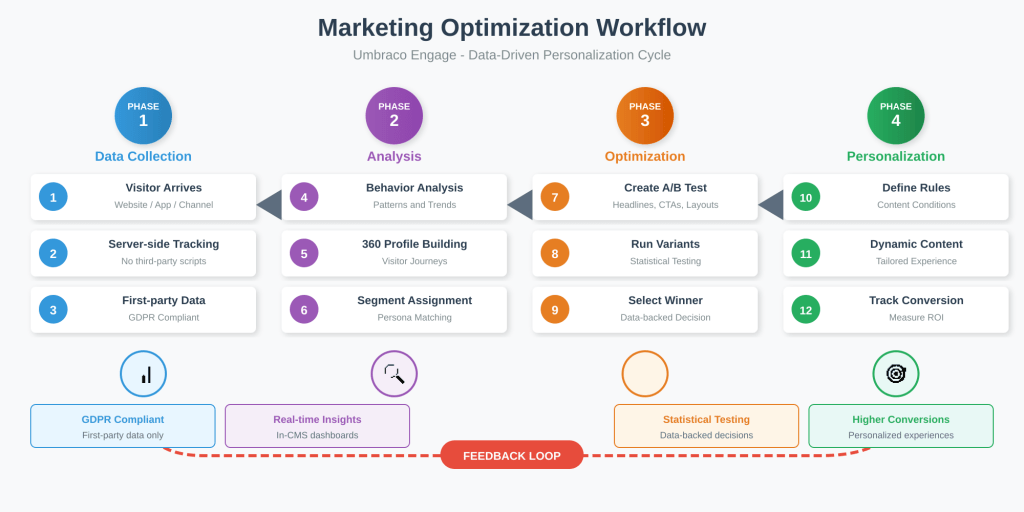
Developer Implementation Guide
Step 1: Project Setup
Create new Umbraco 17 project:
# Ensure .NET 10 SDK is installeddotnet --version # Should be 10.x# Create new Umbraco project with Delivery API enableddotnet new umbraco -n MyMarketingProject --use-delivery-api# Navigate to projectcd MyMarketingProject# Install Umbraco Engagedotnet add package Umbraco.Engage# Install Umbraco Engage Headless (for headless projects)dotnet add package Umbraco.Engage.HeadlessStep 2: Configure appsettings.json
{ "Umbraco": { "CMS": { "DeliveryApi": { "Enabled": true, "PublicAccess": true, "ApiKey": "your-secure-api-key-here", "Media": { "Enabled": true } }, "Global": { "TimeZone": "UTC" } } }}Step 3: Update Program.cs
builder.CreateUmbracoBuilder() .AddBackOffice() .AddWebsite() .AddDeliveryApi() .AddEngageApiDocumentation() // Add for Umbraco Engage .AddComposers() .Build();Step 4: Configure Load-Balanced Backoffice (Optional)
For enterprise deployments with multiple servers:
// Custom IServerRoleAccessor for load balancingpublic class StaticServerAccessor : IServerRoleAccessor{ public ServerRole CurrentServerRole => ServerRole.SchedulingPublisher;}// Register in Program.cs or via Composerbuilder.Services.AddSingleton<IServerRoleAccessor, StaticServerAccessor>();// Enable cache versioning for load balancingbuilder.AddUmbraco() .AddBackOffice() .AddWebsite() .SetBackofficeCacheVersioningEnabled(true) // Required for LB .Build();Implementation Steps
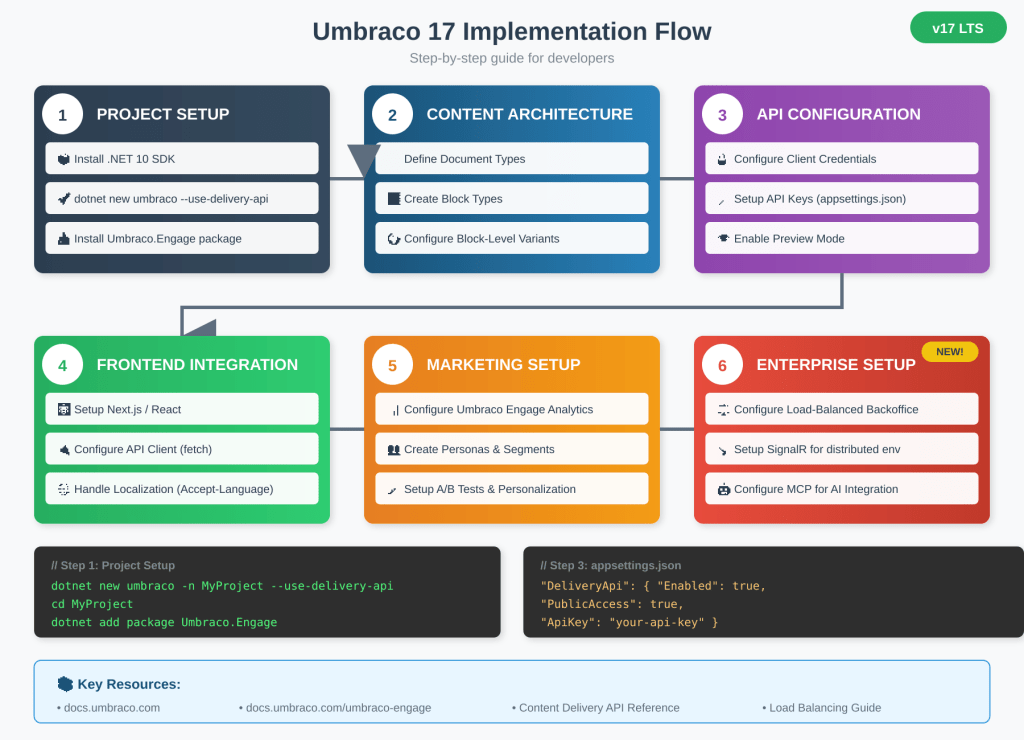
Content Delivery API Usage
Key Endpoints
| Endpoint | Description |
|---|---|
GET /umbraco/delivery/api/v2/content | Query multiple content items with filtering and pagination |
GET /umbraco/delivery/api/v2/content/item/{id} | Get single content item by GUID |
GET /umbraco/delivery/api/v2/content/item/{path} | Get content item by URL path |
GET /umbraco/delivery/api/v2/media | Query media items |
Next.js Frontend Integration
API Client Setup (lib/umbraco.ts):
// lib/umbraco.ts
const UMBRACO_URL = process.env.NEXT_PUBLIC_UMBRACO_URL;
const API_KEY = process.env.UMBRACO_API_KEY;

interface UmbracoContent {
  name: string;
  id: string;
  contentType: string;
  properties: Record<string, any>;
  cultures?: Record<string, { path: string }>;
}

export async function getContentByPath(
  path: string,
  locale: string = 'en-US'
): Promise<UmbracoContent> {
  const response = await fetch(
    `${UMBRACO_URL}/umbraco/delivery/api/v2/content/item/${path}`,
    {
      headers: {
        'Accept-Language': locale,
        'Api-Key': API_KEY || '',
      },
      next: { revalidate: 60 } // ISR: revalidate every 60 seconds
    }
  );

  if (!response.ok) {
    throw new Error('Failed to fetch content');
  }

  return response.json();
}

export async function getContentByType(contentType: string) {
  const response = await fetch(
    `${UMBRACO_URL}/umbraco/delivery/api/v2/content?filter=contentType:${contentType}`,
    {
      headers: {
        'Api-Key': API_KEY || '',
      },
    }
  );

  return response.json();
}

// Preview mode support
export async function getPreviewContent(id: string) {
  const response = await fetch(
    `${UMBRACO_URL}/umbraco/delivery/api/v2/content/item/${id}`,
    {
      headers: {
        'Api-Key': API_KEY || '',
        'Preview': 'true',
      },
    }
  );

  return response.json();
}
Marketing Project Use Cases
1. Multi-language Marketing Campaign
Challenge: Launch a campaign targeting audiences in multiple countries with localized content.
Solution with Umbraco 17:
- Block-Level Variants for language-specific content blocks
- UTC date handling ensures consistent scheduling across timezones
- Content Delivery API returns localized content via
Accept-Languageheader - Umbraco Engage tracks engagement per locale
2. E-commerce Personalization
Challenge: Increase conversion rates with personalized product recommendations.
Solution with Umbraco 17:
- Integrate Umbraco Commerce with Umbraco Engage
- Access order history at visitor profile level
- Create segments based on purchase history and behavior
- A/B test offer strategies with real-time statistical analysis
3. Enterprise Content Operations
Challenge: Large editorial team (50+ editors) needs reliable performance and no single point of failure.
Solution with Umbraco 17:
- Load-Balanced Backoffice scales horizontally
- SignalR-based real-time updates across all servers
- Better resilience with no single point of failure
- Simplified infrastructure management
4. AI-Powered Content Platform
Challenge: Leverage AI tools for content creation and optimization.
Solution with Umbraco 17:
- Developer MCP for AI-assisted development
- Content Delivery MCP gives AI tools safe, read-only access to published content
- Build AI-powered features like content summarization, translation, and recommendations
- Foundation for future AI editorial workflows
Upgrade Path: From v13 to v17
Direct LTS-to-LTS Migration
Umbraco 17 supports direct upgrade from v13 with automatic migrations:
# 1. Update .NET SDK to 10.x# 2. Update Umbraco packagesdotnet add package Umbraco.Cms --version 17.0.0# 3. Update Umbraco.Cms.DevelopmentMode.Backoffice (for ModelsBuilder)dotnet add package Umbraco.Cms.DevelopmentMode.Backoffice# 4. Run migrations automatically on first startdotnet runKey Breaking Changes to Address
- Razor Runtime Compilation removed → Use
Umbraco.Cms.DevelopmentMode.Backofficepackage - AngularJS Backoffice gone → Custom extensions need Web Components rewrite
- Extension Methods phased out → Use new Extension API
- Date/Time handling → All dates now UTC (migration automatic)
Best Practices
For Developers
- Leverage Load Balancing – Configure SignalR properly for distributed environments
- Use TypeScript Models – Generate from Swagger/OpenAPI with Orval or Hey API
- Implement UTC Handling – Design frontend to display dates in user’s local timezone
- Secure API Access – Use Client Credentials for server-side requests
- Explore MCP Integration – Use Developer MCP for AI-assisted development workflows
For Marketers
- Use Deploy for Engage – Transfer segments and personas between environments
- Define Clear Personas – Based on behavior patterns and business objectives
- A/B Test Incrementally – One variable at a time for clear insights
- Leverage 360° Profiling – Build comprehensive visitor journeys
- Schedule with Confidence – UTC handling ensures global consistency
Conclusion
Umbraco 17 LTS represents a major milestone for the platform:
- Enterprise-Ready – Load-balanced backoffice finally removes the editorial bottleneck
- Future-Proofed – .NET 10 LTS foundation with support until Q4 2028
- AI-Ready – MCP integration enables AI-powered development and content workflows
- Marketing Intelligence – Umbraco Engage with Deploy support for complete marketing suite
- Global Operations – UTC date handling for consistent worldwide operations
- Modern Architecture – New backoffice with Web Components for better performance and extensibility
Whether you’re upgrading from v13 or starting fresh, Umbraco 17 provides the stability, scalability, and features needed for modern marketing projects.
Additional Resources
- Umbraco 17 Documentation: docs.umbraco.com
- Umbraco Engage Documentation: docs.umbraco.com/umbraco-engage
- Umbraco 17 Release Blog: umbraco.com/blog/umbraco-17-lts-release
- Load Balancing Guide: docs.umbraco.com/umbraco-cms/fundamentals/setup/server-setup/load-balancing
- Content Delivery API: docs.umbraco.com/umbraco-cms/reference/content-delivery-api
- Umbraco Product Roadmap: umbraco.com/products/knowledge-center/roadmap