


A Brief of Kubernetes Services
Assuming that the application runs in containers, which run inside of Pods. All Pods in a Kubernetes cluster have their IP address and are attached to the same flat Pod network.
Kubernetes Deployment can help to create and destroy Pods dynamically. Scaling-up introduces new Pods with new IP addresses. Scaling down removes Pods. Rolling updates delete existing Pods and replace them with new ones with new IPs. But there is no guarantee that the pod’s IP address will remain the same throughout its life cycle. It is where Services come to the rescue by providing a stable and reliable network endpoint for groups of unreliable Pods.
Every Service gets its stable IP address, its own stable DNS name, and its stable port. It uses labels and selectors to select the Pods they send traffic to dynamically.

With a Service in place, the Pods can scale up and down. They can fail, and they can be updated and rolled back. Despite all of this, client access is still possible via the Service because the Service observes changes, maintains an up-to-date list of healthy Pods, and sends traffic to them. But it never changes its stable IP, DNS, and port.
The default Service type is ClusterIP. It registers a DNS name, virtual IP, and port with the cluster’s internal DNS that is only accessible from inside the cluster. All Pods in the cluster can use the cluster’s DNS service. If a Pod knows the name of a Service, it can resolve the Service’s name to a ClusterIP address and connect to the Pods behind the Service.

Kubernetes Service Discovery
We’ve known that each Service gets its stable IP address and port. The IP address is virtual IP, and it is not assigned to any network interfaces. Clients (usually Pods) use the Service by connecting to this IP address and port. But the Service’s IP itself doesn’t represent anything. That is reason why you can’t ping Service.
How Does Service Discovery Work?
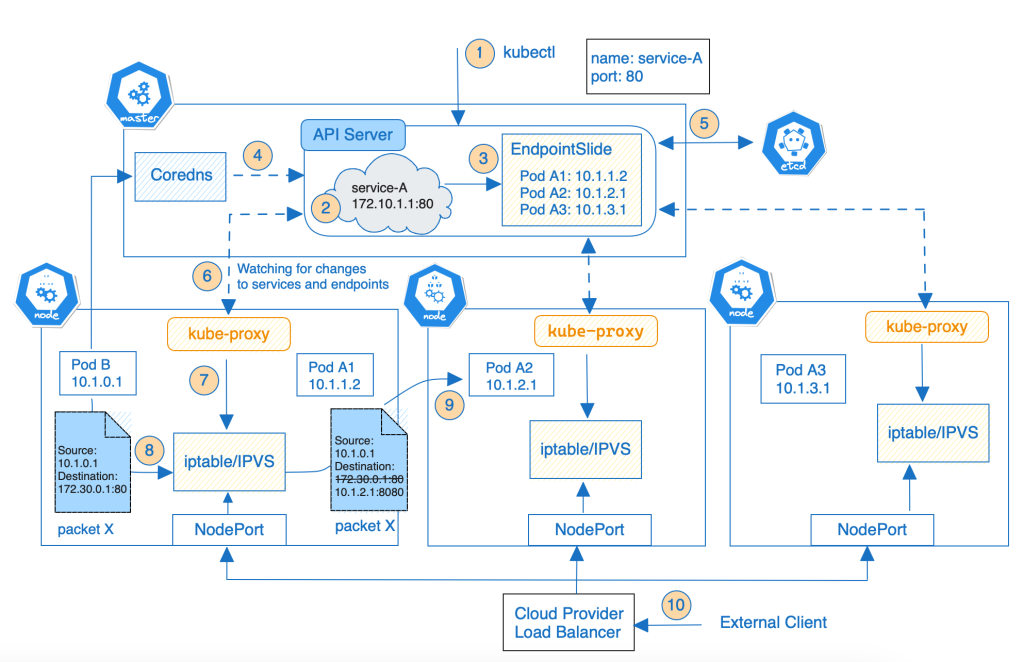
The below diagram shows what happens when you create a Service and how Service Discovery work:
Service Discovery Details
The details process of the Service Discovery in Kubernetes looks like this:
- You create a new Service by posting a Service manifest to the API server via
kubectl. - The Service is located a stable virtual IP address and port that called ClusterIP (don’t confuse with ClusterIP type)
- The control plane automatically creates EndpointSlice objects for any Kubernetes Service to hold the list of healthy Pods matching the Service’s label selector. EndpointSlice objects group network endpoints together by unique combinations of protocol, port number, and Service name.
- The cluster DNS server (such as CoreDNS) watches the Kubernetes API for new Services and creates a set of DNS records for each one. Then all Pods in the cluster should automatically be able to resolve Service by DNS name.
- The control plane stores the Service’s configuration in the cluster store – the ETCD database.
- The kube-proxy agent on every node is watching the API server for new Service and EndpointSlide objects.
- When the kube-proxy sees one, it creates local iptables (or IPVS) rules on all worker nodes to redirect ClusterIP traffic to Pods matching the Service’s label selector (read Virtual IPs and Service Proxies for more details). At the end of proceed, the Service is ready.
- When the client Pod (inside the cluster) wants to access the Service, it resolves the Service IP address that matches the Service name. And starts initiating a request through that IP address.
- The node’s kernel first checks if the packet (packet X) matches one of the created rules. If the packet has the destination IP equal to Service’s IP and destination port, then the node kernel will replace the packet’s destination IP and port with the IP and Port of a randomly selected Pod. From here on, it works like the client pod has sent the packet to the selected pod directly instead of through the Service.
- With the request from the internet, a load balancer is configured after the external cloud. It forwards an external access request to the port of a node, which then forwards the requests to the Cluster IP address based on the network rules (iptables or IPVS).
Conclusion
After going through this blog, you know what service discovery is in Kubernetes and how service discovery works. In Kubernetes, service discovery is implemented with automatically generated service names that map to the Service’s IP address. A client can use of DNS names or environment variables available inside the pods to connect to other Services.