


Introduction
Unity Catalog is a unified governance solution for data in the Lakehouse. It is crucial in managing stored information, particularly for those working with Databricks. Integrated into Delta Lake, it is a robust metadata management system. It offers a centralized hub for users to handle metadata information related to data stored in Delta Lake. This system simplifies data management by providing a cohesive perspective on data across various sources and formats.
Before the introduction of Unity Catalog, each Databricks workspace had its own meta store, user management, and access controls. This led to duplicated efforts in maintaining consistency across all workspaces. To tackle these challenges, Databricks developed Unity Catalog, which offers centralized access control, auditing, lineage, and data discovery capabilities across Databricks workspaces.
Architecture of Unity Catalog
Unity Catalog to managing identity, meta store, and access controls, all your Databricks identities like users, groups, and service principles live in the Unity catalog.
All your metadata also lives in its meta store i.e. all your databases/schemas, tables, and views are defined in the unity catalog meta store.
Once these two things i.e. user management and metadata are centralized, you only need to assign permissions to the user or identity to this metastor data object i.e. defining who can do what! That information is also stored in the Unity catalog
Next, we can connect our workspace to the catalog once we define the meta store.
So once connected to Databricks workspace, use unity catalog for the authorization i.e. say for example one person from Databricks’s workspace tried to access a data object, it can be a database/schema, tables, or view, Databricks workspace communicates with unity catalog for authorization.
The person can access that data object only if he has access and that access is defined in the unity catalog.
Let’s compare the one with the unity catalog and the one without it:
Without Unity Catalog
-> It works in a completely decentralized way.
-> All your access controls, user management, and meta store are local to each Databricks workspace.
-> There is no sharing of meta store between the workspaces.

With Unity Catalog
-> Access controls, user management, and meta store are centralized and managed by it.
-> Can connect workspaces with Unity Catalog and can control all the workspaces from the centralized Unity catalog.

Key Features of Unity Catalog
Centralized Metadata Layer
It allows you to implement a centralized metadata layer i.e. all your databases, tables and views can be shared across multiple Databricks workspaces.
Standard SQL-based security model
It allows you to use standard SQL syntax to grant permissions on databases, tables, and views. This permission works across all workspaces.
Built-in auditing
It captures the user’s level audit logs. It offers features like –
Data Discovery: With Uniou can add labels and notes to your data stuff, and there’s a search tool to help people find what they’re looking for.
Data Lineage: Data lineage is the tracking and visualization of how data moves and transforms throughout its lifecycle in a system or process.
Delta Sharing
It enables Databricks users to securely share data outside the organization, ensuring effective management, governance, auditability, and tracking capabilities.

Unity Catalog’s Object Model
- Meta Store: Think of it as a big container for information about your data. It’s like a giant filing system that organizes everything into three levels: catalogs, schemas, and tables.
- Catalog: This is like the main folder in the filing system. It helps organize all your different types of data.
- Schema: This is like a subfolder within the main folder. It’s where you keep your tables and views, which are basically different ways of looking at your data.
- Table and View: These are individual files or folders within the subfolder. Tables are like spreadsheets or databases where you store your structured data, like in Excel. Views are like saved queries or virtual tables. They let you look at your data in a particular way without changing the actual data.
When talking about accessing data objects, we use a three-level namespace: catalog.schema.asset. The asset could be something like a table or a view.
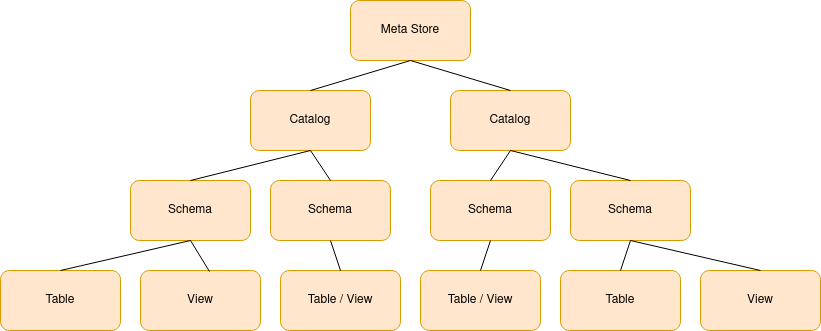
It follows the hierarchical naming standard.
- Meta store is at the root level in the hierarchy and each meta store contains multiple catalogs.
- Catalogs are at the first level in the hierarchy, and they contain multiple schemas or databases.
- Each Schema/Database can have multiple tables and views.
Conclusion
Unity Catalog offers a robust solution for centralized metadata management and user administration, streamlining the sharing of data objects across various workspaces. With its support for Standard SQL commands, it ensures controlled and secure access to data. The platform’s focus on data lineage, access auditing, and comprehensive search capabilities enhances transparency and facilitates efficient data discovery. Additionally, it introduces Delta Sharing, enabling secure external data sharing with robust governance and audit capabilities. Overall, it stands out as comprehensive and versatile for effective data management in diverse organizational settings.
Certainly! If you require additional information, please refer to this link.