



Hi, it appears that our deployed model has been yielding suboptimal results lately. Could you kindly review the dataset utilized for its training?

David (Client)
Sure, David. Allow me some time to revisit that experiment and gather the necessary information.

Ray (Developer)
How long, I believe you must have kept the record of the experiments, right?
David (Client)
Thinking, what to say!
Ray (Developer)
I BELIEVE YOU DON’T WANNA KEEP THINKING ABOUT THAT LIKE RAY, RIGHT?
This is a problem we might also encounter if we fail to follow best practices before developing a machine learning or any other solution.
Tracking experiments is a crucial practice to uphold, this is what we discuss today along with how to achieve it.
Certainly, whenever we embark on building a solution, we meticulously plan and follow a proper development cycle, incorporating input from all team members to finalize details.
When it comes to crafting a Machine Learning Solution, there’s a plethora of inputs to consider. These encompass not only inputs from teams but also technical aspects like datasets, algorithms, hyperparameters, and more, and surely, we want to keep all of these into some records, so that we never face the challenge like in the above conversation “RAY” was facing.
Here is how we can leverage an open-source framework known as Mlrun, a perfect name suitable for machine learning end to end flow tracking. So, let’s begin step by step.
Let’s first Understand What is Mlrun?
MLRun, an open MLOps platform, accelerates the creation and management of ML applications throughout their lifecycle. Integrated seamlessly into your development and CI/CD environment, MLRun automates the deployment of production data, ML pipelines, and online applications to achieve a successful workflow for ML tracking.
This significantly minimizes engineering efforts, shortens time to production, and optimizes computation resources.
With MLRun, you have the flexibility to use any IDE on your local machine or in the cloud.
By bridging the gaps between data, ML, software, and DevOps/MLOps teams, MLRun fosters collaboration and facilitates rapid continuous improvements.
Now let’s follow installation instructions for Mlrun
Mlrun provides two primary functionalities to accomplish this objective: Service and The Client (comprising SDK and UI).
SERVICE
MLRun service runs over Kubernetes (can also be deployed using local Docker for demo and test purposes). It can orchestrate and integrate with other open-source open source frameworks, as shown in the following diagram.
CLIENT (SDK & UI)
MLRun client SDK is installed in your development environment and interacts with the service using REST API calls.
Prior to commencing the installation process, it is essential to verify the presence of Python 3.9 since Mlrun exclusively supports this particular Python version at the moment.
There are various options available for setting up MLRun.
LOCAL DEPLOYMENT
Deploying a Docker on your laptop or a single server is ideal for testing or small-scale environments, offering simplicity in deployment despite limited resources and scalability.
Know MoreKUBERNETES CLUSTER
Set up an MLRun server on Kubernetes for elastic scaling. Although it offers scalability, it’s more intricate to install since you need to set up Kubernetes yourself.
Know MoreAmazon Web Services (AWS)
Set up an MLRun server on AWS for the simplest installation and cloud-based service usage. While MLRun software is free, AWS infrastructure services may incur costs for the ML tracking experiments.
Know More
Previous slide
Next slide
Given that Python stands out as the most prevalent language for machine learning endeavours, we’ll proceed to outline the installation steps accordingly.
- Install Mlrun Locally: pip install mlrun
Configure Remote Environment, create an env.sh file and write following entries into it:
- export HOST_IP=127.0.0.1 (Adapt the address as per your requirements)
- export SHARED_DIR=~/mlrun-data (Specify the desired path for storing mlrun data).
- export $SHARED_DIR -p
Since you have created the .env file now open a terminal in your PyCharm project and run command:
- source env.s
Now in the same terminal run command:
- docker compose up (Make sure docker is installed on your system).
You will see Mlrun server getting starter on your local system like this:
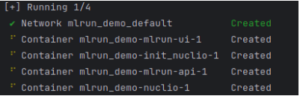
Now to access the Mlrun UI, visit: http://localhost:8060/ (Here you will be able to see the Mlrun UI)
Great, you have successfully achieved the first milestone of ML Tracking Experiments 
Now that we’ve completed the MLRun setup, let’s proceed to track our machine learning lifecycle. We’ll log our necessary metrics and dataset into MLRun and view using Mlrun UI.
Initially, we’ll establish our project integrated with Mlrun by importing the necessary library and crafting basic project setup code.
					#Import Library
import mlrun
#Set Project for mlrun
mlrun.get_or_create_project(f"{project_name}", context="./", user_project=True)
#Note: Whenever utilizing the mlrun wrapper to log our data, it's essential to ensure that the project is initialized within that specific code block.
We will now describe our dataset by defining a function that manages it using the Mlrun handler. Please ensure that your handler function is defined in the same directory.
					project.set_function(func=f"{self.file_path}", name=self.data_gen_function_name, kind="job",
                                 image="mlrun/mlrun",
                                 handler="data_generator")
project.save()
project.run_function(self.data_gen_function_name, local=True)
describe_func = mlrun.import_function("hub://describe")
describe_func.run(
                name=self.describe_run_function_name,
                handler='analyze',
                inputs={"table": f"{self.dataset_path}"},
                params={"name": self.dataset_name, "label_column": self.label_col},
                local=True
            )
					import mlrun
import pandas as pd
#This is preprocessed dataset, please preprocess your dataset accordingly before logging into mlrun.
@mlrun.handler()
def data_generator(context):
'''This is handler function to read dataset and save it to parquet file.'''
    dataset = pd.read_csv("your_dataset_path")
    dataset.to_parquet(dataset_path)
    context.logger.info("Saving dataset")
Since we are done with data part now it’s time to move with the mode training using Mlrun auto trainer.
					auto_trainer = mlrun.import_function("hub://auto_trainer")
    additional_parameters = {
        "Random Classifier Depth": 8, #Please Replace the value accordingly if you want to pass something else.
    }
    auto_trainer.run(
        inputs={"dataset": 'dataset_path'},
        params={
            "model_class": 'sklearn.ensemble.RandomForestClassifier', #Please Replace the model accordingly if you want to pass something else.
            "train_test_split_size": 'dataset-split-size',
            "random_state": 42, #Please Replace the value accordingly if you want to pass something else.
            "label_columns": 'target_column',
            "model_name": 'model-name',
            **additional_parameters
        },
        handler='train',
        local=True,
    )
Once the model training is completed, we can see the whole experiment run on the Mlrun UI, as we have already mentioned above how we can see the Mlrun UI.
Conclusion
In summary, it’s crucial to track experiments in machine learning development to prevent suboptimal outcomes. This introduces MLRun, an open-source MLOps platform aimed at simplifying the ML application lifecycle.
By seamlessly integrating into development environments and providing service and client functionalities, MLRun facilitates efficient deployment, management, and monitoring of ML applications.
With MLRun’s capabilities, developers can monitor and visualize experiment runs, promoting transparency and enabling swift, continuous enhancements in machine learning projects.