



Introduction
In today’s data-driven world, the ability to manage vast amounts of information efficiently is paramount for businesses striving to stay competitive. Enter Azure Cosmos DB – Microsoft’s cutting-edge, globally distributed database service designed to address the challenges of building and deploying modern applications at scale. In this blog post, we’ll delve into the world of Azure Cosmos DB, exploring its features, benefits, and why it’s a game-changer for developers and businesses alike.
What is Azure Cosmos DB?
Azure Cosmos DB is a fully managed, globally distributed NoSQL database service provided by Microsoft Azure. It is built to deliver high performance, low latency, and seamless scalability across geographical regions. Unlike traditional relational databases, Azure Cosmos DB is schema-agnostic, enabling developers to store and query diverse data models including documents, key-value pairs, graphs, and columnar data.

Key Features and Capabilities
- Global Distribution: Azure Cosmos DB offers unparalleled global distribution, allowing data to be replicated across multiple Azure regions with ease. This ensures high availability and low latency for users worldwide, regardless of their geographic location.
- Multi-Model Support: With support for multiple data models including SQL, MongoDB, Cassandra, Gremlin, and Table APIs, Azure Cosmos DB provides developers with the flexibility to choose the most suitable data model for their application requirements.
- Scalability: Azure Cosmos DB is designed to handle massive workloads and scale seamlessly as your application grows. It offers elastic scaling both in terms of storage and throughput, allowing you to accommodate fluctuating demands without downtime.
- SLA-Backed Performance: Microsoft guarantees industry-leading performance and availability with Azure Cosmos DB, backed by comprehensive service level agreements (SLAs) for latency, throughput, and availability.
- Global Data Consistency: Azure Cosmos DB ensures strong consistency, session consistency, eventual consistency, or even eventual consistency within a bounded staleness window, depending on your application’s needs. This enables developers to achieve the right balance between consistency and performance.
- Security and Compliance: Azure Cosmos DB provides robust security features including encryption at rest and in transit, role-based access control (RBAC), and compliance with industry standards such as GDPR, HIPAA, and ISO.
Getting Started With Azure Cosmos DB
Step 1: Setting Up Your Azure Cosmos DB Account
The journey begins by creating your Azure Cosmos DB account. Head over to the Azure portal and follow these simple steps:
- Create a Resource: Log in to the Azure portal and click on “Create a resource.”
- Find Azure Cosmos DB: Search for “Azure Cosmos DB” in the marketplace and select it.
- Configuration: Fill in the necessary details like subscription, resource group, account name, API, and location. Choose the API that aligns with your application’s requirements.
- Create: Review your configuration, then hit “Create” to initiate the creation process.
Step 2: Crafting Your Databases and Containers
Once your Azure Cosmos DB account is ready, it’s time to set up your databases and containers:
- Navigate to Data Explorer: Go to your newly created Azure Cosmos DB account and click on “Data Explorer.”
- Create New Container: Click on “New Container” to create a new database and container. Provide the required details like database ID, container ID, partition key, and throughput.
- Confirmation: Review your settings and click “OK” to create the database and container.
Step 3: Connecting to Azure Cosmos DB
Now that your Azure Cosmos DB environment is set up, it’s time to connect to it from your application:
- Retrieve Connection String: Obtain the connection string for your Azure Cosmos DB account from the Azure portal.
- Integration: Use the connection string in your application code to establish a connection to Azure Cosmos DB. Ensure you’re using the appropriate SDK or client library for your chosen programming language.
Step 4: Embracing CRUD Operations
With the connection established, you’re ready to perform CRUD operations on your databases and containers:
- Using SDKs: Leverage the SDK or client library to execute Create, Read, Update, and Delete operations on your data.
- Querying Data: Utilize the SQL-like query language (for SQL API) or API-specific query methods to retrieve data from Azure Cosmos DB.
Step 5: Monitoring and Management
As your application grows, it’s essential to monitor and manage your Azure Cosmos DB account:
- Performance Monitoring: Keep an eye on performance metrics and usage statistics using the Azure portal.
- Scaling Up/Down: Adjust throughput (RU/s) based on workload requirements to ensure optimal performance.
- Configuration: Configure backups, failover priorities, and other advanced settings as needed for your application.

Use Cases
Azure Cosmos DB is ideally suited for a wide range of use cases across industries, including:
- Real-Time Analytics: Powering real-time analytics and personalized recommendations by processing large volumes of data with low latency.
- IoT Solutions: Managing and analyzing IoT data streams in real-time to drive insights and automation.
- Gaming: Building highly responsive and scalable gaming experiences that can handle millions of concurrent users.
- Retail and E-Commerce: Delivering personalized shopping experiences and inventory management at scale.
- Finance: Processing financial transactions securely and reliably while complying with regulatory requirements.
Advanced Capabilities
- Serverless Compute: Azure Cosmos DB offers serverless database operations, allowing developers to pay only for the resources consumed by their application without worrying about provisioning or managing servers.
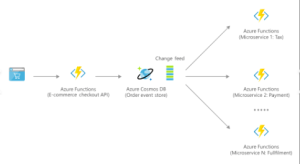
- Change Feed: The change feed feature in Azure Cosmos DB enables developers to build event-driven architectures by capturing and processing real-time changes to data within the database.
- Multi-Master Replication: With multi-master replication, Azure Cosmos DB allows for simultaneous writes across multiple regions, ensuring low-latency writes and high availability even in the face of regional outages.
- Global Distribution Protocol: Azure Cosmos DB’s global distribution protocol ensures data consistency and low latency across distributed databases, enabling seamless failover and disaster recovery scenarios.
- Auto-Indexing: Azure Cosmos DB automatically indexes data to support fast and efficient queries, eliminating the need for manual index management and optimization.
Conclusion
Azure Cosmos DB represents the future of database technology, offering unparalleled scalability, performance, and global distribution for modern applications. Whether you’re building a web application, IoT solution, or enterprise-grade system, Azure Cosmos DB provides the flexibility and capabilities needed to succeed in today’s digital landscape. With its robust features, comprehensive SLAs, and seamless integration with the Azure ecosystem, Azure Cosmos DB empowers developers to innovate faster and deliver exceptional user experiences.
In conclusion, Azure Cosmos DB isn’t just a database—it’s a catalyst for innovation and a key enabler of digital transformation in the cloud era. Embrace the power of Azure Cosmos DB today and unlock the full potential of your data-driven applications.