


Introduction
Combining Postman and Burp Suite allows a powerful setup to test APIs effectively, even in a free-tier environment. Postman simplifies API request crafting, while Burp Suite intercepts and analyzes traffic, letting you discover security issues.
In modern application development, APIs are the backbone of communication between services. With this increasing reliance, ensuring API security becomes critical. This blog walks you through a powerful combo: using Postman to craft API requests and Burp Suite Community Edition to intercept, analyze, and manipulate those requests to uncover vulnerabilities.
Let’s dive into setting up this efficient workflow for API security testing.
Why Combine Postman and Burp Suite?
- Postman offers a clean interface to test and automate API calls.
- Burp Suite, even in its free Community Edition, provides powerful tools to inspect, modify, and replay HTTP requests.
By chaining them together, you get the best of both worlds:
- Easily send complex API requests via Postman
- Intercept and analyze those requests using Burp
- Test for security flaws such as injection, broken authentication, insecure direct object references (IDOR), and more
Tools Overview
What is Postman?
Postman is an easy-to-use tool for creating, testing, and documenting APIs. It allows developers and testers to craft HTTP requests with custom headers, bodies, and authentication schemes—all from a visual interface.
What is Burp Suite Community Edition?
Burp Suite is a well-known web security testing tool. The Community Edition, though limited compared to the Professional version, still provides powerful features like:
- HTTP(S) proxy for intercepting requests
- Repeater for replaying/editing requests
- Intruder for basic manual fuzzing
Setting Up the Environment
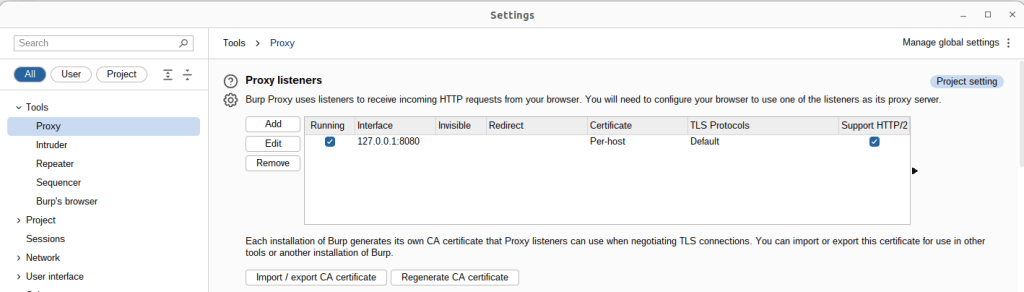
Step 1: Configure Burp Suite’s Proxy
- Launch Burp Suite.
- Go to Proxy → Options.
- Confirm a listener is running on 127.0.0.1:8080 (the default proxy port).
- If not present, click Add, and configure:
- Interface: 127.0.0.1
- Port: 8080
- Make sure “Running” is checked.
This proxy will intercept traffic from Postman.
Step 2: Set Postman to Route Through Burp
In Postman:
- Open Settings → Proxy tab.
- Under Global Proxy Configuration, enable:
- Proxy server: 127.0.0.1
- Port: 8080
- Toggle the switch to enable proxying.
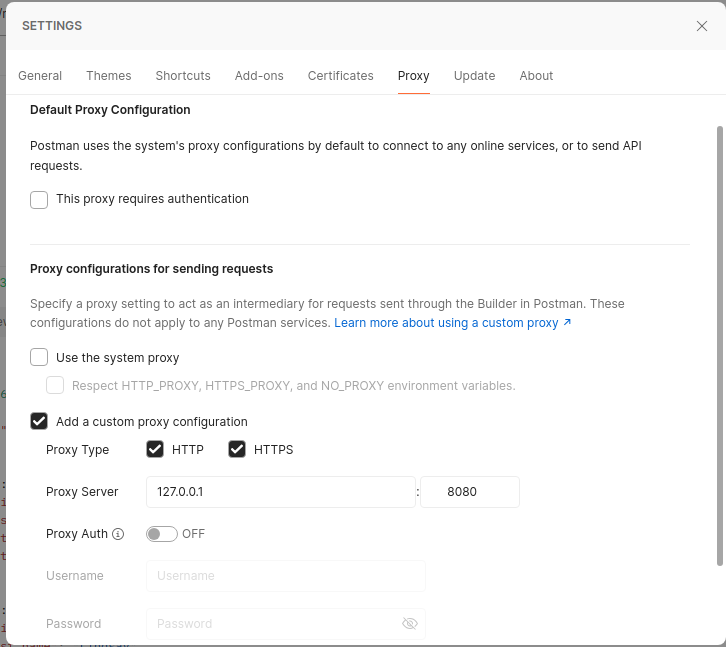
Alternatively, you can enable proxy per-request for more control.
Capturing API Traffic
Now that the proxy is configured, send any API request from Postman. Go to Burp → Proxy → HTTP History, and you’ll see the request intercepted and logged.
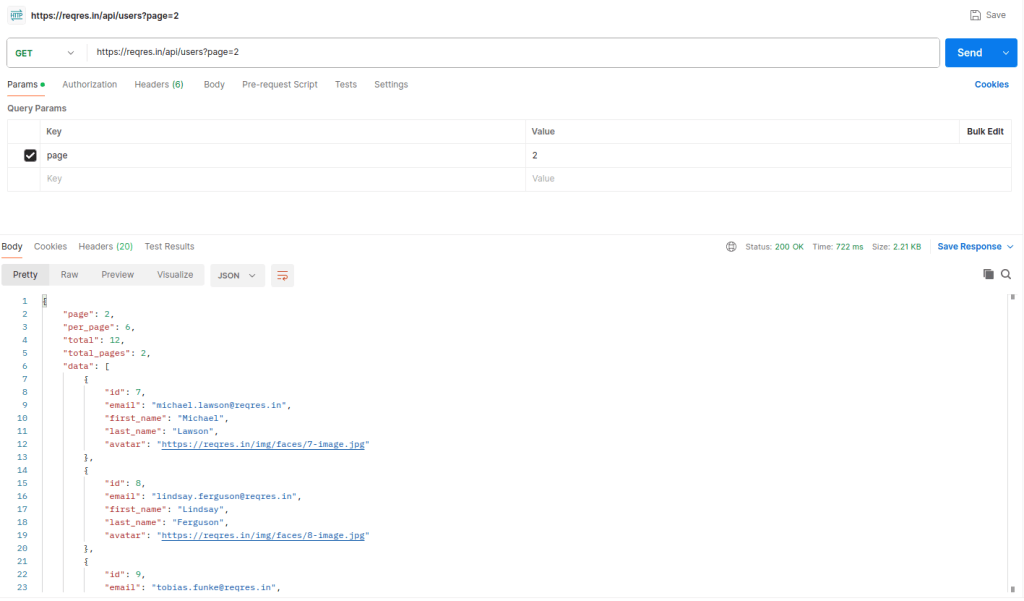
Send a Sample API Request via Postman
- Create a new request in Postman (e.g.,
GEThttps://reqres.in/api/users?page=2). - Send the request.
Intercept and Analyze the Request in Burp Suite
- In Burp Suite, go to Proxy > HTTP History.
- Locate the intercepted request from Postman.
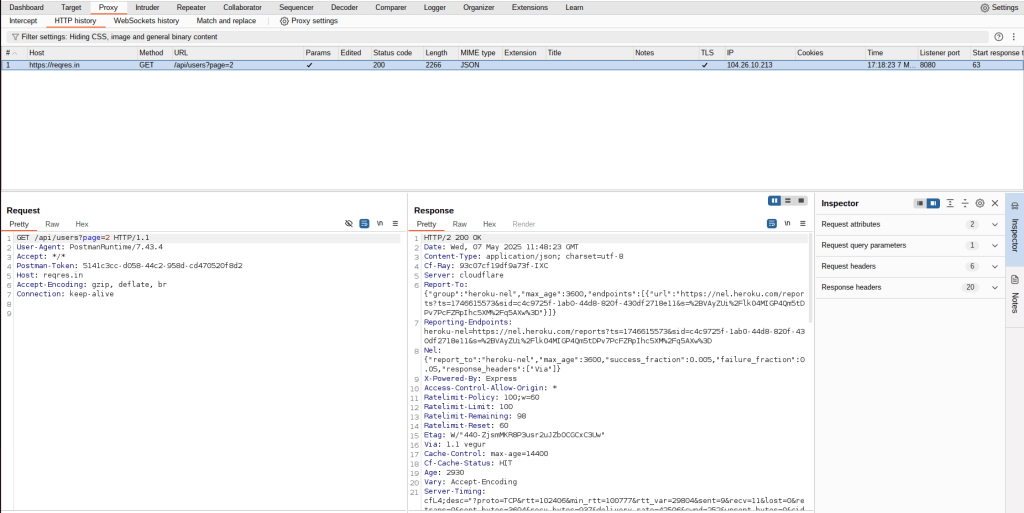
You can:
- Inspect request headers, params, and body.
- Observe response data.
- Identify sensitive endpoints or exposed data.
Handling HTTPS Traffic (SSL/TLS)
APIs often use HTTPS, which encrypts traffic. Burp can’t read encrypted data unless it installs its own certificate as a trusted CA.
Steps:
- In your browser, while routed through Burp, open http://burp.
- Download the Burp CA certificate.
- Install the certificate:
- Postman: Settings → Certificates → Add Certificate
- Operating System: Import into the system trust store.
- Restart Postman if needed.
Once trusted, Burp can decrypt HTTPS traffic and show you the full request/response.
Chaining with Burp Suite Tools
Once a request is visible in Burp, you can leverage several features:
Repeater
- Resend multiple times to test various conditions.
- Right-click the request → Send to Repeater.
- Modify headers, params, and body.
Intruder (Community Edition)
- Right-click → Send to Intruder.
- Define payload positions manually (e.g., username field).
- Add a payload list (usernames, tokens, etc.).
- Note: Community edition is slower and single-threaded.
This is useful for testing brute-force, injection, or parameter manipulation manually.
Organizing with Postman Collections
Postman supports Collections in grouping and organizing API requests. Benefits:
- Easy to save and reuse endpoints.
- Allows team sharing and documentation.
- You can simulate entire workflows (e.g., login → fetch data → logout).
These workflows, when routed through Burp, give you visibility into the whole API lifecycle.
Real-World Example: Testing Auth Flows
Let’s say you’re testing a login-protected API:
- Use Postman to send a login request (e.g., POST /auth/login).
- Capture the response and JWT/access token in Burp.
- Replay the token request with modified tokens in Burp Repeater.
- Test how the API reacts:
- Can you access data with an expired token?
- Can you modify the token payload?
- What happens if you send a token from another user?
This flow helps test for:
- Token validation issues
- IDOR (Insecure Direct Object References)
- Broken auth logic
Common Pitfalls & Troubleshooting
| Issue | Solution |
|---|---|
| Requests not showing in Burp | Check Postman proxy settings, Burp listener, firewall |
| Burp Repeater shows an empty body | Check Postman proxy settings, Burp listener, and firewall |
| Postman says “SSL Error” | Burp cert not trusted or incorrect setup |
| Install and trust the Burp CA certificate | HTTPS traffic is not readable |
Limitations of Burp Suite Community Edition
- No automated scanning or active vulnerability detection.
- Intruder is slow and lacks powerful automation.
- Extensions (via BApp Store) mostly require Burp Pro.
However, for manual API pentesting and learning, it’s more than sufficient.
Conclusion
Chaining Postman with Burp Suite Community Edition creates a powerful, low-cost setup for exploring, testing, and attacking APIs — without needing enterprise tools.
While Postman excels at crafting and managing requests with ease, Burp Suite brings in-depth inspection, modification, and attack surface analysis to the table. By routing Postman’s traffic through Burp’s proxy, you unlock the ability to:
- Intercept and replay API requests in real time
- Test input manipulation via Repeater
- Simulate attacks using Intruder
- Observe and learn how APIs respond under different security scenarios
Even with limitations in the Community Edition — like the lack of multi-threaded attacks or advanced automation — the manual control and visibility Burp offers makes it invaluable for any beginner or intermediate API pentester.
Whether you’re auditing third-party APIs, testing your own endpoints, or learning the basics of API security, this chained workflow gives you both speed and visibility, making it perfect for hands-on learning and practical assessments.