



What is terraform
Terraform is an open-source infrastructure as code (IaC) tool developed by HashiCorp. Cloud infrastructure provisioning and management, together with resource management, are handled by Terraform. This is widely used in DevOps and the cloud to automate infrastructure. It helps in reducing the manual configuration of infrastructure.
Imagine a Scenario
Imagine a scenario where In a corporate environment, a jump server, is deployed to provide secure access to internal resources and systems. The jump server serves as an intermediary between users and the servers within the corporate network. This scenario tells how the jump server is used to enhance network security and manage access to critical systems. Running Terraform offline is a critical requirement in this use case.
Offline terraform
when you run terraform init, Terraform downloads the necessary provider plugins and modules. The init command initializes a Terraform working directory and prepares it for use. This includes downloading the plugins (providers) that your Terraform configuration specifies. These provider plugins are essential for Terraform to interact with various cloud or infrastructure platforms.
Keep in mind that an internet connection is typically required when running terraform init to download and update dependencies. However, in cases where you need to run Terraform in an offline or restricted environment, you can pre-download the necessary dependencies and use a local repository to avoid internet access during the init phase.
Using a filesystem mirror for Terraform is a way to work with Terraform dependencies, providers, modules, and plugins in an offline or restricted environment. This approach involves creating a local mirror of the required files and resources, allowing you to run Terraform without relying on internet access. Here’s how you can set up and use a filesystem mirror
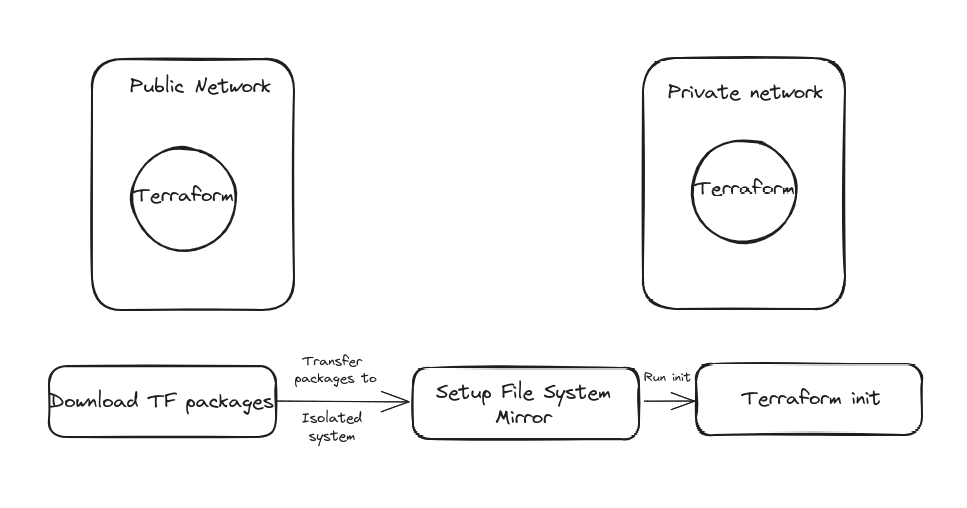
Prerequisites:
- A system with internet access to download Terraform dependencies initially.
- A system with access to the offline or restricted environment where you plan to run Terraform.
- A system with access to the offline or restricted environment where you plan to run Terraform.
- In this blog, the tasks are performed under ubuntu.
Step1:
Create a file under terraform folder and run terraform init first to download the plugins.
terraform/version.tf
terraform {
  required_providers {
    mycloud = {
      source = "hashicorp/aws"
      version = ">= 1.0"
    }
 }
}
Step2:
Create one more file under tf_cache
tf_cache/.terraformrc
For Ubuntu users, the name of the file will be .terraformrc and for Windows, it will be terraform.rc
provider_installation {
  filesystem_mirror {
    path = "/home/{user}/tf_cache"
    include = ["registry.terraform.io/hashicorp/"] } direct { exclude = ["registry.terraform.io/hashicorp/"]
  }
}
plugin_cache_dir = "home/knoldus/tf_cache"
disable_checkpoint=true
Step3:
Run the terraform init with the internet connection. Terraform downloads the necessary provider plugins and modules. Now simply copy the “registry.terraform.io” folder from the .terraform dir to the tf_cache directory. Now delete the .terraform and .terraform.lock.hcl files.
Step4:
Setup env variables as follows
export TF_PLUGIN_CACHE_DIR="c:/tf_cache"
export TF_CLI_CONFIG_FILE="c:/tf_cache/terraform.rc"
Step5:
Make sure you have your internet disconnected and run terraform init in your working directory. If you have followed the above steps, terraform init will pull the package from “tf_cache” to your working directory. It will NOT look for pulling from the internet.
You can also take reference from the tech-hub template on Git Hub.