


In today’s data-driven world, organizations are increasingly leveraging machine learning (ML) to gain insights, enhance operational efficiency, and drive innovation. Google Cloud’s Vertex AI offers a robust and comprehensive platform for building, deploying, and managing machine learning models.
This blog explores Vertex AI’s capabilities as an end-to-end ML solution, drawing insights from the Google Cloud GenAI MLOps Blueprint.
Understanding Vertex AI
Vertex AI is a unified machine learning platform that provides tools to streamline the ML workflow, from data preparation and model training to deployment and monitoring. It aims to simplify the complexities of machine learning, enabling data scientists, ML engineers, and developers to focus on building innovative solutions rather than managing infrastructure.
Key Features of Vertex AI
Unified Experience
Vertex AI integrates various Google Cloud services, offering a seamless experience across different stages of the ML lifecycle. Users can manage datasets, train models, and deploy solutions all within a single interface.
Scalable Infra
With the power of Google Cloud, Vertex AI can scale resources according to project requirements. Users can leverage powerful GPUs and TPUs to accelerate model training and inference, enabling them to handle large datasets efficiently.
AutoML
Vertex AI includes AutoML capabilities that automate the model training process. Users can build high-quality models with minimal coding, making it accessible for those without extensive ML expertise.
MLOps Integration
Vertex AI supports MLOps practices, allowing organizations to implement best practices for continuous integration, continuous deployment, and monitoring of machine learning models.
Interoperability
Vertex AI supports popular ML frameworks such as TensorFlow, PyTorch, and scikit-learn. This flexibility allows teams to utilize their existing expertise and tools while integrating seamlessly with the Vertex AI environment.
ML Workflow with Vertex AI
The ML workflow in Vertex AI can be divided into several stages, each critical for developing a successful ML solution.
Data Preparation
Data is the backbone of any machine learning project. Vertex AI provides robust tools for data ingestion, cleaning, and transformation. Users can connect to various data sources, including BigQuery, Cloud Storage, and external databases, to access and prepare their datasets.
Model Training

Once the data is ready, the next step is model training. Vertex AI offers several options:
-
Custom Training: Users can define their model architectures using their preferred ML frameworks. The platform provides powerful resources to train these models effectively.
-
AutoML: For those looking for simplicity, Vertex AI’s AutoML feature can automatically build and tune models based on the provided data, reducing the time and effort required for model development.
Model Evaluation
After training, it is essential to evaluate the model’s performance. Vertex AI provides built-in evaluation metrics, allowing users to assess model accuracy, precision, recall, and other key performance indicators. This feedback is crucial for making necessary adjustments before deployment.
Deployment

Deploying a model for production use is a critical phase. Vertex AI enables users to deploy models as REST APIs, allowing real-time predictions. The platform supports both online and batch predictions, catering to various application needs.
Monitoring and Maintenance
Vertex AI’s model monitoring feature ensures continuous performance tracking and anomaly detection to optimize machine learning models in production.
Let’s explore this matter in greater detail.
When building a professional-level ML solution, the steps outlined above serve as a guide for the process. Now, we will discuss the best practices to consider in order to ensure both the security and efficiency of the solution.
Overview of the Enterprise Generative AI and ML Blueprint
The enterprise generative AI and ML blueprint provides a comprehensive framework, including a GitHub repository with Terraform configurations, Jupyter notebooks, Vertex AI Pipelines definitions, a Cloud Composer DAG, and scripts for deployment.
Integrating MLOps for Effective Model Training and Management
The enterprise generative AI and ML blueprint uses a layered approach to support model training and is designed for deployment and management via an MLOps workflow. The diagram below illustrates the MLOps layer’s integration with other layers in the environment.
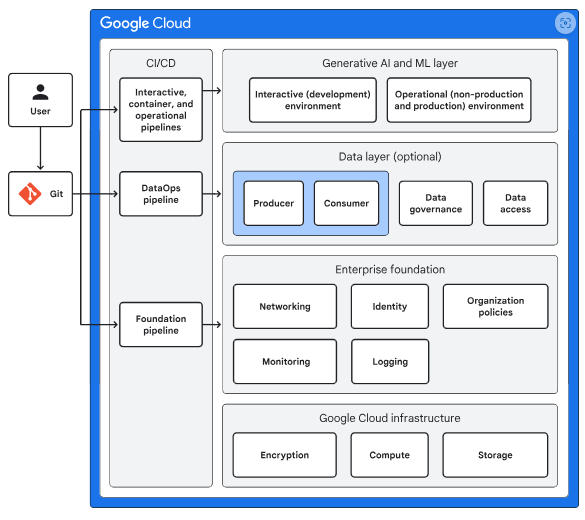
This diagram covers the following elements:
- Google Cloud Infrastructure: Offers built-in security features like encryption at rest and in transit, along with essential components such as compute and storage services.
- Enterprise Foundation: Provides a baseline set of resources including identity management, networking, logging, monitoring, and deployment tools, enabling seamless adoption of Google Cloud for AI workloads.
- Data Layer: An optional component in the development stack that delivers capabilities such as data ingestion, storage, access control, governance, monitoring, and sharing.
- Generative AI and ML Layer: Supports the development and deployment of models. It is designed for tasks like initial data exploration, experimentation, model training, serving, and monitoring.
- CI/CD: Supplies tools for automating infrastructure provisioning, configuration, management, and deployment of workflows and software. These tools ensure consistent, reliable, and traceable deployments, reduce manual errors, and speed up the development cycle.
Engage Directly with Data for Model Creation
The enterprise generative AI and ML blueprint enables direct engagement with data, allowing you to create models within an interactive (development) environment and then transition them into an operational (production or non-production) setting.
Develop ML Models Using Vertex AI Workbench
In the interactive environment, you can develop ML models using Vertex AI Workbench, a Google-managed Jupyter Notebook service. Here, you can implement data extraction, transformation, and model tuning before promoting these capabilities to the operational environment.
Systematic Model Building and Testing in Operational Environments
Within the operational (non-production) environment, you utilize pipelines to systematically build and test your models in a repeatable and controlled manner.
Once you are confident in the model’s performance, you can deploy it into the operational (production) environment. The diagram below illustrates the various components of both the interactive and operational environments.
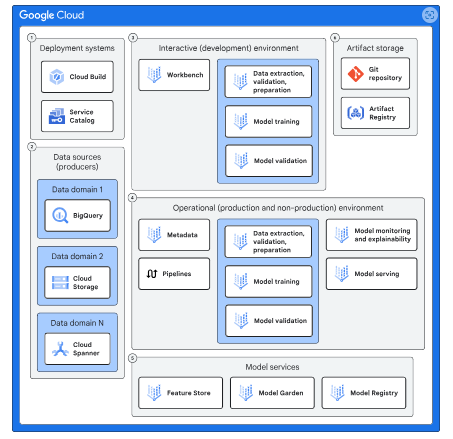
This diagram includes the following components:
Deployment Systems:
Services like Service Catalog and Cloud Build facilitate the deployment of Google Cloud resources in the interactive environment. Cloud Build also handles the deployment of these resources and model-building workflows into the operational environment.
Data Sources:
Services such as BigQuery, Cloud Storage, Spanner, and AlloyDB for PostgreSQL host your data. The blueprint includes example datasets available in BigQuery and Cloud Storage.
Interactive Environment:
A space where you can engage directly with data, experiment with models, and create pipelines for the operational environment.
Operational Environment
An area designed for building and testing models in a repeatable manner, allowing for deployment into production.
- Model Services: The following services support various MLOps activities:
-
- Vertex AI Feature Store: Supplies feature data to your model.
- Model Garden: Offers a library of ML models, including Google’s models and select open-source options.
- Vertex AI Model Registry: Manages the lifecycle of your ML models.
- Artifact Storage: These services are responsible for storing the code and containers used in model development and pipelines. They include:
-
- Artifact Registry: Stores containers utilized by pipelines in the operational environment to manage different stages of model development.
- Git Repository: Maintains the codebase for the various components involved in model development.
Platform Personas:
When deploying the blueprint, you create four user groups: MLOps engineers, DevOps engineers, data scientists, and data engineers. Each group has specific responsibilities:
- The MLOps engineer group develops Terraform templates for the Service Catalog, providing templates applicable to multiple models.
- The DevOps engineer group reviews and approves the Terraform templates created by the MLOps team.
- The Data scientist group is responsible for developing models, pipelines, and the containers utilized by these pipelines, typically with one team dedicated to each model.
- The Data engineer group is tasked with approving the artifacts created by the data science group.
Organization structure
This blueprint builds upon the organizational structure of the enterprise foundation blueprint to deploy AI and ML workloads. The diagram below illustrates the projects added to the foundation to support AI and ML workloads.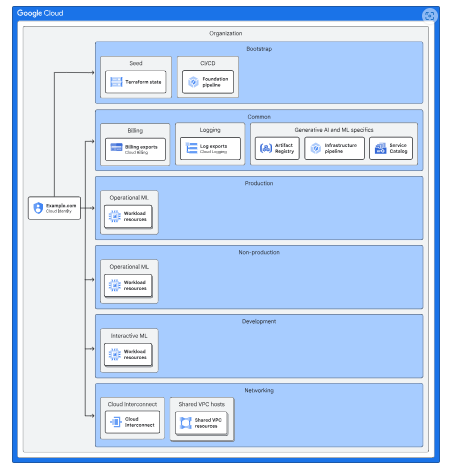
Networking
The blueprint utilizes the Shared VPC network established in the enterprise foundation blueprint. In the interactive (development) environment, Vertex AI Workbench notebooks are deployed within service projects, allowing on-premises users to access these projects via the private IP address space in the Shared VPC network.
On-premises users can connect to Google Cloud APIs, such as Cloud Storage, through Private Service Connect. Each Shared VPC network (development, non-production, and production) is configured with a separate Private Service Connect endpoint.
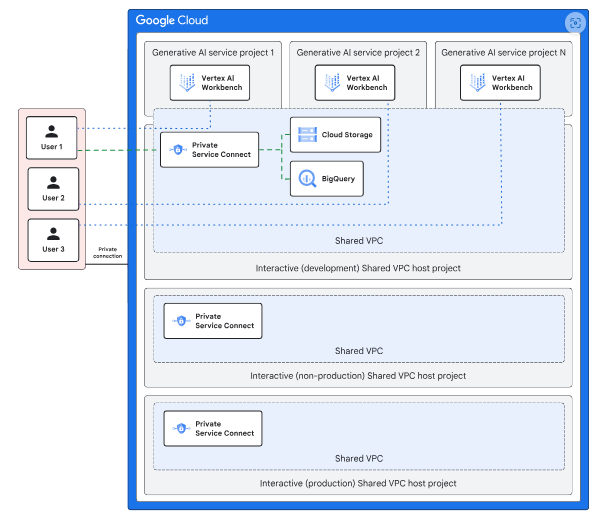
The operational environment, consisting of non-production and production, is set up with two distinct Shared VPC networks that on-premises resources can access via private IP addresses. Both the interactive and operational environments are secured using VPC Service Controls.
- Cloud Logging
This blueprint uses the Cloud Logging capabilities that are provided by the enterprise foundation blueprint.
- Cloud Monitoring
To monitor custom training jobs, the blueprint includes a dashboard that lets you monitor the following metrics:
-
-
- CPU utilization of each training node
- Memory utilization of each training node
- Network usage
-
In the event of a custom training job failure, the blueprint leverages Cloud Monitoring to send email alerts notifying you of the issue. For monitoring models deployed via the Vertex AI endpoint, the blueprint includes a dashboard that displays the following metrics:
- Performance metrics:
- Predictions per second
- Model latency
- Resource usage:
- CPU usage
- Memory usage
Operations
Interactive environment
To allow you to explore data and develop models while upholding your organization’s security standards, the interactive environment offers a controlled set of permissible actions. You can deploy Google Cloud resources using one of the following approaches:
- Deploying resources via the Service Catalog, which is preconfigured with resource templates through automation.
- Creating code artifacts and committing them to Git repositories using Vertex AI Workbench notebooks.
The following diagram depicts the interactive environment.
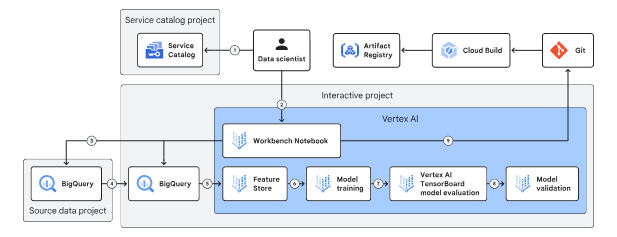
Deploying Resources:
Data scientists use the Service Catalog to deploy Vertex AI Workbench notebooks, which serve as the main interface for working with Google Cloud resources.
Source Data Management:
Source data is stored separately, managed by data owners, and is read-only for data scientists, who can transfer data into the interactive environment but not out.
Data Storage:
BigQuery and Cloud Storage handle structured and unstructured data respectively, while Feature Store provides low-latency access for model training.
Model Training:
Data scientists train models with Vertex AI custom training jobs and perform hyperparameter tuning.
Model Evaluation:
Vertex AI Experiments and TensorBoard enable tracking and comparing model performance, while Vertex AI evaluation validates models using training and validation datasets.
Operational Integration:
Data scientists build containers with Cloud Build, store them in Artifact Registry, and use them in pipelines within the operational environment.
Operational environment
The operational environment incorporates a Git repository and pipelines, encompassing both the production and non-production settings of the enterprise foundation blueprint.
In the non-production environment, the data scientist selects a pipeline developed in the interactive environment, runs it, evaluates the results, and decides which model to promote to the production environment.
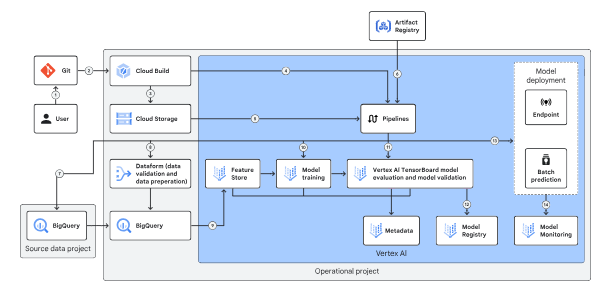
A typical operational flow has the following steps:
-
A data scientist merges a development branch into a deployment branch, which triggers a Cloud Build pipeline that moves a DAG or Python file into Cloud Storage, depending on the orchestrator used.
-
The pipeline then pulls a container from Artifact Registry to facilitate data transfer and prepares it for model training using Vertex AI custom training and evaluation.
-
Finally, the validated model is imported into the Model Registry for predictions, while Vertex AI Model Monitoring tracks its performance in the production environment.
Deployment
The blueprint employs a series of Cloud Build pipelines to provision the infrastructure, operational environment, and containers necessary for creating generative AI and ML models. The specific pipelines and provisioned resources are as follows:
- Infrastructure Pipeline: Part of the enterprise foundation blueprint, this pipeline provisions Google Cloud resources for the interactive and operational environments.
- Interactive Pipeline: This pipeline operates within the interactive environment, copying Terraform templates from a Git repository to a Cloud Storage bucket for Service Catalog. It is triggered by a pull request to merge with the main branch.
- Container Pipeline: A Cloud Build pipeline is included to create immutable container images for the operational pipeline. These images ensure consistent deployment across environments and are stored in Artifact Registry, referenced by operational configuration files.
- Operational Pipeline: This pipeline, part of the operational environment, copies DAGs for Cloud Composer or Vertex AI Pipelines to build, test, and deploy models.
Service Catalog
Service Catalog allows developers and cloud administrators to make their solutions accessible to internal enterprise users. Terraform modules are built and published as artifacts to a Cloud Storage bucket via the Cloud Build CI/CD pipeline.
Once the modules are copied, developers can create Terraform solutions on the Service Catalog Admin page, add them to Service Catalog, and share them with interactive environment projects for resource deployment.
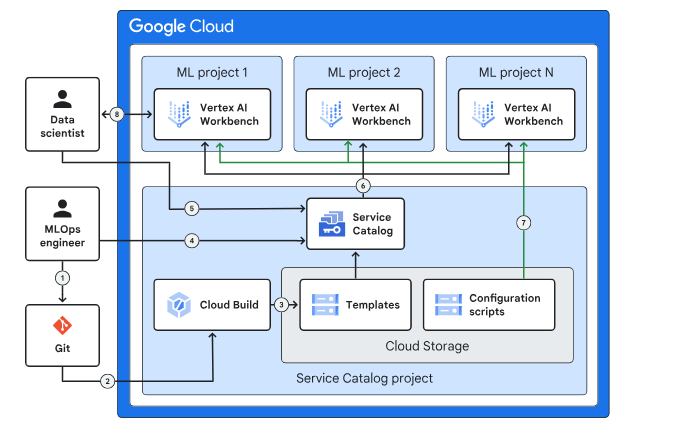
Security controls
The enterprise generative AI and ML blueprint employs a layered defense-in-depth security model that utilizes default Google Cloud capabilities, Google Cloud services, and security features configured through the enterprise foundation blueprint.
The diagram below illustrates the various layers of security controls within the blueprint.
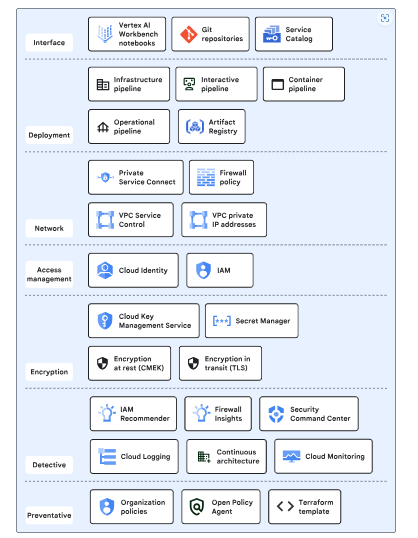
Here’s a concise version of the points:
- Interface: Offers data scientists-controlled access to interact with the blueprint.
- Deployment: Utilizes pipelines for infrastructure deployment, container building, and model creation, ensuring auditability, traceability, and repeatability.
- Networking: Implements data exfiltration protections at both the API and IP layers for blueprint resources.
- Access Management: Manages resource access to prevent unauthorized use.
- Encryption: Enables control over encryption keys and secrets, protecting data with default encryption-at-rest and encryption-in-transit.
- Detective: Detects misconfigurations and malicious activities.
- Preventive: Provides control over and restrictions for infrastructure deployment.
Conclusion
In conclusion, this blog outlines a comprehensive framework for implementing end-to-end MLOps with Vertex AI, emphasizing the integration of various Google Cloud resources and services. By utilizing structured pipelines, robust security measures, and effective access management, organizations can streamline the development, deployment, and monitoring of generative AI and ML models.
This layered approach not only enhances operational efficiency but also ensures data protection and compliance, empowering data scientists to innovate while maintaining a secure and controlled environment.