


In today’s fast-paced software delivery environment, user interface stability is just as critical as functional correctness. Even a minor CSS or layout change can negatively impact user experience and brand perception if it reaches production unnoticed.Visual Regression Testing (VRT) plays a key role in ensuring UI consistency across releases. This blog explains how organizations can implement Visual Regression Testing effectively using BackstopJS, and how it fits into an enterprise-grade quality engineering strategy.
What is Visual Regression Testing?
Visual Regression Testing is a method used to detect unexpected visual changes in a frontend of web application. Instead of validating DOM structure or functional behaviour, it focuses purely on how the UI looks.
It works by:
- Capturing baseline screenshots (known good state)
- Capturing new screenshots after changes
- Comparing both images pixel‑by‑pixel
- Highlighting differences beyond an acceptable threshold
Why Do We Need Visual Regression Testing?
From a business and engineering perspective, visual defects are among the most expensive to fix once released to production. Traditional automation frameworks focus on functionality but often overlook UI-level regressions.
Visual Regression Testing helps organizations:
- Protect brand identity and design consistency
- Detect UI issues early in the development lifecycle
- Reduce manual UI verification effort
- Increase confidence in frequent releases
- Support cross-device and responsive testing strategies
What is BackstopJS?
BackstopJS is an open‑source visual regression testing framework built on Node.js. It uses headless browsers like Chromium (via Puppeteer) or Playwright to capture screenshots and compare them.
Key Features
- Simple JSON‑based configuration
- Supports multiple viewports
- Scenario‑based testing
- Visual diff reports
- CI/CD integration
- Works with Puppeteer and Playwright
BackstopJS Architecture (High Level)
- Test scenarios defined in
backstop.json - Browser engine loads the page
- Screenshots captured for each scenario and viewport
- Images compared with baseline
- HTML report generated with diffs
Installing BackstopJS
Prerequisites
- Node.js (v16 or above recommended)
- npm or yarn
Installation
npm install -g backstopjsVerify installation:
backstop --versionInitializing BackstopJS
Create a BackstopJS project:
backstop initThis generates:
backstop.json– main configurationbackstop_data/– screenshots and reports
Understanding backstop.json
A simplified example:
{
  "id": "demo_project",
  "viewports": [
    { "label": "desktop", "width": 1366, "height": 768 },
    { "label": "mobile", "width": 375, "height": 667 }
  ],
  "scenarios": [
    {
      "label": "Home Page",
      "url": "https://example.com",
      "delay": 1000,
      "misMatchThreshold": 0.1
    }
  ],
  "engine": "puppeteer",
  "report": ["browser"],
  "paths": {
    "bitmaps_reference": "backstop_data/bitmaps_reference",
    "bitmaps_test": "backstop_data/bitmaps_test",
    "html_report": "backstop_data/html_report"
  }
}
Key Sections Explained
- viewports – screen sizes to test
- scenarios – pages and actions to capture
- misMatchThreshold – allowed visual difference
- engine – browser automation engine
Creating Baseline Images
Run:
backstop referenceThis captures baseline screenshots and stores them in:
backstop_data/bitmaps_referenceRunning Visual Tests
After UI changes, run:
backstop testBackstopJS will:
- Capture new screenshots
- Compare with baseline
- Generate a visual HTML report
Understanding the HTML Report
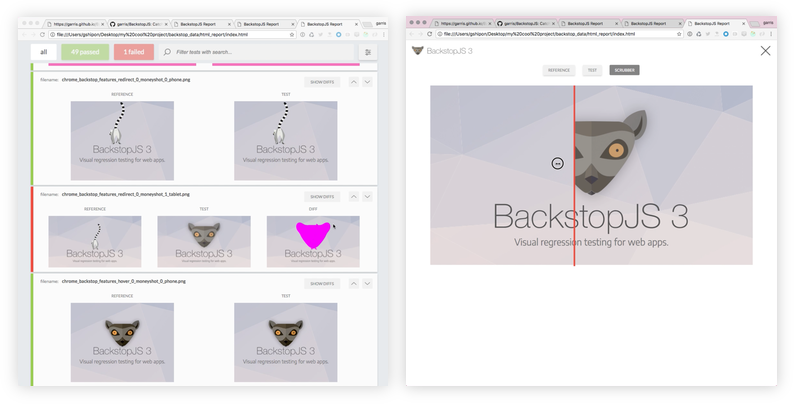
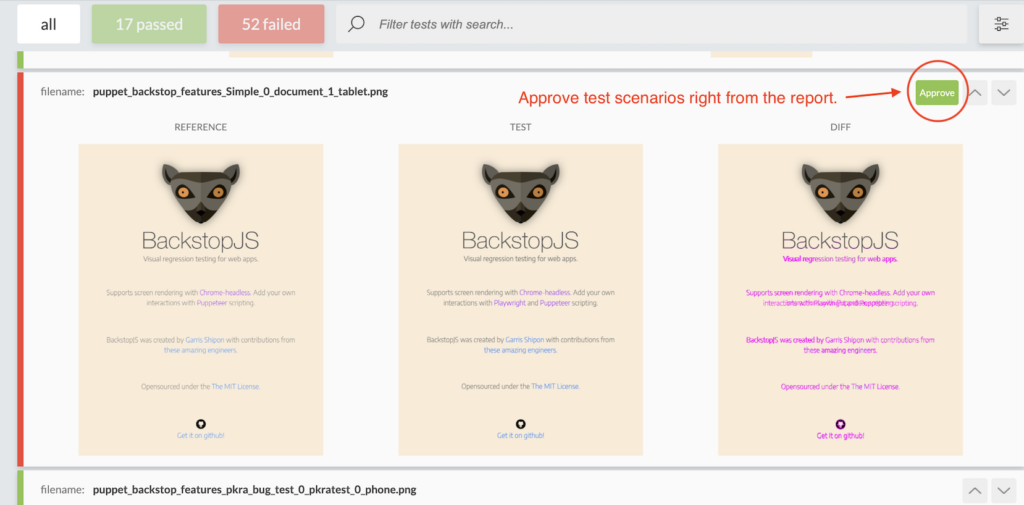
The report highlights:
- Passed scenarios
- Failed scenarios
- Side‑by‑side comparison
- Diff images (highlighted differences)
This makes it easy to quickly identify UI regressions.
Handling Dynamic Content
Dynamic elements like ads, timestamps, or animations can cause false failures.
Common solutions:
hideSelectorsremoveSelectorsdelayorreadySelectoronReadyScript
Example:
"hideSelectors": [".ad-banner", ".timestamp"]Integrating BackstopJS with CI/CD
Typical enterprise CI/CD flow:
- Application build and deployment to a test environment
- Execution of visual regression tests using BackstopJS
- Automatic generation of visual comparison reports
- Pipeline failure if visual differences exceed defined thresholds
- Manual review and approval for baseline updates when required
This approach ensures UI stability without slowing down delivery velocity.
Best Practices
- Keep scenarios small and focused
- Avoid testing highly dynamic pages without masking
- Use meaningful labels for scenarios
- Review diffs before updating baselines
- Store baseline images in version control
Limitations of BackstopJS
- Not a functional testing replacement
- Sensitive to animations and async loading
- Requires maintenance of baseline images
Conclusion
So, we have a lot of people working on a project. The designers try to make it look good. The developers make it work. The quality engineers make sure it is good enough. They all have to work to make sure everything looks the same.
Visual Regression Testing is like a safety net. It helps make sure that the project looks right. It works with the automated tests and the manual tests that people do. BackstopJS is a tool that helps companies find problems, with how things look before they release the project. When you use BackstopJS with your testing pipeline you can be surer that your project will be good. You can deliver a project that people will like. It will work the way it is supposed to. This is because BackstopJS helps you find problems early so you can fix them before you deploy the project. By adopting Visual Regression Testing as part of a test strategy, organisation can significantly reduce UI-related production defects while accelerating delivery timelines.