


A browser agent is an AI that drives a real web browser the way a person would — navigating, clicking, typing, and pulling data back out from a goal you describe in plain language.
Microsoft took a different swing at it. In May 2026 it open-sourced Webwright, a minimal, terminal-native web agent framework under the MIT license. In this post I’d like to share what I’ve found out about this open-source framework.
1.What is Webwright?
1.1 Webwight solution
Instead of a click-by-click browser session, Webwright hands the model a terminal. The model writes Playwright Python code to launch, inspect, and discard browser sessions. Screenshots and page state get captured only when the model actually needs them.
The tagline says it plainly: turn your coding models into state-of-the-art browser agents.
What “terminal and workspace” actually means
The terminal is a plain shell — the same bash prompt a developer uses. Rather than emitting “click element #14,” the model emits a shell command or a Python file. Browsers get launched from inside it, which makes the browser a disposable subprocess rather than the agent’s permanent home.
The workspace is the folder that shell runs in, and it’s where the agent’s real state lives: the scripts it wrote, the screenshots it captured, stdout logs, debug artifacts. Because durable state sits in files rather than a live session, the agent can re-read its own code, fix a line, and rerun it — the way an engineer iterates on an automation script.
1.2 How the loop of Webwright works
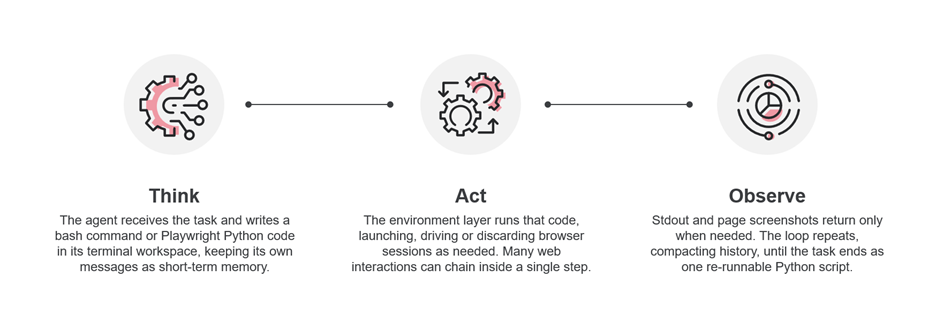
Three steps, repeated.
- Think — the agent receives the task and writes a bash command or Playwright Python code in its workspace, keeping its own messages as short-term memory.
- Act — the environment layer runs that code, launching, driving, or discarding browser sessions. Many web interactions can chain inside a single step.
- Observe — stdout and screenshots return only when needed. The loop repeats, compacting history, until the task ends as one re-runnable Python script.
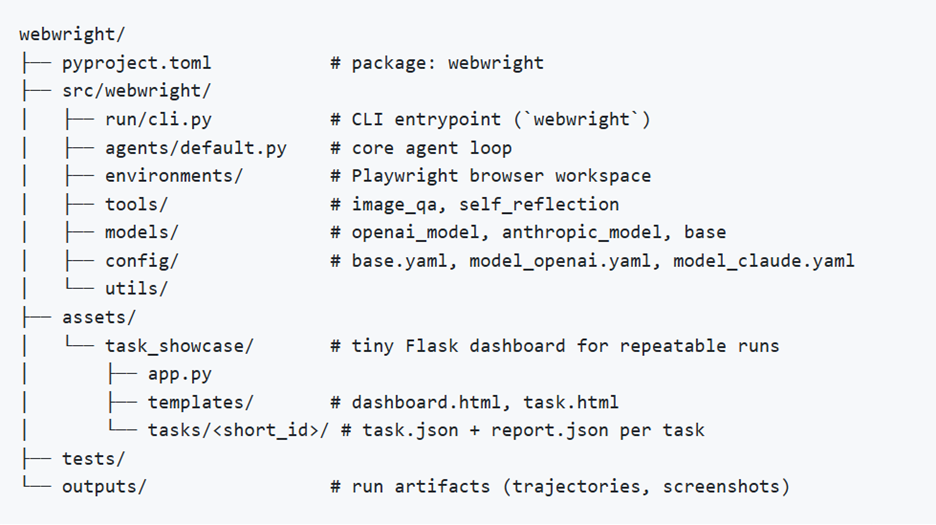
1.3 Webwright project structure
1.4 Why it’s interesting
Radically minimal. Three modules, one agent loop, roughly 1.5k lines of code. No multi-agent orchestration, no graph engine, no hidden plugin layer.
Code beats clicking. Because actions are code, a single step can chain many interactions and spawn several browser sessions in parallel.
State-of-the-art results. SOTA on Odysseys and Online-Mind2Web. With Skill Factory reuse, held-out WebArena accuracy climbs from 55% to 70%.
Reusable and portable. Every solve leaves a parameterised script that reruns standalone — no model in the loop, roughly 40 seconds — and loads as a skill in Claude Code, Codex, OpenClaw, and Hermes.
1.5 Webwright vs. Browser Use
Maybe you’re familiar with Browser Use, here’s a quick comparison between Webwright and Browser Use.
| Browser Use | Webwright | |
| Paradigm | Autonomous LLM agent loop over DOM and accessibility snapshots | Coding agent with a terminal; the browser is just an environment it spawns |
| Action space | Indexed click and type actions selected by the LLM | Free-form Python; it writes the Playwright scripts itself |
| What is “state”? | The browser session | The local workspace: code, screenshots, logs. The browser is disposable. |
| Loop shape | Observe, predict next action, execute, repeat | Write code, execute, inspect screenshots, repair |
1.6 The honest caveats
- Cost: based on my experience when trying to generate some script with Webwright, it tooks around 0.3$ for a test case with 10 steps. We need choose the good model like gpt-5.4 for implementation. I’ve tried with gpt-4o, and it couldn’t provide the final output
- Performance: it takes a few minutes to generate the simple script while we can do it much faster with Playwright MCP/CLI.
- Script Quality: Currently, the script from Webwright is only runnable. It doesn’t apply POM, data-driven or apply best practice in automation test.
2. Quick steps to start with Webwright
- Install Python 3.10 (or newer) and venv
- Get the code —clone from github.com/microsoft/Webwright
- Create a virtual environment — python -m venv .venv, then source .venv/bin/activate

- Install the package — pip install -e . pulls dependencies and the webwright CLI
- Install browser binaries — playwright install chromium
- Add your API keys — export OPENAI_API_KEY or ANTHROPIC_API_KEY

- Run your first task — call the CLI with your task string; artifacts, logs, and the re-runnable script land in the workspace

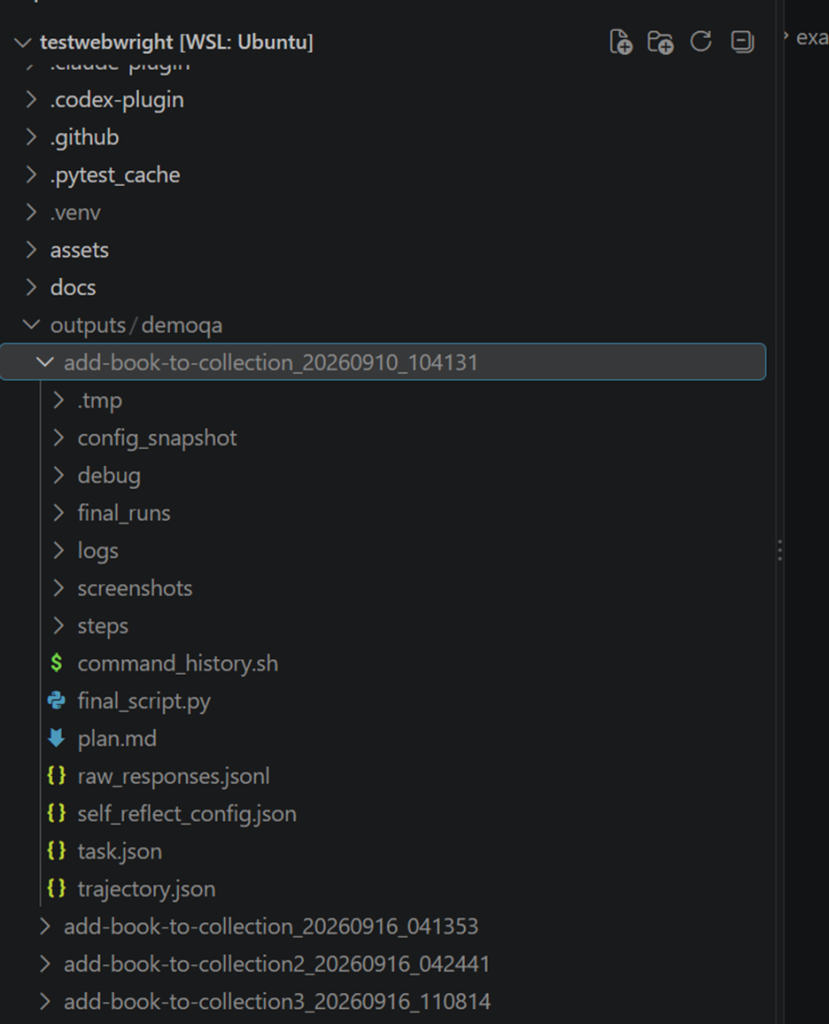
- Sample output folder
In the output folder, we can easily find the final_script.py. To ensure the correctness of the generated script, we can check other artifacts like screenshots or steps the agent implemented the script.
Conclusion
Webwright is a good example of a genuinely fresh way of thinking about how we build agents: give a strong coding model a terminal and a workspace, and let it write the automation instead of guessing the next click. The limitations are real — the cost per task, the time it takes to produce even a simple script, and the quality of the generated code all still need work. But the underlying idea is promising, and it’s the kind of approach that gets better quickly as models improve. I won’t be adopting Webwright for real work at this point, but it’s firmly on my watchlist and I’ll keep following how the framework develops.