


Introduction
Push Notifications are short messages sent by a system to user devices. They are usually displayed as pop-up messages to attract user attention. Push notifications can be text-only messages or rich push notifications with images, sounds,…
Sending Push Notification has been recognized as one of the most effective method to communicate with users, and increase user engagement. It delivers timely content even when users are not opening applications to use them.
What are Mobile Push Notifications?
There are two types of Push notifications:
- Web-based type: it is also known as “web push”. In this method, websites send notifications to user devices, and users will get and read notifications on their website browsers. To get notifications, users do not need to be active on websites. However, they must open the browsers and allow websites to send notifications.
- App-based type: To receive app notifications, users must install mobile apps on their devices and must grant permission to receive notifications. Then, when mobile applications send push notifications to their smartphones, users will be capable of receiving them. They can find push notifications displayed on their Device’s lock screen. Notifications also appear in the Device notification center or inside the mobile app.
Elements in Mobile Push Notifications
The interface of a mobile push notification may be different on the Operating System (Android/iOS) and Operating System version. However, here are common elements in a push notification that you should know and define for technical implementation:
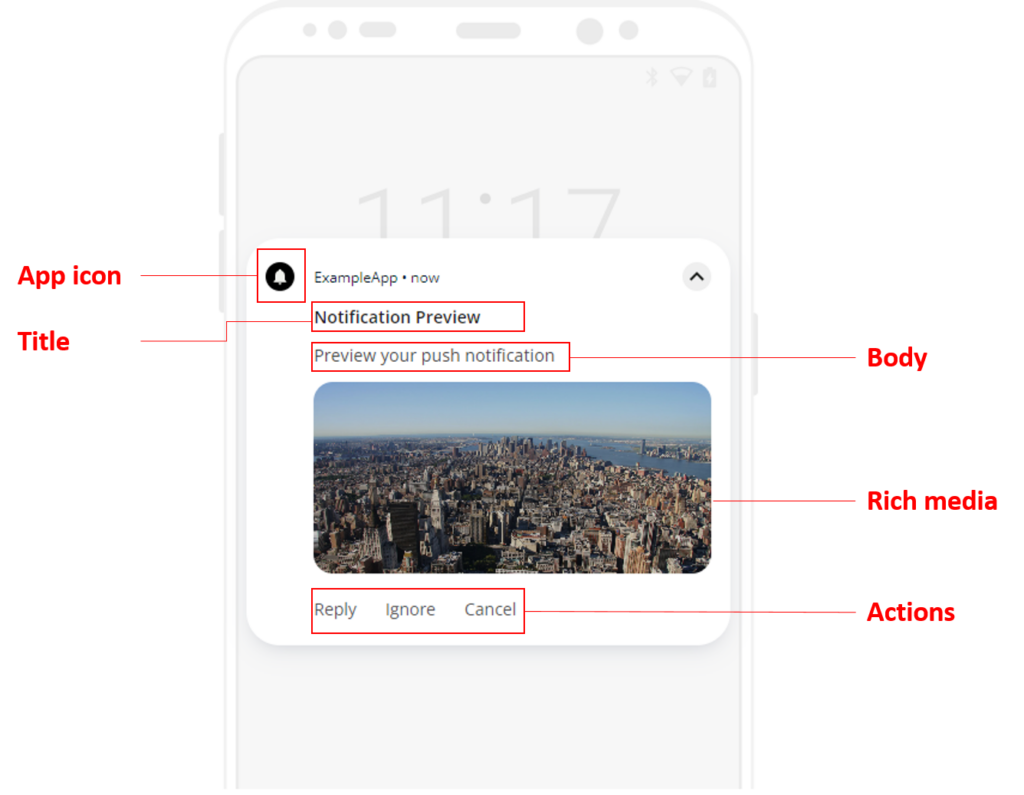
App icon
This element will show your app icon
Title
Kindly define only 25 to 50 characters in the title element. Because this helps users read the whole content in preview mode. You can define characters from the keyboard like letters, numbers, special characters or icons. However, if you use keyboard icons, users with different devices may see them differently. This variance depends on how the operating system recognizes them.
Sub-title
This feature is only available on iOS push notifications. You can define one more line below the main title. It gives more additional information for users.
Body
You should define no more than 150 characters to make it visible fully in the preview mode. You can input characters from the keyboard such as letters, numbers, special characters, or icons.
Rich media
You can create rich push notifications by providing more interactive content such as images, audio, or videos.
- For iOS:
- Image: JPEG, PNG, GIF
- Audio: MP3, M4A, AIFF, WAV
- Video: AVI, MP4, MPEG, MPEG2
- For Android:
- Image: JPEG, PNG
- Note: Android does not support audio or video in push notifications
Timestamp
This element shows the time when the notification was received.
Actions
- App-related task buttons:
- To provide the convenience of completing an app-related task from the notification, you can add buttons in your notification content. The choices of buttons can vary due to the difference in the support of Operating Systems and Operating System versions. For instance, from Android 7.0, you can add Reply button to enter the text directly from the push notification; from Android 10: the platform supports generating automatically action buttons.
- Expandable icon button: Only Android devices have this support. By tapping on this icon, users can read more content compared to the default mode, it’s up to 7 lines of text.
- Require devices unlocked: This action aims to add an extra layer of security to notifications when users tap on locked devices. On Android 12 and higher, you can configure this setup to require users must unlock devices before performing a given notification action.