


In software development, a system passing QA testing does not always mean it is ready for release. Many products work correctly from a technical point of view but fail when real users try to use them in daily work.
User Acceptance Testing (UAT) closes this gap. UAT ensures the software truly supports business processes and meets user expectations before it goes live.
In this article, we explain what UAT is, who performs it, what teams test during UAT, and why UAT plays a vital role in delivering successful and reliable software.
What Is User Acceptance Testing (UAT)?
User Acceptance Testing (UAT) is the testing phase where business users or end users verify that the system meets business requirements and works correctly in real-life scenarios.
UAT focuses on one key question: Does this system work for real users and real business needs?
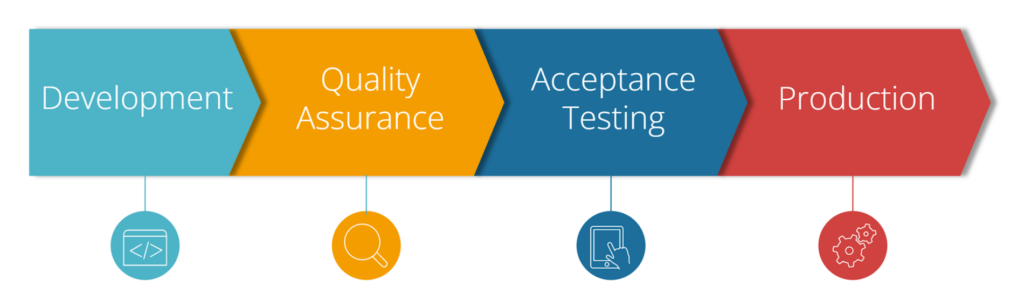
Unlike QA testing, which focuses on finding defects, UAT focuses on acceptance—confirming that the business can confidently use the system in production.
Who Performs UAT?
UAT is usually performed by people who understand the business best, such as:
- Business users
- Product owners
- Subject matter experts (SMEs)
- Key end users
The QA team supports UAT by preparing test environments, test data, and guidance. However, QA does not replace users. The value of UAT comes from real business validation.
What Is Tested During UAT?
UAT focuses on how users apply the system in real situations, including:
- End-to-end business workflows
- Business rules and calculations
- User roles and access permissions
- Data accuracy, reports, and outputs
- Integration with other systems
Teams usually write UAT scenarios in simple business language, which makes them easy for non-technical users to understand and execute.
Why Do We Need User Acceptance Testing?
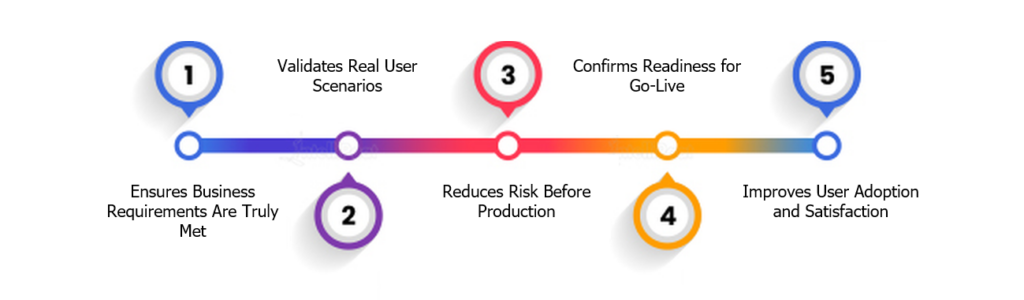
1. Ensures Business Requirements Are Truly Met
A system may pass all functional tests but still behave differently from what the business expects.
UAT helps teams confirm that:
- The system implements requirements correctly
- Business rules work as intended
- Workflows match real daily operations
2. Validates Real User Scenarios
UAT reflects how users actually interact with the system, not just how it was designed.
This approach helps identify:
- Missing or incorrect steps
- Unrealistic assumptions
- Complicated or unclear processes
3. Reduces Risk Before Production
Business-critical issues discovered after release can cause delays, rework, and unhappy users.
UAT helps teams catch:
- Incorrect calculations
- Broken approval flows
- Permission and access problems
Before the system reaches production.
4. Confirms Readiness for Go-Live
UAT often serves as the final approval stage before release.
When UAT is completed successfully:
- The business provides sign-off
- Stakeholders gain confidence
- The system becomes ready for real use
5. Improves User Adoption and Satisfaction
When users participate in UAT:
- They become familiar with the system early
- Teams identify training needs sooner
- Organizations reduce resistance to change
As a result, user adoption after release becomes smoother and faster.
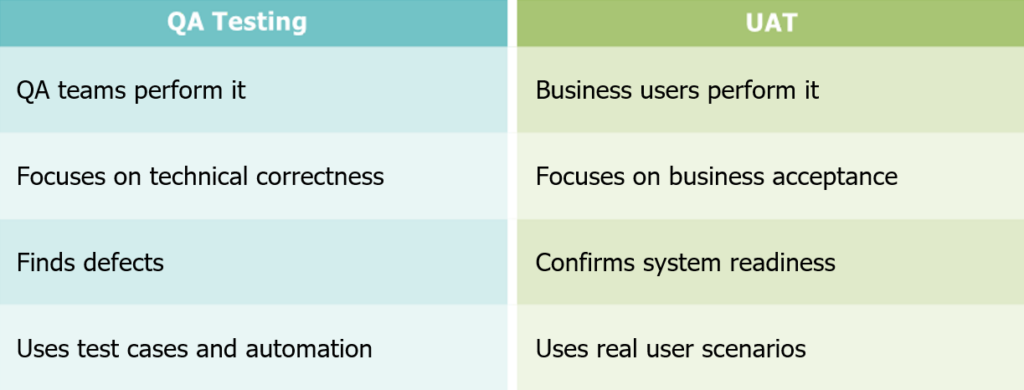
How QA Testing Differs from UAT
Although both are essential, UAT and QA testing serve different purposes. UAT does not replace QA testing—it completes the testing process.
When Is UAT Most Important?
UAT is especially important when:
- Business rules are complex
- The system impacts daily operations
- Multiple user roles are involved
- Regulatory or approval processes exist
In these situations, skipping UAT significantly increases release risk.
Conclusion
User Acceptance Testing is a critical step in delivering software that truly works for its users. It ensures the system is not only technically correct but also practical, usable, and aligned with business goals.
By validating real workflows with real users, UAT reduces risk, improves user adoption, and provides confidence before go-live.