



One of the most common questions in software testing is whether a project should rely on manual testing or automation testing. In practice, this is not an either–or decision. The most successful QA strategies combine both manual and automation testing, using each approach where it delivers the most value.
This blog combines two perspectives:
- When manual and automation testing should be used together
- Which project conditions make this combination necessary
By understanding both aspects, QA teams can design a balanced testing strategy that improves coverage, reduces risk, and supports fast, reliable releases.
Manual Testing vs Automation Testing: A Quick Recap
1. Manual Testing

Manual testing relies on human testers executing test cases without scripts. It is flexible, adaptive, and essential where judgment and observation are required.
Best for:
- Exploratory testing
- Usability and UX validation
- New or frequently changing features
- Complex scenarios requiring human insight
2. Automation Testing
Automation testing uses tools and scripts to execute predefined test cases repeatedly and consistently.
Best for:
- Regression testing
- Repetitive and data-driven scenarios
- Stable features
- CI/CD pipelines and frequent releases
Why Projects Should Use Both Manual and Automation Testing
Using only manual testing can slow down delivery and increase the chance of human error. Using only automation can miss usability issues, visual defects, and unexpected user behavior.
Combining both approaches allows teams to:
- Achieve broader and deeper test coverage
- Balance speed with quality
- Catch defects earlier
- Adapt testing as the product evolves
Project Conditions That Require Both Manual and Automation Testing
1. Medium to Large Project Scope
Projects with many features, modules, or integrations quickly become difficult to manage with a single testing approach.
- Automation testing handles large regression suites efficiently
- Manual testing explores new features and complex flows
2. Ongoing Development with Changing Requirements
Most products evolve continuously.
- Early stages: requirements change frequently → manual testing is more effective
- Later stages: features stabilize → automation testing delivers long-term value
Projects in active development benefit the most from combining both.
3. High Regression Risk
If changes can easily break existing functionality—such as core business flows, shared services, or APIs—automation becomes critical.
- Automation testing ensures fast and reliable regression coverage
- Manual testing validates behavior in real usage scenarios
4. User-Facing and UX-Critical Features
For applications where user experience directly impacts success:
- Manual testing evaluates usability, accessibility, layout, and visual correctness
- Automation testing verifies functional behavior behind the UI
5. Multiple Platforms, Devices, or Environments
Projects that support:
- Multiple browsers
- Web and mobile applications
- Different operating systems or configurations
Benefit from:
- Automation for repetitive cross-platform checks
- Manual testing for device-specific and visual issues
6. CI/CD Pipelines and Frequent Releases
When teams release daily or weekly, fast feedback is essential.
- Automation testing runs on every build and deployment
- Manual testing focuses on high-risk changes and release validation
7. Complex Business Rules and Decision Logic
Features involving permissions, pricing, approvals, or validations often depend on multiple conditions.
- Automation testing ensures rule consistency across scenarios
- Manual testing explores edge cases and unexpected combinations
8. Limited Time with High Quality Expectations
When deadlines are tight but quality cannot be compromised:
- Automation provides speed and confidence
- Manual testing adds human insight and risk awareness
Together, they deliver the best results.
9. Long-Term Product Maintenance
For products expected to evolve over time:
- Automation testing offers long-term ROI
- Manual testing adapts quickly to new features and changes
When to Apply Both in Practice
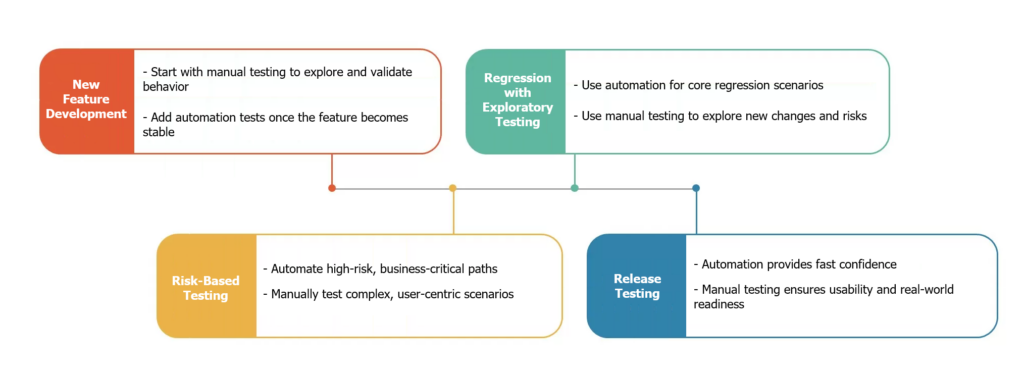
Best Practices for Combining Manual and Automation Testing
- Do not automate everything—focus on value
- Keep manual testing exploratory and purposeful
- Automate stable, repetitive, and high-risk scenarios
- Regularly review and maintain automated tests
- Align testing strategy with business risk and team maturity
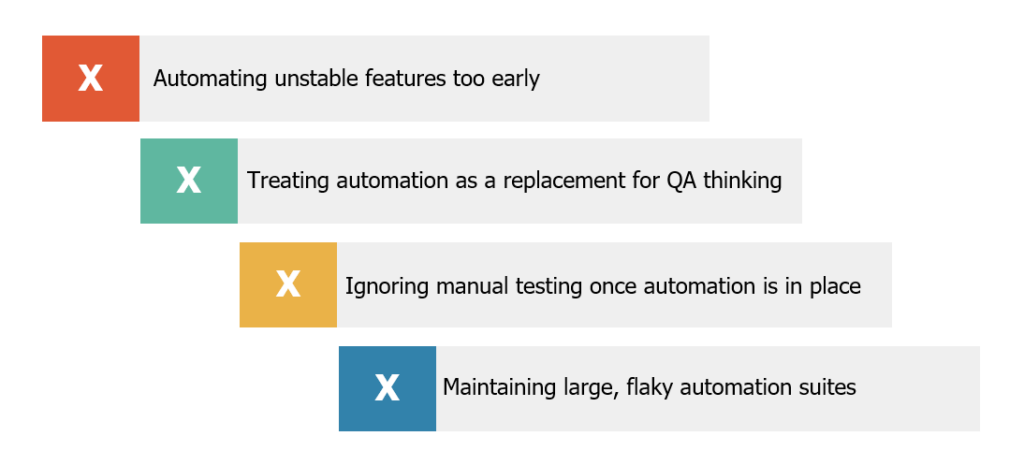
Common Mistakes to Avoid
Conclusion
Manual testing and automation testing are not competitors—they are complementary. Projects with evolving requirements, complex logic, frequent releases, and high-quality expectations require both approaches to succeed.
By understanding the right project conditions and applying each testing method at the right time, QA teams can test smarter, reduce risk, and deliver higher-quality software with confidence.