


1. Introduction
Search is one of the most important features in modern applications. Whether it’s an e-commerce platform, a knowledge base, or a document system users expect accurate and intelligent results.
Traditional search relies on matching keywords.
But modern users don’t just type keywords.
They ask questions, describe idea and expect systems to understand meaning.
This is where Semantic Search comes into play.
In this article, we’ll understand:
- What Semantic Search actually means
- How it works internally
- Why embeddings and vector databases matter
- How to build a real Semantic Search system using:
- Spring Boot
- Spring AI
- PostgreSQL with PGVector
- Ollama
By the end, you’ll have a working AI-powered book search engine.
2. Understanding Semantic Search
Before writing code, we need to understand the idea behind Semantic Search.
2.1 What is Semantic Search?
Semantic Search is a search technique that retrieves results based on meaning, not just matching words.
For example:
User searches:
“A dystopian novel about government surveillance”
Even if the description does not contain those exact words, the system should return:
→ 1984 by George Orwell
Because it understands the concept of dystopia and surveillance.
That’s semantic understanding.
2.2 Core Concepts Behind Semantic Search
Word Embeddings: Word embeddings are a type of word representation that allows words with similar meanings to have similar representations. Word embeddings convert words into numerical vectors that can be used in machine-learning models.
Semantic Similarity: Semantic similarity is a measure of how similar two pieces of text are in terms of meaning. It’s used to compare the meaning of words, sentences, or documents.
Vector Space Model: The vector space model is a mathematical model used to represent text documents as vectors in a high-dimensional space. In this model, each word is represented as a vector, and the similarity between two words is calculated based on the distance between their vectors.
Cosine Similarity: Cosine similarity is a similarity measure between two non-zero vectors of an inner product space that measures the cosine of the angle between them. It calculates the similarity between two vectors in the vector space model.
3. Architecture Overview

Our Semantic Search system works like this:
- Store book descriptions
- Convert them into embeddings
- Save embeddings in PostgreSQL using PGVector
- When a user searches:
- Convert query to embedding
- Compare with stored vectors
- Return most similar results
4. Setting Up the Infrastructure
We use Docker to run:
- PostgreSQL with PGVector
- Ollama for local LLM and embeddings
Spring Boot’s Docker Compose support automatically starts containers when the app runs.
This keeps everything clean and reproducible.
5. Configuring Spring AI
First, we should have Docker installed on our machine to run PGVector and Ollama. Then, we need the Spring AI Ollama and PGVector dependencies in our Spring application:
To run Ollama and embedding models locally, ensure your system meets the following requirements:
- Minimum RAM: 8 GB
- Recommended RAM: 16 GB or higher
- CPU: Modern multi-core processor (Intel i5/Ryzen 5 or above recommended)
- GPU (Optional): NVIDIA GPU for better performance (not mandatory)
- Storage: 5–10 GB free space for model downloads
Lightweight models like nomic-embed-text run smoothly on most modern laptops, while larger LLMs may require higher RAM and GPU support.
<dependency>
    <groupId>org.springframework.ai</groupId>
    <artifactId>spring-ai-ollama-spring-boot-starter</artifactId>
</dependency>

<dependency>
    <groupId>org.springframework.ai</groupId>
    <artifactId>spring-ai-pgvector-store-spring-boot-starter</artifactId>
</dependency>
We’ll also add Spring Boot’s Docker Compose support to manage the Ollama and PGVector Docker containers:
  <dependency>
            <groupId>org.springframework.boot</groupId>
            <artifactId>spring-boot-docker-compose</artifactId>
        </dependency>
In addition to the dependency, we’ll put these together by describing the two services in a docker-compose.yml file:
services:
  postgres:
    image: pgvector/pgvector:pg17
    environment:
      POSTGRES_DB: vectordb
      POSTGRES_USER: postgres
      POSTGRES_PASSWORD: postgres
    ports:
      - "5434:5432"
    healthcheck:
      test: [ "CMD-SHELL", "pg_isready -U postgres" ]
      interval: 10s
      timeout: 5s
      retries: 5

  ollama:
    image: ollama/ollama:latest
    ports:
      - "11435:11434"
    volumes:
      - ollama_data:/root/.ollama
    healthcheck:
      test: [ "CMD", "curl", "-f", "http://localhost:11435/api/health" ]
      interval: 10s
      timeout: 10s
      retries: 10

volumes:
  ollama_data:
In application.yml, we configure:
spring:
  ai:
    ollama:
      init:
        pull-model-strategy: when_missing
        chat:
          include: true
      embedding:
        options:
          model: nomic-embed-text
    vectorstore:
      pgvector:
        table-name: semantic_table_new
        initialize-schema: true
        dimensions: 768
        index-type: hnsw

  docker:
    compose:
      file: docker-compose.yml
      enabled: false
  datasource:
    url: jdbc:postgresql://localhost:5434/vectordb
    username: postgres
    password: postgres
    driver-class-name: org.postgresql.Driver
  jpa:
    database-platform: org.hibernate.dialect.PostgreSQLDialect
Ollama Settings
- Pull model automatically if missing
- Use
nomic-embed-textfor embeddings
This model generates 768-dimensional embeddings.
6. Ingesting Data into the Vector Store
We define a simple Book record:

At application startup, we load a few sample books into the system. Each book is converted into a Document object and then stored in the vector database so it can be used for semantic search.
Behind the scenes:
- Spring AI generates embeddings
- Embeddings are stored in PostgreSQL
- Vector index is created
Now the system is ready for semantic search.

7. Implementing Basic Semantic Search
We expose: POST /books/search

Above code, Converts query into embedding, Searches vector database and returns top 3 similar books.
After starting the application, we’re ready to perform a search. Let’s use CURL to search for instances of 1984:
curl -X POST --data "1984" http://localhost:8080/books/search8. Enhancing Search with LLM (RAG)
POST /books/enhanced-search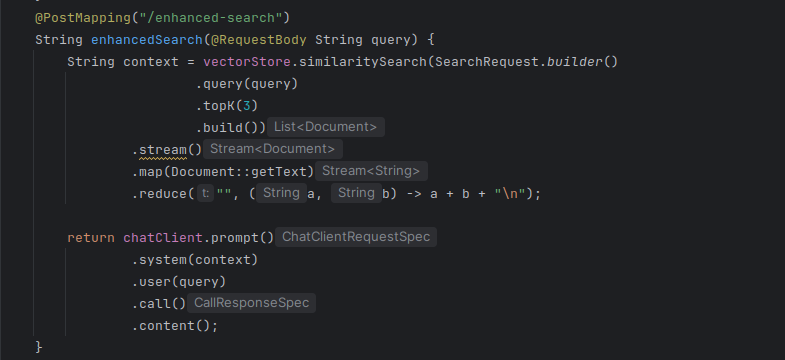
Above code, Retrieve top 3 matching book descriptions, combine them as context, send to Ollama via ChatClient and generate a refined response
And now let’s test the enhanced semantic search functionality by sending a POST request:
curl -X POST --data "1984" http://localhost:8080/books/enhanced-search
The key difference between /books/search and /books/enhanced-search is that the first endpoint only retrieves semantically similar documents, while the second endpoint follows the Retrieval-Augmented Generation (RAG) approach. It retrieves relevant documents and then passes them as context to the LLM, which generates a more natural, human-like response.
Conclusion
In this project, we built a Semantic Search system using Spring Boot and Spring AI with PostgreSQL and Ollama.
The /books/search endpoint demonstrates pure vector-based semantic similarity search, returning the most relevant books based on meaning. Meanwhile, the /books/enhanced-search endpoint extends this by applying RAG, generating a more natural and context-aware response using an LLM.
Together, these two endpoints show how traditional search can evolve into intelligent, AI-powered retrieval within a modern Spring application.