


WPML or WordPress Multilingual is a very popular websites translation plugin, flagship product provided by onTheGoSystems. WPML acts as a plugin that helps users generate multilingual websites base on their initial one. By applied this, users’ website quickly communicate with viewers in different countries without having to cost yourself too much for other overly complicated, unnecessary translation service. WPML ensures full information displayed on your website translated into target languages according to your need.
1. Convenient, customizable translation assistant
Flexible translation
WPML is supported by advanced AI in language recognition.
WPML performs translation to meet most of needs such as word translation, text string translation or even post translation with the help of large databases and AI machine learning to optimize SEO requirements, accurate terminology throughout the entire translation process.
WPML’s web content management system (CMS) statistics show that nearly 70% of WordPress users are using WPML. The WPML All-Inclusive subscription includes all of the following plugins and features:
- – String Translation
- – Translation Management
- – Media Translation
- – WooCommerce Multilingual
- – Gravity Forms Multilingual
- – Contact Form 7 Multilingual
- – BuddyPress Multilingual
- – Advanced Custom Fields Multilingual
- – WP All Import Multilingual
- – MailChimp Multilingual
- – Yoast SEO Multilingual
- – Toolset Types
- – Toolset Views LITE
- – Toolset Module Manager
- – Sticky Links
- – CMS Navigation
Global accessibility
By building your website content in multiple languages, you can now confidently expand your reach and directly tap into new markets. The ability to reach a wider audience, viewers means positively increasing in traffic, conversions, and revenue. When customers visit a website, the first visual impression that the interface brings will help customers have a better initial experience, they would effortlessly remember the content better, interact more effectively with the brand and product that the user is recommending.
Localization and cultural relevance
Each language is associated with the culture of each country. With significiant support from AI, WPML not only translates correctly but also has the ability to translate freely, beyond the semantics of the original language, towards localization in the target language. This means that WPML will bring users a translation in the target language with content rich in identity, cultural context, and idioms in each language of each country that the user desires.
Cost-saving solution
Hiring specialized teams to develop multilingual websites can be expensive, instead, WPML offers a cost-saving solution. By leveraging the power of WordPress and the WPML plugin, users can create and manage multilingual websites without spending too much and still be able to meet their needs.
2. Must-know notes when using WPML
Compose the original text strategically and intentionally
Before starting to translate content, take your time to design the original language structure, or your text. When you have a clear, easy-to-understand base of the original language, then make your decision of which target languages that WPML must support and present.
Place the language switch button in a visible location
WPML provides many language switcher options that allow customers to easily switch between different language versions of the website. Make sure you place the custom language switch button in a location that fits your website design for a better user experience.
Prioritize your translation strategy to optimize bandwidth: Instead of defaulting to translating your entire site at once, which would put a strain on your internet bandwidth, prioritize essential, customer-approved sections of information initially, then eventually to other content, and finally the entire site. Start with high-traffic sites, such as your homepage, product pages, and blog posts. This will ensure that your customers have the impression that website is well-translated and well-organized, with intelligent prioritization.
Take advantage of Translation Management
WPML’s Translation Management feature allows you to submit content for professional translation or assign translation work to members of your team. Use it to streamline your translation process and ensure consistent quality across multiple languages.
Review Translations
No matter what tool you use, it is not always possible to reflect the entire user’s idea, so periodically review and monitor your website to detect any problems or inconsistencies. WPML has built-in debugging tools and to help users identify, resolve, and synchronize any translation-related issues effectively.
Always update to the latest version
The benefit of using licensed WPML is that WPML will be actively developed, users will regularly receive updates to improve functionality and compatibility. Therefore, users should pay attention to newly plugins and add-ons to ensure optimal performance and website visitors will always experience the latest features and improvements.
3. Comparision between WPML and others
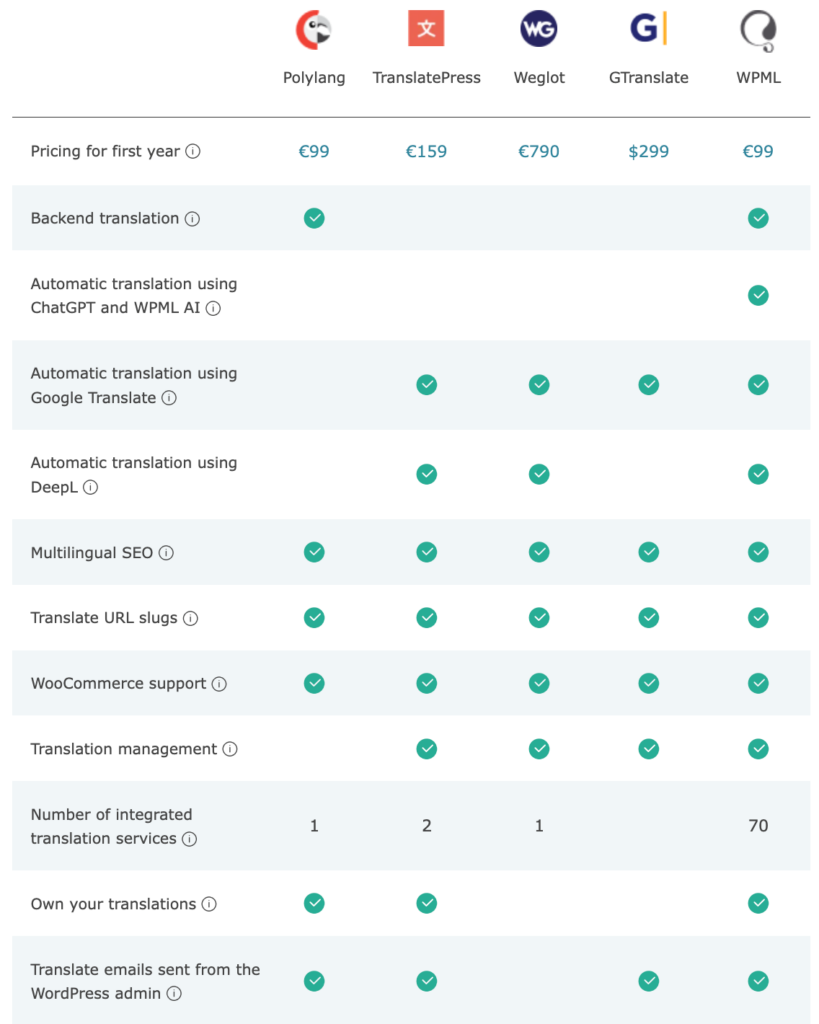
It can be seen that WPML is a plugin that brings the most complete and comprehensive utilities of WordPress.
4. Conclusion
Building a multilingual website requires more than just translating words—it demands strategic planning, smart prioritization, and the right tools. WPML offers everything you need to manage translations efficiently, maintain quality, and deliver a seamless user experience across languages. By following the best practices outlined above, you can ensure your website is not only accessible globally but also professionally presented and consistently updated. Make WPML a central part of your multilingual strategy and elevate your website to international standards.
References: