



Welcome back to our journey to Akka Agentic AI! The last blog, Akka Agent AI: Secret to Planning a Perfect Trip – Part 2, provides a step-by-step guide to add a personalized touch to an Akka AI Agent for each User. But a trip’s success heavily depends on weather as well. If weather is not favorable, then User might not enjoy the trip.
This article will guide us on adding a Weather AI Agent that will help us retrieve weather forecast information and plan a trip accordingly.
Add Weather AI Agent
import akka.javasdk.agent.Agent;
import akka.javasdk.annotations.ComponentId;

@ComponentId("weather-agent")
public class WeatherAgent extends Agent {

    private static final String SYSTEM_MESSAGE =
            """
            You are a weather agent.
            Your job is to provide weather information.
            You provide current weather, forecasts, and other related information.
            """.stripIndent();

    public Effect<String> query(String location) {
        // prettier-ignore
        return effects()
                .systemMessage(SYSTEM_MESSAGE)
                .userMessage(location)
                .thenReply();
    }
}
In case, if you don’t want to use real weather forecast information, you can change the implementation to return a hard-coded weather, such as “It’s always sunny”. But that would beat the real purpose of adding a Weather AI Agent, working along with Planning Agent, to plan an enjoyable trip.
Test the Weather AI Agent
Before integrating the Weather AI Agent, with Planning Agent, we would like to see if the WeatherAgent works in isolation or not.
import akka.javasdk.testkit.TestKitSupport;
import java.util.UUID;
import org.junit.jupiter.api.Test;

import static org.assertj.core.api.Assertions.assertThat;

public class WeatherAgentIntegrationTest extends TestKitSupport {

    @Test
    public void testAgent() {
        var sessionId = UUID.randomUUID().toString();
        var message = "Tokyo";
        var forecast = componentClient
                .forAgent()
                .inSession(sessionId)
                .method(WeatherAgent::query)
                .invoke(message);

        System.out.println(forecast);
        assertThat(forecast).isNotBlank();
    }
}
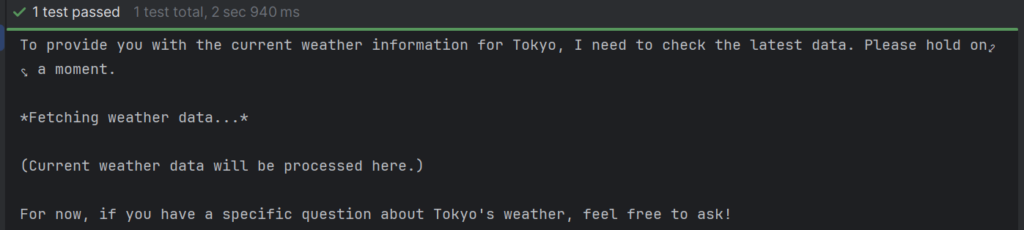
Here we don’t have much to assert, since the weather is different every day, but at least we can see the result & verify that it doesn’t fail.
Since, the test is using a real LLM request, hence we must set our OpenAI API key as an environment variable:
set OPENAI_API_KEY=<your-openai-api-key>Test can be executed using:
mvn verifyTest Results!
Orchestrate the agents
We have two agents now, the PlanningAgent and the WeatherAgent. Next we need to introduce a workflow that will call the Weather AI Agent before calling the Planning AI Agent to consider weather before planning a trip. To do so, we need to follow a 2-step process.
1. Add a Workflow
- The workflow starts, and keeps track of the userId and original query in the state of the workflow.
- First step is to retrieve the weather forecast.
- Weather forecast is retrieved by the WeatherAgent, which must extract the location from the user query.
- Next step is to plan the trip via PlanningAgent.
- The final result is stored in a workflow state.
import akka.Done;
import akka.javasdk.annotations.ComponentId;
import akka.javasdk.annotations.StepName;
import akka.javasdk.client.ComponentClient;
import akka.javasdk.workflow.Workflow;
import org.slf4j.Logger;
import org.slf4j.LoggerFactory;

import static java.time.Duration.ofSeconds;

@ComponentId("plan-trip")
public class PlanTripWorkflow extends Workflow<PlanTripWorkflow.State> {

    private static final Logger logger = LoggerFactory.getLogger(PlanTripWorkflow.class);

    public record Request(String userId, String message) {}

    public record State(String userId, String userQuery, String finalAnswer) {
        State withAnswer(String answer) {
            return new State(userId, userQuery, answer);
        }
    }

    private final ComponentClient componentClient;

    public PlanTripWorkflow(ComponentClient componentClient) {
        this.componentClient = componentClient;
    }

    public Effect<Done> start(Request request) {
        return effects()
                .updateState(new State(request.userId(), request.message(), ""))
                .transitionTo(PlanTripWorkflow::askWeather)
                .thenReply(Done.getInstance());
    }

    public Effect<String> getAnswer() {
        if (currentState() == null || currentState().finalAnswer.isEmpty()) {
            String workflowId = commandContext().workflowId();
            return effects()
                    .error("Workflow '" + workflowId + "' not started, or not completed");
        } else {
            return effects().reply(currentState().finalAnswer);
        }
    }

    @Override
    public WorkflowSettings settings() {
        return WorkflowSettings.builder()
                .stepTimeout(PlanTripWorkflow::askWeather, ofSeconds(60))
                .stepTimeout(PlanTripWorkflow::suggestPlans, ofSeconds(60))
                .defaultStepRecovery(maxRetries(2).failoverTo(PlanTripWorkflow::error))
                .build();
    }

    @StepName("weather")
    private StepEffect askWeather() {
        var forecast = componentClient
                .forAgent()
                .inSession(sessionId())
                .method(WeatherAgent::query)
                .invoke(currentState().userQuery);

        logger.info("Weather forecast: {}", forecast);

        return stepEffects()
                .thenTransitionTo(PlanTripWorkflow::suggestPlans);
    }

    @StepName("plans")
    private StepEffect suggestPlans() {
        var suggestion = componentClient
                .forAgent()
                .inSession(sessionId())
                .method(PlanningAgent::query)
                .invoke(new PlanningAgent.Request(currentState().userId(), currentState().userQuery()));

        logger.info("Trip Plan: {}", suggestion);

        return stepEffects()
                .updateState(currentState().withAnswer(suggestion))
                .thenEnd();
    }

    private StepEffect error() {
        return stepEffects().thenEnd();
    }

    private String sessionId() {
        // the workflow corresponds to the session
        return commandContext().workflowId();
    }
}
Just wondering, how PlanningAgent will come to know about the weather forecast, if it is not passed as a parameter? The answer lies in the session memory which is shared by both, PlanningAgent and WeatherAgent. Hence, the PlanningAgent will have weather forecast information present in the context that is sent to the AI Model.
2. Update/Add the Endpoints
import akka.javasdk.annotations.Acl;
import akka.javasdk.annotations.http.Get;
import akka.javasdk.annotations.http.HttpEndpoint;
import akka.javasdk.annotations.http.Post;
import akka.javasdk.client.ComponentClient;
import com.example.application.PlanTripWorkflow;
import akka.http.javadsl.model.HttpResponse;
import akka.javasdk.http.HttpResponses;
import com.example.entity.PreferencesEntity;

import java.util.UUID;

@Acl(allow = @Acl.Matcher(principal = Acl.Principal.INTERNET))
@HttpEndpoint
public class PlanningEndpoint {

    public record Request(String message) {}
    public record AddPreference(String preference) {}

    private final ComponentClient componentClient;

    public PlanningEndpoint(ComponentClient componentClient) {
        this.componentClient = componentClient;
    }

    @Post("/plans/{userId}")
    public HttpResponse suggestPlans(String userId, Request request) {
        var sessionId = UUID.randomUUID().toString();
        var res = componentClient
                .forWorkflow(sessionId)
                .method(PlanTripWorkflow::start)
                .invoke(new PlanTripWorkflow.Request(userId, request.message()));
        return HttpResponses.created(res, "/plans/" + userId + "/" + sessionId);
    }

    @Get("/plans/{userId}/{sessionId}")
    public HttpResponse getAnswer(String userId, String sessionId) {
        var res = componentClient
                .forWorkflow(sessionId)
                .method(PlanTripWorkflow::getAnswer)
                .invoke();

        if (res.isEmpty()) return HttpResponses.notFound(
                "Answer for '" + sessionId + "' not available (yet)"
        );
        else return HttpResponses.ok(res);
    }
}
A point to be noted, since the workflow is running in the background we can’t wait for the final answer. Hence, we need another endpoint to retrieve the recommended plan.
Let’s Plan a Trip!
1. Set OpenAI API Key as environment variable
set OPENAI_API_KEY=<your-openai-api-key>2. Start the service locally
mvn compile exec:java3. Plan Trip! Considering Weather
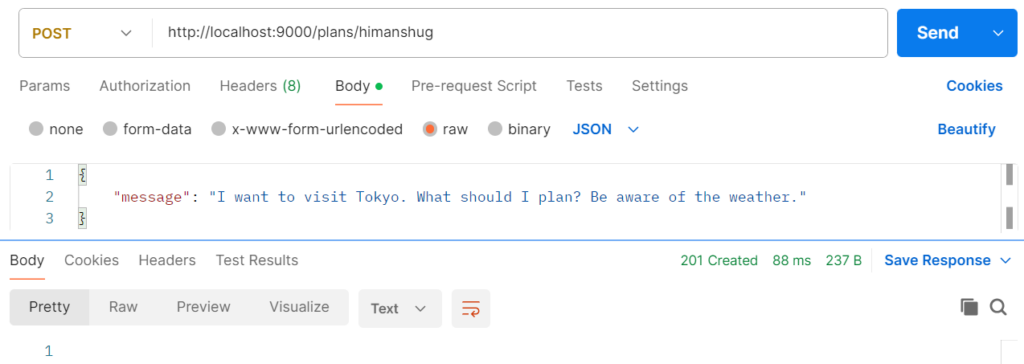
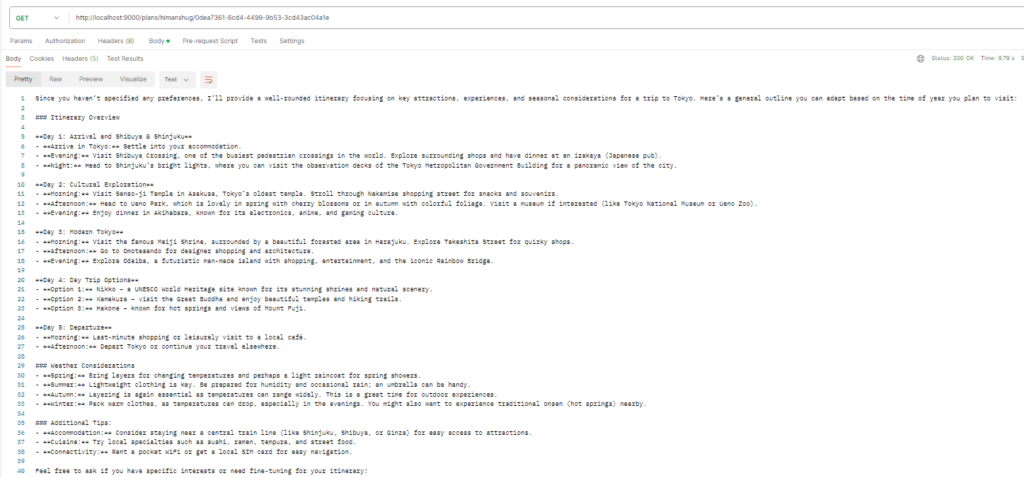
In the suggested plan, weather forecast (considerations) are taken into account as well.
Next Steps
Till now we have been working around one suggestion per session. What if we need to see all suggestions provided by the Akka AI Agents to a User. Would Akka Agentic AI be able to help us? We will explore that option in our next blog, so stay tuned 🙂