



What Is Cloud Tag Governance?
As cloud environments scale, governance becomes harder than provisioning. Without precise controls, teams quickly lose visibility over costs, ownership, security, and compliance. Cloud Tag Governance is one of the most effective, yet often misunderstood, mechanisms for establishing control at scale. This article explains how to use tags to enforce user behavior during resource creation, highlighting practical Cloud Tag Governance patterns and real-world considerations. While the examples focus on AWS, the principles apply across all major cloud platforms.
Why Enforcing Tags Is Critical for Cloud Governance?
Tags are frequently treated as simple metadata. In reality, when appropriately enforced, they become a core governance control. Enforced tags enable organizations to:
- Track costs accurately across teams and projects
- Establish clear ownership for every resource
- Apply security and compliance policies consistently
- Enable automation and lifecycle management
Without enforcement, tagging becomes optional, and optional governance always fails.
Common Cloud Governance Problems Without Tag Enforcement
Many cloud environments face the same recurring issues:
- Resources are created without owner or project information
- Tag values are inconsistent or free-text
- Production and non-production resources are indistinguishable
- Cost reports are incomplete or misleading
These problems are not caused by user intent, but by a lack of system-level enforcement.
Core Principle of Cloud Tag Governance: Enforce Tags at Creation Time
The most important rule of cloud tagging governance is simple:
Tags must be enforced when a resource is created, not after.
Relying on training, documentation, or manual reviews does not scale. Governance must be policy-driven and automatic.
Primary Cloud Tag Governance Enforcement Mechanisms (AWS Example)
1. Organization-Level Enforcement with Service Control Policies (SCP)
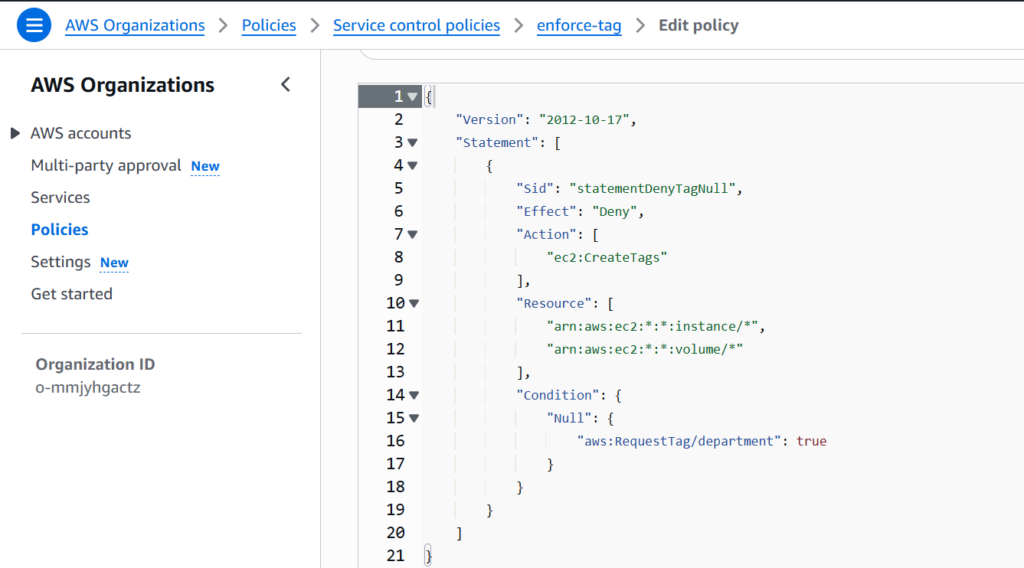
Service Control Policies provide problematic guardrails across AWS Organizations. They can explicitly deny resource creation if required tags are missing.
Example: Deny EC2 creation if the department The tag is not provided.
{
  "Effect": "Deny",
  "Action": [
    "ec2:RunInstances",
    "ec2:CreateVolume"
  ],
  "Resource": "*",
  "Condition": {
    "Null": {
      "aws:RequestTag/department": "true"
    }
  }
}
Outcome:
- Resource creation fails immediately without the required tags
- Users cannot bypass enforcement
- Governance is applied consistently across accounts
Important limitations:
- SCPs do not modify existing resources
- SCPs do not improve the UI experience
- SCPs enforce rules, not tag values
2. Tag Standardization with AWS Tag Policies
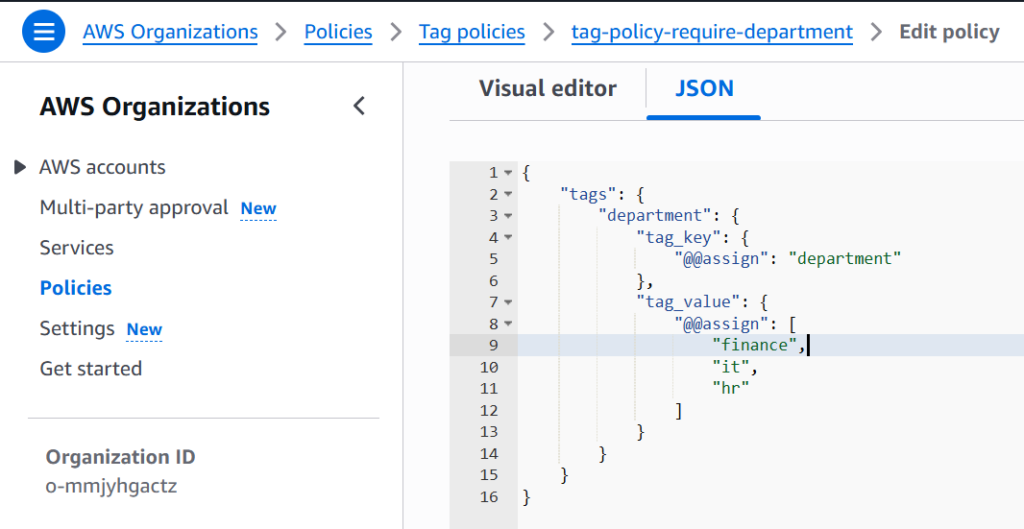
Tag Policies define what “good tagging” looks like across the organization. They specify:
- Required tag keys
- Allowed values
- Case sensitivity rules
For example:
environment: dev, test, proddepartment: finance, it, hr
Tag Policies do not block actions. Instead, they:
- Measure compliance
- Highlight non-conforming resources
- Support reporting and audits
Think of Tag Policies as governance visibility, not enforcement.
{
    "tags": {
        "department": {
            "tag_key": {
                "@@assign": "department"
            },
            "tag_value": {
                "@@assign": [
                    "finance",
                    "it",
                    "hr"
                ]
            }
        }
    }
}
3. Enforcing Tags with IAM Identity Center (SSO) Permission Sets
In AWS environments that use IAM Identity Center (formerly AWS SSO), tag enforcement must be designed around groups and permission sets, not IAM users. Understanding this model correctly is critical for implementing effective governance.
IAM Identity Center Permission Model
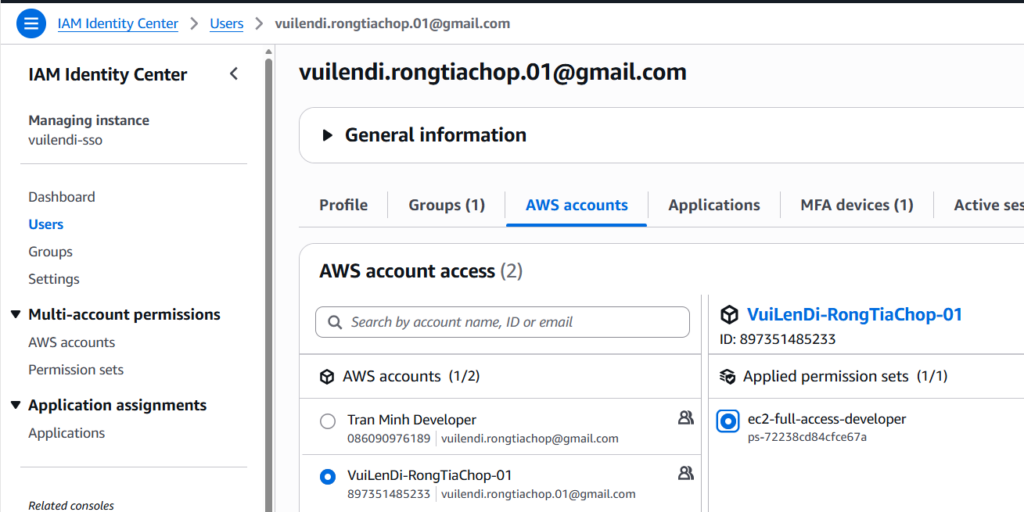
IAM Identity Center follows a three-layer assignment model:
- Users belong to one or more Groups
- Groups are assigned to multiple AWS Accounts
- Each Group–Account assignment includes one or more Permission Sets
A Permission Set defines what users can do in a target AWS account and may include:
- AWS Managed Policies
- Customer Managed Policies
- Inline IAM Policies
Tag enforcement logic is implemented inside the inline policy of the permission set.
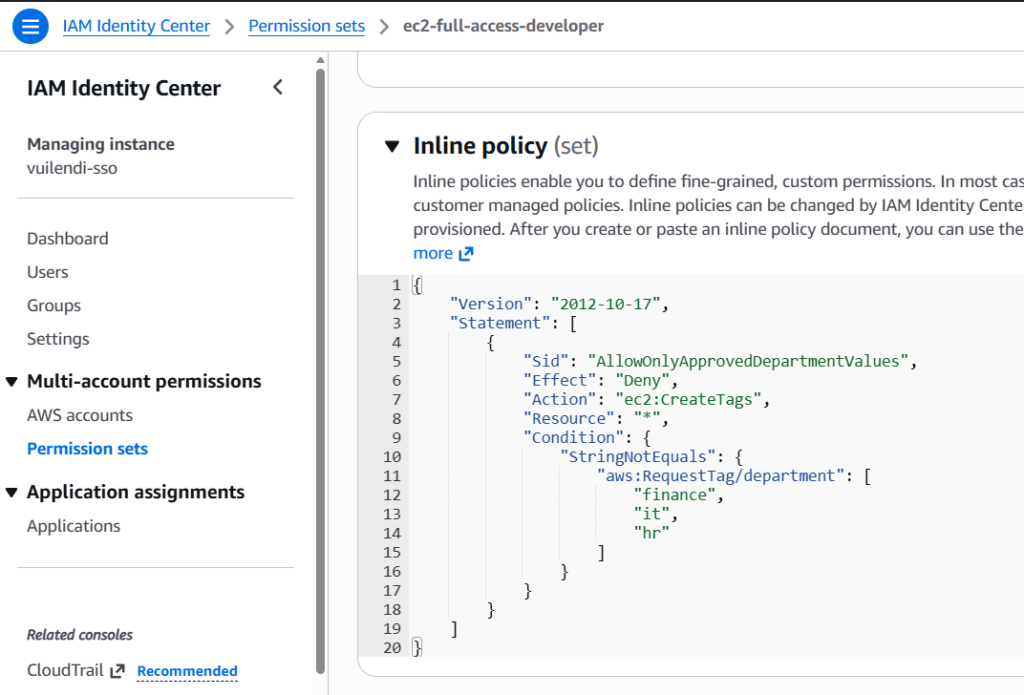
Where Tag Enforcement Actually Happens
When an SSO user logs in:
- IAM Identity Center assumes a generated IAM role in the target account
- That role inherits all permissions from the assigned permission set
- Inline policies are evaluated at request time, just like standard IAM policies
Therefore, tag enforcement is applied centrally and consistently across all accounts that use the permission set.
Example: Enforcing Allowed department Tag Values
The following inline policy is attached to a Permission Set.
It explicitly denies the ec2:CreateTags action if the requested department tag is not one of the approved values.
{
    "Version": "2012-10-17",
    "Statement": [
        {
            "Sid": "AllowOnlyApprovedDepartmentValues",
            "Effect": "Deny",
            "Action": "ec2:CreateTags",
            "Resource": "*",
            "Condition": {
                "StringNotEquals": {
                    "aws:RequestTag/department": [
                        "finance",
                        "it",
                        "hr"
                    ]
                }
            }
        }
    ]
}
How This Policy Works
This policy enforces tagging rules at resource creation or modification time:
- If a user attempts to create or tag an EC2 resource
- And the
departmenttag is missing or has an invalid value - The request is explicitly denied
- The error message is returned immediately to the user
This ensures that only approved department values are allowed, no free-text tagging.
Why Denying ec2:CreateTags Is Effective
Enforcing tag rules on ec2:CreateTags has several advantages:
- It applies to both initial resource creation and post-creation tagging
- It prevents users from “fixing” tags with invalid values later
- It avoids over-blocking core EC2 actions like
RunInstances - It works seamlessly with both Console and API usage
This makes it ideal for SSO-based environments.
4. Compliance Monitoring with AWS Config
AWS Config rules can:
- Detect missing or invalid tags
- Trigger remediation (Lambda, SSM Automation)
- Notify security or platform teams
Example use cases:
- Auto-stop instances without
owner - Auto-tag resources based on the creator
- Report non-compliance to Security Hub
⚠️ Config is reactive, not preventive.
Important Considerations and Limitations
While this approach is practical, it also has clear boundaries. First, it does not retroactively fix existing resources, which means previously created assets may remain non-compliant. Second, it applies only to actions covered by, and therefore cannot govern every possible resource operation. In addition, this method does not provide dropdowns or contextual UI guidance in the AWS Console, which can limit user experience. Finally, because its scope is limited to specific actions and accounts, it must be combined with Service Control Policies (SCPs) to achieve organization-wide enforcement. For these reasons, this approach should be treated as part of a layered Cloud Tag Governance model, rather than the sole control mechanism.
Recommended Governance Pattern with IAM Identity Center
| Layer | Mechanism | Purpose |
|---|---|---|
| Organization | SCP | Mandatory tag presence |
| Identity | SSO Permission Set Inline Policy | Allowed tag values |
| Standardization | Tag Policies | Visibility and reporting |
| Compliance | AWS Config | Detection and remediation |
| Provisioning | IaC / Service Catalog | Improved user experience |
This model balances control, scalability, and developer productivity.
Improving User Experience (UX)
A common complaint:
“Why don’t I see a dropdown for tags in the AWS Console?”
Because the AWS Console does not support dynamic tag dropdowns from policies.
Solutions:
- Use Infrastructure as Code (Terraform, CDK)
- Use AWS Service Catalog with predefined parameters
- Use Internal portals or provisioning pipelines
- Enforce via CI/CD pre-checks
Governance should be invisible, not painful.
Conclusion
In SSO-first AWS environments, inline policies defined in IAM Identity Center permission sets are the most effective way to enforce tag behavior for users. Because these policies are evaluated at request time, they ensure that tagging rules are applied consistently whenever users create or modify resources across multiple AWS accounts. By explicitly denying actions based on invalid or non-compliant tag values, organizations can achieve several critical governance outcomes.
First, they eliminate inconsistent and free-text tagging, a primary cause of unreliable reporting in large cloud environments. Second, they significantly improve cost allocation accuracy by ensuring that every resource is tagged with approved and meaningful values from the start. Third, they strengthen security ownership and accountability, making it clear which teams or departments are responsible for each resource. In addition, enforced tags enable more reliable automation at scale, allowing lifecycle policies, cleanup jobs, and compliance workflows to operate without exceptions or manual intervention. Finally, this approach supports long-term scalability by keeping governance rules centralized and aligned with the organization’s SSO-based access model.
For these reasons, effective Cloud Tag Governance starts with enforced tags, designed correctly around IAM Identity Center, and implemented as part of a broader, layered governance strategy rather than as an isolated control.