


Introduction
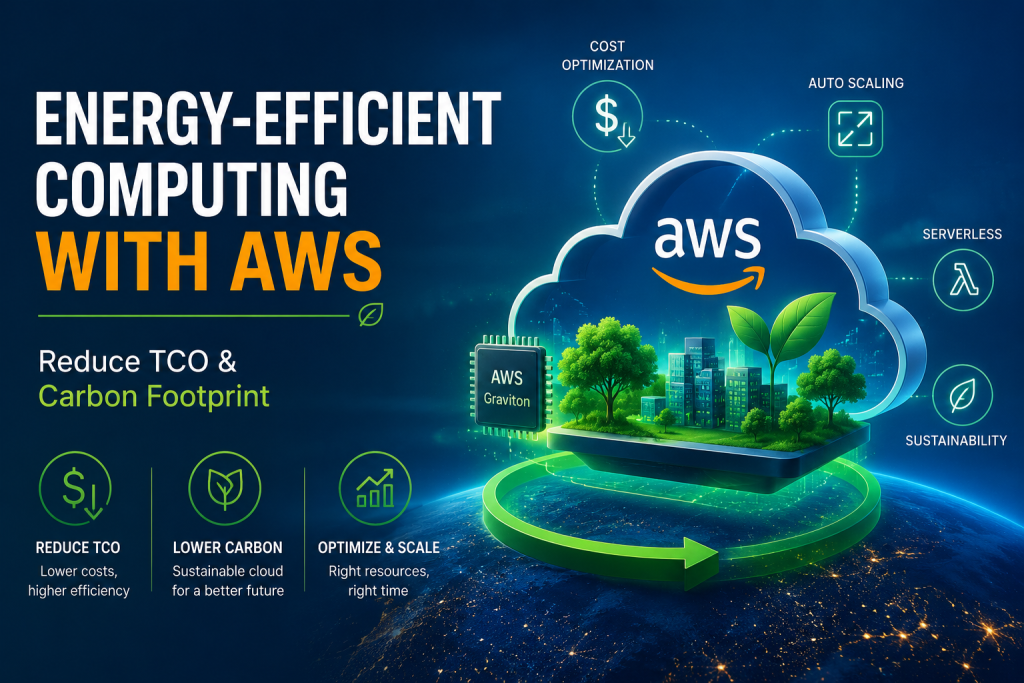
Cloud sustainability and cost optimization are now closely connected architecture concerns. A workload that wastes compute capacity usually wastes money as well. It may also increase the environmental impact of the cloud resources used to deliver the same business function. This is why Energy-Efficient Computing AWS is becoming an important practice for cloud architects, platform engineers, FinOps teams, and sustainability-focused technology leaders.
Energy efficiency on AWS is not only about choosing a “greener” instance type. It is about designing workloads that use the minimum resources required to deliver reliable business value. This includes rightsizing compute, reducing idle capacity, using efficient processors, scaling based on demand, optimizing containers, improving storage lifecycle policies, and measuring carbon impact.
AWS Well-Architected defines sustainability as a pillar focused on environmental impacts, especially energy consumption and efficiency, because these are important levers for architects to reduce resource usage. Therefore, energy-efficient cloud computing should be treated as an architectural discipline, not only as a reporting exercise.
What Is Energy-Efficient Computing on AWS?
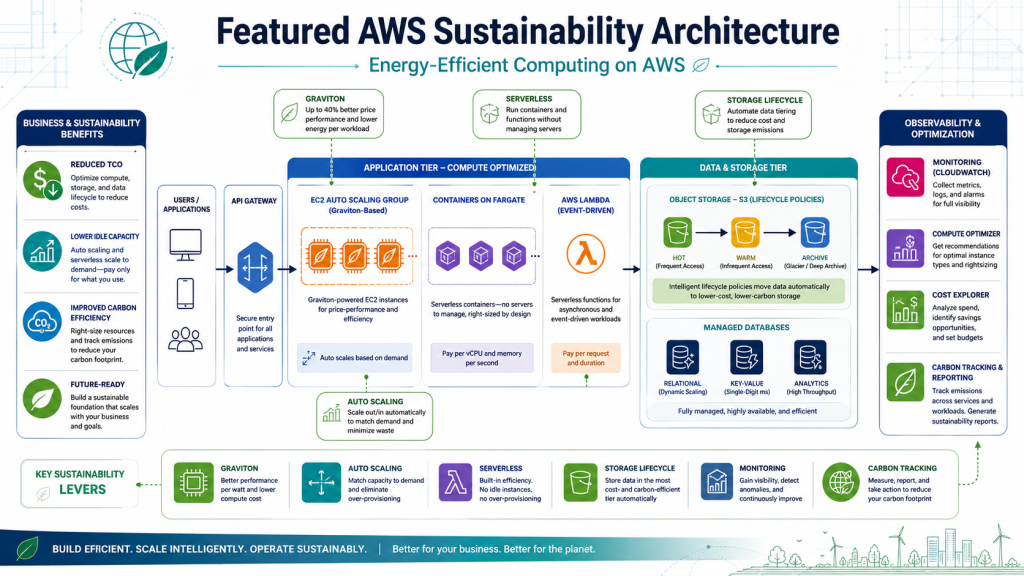
Energy-efficient computing on AWS means designing, operating, and continuously improving workloads so they consume fewer resources while still meeting business, performance, and reliability requirements. It connects sustainability with cost optimization and performance efficiency.
In practical terms, this means avoiding overprovisioned infrastructure, selecting efficient compute platforms, removing idle capacity, reducing unnecessary data movement, and measuring the environmental impact of cloud usage. It also means asking whether every provisioned resource still supports real business value.
For example, an EC2 instance running at very low utilization for months may appear harmless, but it still contributes to cloud spend and resource consumption. A container cluster with over-requested CPU and memory may scale larger than necessary. A data lake with duplicated, uncompressed, or rarely accessed data may increase storage cost and operational overhead.
Energy-Efficient Computing AWS focuses on these inefficiencies and turns them into optimization opportunities.
Why Energy Efficiency Reduces Both TCO and Carbon Footprint
Total cost of ownership, or TCO, includes more than the monthly AWS bill. It includes compute cost, storage cost, data transfer cost, operational effort, monitoring overhead, governance effort, and engineering time spent managing inefficient systems.
Energy efficiency helps reduce TCO because many cost drivers are also resource waste drivers. Overprovisioned instances cost more. Idle environments consume capacity without delivering value. Poor scaling policies increase unnecessary runtime. Inefficient data movement increases network and processing costs.
The same principle applies to carbon footprint. When a workload uses fewer resources to deliver the same result, it generally reduces its environmental impact. AWS also notes that the Sustainability Pillar provides design principles, best practices, trade-offs, and improvement plans for meeting sustainability targets in AWS workloads.
The architectural goal is simple: deliver the required business outcome with the least practical amount of compute, storage, and network activity.
Core Principles of Energy-Efficient Computing AWS
Match Supply With Real Demand
The first principle is to match provisioned capacity with actual demand. Many cloud environments become inefficient because teams provision for peak demand and then leave that capacity running all the time.
AWS workloads should use demand-based scaling where possible. EC2 Auto Scaling, Application Auto Scaling, AWS Lambda, AWS Fargate, and managed services can help reduce idle infrastructure. For predictable non-production workloads, scheduling can stop or scale down resources outside business hours.
This principle is especially useful for development, staging, testing, analytics, and internal workloads. These systems often do not need to run continuously.
Maximize Utilization Without Sacrificing Reliability
Energy-efficient architecture does not mean pushing every resource to 100% utilization. That approach may reduce reliability and create performance risk. Instead, the goal is to increase useful utilization while preserving resilience.
Teams should monitor CPU, memory, network, disk I/O, queue depth, and application-level metrics. Then they can right-size resources based on historical behavior and expected demand patterns.
For resilient systems, the better approach is often dynamic capacity instead of permanent overcapacity. Queues, autoscaling policies, managed databases, and asynchronous processing can absorb demand changes without keeping excess infrastructure running all the time.
Choose Efficient Compute Platforms
Compute selection has a direct effect on both cost and sustainability. AWS Graviton is one of the most important options for energy-efficient compute on AWS. AWS states that Graviton-based EC2 instances use up to 60% less energy than comparable EC2 instances for the same performance.
Graviton can be suitable for many workloads, including web applications, microservices, containers, Java, Go, Node.js, Python services, databases, and machine learning inference. However, teams should benchmark workloads before migration. Application dependencies, container images, third-party libraries, and runtime behavior must be validated.
Serverless can also improve energy efficiency for intermittent workloads because it reduces the need to keep servers running while waiting for requests.
Measure, Review, and Improve Continuously
Energy efficiency is not a one-time migration project. It requires continuous review. Usage patterns change, traffic grows, applications evolve, and new AWS services or instance families become available.
AWS provides sustainability and carbon visibility tools to help customers understand cloud emissions. The AWS Customer Carbon Footprint Tool documentation states that the tool shows carbon footprint data at 0.001 MTCO2e resolution, although AWS documentation also notes that CCFT was scheduled to be deprecated on June 30, 2026 in favor of the newer AWS Sustainability service.
Because of this change, teams should use current AWS Sustainability tooling and documentation when building long-term reporting workflows.
Key AWS Strategies for Energy-Efficient Computing
Right-Size EC2, ECS, EKS, and Database Workloads
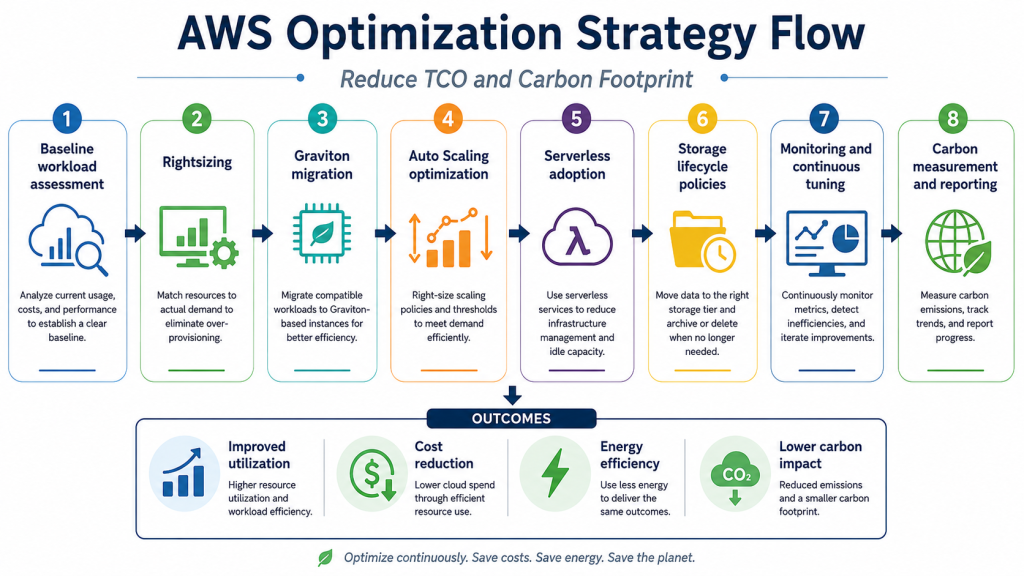
Rightsizing is one of the most direct ways to improve energy efficiency. It means matching resource allocation to actual workload demand.
For EC2, teams should analyze CPU, memory, network, and disk usage over time. For ECS and EKS, they should review task and pod requests, limits, node utilization, and autoscaling behavior. For databases, they should review instance class, storage type, IOPS, read replicas, connection patterns, and query performance.
AWS Compute Optimizer, CloudWatch metrics, Cost Explorer, and tagging can help identify oversized or underused resources. The goal is not simply to reduce size, but to improve the relationship between workload value and resource consumption.
Use AWS Graviton Where Workloads Are Compatible
AWS Graviton is a strong option for Energy-Efficient Computing AWS because it combines price-performance improvements with energy efficiency. AWS states that Graviton-based EC2 instances use up to 60% less energy than comparable EC2 instances for the same performance.
A practical migration should start with compatible workloads. Stateless services, containerized applications, microservices, build systems, API services, and many managed database workloads are often good candidates.
However, migration should follow an engineering process. Teams should test Arm64 container images, validate dependencies, benchmark latency and throughput, run canary deployments, and compare cost per transaction before full rollout.
Reduce Idle Capacity With Auto Scaling and Serverless
Idle capacity is one of the most common sources of cloud waste. Auto Scaling helps reduce this waste by adding or removing resources based on real demand.
For variable workloads, EC2 Auto Scaling and Application Auto Scaling can adjust capacity dynamically. For containerized workloads, ECS Service Auto Scaling, EKS autoscaling patterns, and Karpenter can help reduce unnecessary nodes. For event-driven workloads, AWS Lambda and AWS Fargate can reduce the need for always-on infrastructure.
Serverless is especially useful for intermittent jobs, APIs with variable traffic, data processing tasks, automation workflows, and event-based systems. When designed well, it can reduce operational overhead and improve resource efficiency.
Optimize Containers and Kubernetes Workloads
Container platforms can become inefficient when CPU and memory requests are too high. In Kubernetes, over-requested resources can cause clusters to scale out even when actual usage is low.
To improve efficiency, teams should review pod requests and limits, remove unused workloads, consolidate services safely, and choose suitable node families. AWS container sustainability guidance also recommends considering Graviton-based instances for container workloads, noting the same up to 60% energy reduction claim for comparable performance.
For EKS, teams can evaluate Cluster Autoscaler, Karpenter, or newer managed scaling options depending on their operational model. The important point is to align requested capacity with real application behavior.
Improve Storage and Data Movement Efficiency
Compute is not the only factor in cloud efficiency. Storage and data transfer also affect TCO and environmental impact.
Teams should reduce unnecessary data duplication, compress data where appropriate, and use lifecycle policies for Amazon S3. Infrequently accessed data should move to suitable lower-cost storage classes. Temporary data should have retention policies, and old logs should not remain in expensive storage indefinitely.
Data movement also matters. Unnecessary cross-region transfer, repeated ETL jobs, and inefficient analytics queries can increase cost and processing requirements. A sustainable architecture keeps data close to where it is needed and avoids avoidable movement.
Use Spot Instances and Savings Plans Carefully
Spot Instances can reduce cost for fault-tolerant workloads such as batch jobs, CI/CD tasks, data processing, rendering, and stateless workers. However, they require interruption handling.
Savings Plans can reduce cost for predictable baseline usage. However, teams should avoid using financial commitments as a substitute for architectural efficiency. Buying commitment for overprovisioned capacity may reduce the unit price, but it does not remove waste.
The better sequence is to optimize demand, right-size workloads, reduce idle resources, and then commit to the stable baseline that remains.
Measure Carbon Impact With AWS Sustainability Tools
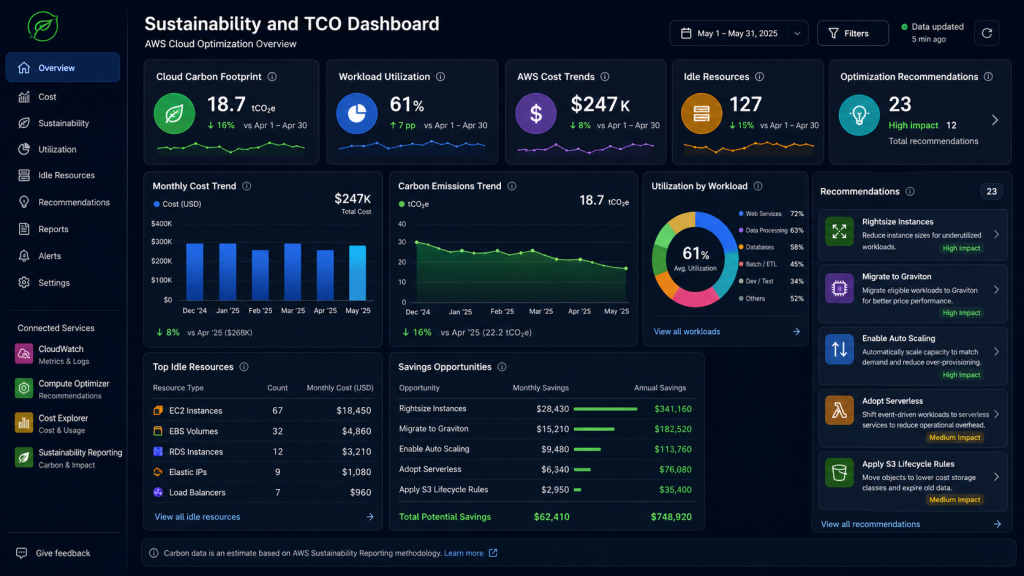
Measurement turns sustainability from an abstract goal into an operational practice. Teams should combine sustainability data with cost, utilization, and ownership metadata.
A practical reporting model may include AWS Sustainability tooling, Cost Explorer, CloudWatch, AWS Compute Optimizer, tagging, and account-level governance. The goal is to understand which workloads consume the most resources, which teams own them, and which optimization actions can reduce both cost and carbon impact.
Reference Architecture for Energy-Efficient AWS Workloads
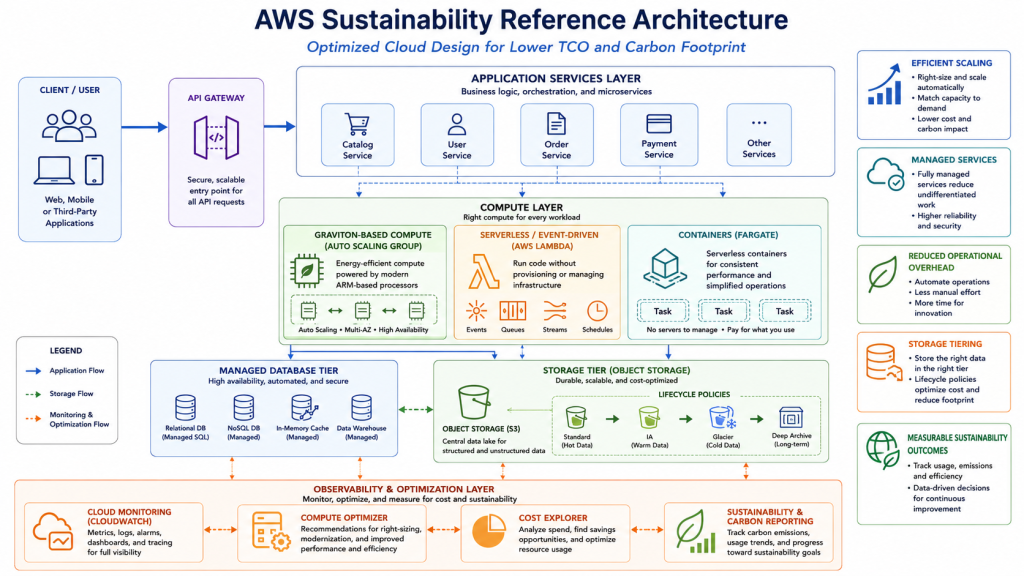
A practical reference architecture for Energy-Efficient Computing AWS may look like this:
User traffic or event source
→ Amazon API Gateway or Application Load Balancer
→ Auto Scaling compute layer
→ Graviton-based EC2, ECS, or EKS where compatible
→ AWS Lambda or AWS Fargate for event-driven workloads
→ Managed database or cache
→ Amazon S3 lifecycle storage
→ Amazon CloudWatch metrics and logs
→ AWS Compute Optimizer recommendations
→ AWS Cost Explorer and tagging
→ AWS Sustainability tooling
→ Governance and architecture review process
This architecture reduces idle infrastructure by scaling compute according to demand. It improves energy efficiency by using efficient compute platforms where compatible. It lowers TCO by combining rightsizing, serverless execution, lifecycle policies, and cost visibility. It also supports sustainability governance through measurement and regular review.
Common Mistakes to Avoid
Treating Sustainability as Separate From Cost Optimization
Sustainability and FinOps should not operate in isolation. In many cases, the same inefficient resource increases both spend and carbon impact. Shared metrics, tagging, and review cycles help teams make better decisions.
Overprovisioning for Rare Peak Demand
Some workloads are designed around rare traffic peaks and then run at that level all year. This increases cost and resource waste. A better approach is to use Auto Scaling, queues, asynchronous processing, and serverless patterns.
Migrating to Graviton Without Benchmarking
Graviton can be highly effective, but teams should not migrate blindly. They should test application compatibility, dependency support, latency, throughput, memory behavior, and deployment pipelines before broad adoption.
Ignoring Non-Production Environments
Development, testing, staging, and sandbox accounts often contain idle resources. Scheduling, time-to-live policies, automated cleanup, and budget alerts can reduce waste significantly.
Measuring Cost but Not Utilization or Carbon
A low bill does not always mean an efficient architecture. Teams should also measure utilization, idle capacity, workload value, and carbon impact. This creates a more complete view of efficiency.
Best Practices Checklist
Use this checklist when reviewing AWS workloads for energy efficiency:
- Right-size EC2, ECS, EKS, databases, and analytics workloads.
- Use Auto Scaling for variable demand.
- Prefer serverless for intermittent or event-driven workloads.
- Evaluate AWS Graviton for compatible applications.
- Use Spot Instances for fault-tolerant workloads.
- Apply Savings Plans only after rightsizing the baseline.
- Stop or scale down non-production resources outside working hours.
- Apply S3 lifecycle policies and reduce unnecessary data duplication.
- Avoid unnecessary cross-region data transfer.
- Tag workloads by owner, application, environment, and cost center.
- Review CloudWatch, Compute Optimizer, Cost Explorer, and AWS Sustainability data regularly.
- Include sustainability goals in architecture review processes.
Conclusion
Energy-Efficient Computing AWS is both a technical architecture practice and a financial optimization strategy. It helps teams reduce TCO and lower cloud carbon footprint by using fewer resources to deliver the same or better business value.
The most effective strategies include rightsizing workloads, using AWS Graviton where compatible, reducing idle capacity with Auto Scaling and serverless services, optimizing container clusters, improving storage lifecycle policies, and measuring carbon impact with current AWS sustainability tools.
A sustainable AWS workload is not created by one service choice alone. It is created through continuous architectural discipline: measure demand, remove waste, choose efficient platforms, automate scaling, and review outcomes over time.
References
https://docs.aws.amazon.com/wellarchitected/latest/framework/sustainability.html
https://docs.aws.amazon.com/wellarchitected/latest/sustainability-pillar/sustainability-pillar.html
https://aws.amazon.com/ec2/graviton/graviton-sustainability
https://aws.amazon.com/ec2/graviton
https://aws.amazon.com/sustainability/tools/console
https://docs.aws.amazon.com/awsaccountbilling/latest/aboutv2/ccft-overview.html
https://docs.aws.amazon.com/awsaccountbilling/latest/aboutv2/what-is-ccft.html
https://docs.aws.amazon.com/wellarchitected/latest/performance-efficiency-pillar/welcome.html
AWS Well-Architected Framework: In a nutshell – NashTech Blog