


Building API Integration Tests in .NET #3: Testcontainers on the Fidelity Ladder
1. Introduction
The mock and InMemory article left us on the second rung of the fidelity ladder: production repository code against in-process substitutes — an in-memory fake or EF Core InMemory. That catches handler and LINQ bugs, but not how your app behaves against real external infrastructure.
The third rung swaps those substitutes for throwaway Docker containers started from test code: databases, message brokers, caches, emulators — anything your system depends on that can run as an image.
| Rung | What you gain | What you still defer |
|---|---|---|
| Testcontainers | Real behavior of containerized dependencies you wire in | Coordinated multi-service graphs, live .NET sibling APIs |
| Mock and InMemory | Fast feedback without Docker | Anything that only exists in a real broker, DB, or cache process |
This article uses PostgreSQL as the worked example because eShop Catalog needs it — including pgvector for semantic search. The same fixture pattern applies if your next dependency is RabbitMQ, Redis, or Azurite; Section 4 maps common options.
Prerequisites: Docker Desktop (or a Docker daemon) on the machine that runs the tests.
2. A quick review — Mock and InMemory
| Concept | Summary |
|---|---|
| Test fidelity ladder | Same API tests, increasing infrastructure realism |
WebApplicationFactory | Hosts the real API in-process; configuration and services are swapped per mode |
| Repository Mock / EF InMemory | Substitutes that stay inside the test process — no Docker |
| Why should we climb further | Substitutes cannot reproduce provider-specific protocols, extensions, or wire formats |
The pattern in this post is unchanged: one CatalogApiTests class, one mode attribute, one fixture switch — only the infrastructure behind the host changes.
3. What is Testcontainers?
Testcontainers is a library that starts throwaway Docker containers from your test process. You choose an image (or build a custom one), configure ports and credentials in code, and the library pulls the image if needed, waits until the dependency is ready, and exposes an address your app can use — a connection string, a URL, or a mapped host port.
The lifecycle is always the same:
- Build a container descriptor in the test fixture (
PostgreSqlBuilder,RabbitMqBuilder,RedisBuilder, …). StartAsync()— container runs for the life of the fixture.- Inject the address into the app under test (usually
ConfigureHostConfigurationorConfigureTestServices). DisposeAsync()— container is removed when tests finish.
No manual docker run. No checked-in docker-compose.yml dedicated to tests. No shared “team Postgres” on localhost that every developer must install and keep in sync.
Testcontainers is not a test framework. It does not replace xUnit or WebApplicationFactory. It is infrastructure glue: real dependencies on demand, wired into the integration test host from the series introduction and mock/InMemory article.
4. What can you containerize?
Testcontainers for .NET ships modules for many common dependencies. The eShop demo uses only PostgreSQL today; the mechanics are identical for other types.
| Dependency | Testcontainers module (examples) | What API tests often validate |
|---|---|---|
| PostgreSQL / SQL Server / MySQL | PostgreSqlBuilder, MsSqlBuilder | EF migrations, SQL dialect, constraints, indexes |
| RabbitMQ / Kafka | RabbitMqBuilder, KafkaBuilder | Publish/subscribe, consumer handlers, retry behavior |
| Redis | RedisBuilder | Cache semantics, TTL, distributed locks |
| Azurite | AzuriteBuilder | Blob/queue/table storage without Azure |
| Elasticsearch / OpenSearch | Community or generic modules | Index mappings, search queries |
| Custom service | ContainerBuilder with your Dockerfile | Any image you can build |
You are not limited to one container per fixture. A test host can start Postgres and RabbitMQ and Redis in InitializeAsync, inject three connection strings, and wait for each to become healthy — you write that orchestration (or wrap it in a shared library). The messaging article shows messaging with Aspire; the same RabbitMQ image could be started with Testcontainers instead.
eShop in this post: Catalog needs PostgreSQL with pgvector — a Postgres extension for vector similarity search. That is why the case study below picks ankane/pgvector, not because Testcontainers is database-only.
5. When to climb to this rung
When to use it
- A substitute from the InMemory article cannot model the protocol or provider you need — InMemory EF does not speak PostgreSQL; a no-op
IEventBusdoes not exercise AMQP. - Provider-specific behaviour matters: SQL extensions, broker acknowledgements, cache eviction, storage API quirks.
- CI should hit the real infrastructure without adopting Aspire in the test project.
- You want isolation — each run gets fresh containers instead of shared dev services.
Blind spots
- Cold start — first run pulls images; expect roughly 10–30 seconds or could be longer (due to the number of image, image size) before tests execute (warm runs are faster).
- You own orchestration — startup order, health waits, and wiring multiple containers are your code. The Aspire article introduces Aspire when standardizing that graph is worth the extra packages.
- Not everything is container-shaped — some teams depend on managed cloud APIs (real AWS S3, Azure OpenAI) where emulators or contract tests are a better fit than Testcontainers alone.
What changes from the InMemory rung (Catalog example)
| Piece | EF InMemory mode | Testcontainers mode |
|---|---|---|
| Persistence | In-process EF provider | PostgreSQL in Docker |
| Other deps (messaging, AI) | Test doubles | Still test doubles in eShop’s current mode — containers added when you choose |
| Initialization | EnsureCreated on InMemory | MigrateAsync + seed on real Postgres |
| Docker | Not required | Required |
6. Testcontainers vs Aspire in tests
Both rungs use Docker. The difference is who owns the orchestration layer (see the series introduction, Section 6).
Testcontainers starts each dependency imperatively and injects addresses into the configuration. In the demo, the container setup is wrapped in a reusable helper — eShop’s CatalogTestcontainersHost for one Postgres instance. You can scale to many container types as you want.
Aspire in tests provides a declarative resource graph, built-in health waits, and AddProject for live .NET sibling services. Worth it when your app already uses Aspire in development and tests need several wired dependencies with less custom glue.
Neither replaces WebApplicationFactory for the API under test. Both replace what sits behind it.
7. The integration pattern (any container)
Regardless of image, Testcontainers follow the same four steps:
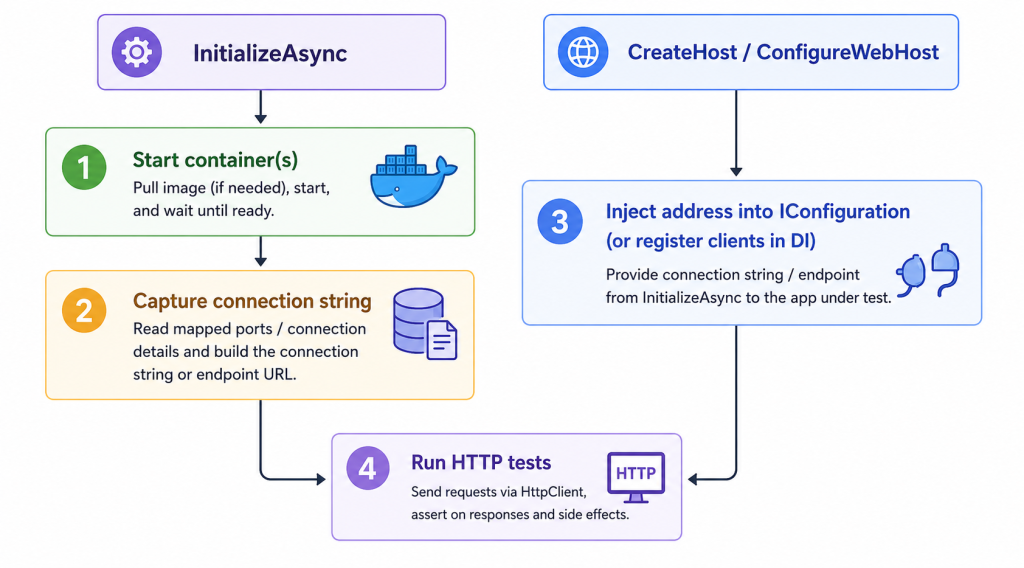
- Host class — thin wrapper (
CatalogTestcontainersHost) that builds the container, callsStartAsync(), returns the address. - Fixture
InitializeAsync— start container beforeWebApplicationFactoryboots so configuration is ready. - Configuration injection — overwrite
ConnectionStrings:*,EventBusURL, or other keys the production app already reads. - Same tests — HTTP client and assertions unchanged; only the mode attribute or runsettings file switches.
In the demo, Ordering’s OrderingTestcontainersHost repeats the pattern with a standard Postgres image — same steps, different database name. A RabbitMQ variant would return a broker URI and set ConnectionStrings:EventBus instead of catalogdb.
8. Case study: Catalog.API with PostgreSQL
This section is one application of the pattern above — chosen because Catalog persists data in PostgreSQL. Semantic search with pgvector is covered in optional reading at the end of this section; skip it if vector search is not relevant to your app.
Start the database container
internal sealed class CatalogTestcontainersHost : IAsyncDisposable
{
    private PostgreSqlContainer? _postgresContainer;

    public async Task<string> StartAsync()
    {
        _postgresContainer = new PostgreSqlBuilder("ankane/pgvector:latest")
            .WithDatabase("CatalogDB")
            .WithUsername("postgres")
            .WithPassword("postgres")
            .WithCleanUp(true)
            .Build();

        await _postgresContainer.StartAsync();
        return _postgresContainer.GetConnectionString();
    }

    public async ValueTask DisposeAsync()
    {
        if (_postgresContainer is not null)
            await _postgresContainer.DisposeAsync();
    }
}
Why WithCleanUp(true) matters on CI agents
Each test run that starts a container creates a real Docker process on the host that executes the job — your laptop, a GitHub Actions ubuntu-latest VM, or a self-hosted build agent. When the fixture disposes, something must stop and remove that container. If it does not, you get orphans containers (and often anonymous volumes) left behind after the test process exits.
That is painful in CI for several reasons:
| Problem | What happens |
|---|---|
| Shared agents | Self-hosted runners reuse the same machine across PRs. Orphans stack up until someone runs docker ps and wonders why forty Postgres containers are idle. |
| Resource exhaustion | Each container holds memory, disk for writable layers, and sometimes named/anonymous volumes. Enough orphans and the next job fails with no space left on device or Out Of Memory errors — flaky failures unrelated to your code. |
| Port and name collisions | Stale containers can bind ports or retain labels that confuse the next run, especially if a previous job crashed before DisposeAsync. |
| Slower, noisier pipelines | Agents that never reclaim Docker state need manual cleanup scripts or periodic VM resets — operational toil that shows up as “CI was fine yesterday.” |
WithCleanUp(true) tells Testcontainers to remove the container when the fixture is disposed — the normal path when CatalogApiTestSession tears down at the end of the test assembly, or when a single fixture’s DisposeAsync runs.
You still want defensive habits:
- Always dispose the fixture — implement
IAsyncLifetime/IAsyncDisposableon the fixture and let the session own one instance per mode (as eShop does). A test run that is killed mid-flight (dotnet testcancelled, agent timeout) may skip dispose; Testcontainers also runs a resource reaper (Ryuk) on many setups to garbage-collect labeled containers, but do not treat that as a substitute for fixture disposal in your own code. - Use
WithCleanUp(true)on every builder in the fixture — Postgres, RabbitMQ, Redis — so each dependency you add follows the same rule. - On self-hosted CI, schedule an occasional
docker container prune/docker system prunejob as a safety net, not the primary strategy.
On ephemeral cloud runners (GitHub-hosted ubuntu-latest), the entire VM is discarded after the job, so orphans are less likely to hurt the next PR — but they can still break later steps in the same job (integration tests followed by Docker-based packaging, scan steps, or a second test project on the same agent). Explicit cleanup keeps each job self-contained.
Wire the fixture
case CatalogFunctionalTestMode.Testcontainers:
    _postgresConnectionString = await _testcontainersHost!.StartAsync();
    _ = Services;
    await CatalogDatabaseHelper.EnsurePostgresSeededAsync(Services);
    break;
Inject catalogdb
Production Catalog registers EF against the catalogdb connection name with vector support. Test mode overwrites that key:
case CatalogFunctionalTestMode.Testcontainers:
    settings["ConnectionStrings:catalogdb"] = options.PostgresConnectionString;
    break;
Keep non-DB deps as doubles (for now)
Catalog Testcontainers mode still uses FakeCatalogAI and no-op event services — only persistence is containerized in this mode. Adding a RabbitMqBuilder alongside Postgres would follow the same inject-and-configure steps; Post 5 covers messaging in depth via Aspire.
Migrate, seed, and run the same tests
await context.Database.MigrateAsync();
await seeder.SeedAsync(context);
Annotate the test class (or override via runsettings) and run the same CatalogApiTests as in mock and InMemory modes — pagination, create, update, delete. Persistence helpers read through LoadItemFromPostgresAsync when verifying writes. Testcontainers and Aspire share that path; only the connection string source differs.
9. Case study: Catalog.API with PostgreSQL and pgvector
Optional reading — pgvector and semantic search
Skip this section if you do not use vector search. It explains why eShop picks theankane/pgvectorimage and how to test embedding ranking once the basics above are clear.
What the repository executes on PostgreSQL
When semantic search runs with AI enabled, CatalogRepository orders by cosine distance — SQL that only translates correctly against pgvector:
public Task<List<CatalogItem>> GetItemsBySemanticRelevanceAsync(
    Vector vector, int pageIndex, int pageSize, CancellationToken cancellationToken = default) =>
    context.CatalogItems
        .Where(c => c.Embedding != null)
        .OrderBy(c => c.Embedding!.CosineDistance(vector))
        .Skip(pageSize * pageIndex)
        .Take(pageSize)
        .ToListAsync(cancellationToken);
Under Testcontainers, that CosineDistance call becomes provider SQL. Under EF InMemory, the property is ignored entirely (InMemory article).
Existing test: semantic search endpoint (name fallback today)
eShop’s GetCatalogItemWithsemanticrelevance runs in Testcontainers mode with the same HTTP test as every other mode:
[Theory]
[InlineData(2.0)]
public async Task GetCatalogItemWithsemanticrelevance(double version)
{
    var host = await CreateHostAsync(new ApiVersion(version));

    var response = await host.Client.GetAsync(
        "api/catalog/items/withsemanticrelevance?text=Wanderer&PageSize=5&PageIndex=0");

    response.EnsureSuccessStatusCode();
    var result = JsonSerializer.Deserialize<PaginatedItems<CatalogItem>>(body, options);

    Assert.Equal(1, result.Count);
    Assert.Single(result.Data);
}
With the default FakeCatalogAI (IsEnabled => false), the endpoint falls back to name-prefix search — it finds “Wanderer Black Hiking Boots” without touching pgvector. That still validates the HTTP contract on a real Postgres database, but it does not exercise embeddings yet.
Example: asserting pgvector ranking end-to-end
To test the embedding path, enable AI in the test host and seed vectors into Postgres before calling the same endpoint. A minimal stub avoids Ollama while forcing the semantic branch:
// Test-only double — register in ConfigureTestServices for this test class
internal sealed class StubCatalogAI : ICatalogAI
{
    public bool IsEnabled => true;

    public ValueTask<Vector?> GetEmbeddingAsync(string text) =>
        ValueTask.FromResult<Vector?>(new Vector(new float[] { 1f, 0f, 0f }));
    // ... other ICatalogAI members return null or empty as needed
}
In the test, assign embeddings to two catalog rows (same dimension count for every vector). Item A is aligned with the search vector; item B is not:
[Fact]
[CatalogFunctionalTestMode(CatalogFunctionalTestMode.Testcontainers)]
public async Task SemanticSearch_ReturnsClosestEmbeddingFirst()
{
    var host = await CreateHostAsync(new ApiVersion(2.0));

    // Arrange — write embeddings into real pgvector columns
    await using (var scope = host.Fixture.Services.CreateAsyncScope())
    {
        var context = scope.ServiceProvider.GetRequiredService<CatalogContext>();

        var wanderer = await context.CatalogItems.SingleAsync(i => i.Id == 1);
        var other = await context.CatalogItems.SingleAsync(i => i.Id == 2);

        wanderer.Embedding = new Vector(new float[] { 1f, 0f, 0f }); // closest to search vector
        other.Embedding = new Vector(new float[] { 0f, 1f, 0f });   // farther away

        await context.SaveChangesAsync();
    }

    // Act — StubCatalogAI returns [1,0,0] for the search text
    var response = await host.Client.GetAsync(
        "api/catalog/items/withsemanticrelevance?text=hiking&PageSize=1&PageIndex=0");
    response.EnsureSuccessStatusCode();

    var page = JsonSerializer.Deserialize<PaginatedItems<CatalogItem>>(body, options);

    // Assert — pgvector cosine ranking surfaced through HTTP
    Assert.NotNull(page.Data);
    Assert.Equal("Wanderer Black Hiking Boots", page.Data[0].Name);
}
Why this test belongs on the Testcontainers rung:
| Step | Requires real Postgres + pgvector? |
|---|---|
Persist Embedding as vector | Yes — column type and extension |
OrderBy(Embedding.CosineDistance(...)) | Yes — provider-specific SQL |
HTTP through WebApplicationFactory | Yes — full integration path |
On EF InMemory, the test never gets past model creation for Embedding. On Repository Mock, InMemoryCatalogRepository stubs semantic search without distance math. Only here does the same assertion prove that ranking logic survives from LINQ through PostgreSQL and back to the API response.
10. Shared fixture vs per-test isolation
eShop reuses one container set per test mode per assembly run via CatalogApiTestSession:
private readonly ConcurrentDictionary<CatalogFunctionalTestMode, Lazy<Task<CatalogApiFixture>>> _fixtures = new();All tests in that mode share the same Postgres instance. Cold-start cost is paid once per run.
Trade-off: mutable tests can affect later tests. We can mitigate this issue with deterministic IDs in read-heavy scenarios.
| Approach | When to use |
|---|---|
| Shared fixture (default) | Many tests, mostly reads — amortize container startup |
| Respawn | Write-heavy suite — reset DB between tests without restarting containers |
| Container per test class / test | Strong isolation — reserve for expensive or order-sensitive cases |
Respawn truncates tables or restores a baseline quickly — works for any relational container, not only Postgres.
11. Composing multiple containers
Testcontainers shines when you need more than one dependency without Aspire:
| eShop need | Container option | Injected as |
|---|---|---|
| Catalog / Ordering data | PostgreSqlBuilder | ConnectionStrings:catalogdb / ordering equivalent |
| Transactional messaging | RabbitMqBuilder | ConnectionStrings:EventBus |
| Distributed cache | RedisBuilder | ConnectionStrings:Redis or options type |
| Identity data (without live API) | Second PostgreSqlBuilder | Separate connection string |
In the eShop demo, OrderingTestcontainersHost today starts one standard Postgres database — same imperative pattern, no pgvector. Identity is still mocked; while the Aspire mode adds a live Identity.API project alongside databases.
To add RabbitMQ with Testcontainers in your own fork:
- Start
RabbitMqBuilderinInitializeAsyncafter Postgres is healthy. - Inject the broker URI into
ConnectionStrings:EventBus. - Remove no-op
IEventBusregistrations inConfigureTestServices. - Run the same HTTP tests — now exercising real publish/consume paths.
The maintenance cost grows with each container you wire. Aspire trades that for a declarative graph when the topology is stable and already modeled in AppHost.
12. Running locally and in CI
Runsettings
<ESHOP_CATALOG_FUNCTIONAL_TEST_MODE>Testcontainers</ESHOP_CATALOG_FUNCTIONAL_TEST_MODE>
<ESHOP_ORDERING_FUNCTIONAL_TEST_MODE>Testcontainers</ESHOP_ORDERING_FUNCTIONAL_TEST_MODE>
CLI
dotnet test tests/Catalog.FunctionalTests --settings eShop.FunctionalTests.Testcontainers.runsettings
dotnet test tests/Catalog.FunctionalTests --filter-trait FunctionalTestMode=testcontainers
Docker must be running locally. Visual Studio: select eShop.FunctionalTests.Testcontainers.runsettings under Configure Run Settings.
GitHub Actions sketch
jobs:
  integration-testcontainers:
    runs-on: ubuntu-latest
    steps:
      - uses: actions/checkout@v4
      - uses: actions/setup-dotnet@v4
        with:
          dotnet-version: '9.0.x'
      - name: Run Testcontainers tests
        run: >
          dotnet test tests/Catalog.FunctionalTests
          --settings eShop.FunctionalTests.Testcontainers.runsettings
          --filter-trait FunctionalTestMode=testcontainers
ubuntu-latest provides Docker; Testcontainers manages images inside the job — no separate services: Postgres block required.
Pros and cons (Testcontainers rung)
| Pros | Cons |
|---|---|
| Real behavior for any containerized dependency | Requires Docker on dev and CI |
| Same HTTP tests — mode switch only | Cold start slower than Mock/InMemory |
| Imperative control — one container or many | Multi-container wiring is manually configured vs auto-configured by Aspire |
| Fewer packages than Aspire hosting in tests | You maintain orchestration helpers |
13. Conclusion
Testcontainers is the first ladder rung that runs real infrastructure in Docker — not only databases. The integration pattern is stable: start containers in the fixture, inject addresses into configurations, keep WebApplicationFactory and HTTP tests unchanged.
eShop demonstrates that pattern with PostgreSQL and pgvector because Catalog semantic search demands it. Your application might start with Redis, RabbitMQ, or SQL Server instead; the fixture shape stays the same.
Stay on mock and InMemory for fast local loops. Climb here when substitutes stop answering your question. Climb to Aspire when orchestrating many dependencies — including live .NET services — should not be hand-written glue.
14. References
This series
- Part 1 — A Test Fidelity Ladder
- Part 2 — Repository Mock and EF InMemory
- Part 3 — Testcontainers on the Fidelity Ladder
- Part 4 — Aspire on the Fidelity Ladder — this article
- Part 5 — Messaging, Outbox, and RabbitMQ on the Fidelity Ladder
Demo repo
- trainer1234/eShop-test on GitHub — pluggable functional test modes
- dotnet/eShop on GitHub — upstream reference application
Testcontainers & testing
- Testcontainers for .NET — modules, builders, and lifecycle API
- Integration tests in ASP.NET Core
- Respawn — fast database reset between tests
Related NashTech posts
- Integration Testing in .NET with Test Containers — introductory WAF + Postgres walkthrough; this series adds pluggable modes, pgvector as a case study, and the broader container catalogs