



Key takeaways:
We need to avoid Kubernetes Deployment Antipatterns for several reasons:
- Reliability: Antipatterns can lead to unreliable deployments, increasing the likelihood of system failures and downtime.
- Security: Antipatterns may introduce security vulnerabilities, compromising the integrity and confidentiality of the system.
- Maintainability: Antipatterns can make deployments harder to manage and maintain, resulting in increased complexity and technical debt.
- Consistency: Antipatterns may cause inconsistencies between environments, making it difficult to replicate and troubleshoot issues.
- Scalability: Antipatterns can hinder scalability efforts by introducing inefficiencies and bottlenecks in the deployment process.
- Compliance: Antipatterns may violate regulatory and compliance requirements, exposing the organization to legal and financial risks.
Anti-pattern 7 – Operating without a strategy for managing secrets
In part 1 we explained why baking configuration in containers is a bad practice. This holds particularly true for secrets. If you employ a dynamic service for configuration adjustments, it’s logical to utilize the same (or a similar) service for managing secrets.
Secrets ought to be conveyed to containers during runtime. There exist numerous approaches to handling secrets, ranging from straightforward storage methods to storing them encrypted in Git repositories, or employing comprehensive solutions like HashiCorp Vault.
Several common pitfalls include:
- Employing multiple methods for secret management.
- Misinterpreting runtime secrets with build-time secrets.
- Utilizing intricate secret injection mechanisms that hinder local development and testing.
The crucial point here is to select a strategy and adhere to it consistently. It’s essential for all teams to adopt the same approach for secret management. Regardless of the environment, all secrets should be handled uniformly. This ensures easy secret tracking, enabling you to identify when and where a secret was utilized.
Runtime secrets encompass the sensitive information that an application requires post-deployment. Examples include database passwords, SSL certificates, and private keys. These are crucial for the application’s operation but are not needed during the build or deployment process.
Build secrets are the confidential information necessary solely during the packaging phase of an application. Examples include credentials for artifact repositories like Artifactory or Nexus, or for file storage in an S3 bucket. These secrets are unnecessary in production and must never be transmitted to a Kubernetes cluster. It’s crucial that each deployed application receives only the secrets it requires, a principle that holds true even for non-production clusters.
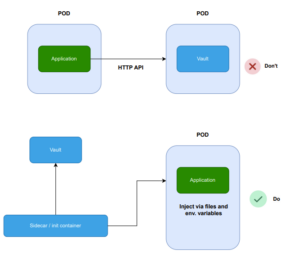
For instance, despite HashiCorp Vault offering a versatile API for accessing secrets and tokens, your Kubernetes application should refrain from directly utilizing this API to retrieve necessary information. Doing so complicates local testing, as developers would need to set up a Vault instance locally or mock Vault responses just to run the application
Anti-pattern 8 – Incorrect utilization of health probes
By default, Kubernetes applications lack health probes unless explicitly configured. Similar to resource limits, health probes should be regarded as integral components of Kubernetes deployments. Thus, all applications deployed in any type of cluster should include both resource limits and health probes.
Health probes determine whether and when your application is prepared to handle traffic. As a developer, it’s crucial to comprehend how Kubernetes utilizes your readiness and liveness endpoints and the ramifications of each one, particularly understanding the significance of timeouts for each.
To summarize:
- Startup probe: Verifies the initial boot of your applications. It executes only once.
- Readiness probe: Ensures your application can respond to traffic continuously. If it fails, Kubernetes halts routing traffic to your app (and will attempt again later).
- Liveness probe: Determines if your application is functioning correctly at all times. If it fails, Kubernetes assumes your app is stalled and restarts it.
Common pitfalls include:
- Failing to consider external services (e.g., databases) in the readiness probe.
- Employing the same endpoint for both the readiness and liveness probes.
- Utilizing an existing “health” endpoint designed for virtual machines instead of containers.
- Neglecting to leverage the health features provided by your programming framework, if available.
- Developing overly complex health checks with unpredictable timings, leading to internal denial-of-service attacks within the cluster.
- Generating cascading failures by checking external services in the liveness health probe.
Accidentally causing cascading failures is a prevalent issue that can be destructive, even with virtual machines and load balancers. This problem is not unique to Kubernetes
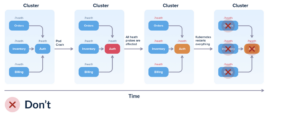
You have three services, each dependent on the Auth service. Ideally, the liveness probe for each service should solely assess if that service can respond to queries. However, if you configure the liveness probe to check dependencies, the following scenario can unfold:
- Initially, all four services function correctly.
- The Auth service experiences a hiccup (such as an overloaded database) and becomes unresponsive.
- All three services correctly detect issues with the Auth service.
- However, they erroneously set their OWN health status to down (or unavailable), despite functioning correctly.
- Kubernetes runs the liveness probes, determining that all four services are down and subsequently restarts all of them, although only one had issues.
For more complex scenarios, it’s beneficial to familiarize yourself with circuit breakers as they allow for decoupling the “liveness” of an application from its ability to respond.