


Key takeaways:
We need to avoid Kubernetes Deployment Antipatterns for several reasons:
- Reliability: Antipatterns can lead to unreliable deployments, increasing the likelihood of system failures and downtime.
- Security: Antipatterns may introduce security vulnerabilities, compromising the integrity and confidentiality of the system.
- Maintainability: Antipatterns can make deployments harder to manage and maintain, resulting in increased complexity and technical debt.
- Consistency: Antipatterns may cause inconsistencies between environments, making it difficult to replicate and troubleshoot issues.
- Scalability: Antipatterns can hinder scalability efforts by introducing inefficiencies and bottlenecks in the deployment process.
- Compliance: Antipatterns may violate regulatory and compliance requirements, exposing the organization to legal and financial risks.
Antipattern 1: Employing Containers with the Latest Tag in Kubernetes Deployments
If you’ve delved into container building, this revelation shouldn’t be unexpected. Utilizing the “latest” tag for Docker images is inherently flawed; “latest” is merely a label and doesn’t inherently signify the most recent or last built version. Additionally, “latest” serves as the default tag if not explicitly specified when referencing a container image.
Employing the “latest” tag in a Kubernetes deployment exacerbates the issue, as it obscures visibility into what is actually deployed in your cluster/
apiVersion: apps/v1
kind: Deployment
metadata:
  name: bad-deployment
spec:
  template:
    metadata:
      labels:
        app: my-deployed-app
    spec:
      containers:
      - name: dont-do-this
        image: docker.io/lecao/my-app:latest
By applying this deployment, you’ve essentially forfeited any information regarding the specific container tag that is currently deployed. Since container tags are mutable, the “latest” tag lacks definitive meaning. It could represent an image created mere minutes ago or one that was generated months ago. Consequently, you’ll find yourself needing to sift through your CI system logs or even download the image locally to ascertain its version.
The “latest” tag becomes even more perilous when paired with an “always pull” policy. Consider this scenario: your pod has failed, prompting Kubernetes to initiate a restart to restore its health—after all, this is precisely why you’ve adopted Kubernetes in the first place.
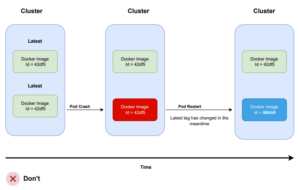
Kubernetes will reschedule the pod, and if your pull policy permits, it will retrieve the “latest” image once more from your Docker registry. Consequently, if the “latest” tag has been updated in the interim, the pod will now run a different version than the other pods. This outcome is often undesired in most scenarios.
The correct deployment format in Kubernetes necessitates adherence to a proper tagging strategy. While the specific strategy employed may vary, having one is crucial.
Several suggestions include:
- Utilizing tags with Git hashes (e.g., docker.io/lecao/my-app:abc34). While straightforward to implement, this approach may be considered overkill as Git hashes are not easily readable by non-technical individuals.
- Employing tags with application versions following semantic versioning (e.g., docker.io/lecao/my-app:v1.0.1). This method offers numerous advantages for both developers and non-developers and is often recommended.
- Adopting tags that denote a consecutive number, such as a build number or build date/time. While this format may be challenging to work with, it can be easily adopted for legacy applications.
If you encounter a deployment utilizing the image with the tag v1.0.5, you should be able to:
- Pull this image locally and confidently ascertain that it is identical to the one running on the cluster.
- Easily trace back the Git hash that generated it.
Antipattern 2: Incorporating the configuration directly into container images
This is actually another anti-pattern stemming from the process of building container images. Your images should be “generic” in the sense that they should be capable of running in any environment.
If your container image contains:
- Hardcoded IP addresses
- Contains Passwords and secrets
- Specific URLs to other services
- Tags such as “dev”, “qa”, “production”
…then you’ve succumbed to the pitfall of constructing environment-dependent container images.
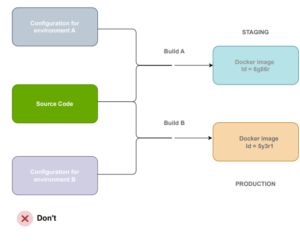
This implies that for each distinct environment, you must rebuild your image, resulting in deploying something different to production than what was tested previously.
The solution to this problem is straightforward: create “generic” container images that are agnostic to the environment they operate in. For configuration, leverage external methods such as Kubernetes configmaps, HashiCorp Consul, Apache Zookeeper, etc.
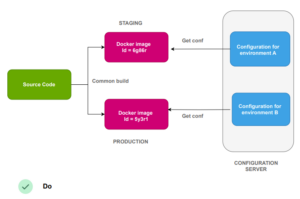
Anti-pattern 3 – Engaging in ad-hoc deployments by manually editing or patching with kubectl commands
Configuration drift is a longstanding issue that predates the emergence of Kubernetes. It occurs when two or more environments are intended to be identical, but due to ad-hoc deployments or changes, their configurations diverge.
Over time, this problem intensifies, potentially leading to extreme scenarios where the configuration of a system becomes unknown and must be deduced from live instances.
Kubernetes is not immune to configuration drift. The powerful kubectl command includes apply/edit/patch functions that can modify resources directly on a live cluster. Unfortunately, this capability is often misused by developers and operators, leading to unrecorded ad-hoc changes within the cluster.
One of the most common causes of failed deployments is discrepancies in environment configuration. A deployment may fail in production, even if it succeeded in the staging environment, due to differences in their configurations.
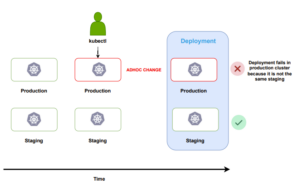
It’s remarkably easy to fall into this trap. Hotfixes, “quick workarounds,” and other questionable hacks often drive ad-hoc changes.
Using kubectl for manual deployments should be avoided altogether. Instead, all deployments should be managed by the deployment platform, ideally adhering to the GitOps paradigm, where changes are recorded in Git.
If all deployments occur through Git commits:
- You maintain a comprehensive history of cluster changes through Git commit records.
- You possess precise insights into the contents of each cluster at any given time and can identify differences among environments.
- Recreating or cloning an environment from scratch is straightforward by referencing the Git configuration.
- Rolling back configurations is effortless by reverting the cluster to a previous commit.
- Crucially, in the event of a deployment failure, you can swiftly identify the recent change that impacted it and how it altered the configuration.
The patch/edit capabilities of kubectl should strictly serve for experimentation purposes only. Manually altering live resources on a production cluster is fraught with risks. In addition to establishing a proper deployment workflow, it’s imperative to communicate with your team that abusing kubectl in this manner should be avoided at all costs.
Continued on part 2.