



Introduction
Routing is an important part of every application which is responsible for navigating between different views. Next.js comes up with two different approaches for routing, first being the page router approach and second the app router.
App router is the new approach and the future of Next.Js.
The page router has a file based system. So whenever you add a new file in your pages directory, it will then be available as a route.
Here we will see the app router approach.
Routing using App Router
Next.Js introduced the concept of app router in version 13. It works with new directory which is app. It supports nested routing, shared layouts, error handling and more.
By default all components inside app directory are react server components. You can also use client components.
When you will create a new next js application, it will prompt you to choose between the two types of routing. By default, the recommended is the app router. You can use this command to create a new next js application – npx create-next-app.
You should have nodejs installed before this.
Unlike Page Router, folders are used to create routes in this approach. The app folder is the root folder which includes a page.js file. The layout file is the shared UI file for one particular route in which folder it is being created.
Let us see an example:
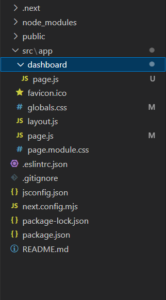
We have created a dashboard directory under app directory. In that we have a page.js file, which will be the main UI file for this route. So after creating this and adding your component code in the page.js file under dashboard directory, you will be able to access the /dashboard without doing any other configuration
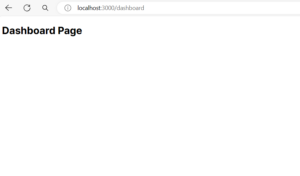
Here you can see we are able to access the dashboard route.
Here are the file conventions with specific behavior:
- layout: shared UI for a whole route segment
- page: unique UI for that particular route
- loading: loading UI for a segment
- not-found: not found UI for a segment
- error: error UI for a segment
Nested Routes
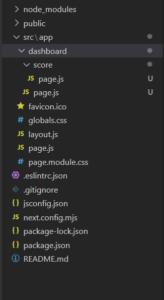
Let us take an example to understand nested routes. For example you want to add route /dashboard/score. In this case you will have to create nested folders. Inside app, first create a dashboard folder and inside that then create a score folder.
In this we have three segments: / which is the first and the root segment, second is the dashboard segment and then third is the leaf segment- score.
App router vs Page Router
If your application requires complex routing where like nested routes or dynamic routing, then app router would be a better approach. With app router you can easily customize your routes.
The page router approach can be a fast and efficient approach to creating and managing pages than the app router approach.
Conclusion
Here we learnt the two approaches followed in next.js and how we can create routes in this approach. Both the approaches have their own strengths, and understanding your requirements will help you determine which one to use in a given scenario. Here you can have a look in detail on routing in next js.
Finally, for more such posts like this, please follow our LinkedIn page- FrontEnd Competency.