



In the realm of software testing, having realistic and diverse test data is paramount for ensuring thorough test coverage and uncovering potential issues. While manual creation of test data can be time-consuming and prone to errors, tools like Mockaroo offer a powerful solution for generating high-quality test data efficiently.
What is Mockaroo?
Mockaroo is a versatile web-based tool designed for generating customized test data with ease. It provides a user-friendly interface for defining data schemas and generating realistic datasets based on those schemas. With support for various data types, formats, and customization options, Mockaroo empowers testers to create comprehensive test data tailored to their specific testing requirements.
Creating Big Test Data with Mockaroo
- Sign Up/Login:
- Visit the Mockaroo website (https://www.mockaroo.com/) and sign up for an account if you haven’t already.
- Once registered, log in to access the tool’s features.
- Define Data Schema:
- Click on the “Create Schema” button to start defining your data schema.
- Add fields to represent the attributes of your dataset (e.g., name, age, email, address).
- Specify the data type for each field. Mockaroo provides a comprehensive array of data types tailored to meet diverse testing and data generation needs. Here’s an overview of the data types available:

- You also can generate your own datatype by using AI.
- Customize Data Generation:
- Utilize Mockaroo’s customization options to tailor the data generation process to your requirements.
- Configure field options such as distribution, format, and locale to ensure the generated data aligns with your testing needs.
- Take advantage of built-in functions and formulas for generating dynamic or complex data.
- Preview Data:
- Before generating a large dataset, preview a sample of the generated data to ensure it meets your expectations.
- Use the “Preview” button to view a sample of the generated data based on your schema and configuration.
- Generate Big Test Data:
- Once satisfied with the data schema and settings, proceed to generate a large dataset.
- Specify the desired number of rows for your dataset (up to 100,000 for paid accounts, limited to 1000 rows for free accounts).
- Click on the “Download” button to initiate the data generation process.
- Mockaroo will generate the specified number of rows based on your schema. It allows users to export generated datasets in various formats:
- CSV: Ideal for tabular data, with each row representing a record and columns separated by commas.
- JSON: Lightweight and human-readable format, suitable for web applications and NoSQL databases.
- SQL: Generates SQL INSERT statements for easy integration with relational databases.
- Excel: Creates Excel-compatible files for advanced analysis and reporting tasks.
- Review and Use Generated Data:
- Check the downloaded file to ensure it contains the expected data.
- Utilize the generated test data for software testing purposes, such as database population, functional testing, and performance testing.
- Optional: Save Schema for Reuse:
- Save your schema for future use if you anticipate needing similar test data.
- Mockaroo allows you to save and manage schemas within your account, making it easy to access and modify them as needed
- Here is an example of a Schema:

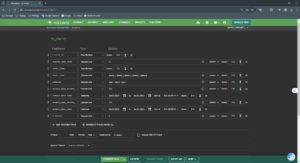
By following these steps, you can efficiently create a large dataset using Mockaroo for your testing needs. Experiment with different data schemas, customization options, and data generation techniques to generate diverse and realistic test data for comprehensive testing scenarios.
Reference:
https://www.mockaroo.com/