


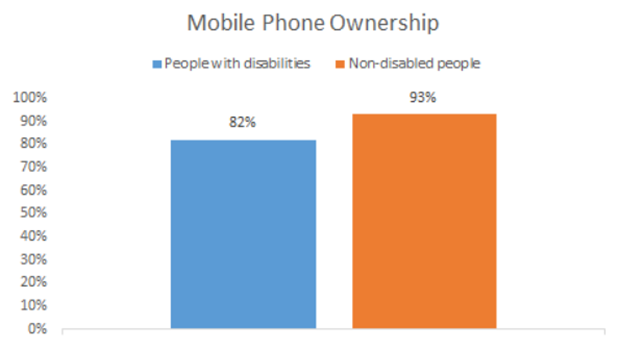
Mobile devices are becoming increasingly popular, not only among the general population but also among people with disabilities. A 2019 survey with 1000 people found that 82% of people with disabilities owned a mobile phone, compared to 93% of the non-disabled people.
Therefore, accessibility testing should be considered to make your application accessible to a wide range of users. In this article, we’ll look at the characteristics of mobile device usage, the concept and needs of mobile accessibility testing, and some practices to consider when conducting accessibility testing in mobile applications.
1. Some characteristics of mobile devices usage
- Mobile devices are used in a variety of environments, including outdoors, where natural light can vary in strength.
- Small screen size is one of the most common characteristics of mobile devices. It can limit user visibility for those with low vision.
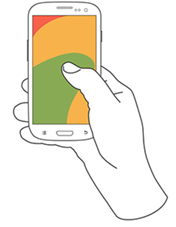
- One-handed use seems to be a common practice for users who need to perform other tasks simultaneously. Many of those using one hand to hold their phone were carrying out other tasks such as carrying bags, steadying themselves while in transit, climbing stairs, holding babies…
2. What is Mobile Accessibility Testing?
Mobile accessibility testing ensures mobile applications are accessible to individuals with disabilities. This includes various visual, auditory, cognitive, and physical disabilities. The goal of mobile accessibility testing is to guarantee that all users, regardless of their abilities or limitations, can access and use the features and content on these platforms comfortably and effectively.
3. Why do we need Accessibility Testing in Mobile Applications?
There are billions of people who use mobile devices but not everybody interacts with their devices the same way.
- Accessibility testing helps ensure that applications are usable by all people. This includes those with disabilities such as visual, auditory, cognitive, and physical disabilities.
- Accessibility testing can help increase the overall usability of digital products, resulting in better user experiences and increased customer satisfaction.
4. Some practices should be considered when doing Accessibility Testing in a Mobile Application
The aspects to check when evaluating accessibility in mobile applications are extensive. We can refer to the WCAG 2.0 Guidelines. The level of accessibility testing will depend on the requirements and cost. In this article, I present only some basic tests that should be considered.
i) Contrast
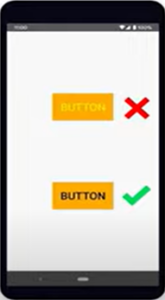
If color of UI elements have insufficient contrast, text can be hard to read and icon can be hard to see. Proper color contrast helps users with visual impairments more easily use the application. Color contrast should be sufficient in both Light mode and Dark mode.
Common issues:
- Insufficient contrast for text elements
- Insufficient contrast for user interface elements and states
- Insufficient contrast for images and icons that convey information
- Content does not respond to color and contrast settings
ii) Text Size
Font size should be large enough for most people to read comfortably. Text can be resized by setting to serve people with visual impairments.
Common issues:
- Text is cut off by the boundary of its container that affect the meaning
- Portions of text do not resize
- Text does not respond to text resize settings

iii) Touch Target
For users with mobility impairments, such as hand tremors, small touch targets may be difficult to interact with. Event users with perfect touch may struggle to easily use controls if they are using one hand, have large fingers, have low vision, or are exposed to shaking, such as when they are walking or riding a bus.
The application should ensure user can easily interact with the elements on the screen. The elements should be large enough for reliable interaction.
In general, you should ensure that touch targets are at least 48x48dp (results in a physical size of about 9mm) regardless of screen size.

Common issues:
- Touch targets are too small
- Touch targets are too close together
These become difficult for user to activate the elements.
iv) Screen Reader
A screen reader is an assistive technology, primarily used by people with vision impairments. It converts text, buttons, images and other screen elements into speech.
Gestures
The gestures on devices can differ depending on the OS. Currently, we mainly focus on iOS (Apple) and Android (Google).
Common gestures:
- Take action on an item. Example:
| Action | Gesture |
| Select an item | Tap |
| Activate the selected item | Double-tap |
- Navigate on the screen. Example:
| Action | Gesture |
| Move to the next item on the screen | Swipe right |
| Move to the previous item on the screen | Swipe left |
Recommended practices
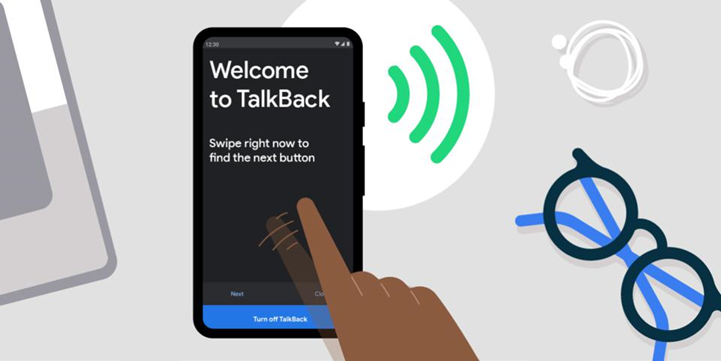
When exploring an application using a screen reader such as VoiceOver (iOS devices), TalkBack (Android devices), you should pay a close attention to the following questions:
- Are you able to reach all the interactive elements?
- Are you able to complete all user flows easily?
Some practices:
- Meaningful content description.
When screen reader is used to interact with your application, each UI element is announced by the content description provided.
Example: If an element button doesn’t include a content description, screen reader will announce it as an unlabeled button. However, with a meaningful content description, Screen Reader will announce it like “ABC button, double-tap to activate”. This gives the user much better understanding about the purpose of the button and how to interact with it.
- Standard device for reference behavior
The announcement of an element can differ across devices. It depends on the OS and device brand. In Android, we have several brands such as Samsung, Pixel, LG, Oppo … Normally, we refer to the announcement on Pixel devices for Android testing. Being a Google-made phone, Pixel is considered as a pure device.
- OS updates may introduces changes, so we need to perform regression testing on the new version.
Common issues
- Interactive elements are not operable while the screen reader is enabled
- Element have missing or incorrect text alternatives
- Hidden content is announced
- The reading order is illogical
5. Conclusion
When testing mobile applications, besides testing functions, accessibility testing is increasingly focused. It helps the applications reach a wide range of users, including people with disabilities. We should think about accessibility when developing a mobile application and make it effective and efficient for the whole development team as a mindset. I hope this article has given you some ideas on how to apply accessibility testing into your development process.
6. References
- https://www.w3.org/TR/mobile-accessibility-mapping/
- https://at2030.org/static/at2030_core/outputs/Mobile-phones-as-assistive-technologies.-Gaps-and_B2wSGDI.pdf
- Articles, videos, images on the internet