



Introduction
Accessibility testing plays a critical role in web development by ensuring that websites and applications are usable by everyone, including individuals with disabilities. In today’s digital landscape, where the internet serves as a primary platform for accessing information and services, it’s crucial to prioritize inclusive digital experiences that meet the needs of diverse users.
The process of accessibility testing involves evaluating a website or application to ensure it adheres to specific accessibility standards and guidelines, such as the Web Content Accessibility Guidelines (WCAG). These guidelines serve as a framework for enhancing the accessibility of web content for people with disabilities, including those who rely on assistive technologies like screen readers, voice recognition software, or alternative input devices.
Understanding Accessibility Testing
Accessibility testing is the process of evaluating web content and applications to ensure they can be accessed and used by individuals with disabilities. It encompasses various aspects, including navigation, interaction, and content consumption. Accessibility testing helps identify and remove barriers that may prevent users with disabilities from accessing and using web content effectively.
Why is Accessibility Testing Important?
Accessibility testing is crucial for several reasons:
- Legal Compliance: Many countries have laws and regulations that require websites and applications to be accessible to people with disabilities. Failing to comply with these regulations can result in legal consequences, including fines and lawsuits.
- User Experience: Accessibility testing improves the user experience for all users, not just those with disabilities. By ensuring that websites and applications are easy to navigate and use, you can increase user satisfaction and retention.
- Business Benefits: Accessible websites and applications have a broader reach and appeal to a more diverse audience. This can lead to increased traffic, engagement, and ultimately, business success.
Introducing Axe and Selenium
Axe and Selenium are two essential tools for accessibility testing. Axe, developed by Deque Systems, is an open-source accessibility testing engine that provides automated testing capabilities. It generates detailed reports highlighting accessibility issues. On the other hand, Selenium is a widely used automation testing framework for web applications. It enables testers to automate interactions with web browsers and conduct various testing tasks, including accessibility testing.
In addition to Axe and Selenium, several other key components are crucial in accessibility testing:
- Semantic HTML: This involves ensuring that HTML markup is semantically correct and adheres to best practices for accessibility. Semantic HTML helps assistive technologies interpret web content correctly.
- Keyboard Accessibility: Verifying keyboard accessibility ensures that all functionality can be accessed and operated using only a keyboard. This is essential for users who rely on keyboard navigation or cannot use a mouse.
- Color Contrast: Checking color contrast ensures that text and graphical elements have sufficient contrast for readability. Adequate color contrast is vital for users with visual impairments or color vision deficiencies.
- Focus Management: Verifying focus management ensures that keyboard focus is visible and moves logically through interactive elements. Proper focus management is crucial for users navigating a website using only a keyboard or assistive technologies.
- Form Accessibility: Ensuring form accessibility involves making forms easy to navigate and complete, with clear labels and instructions. Accessible forms benefit users with disabilities by providing an intuitive and error-free experience.
- ARIA Attributes: Using ARIA (Accessible Rich Internet Applications) attributes enhances accessibility for dynamic content and widgets. ARIA attributes help convey information about the roles, states, and properties of web elements to assistive technologies.
Setting Up Your Testing Environment
To get started with accessibility testing, follow these steps:
- Understand Accessibility Guidelines: Familiarize yourself with accessibility guidelines such as WCAG to grasp the principles and requirements for crafting accessible web content.
- Choose Testing Tools: Select accessibility testing tools that match your project requirements and workflow. Popular options include Axe, Wave, and the WAVE Evaluation Tool.
- Integrate Testing into Your Development Process: Make accessibility testing an integral part of your development workflow right from the start. This ensures that accessibility considerations are addressed proactively and consistently throughout the development lifecycle.
- Run Automated Scans: Utilize automated scans to identify common accessibility issues swiftly. Automated testing tools can help uncover issues related to HTML structure, color contrast ratios, and more, allowing you to address them efficiently.
- Conduct Manual Testing: Supplement automated testing with manual testing. Conduct manual tests to identify nuanced accessibility issues that may not be detected by automated tools. Manual testing involves navigating the website or application using assistive technologies such as screen readers and keyboard navigation.
- Document Findings: Record accessibility issues and their impact on users, along with recommendations for remediation. This documentation aids in prioritizing fixes and ensures accountability for addressing accessibility concerns effectively.
Now before diving into accessibility testing with Axe and Selenium, you need to set up your testing environment. Here’s how:
- Install Java Development Kit (JDK): If you haven’t already, install the JDK on your machine. You can download it from the official Oracle website.
- Download WebDriver Executables: Depending on the browser you intend to test, download the corresponding WebDriver executable (e.g., ChromeDriver for Chrome, GeckoDriver for Firefox, EdgeDriver for Edge).
- Configure Your Project: Set up a project directory for your accessibility tests and place the WebDriver executable in this directory.
Writing Your First Accessibility Test Script
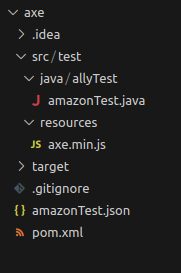
Download “axe.min.js” file from “https://github.com/dequelabs/axe-selenium-java” and place in the “/src/test/resources” directory.
You can add new test scrip in “src/test/fileName.java”.
Add latest dependencies are added to the “pom.xml” file:
-
- WebDriver manager : https://mvnrepository.com/artifact/io.github.bonigarcia/webdrivermanager/
- Java-selenium: https://mvnrepository.com/artifact/org.seleniumhq.selenium/selenium-java/
- Testng: https://mvnrepository.com/artifact/org.testng/testng/
- Axe-selenium: https://mvnrepository.com/artifact/com.deque/axe-selenium/
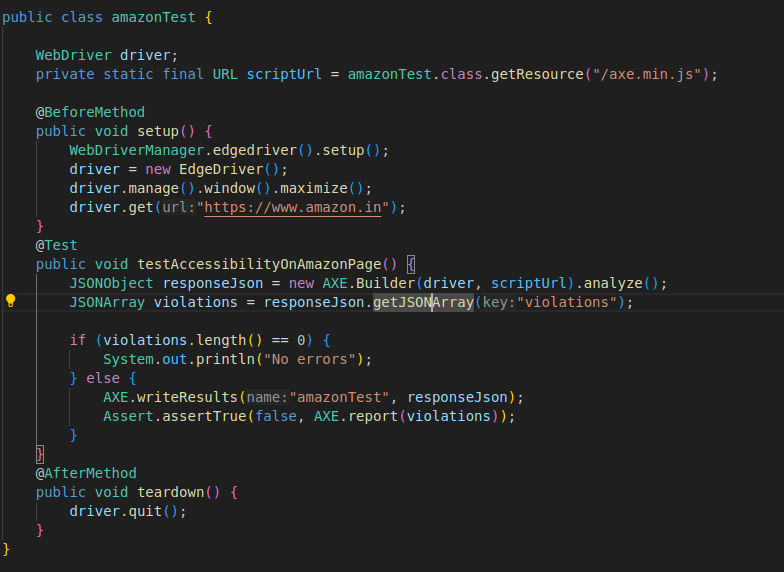
- Now that your environment is set up, let’s write a basic accessibility test script using Java:
Running Your Accessibility Tests
With your accessibility test script in place, it’s time to execute it and analyze the results:
- Execute Your Test Script: Use Maven or your preferred testing framework to run your accessibility test script.
- Analyze Test Results: Review the test output and investigate any identified accessibility violations.
- Fix Accessibility Issues: Address the identified accessibility issues in your web application codebase.
- Re-run Tests: After fixing the issues, re-run your accessibility tests to ensure compliance.
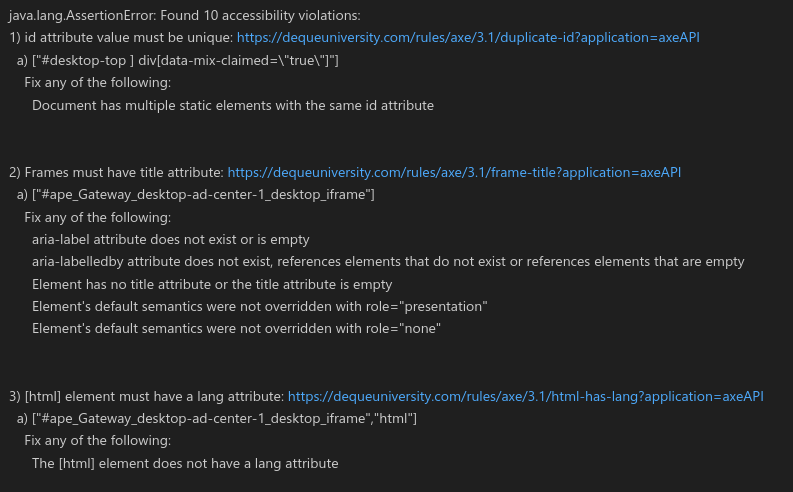
Example of violations based on above test script:
Conclusion
Accessibility testing is an essential practice for creating inclusive digital experiences that accommodate users of all abilities. By understanding the principles of accessibility testing and integrating it into your development process, you can ensure that your websites and applications are accessible to everyone, regardless of disability. Embracing accessibility not only fulfils legal requirements but also enhances the user experience and drives business success in the digital age.
References
- Axe – https://www.deque.com/axe/
- How axe works: https://blog.nashtechglobal.com/understanding-axe-core-the-engine-behind-axe/
- Accessibility testing in Agile: https://blog.nashtechglobal.com/accessibility-testing-in-agile-development-with-axe/
- Web Content Accessibility Guidelines (WCAG) – https://www.w3.org/WAI/standards-guidelines/wcag/