



Introduction to Accessibility Testing:
Let’s delve deep into the vast topic of “Accessibility Testing in Agile Development with Axe” and welcome to the realm of accessibility testing, where our primary goal is to craft software that not only functions but also ensures inclusivity for all users. Ensuring digital products are usable and accessible to individuals with disabilities is crucial. Integrating accessibility testing seamlessly into the fast-paced environment of Agile development is essential for its success. This integration ensures accessibility is prioritized throughout the entire development lifecycle.
Understanding Axe:
Axe, developed by Deque Systems, emerges as a powerful tool in the arsenal of accessibility testing. It seamlessly integrates with both Java and Selenium, making it particularly advantageous for teams leveraging these platforms. By automating the detection of accessibility issues in web applications, Axe empowers developers with actionable insights to enhance accessibility.
Why to use Axe?
What distinguishes Axe is its broad applicability, precise reporting, and adherence to industry standards. Its integration with Selenium and Java caters to a wide range of developers. Moreover, its detailed accessibility reports enable developers to swiftly pinpoint and address issues. Additionally, Axe’s robust rules engine, based on the Web Content Accessibility Guidelines (WCAG), ensures adherence to established accessibility standards.
Agile Development and Accessibility Testing:
Agile development methodologies prioritize collaboration, iterative progress, and adaptability. Integrating accessibility testing into each sprint with Axe ensures that accessibility considerations are ingrained from the outset of development. This proactive approach enables Agile teams to identify and resolve accessibility issues early in the development cycle.
Setting up Axe Selenium Test Project :
Agile development methodologies prioritize collaboration, iterative progress, and adaptability. Integrating accessibility testing into each sprint with Axe ensures that Agile teams ingrain accessibility considerations from the outset of development. This proactive approach enables Agile teams to identify and resolve accessibility issues early in the development cycle.
First create a maven project:

- Create a maven project.
- Now open the POM file and add the latest dependencies:
– Link for java selenium.
– Link for axe-selenium. - Execute the command “mvn install” in your Maven project directory to install the necessary dependencies. Once the dependencies are installed, you can run Axe-Core and Selenium within your Maven project.
<!– Add dependency for Axe Selenium –>
<dependency>
<groupId>com.deque</groupId>
<artifactId>axe-selenium</artifactId>
<version>3.0</version>
</dependency>
<!– Add dependency for Selenium Java –>
<dependency>
<groupId>org.seleniumhq.selenium</groupId>
<artifactId>selenium-java</artifactId>
<version>4.1.1</version>
</dependency>
Now let’s try Running a Basic Test in Java:
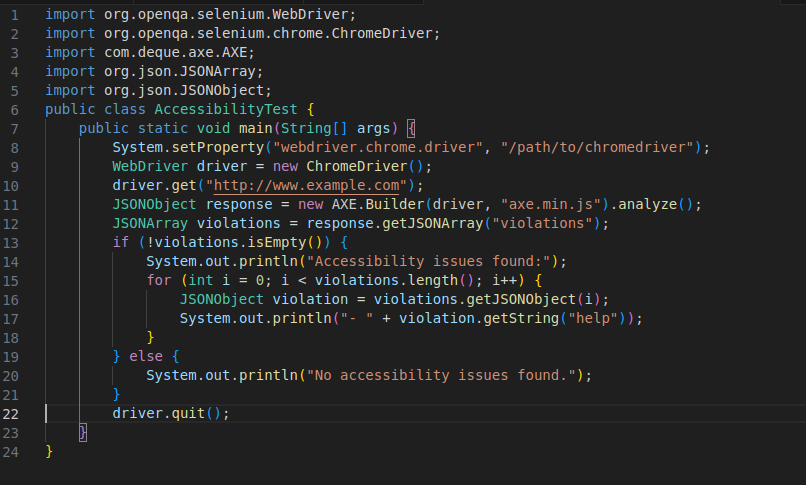
Let’s review what will happen when this code is executed:
- First, the code initializes a new instance of the ChromeDriver.
- Next, it invokes Axe-Core to analyze webpage accessibility and stores the results in a JSONObject named response.
- After that, the code prints the results if it finds any violations. However, if no violations are found, it prints “No accessibility issues found” using an if-else block.
- Finally, to wrap up, we close the driver using driver.quit().
Best Practices and Strategies:
- Accessibility Acceptance Criteria: Include accessibility-related acceptance criteria in user stories to ensure that accessibility considerations are addressed in each development iteration.
- Collaborative Reviews: Encourage collaboration between developers, testers, and designers to review user stories and identify potential accessibility issues early in the development process.
- Integration with CI/CD Pipeline: Integrate Axe accessibility tests into the continuous integration and continuous deployment (CI/CD) pipeline to automate accessibility testing for each build.
- User Testing with Assistive Technologies: Conduct usability testing with users who rely on assistive technologies such as screen readers, voice recognition software, and alternative input devices to identify usability barriers and accessibility issues.
- Inclusive Design Reviews: Involve users with disabilities in design reviews to gather feedback on the accessibility of user interfaces and identify areas for improvement.
- Accessibility Metrics Tracking: Monitor and track accessibility metrics over time to measure progress and identify trends in accessibility performance.
- Comprehensive Reports: Generate comprehensive accessibility reports using Axe to document findings, track issues, and prioritize remediation efforts.
Conclusion:
In conclusion, incorporating Axe for accessibility testing into Agile development methodologies using Java and Selenium is not just advisable, but imperative in today’s inclusive digital landscape. By prioritizing accessibility and adhering to industry standards, Agile teams can create software that is accessible to all users, irrespective of their abilities.
Let’s keep collaborating to make the digital world a more welcoming environment for all users.
References:
To learn deeper into Agile development, web accessibility, and Axe accessibility testing, you may find the following resources helpful:
What is Agile Methodology? https://www.atlassian.com/agile
how to perform a test case execution using Axe: https://docs.deque.com/devtools-html/4.0.0/en/java-test-selenium
Detailed Axe Test Cases: https://github.com/dequelabs/axe-core