


Salesforce is a powerful CRM (Customer Relationship Management) platform that uses data objects, which like tables in a database. These objects hold important business data, such as customer details, sales info, or support requests. As a result, it is important for testers to understand how these objects work so they can check that the data, business rules, and user actions function correctly. In this post, we will walk through standard and custom objects in Salesforce and explain how to test them.
1. What are Objects in Salesforce?
In Salesforce, an object works like a spreadsheet or a table in a database. Each row represents a record, while each column holds a specific field. These objects store important business data, such as contacts, leads, opportunities, or any custom information your business needs. Currently, Salesforce supports several types of objects, including standard objects, custom objects, external objects, platform events, and Big Objects. However, in this post, we will focus on the standard objects and custom objects.
2. Standard Objects: Salesforce Essentials
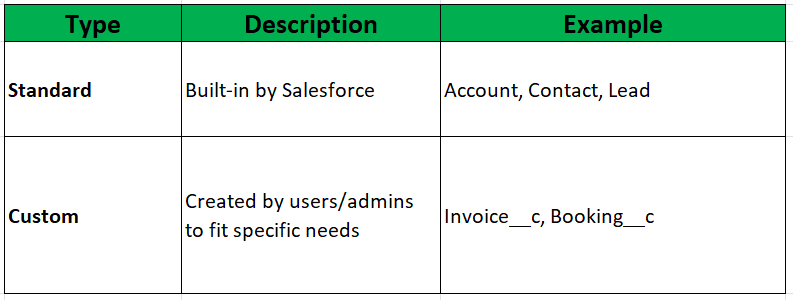
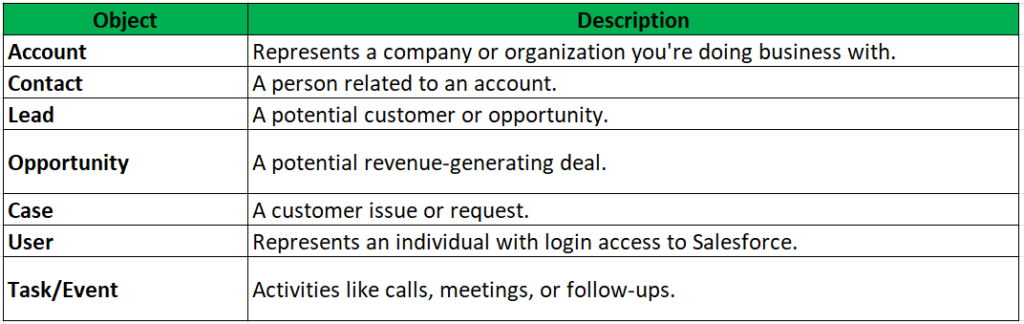
Standard objects are built-in objects provided by Salesforce. They are designed to handle the core CRM features, like managing accounts, contacts, opportunities, etc. There are some common Standard Objects:
3. Custom Objects: Tailored to Business
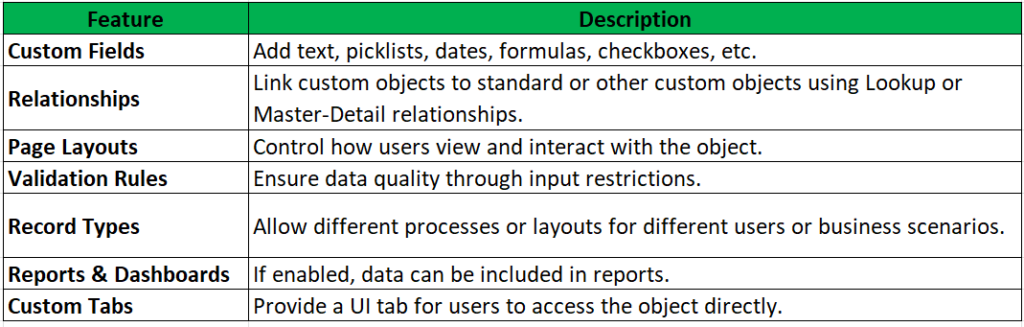
Sometimes, standard objects may not be enough to capture all of a company’s specific data needs. Therefore, Salesforce administrators or developers create custom objects to handle unique business requirements. These custom objects always end with the suffix __c. For example: Invoice__c, Reservation__c, and Guest_Feedback__c. Below, we will look at some key features of custom objects.
4. How to Test Standard & Custom Objects
Since standard and custom objects are key to Salesforce’s CRM features, it is important to keep them stable and accurate. Therefore, testers should perform a mix of functional, UI, security, and process testing to cover all parts of how these objects work. Although there are many ways to test them, this post provides a simple checklist with some basic items that apply to both standard and custom objects during testing.
4.1. Verify Object Functionality
– Perform CRUD testing: this includes creating, reading, updating, and deleting records.
– Check all field settings, such as required fields, default values, help texts, and picklist options.
– Ensure that records are created correctly when using both valid and invalid inputs
– If record types are used, test how they affect page layouts, picklist values, and business rules.
4.2. Field and Data Validation
– Check formula fields to make sure they calculate and display values correctly.
– Check that validation rules work under the right conditions and show clear error messages.
– Review read-only fields, default values, and dependent picklists to confirm they behave as expected.
– Check field-level security across various profiles and permission sets to ensure proper data access.
4.3. Page Layout and UI Behavior
– Confirm that page layouts, compact layouts, and Lightning Record Pages are set up correctly
– Check how dynamic forms behave, especially field visibility rules based on user input or conditions.
– Check quick actions, buttons, related lists, and custom tabs to ensure they work as expected.
4.4. Workflows and Automations
– Validate automation triggered by object events, such as Workflow Rules, Process Builders, Record-Triggered Flows, or Apex Triggers.
– Confirm that the correct actions occur, including field updates, email alerts, task creation, record generation, and approvals.
– Ensure the automation works properly under different data conditions and user roles
4.5. Permission and Access Control Testing
– Validate user access based on Profiles and Permission Sets.
– Check field-level security to ensure fields are hidden or read-only as expected
– Verify record-level access, including Organization-Wide Defaults (OWD), Sharing Rules, and Role Hierarchy.
4.6. Integration & Data Testing
– Validate data syncing and updates through APIs or integrations, such as customer support platforms updating Case records in Salesforce.
– Ensure the system properly handles duplicate records, such as preventing multiple Contact entries with the same email address based on matching rules.
4. 7. Reporting & Analytics
– Ensure that both standard and custom objects are displayed correctly in Reports and Dashboards.
– Validate filter logic, grouping, and summarization of data.
5. Conclusion
A tester’s role in verifying standard and custom objects in Salesforce is to ensure data integrity, functional accuracy, process reliability, and secure access. Besides, testers need to learn to have strong understanding how Salesforce objects interact with each other and the platform’s features is help testing more efficiently. Thanks for reading, and happy testing with Salesforce.
References
https://www.bacancytechnology.com/blog/salesforce-custom-objects