



API security is a critical aspect of modern software development, and it involves much more than just verifying user identities. API Authentication and Authorization Testing ensures that not only are users properly authenticated, but also that their access rights are strictly controlled. Without thorough testing of both authentication and authorization mechanisms, APIs remain vulnerable to unauthorized data access and misuse.
1. What is API Authentication and API Authorization?
API Authentication
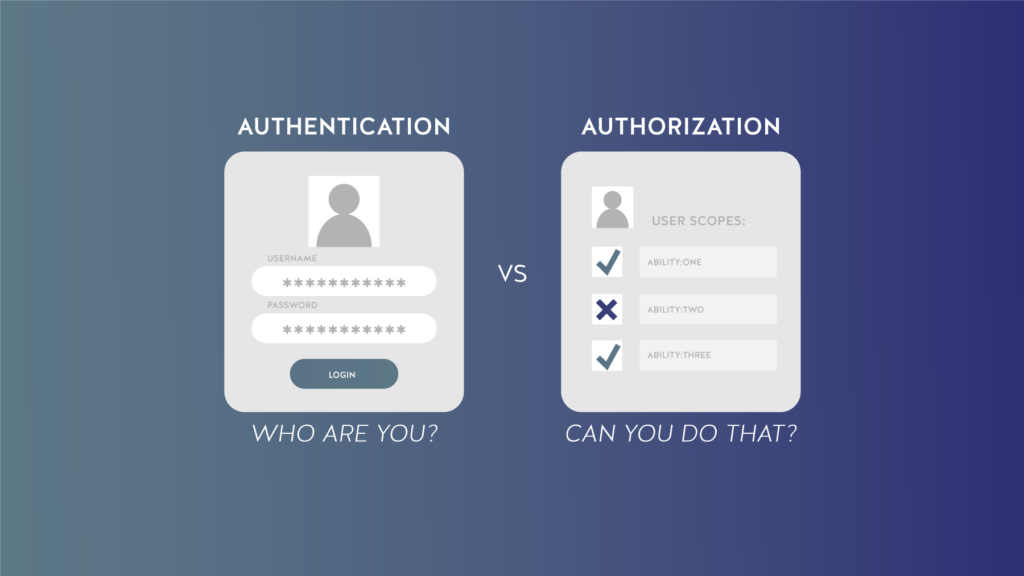
API Authentication is the process of verifying the identity of a user who is making an API request. The purpose is to confirm who the user is by requiring them to provide valid credentials, such as a username and password, one-time password (OTP), or token.
Example: A user logs into the system with a username and password. The system checks the credentials, and if they are valid, it grants the user access to resources.
API Authorization
API Authorization determines what actions an authenticated user can perform. After authenticating a user, the system checks their permissions to access specific resources based on their role or other privileges.
Example: A user with the “Admin” role can create, edit, or delete data, while a user with the “User” role can only read the data.
2. Why is it necessary to test API Authentication and Authorization?
Testing API authentication and authorization is necessary because they protect against unauthorized access and data breaches. Failing to properly test them can lead to serious security vulnerabilities, including data leaks or privilege escalation. Here are the key reasons why this testing is important:
Prevent Unauthorized Access
If authentication or authorization isn’t tested thoroughly, attackers could bypass them and access sensitive data or functions. For example, an attacker might exploit flaws to view other users’ private information, modify records, or perform administrative actions that they shouldn’t have permission for. This kind of broken access control is one of the most common causes of API vulnerabilities.
Protect Sensitive Data
Many APIs handle personal, financial, or confidential business data. Proper testing ensures that only authorized users can access this information, reducing the risk of data leaks or exposure of private details.
Avoid Logical Errors and Misconfigurations
Even when using strong authentication protocols like OAuth or JWT, mistakes in implementation or configuration can introduce security gaps. Testing helps find these issues early, such as missing role checks, expired token handling problems, or incorrect permission assignments.
Ensure Compliance with Regulations
Some organisations have Data protection regulations such as GDPR, HIPAA, and PCI-DSS that require strict control over who can access sensitive data. Testing authentication and authorization helps organizations meet these legal requirements and avoid costly fines or reputational damage.
Build Trust and Maintain System Integrity
Users expect their data to be secure. Properly tested authentication and authorization processes help build confidence in your system, reduce the risks of breaches, and maintain the overall integrity of your API.

3. Common API Authentication and Authorization Methods
API Keys are unique strings that an application includes in each API request to identify itself. While easy to use, they’re not very secure because if someone gets the key, they can use the API too. During testing, you can try sending requests without a key or with an incorrect key to make sure the API denies access properly.
Basic Authentication requires the user to send a username and password with every request, usually encoded in Base64. It’s simple but not very secure if not used with HTTPS, because credentials can be intercepted. In testing, you can try logging in with wrong credentials, weak passwords, or check if the login works over insecure connections.
OAuth 2.0 is a more advanced method that allows users to give apps limited access to their data without sharing passwords. It works by using access tokens issued by an authorization server. Testers can check if the tokens expire properly, if permissions are enforced, and whether unauthorized users can use or reuse tokens.
JWTs are digitally signed tokens that contain user authentication and access information. They can be verified without querying a database, making them ideal for stateless systems.
Role-based Access Control (RBAC) gives users access based on their roles, like Admin or Viewer. Each role has different permissions. For example, an admin might be allowed to create data, while a regular user cannot. We can try accessing admin-level functions with a low-privilege account to see if the system correctly blocks access.
Attribute-based Access Control (ABAC) controls access based on multiple attributes, such as user department, location, time of request, or data sensitivity. It allows for more flexible and detailed policies. In testing, you can try changing the user’s attributes or request context like department or time to see if the API still enforces the correct access rules.
4. Prepare for Testing API Authentication and Authorization
To test API security effectively, you need to follow a few essential preparation steps:
- Define the Testing Objectives: Define the testing objectives by identifying which APIs you want to test, determining the authentication and authorization methods in place (Ex: OAuth, JWT, API keys), and which resources each user or role should be able to access.
- Understand the Authentication Flow: Review how the API handles login or identity verification. Know whether it uses tokens, sessions, headers, or third-party identity providers. Understanding this flow will help you craft valid and invalid authentication attempts during testing.
- Review Authorization Logic: Understand how the system enforces access rules. Does it use RBAC, ABAC, or custom logic? Knowing the model will guide you in testing boundary cases and potential privilege escalation.
- Map Out User Roles and Permissions: List all user roles such as Admin, Standard User, Guest and understand their expected access rights. This helps you create meaningful test cases that check whether each role is restricted or granted access appropriately. We can build a Test Matrix to follow the Authentication and Authorization cases.
- Set Up the Testing Environment and Data: Configure a test environment with mock data, and prepare test accounts with different roles and access levels. Having a range of users allows you to simulate real-world scenarios and verify that each account behaves as expected under the API’s access control rules.
- Select the Right Testing Tools: Choose the testing tools (Postman, OWASP ZAP, Burp Suite) that best meet your needs.
- Write Test Scenarios: Write test scenarios that cover various authentication and authorization situations, including token expiration, brute force attacks, role-based access control, and unauthorized data access based on the scope of your team.
5. Checklist for Testing API Authentication and Authorization
Testing Authentication
- Valid Token Check: Send a request with a valid token and verify whether the API accepts it and returns the correct response.
- Expired or Missing Token Check: Send a request with an expired token or a missing token to see if the API rejects it and returns an appropriate error, such as 401 Unauthorized.
- Brute Force Attack Check: Test if the system limits the number of failed login attempts and blocks further attempts after a certain threshold.
- CSRF/XSS Protection: Ensure the API is protected against Cross-Site Request Forgery (CSRF) or Cross-Site Scripting (XSS) attacks.
Testing Authorization
- Improper Access Control Check: Use a lower-privileged account, such as “User” and attempt to access resources of a higher-privileged account, such as “Admin”. If the system allows this access, there is a security vulnerability. API should deny access or return 403 Forbidden.
- Role-based Access Control (RBAC): Verify that the API enforces different access levels based on the user’s role. For instance, an “Admin” user should have access to create, update, and delete data, while a “User” can only read data.
- Access to Sensitive Data: The API restricts users from accessing unauthorized data to view. It prevents users from viewing another user’s account information.
6. Tools to Support API Authentication and Authorization Testing
Here are some tools that are particularly helpful for testing Authentication and Authorization:
1. Postman
Postman is a popular tool for API testing. It allows you to create API requests, include authentication parameters such as API Key or Bearer Token, and verify the responses from the API. We can test various authentication methods, automate tests through collections, and use environments to test with different data sets.
2. OWASP ZAP
OWASP ZAP is an open-source tool commonly used to find security vulnerabilities in APIs. Automatically scan and detect security vulnerabilities such as SQL injection, XSS, and CSRF. ZAP can also test the authentication and authorization mechanisms of APIs.
3. Burp Suite
Burp Suite is a powerful API security testing tool that helps identify issues with Authentication and Authorization by simulating attacks. Moreover, we can analyze API requests and responses, test for vulnerabilities in unauthenticated and unauthorized requests.
4. JMeter
Apache JMeter is a robust load testing and API testing tool that can also be used for security testing. The user can create test scripts for API requests, test authentication and authorization, and measure performance.
7. Conclusion
Testing API Authentication and Authorization is crucial in the software development lifecycle. These mechanisms help protect systems from unauthorized access and data tampering. By leveraging tools like Postman, OWASP ZAP, and Burp Suite, developers can identify and fix security vulnerabilities, ensuring that only legitimate users can access system resources.