


I. Introduction
API testing is an essential aspect of software development, ensuring that your application’s endpoints are functioning correctly and reliably. In this guide, we’ll introduce you to implement API testing in Python with Pytest and the Requests library.
1. Pytest
Pytest is a one of the most robust testing framework which supports us to implement and manage test case easily in Python. By using Pytest, we can:
- Define test case easily
- Prepare and clean test data quickly with fixture
- Apply data-driven to avoid duplicated code
- Filter test case for test execution
- Run test in parallel to reduce execution time
- Leverage a lot of plugins developed by community
2. Requests library
Requests library is the most popular library which can be used for calling Rest API. With familiar interface, we can create function for calling API and validate the response from the API quickly. We’ll see more sample for using this library in below sections.
II. Implemting basic API test cases (GET, POST, PUT, DELETE)
1. Set up the project structure
Create basic project structure:

- Tests folder is the place which contains test case
- requirements file is the place in which we define the dependencies packages.

2. Install Pytest and Python Requests
Option 1:
- Run the following command for installing Pytest with latest version
pip install pytest- Run the following command for installing Python Requests with latest version
pip install requestsOption 2:
- Input all packages and versions into requirements file then run
pip install -r requirements.txt3. Sample test cases with basic API (GET, POST, PUT, DELETE)
For implementing a test case with Pytest, we need to create a file whose name starts with “test”(Eg: test_api.py). The function whose name starts with “test” will be recognized as a test case.
3.1. Basic API (GET, POST, PUT, DELETE)
For calling basic API, we only need to imports requests package and call the necessary function like get, post or delete

3.2. Request with query parameters
If the API has query params, using parameter “params” to add params for it

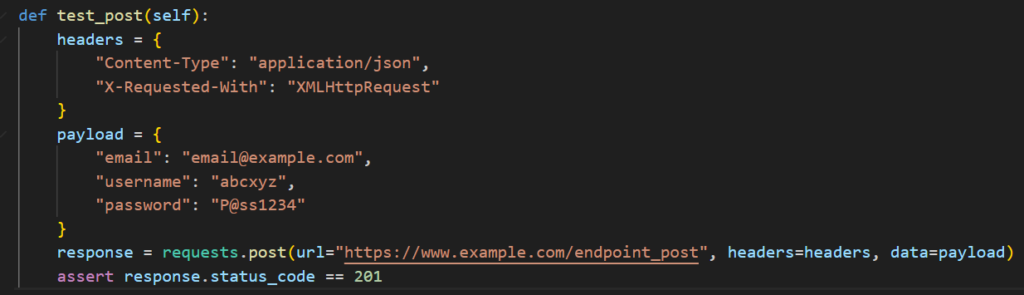
3.3. Request with payload
If the API has payload, using parameter “json” or “data” to add payload for it

3.4. Request with headers
We can use parameter “headers” to add headers for the API
3.5. Handling request authentication
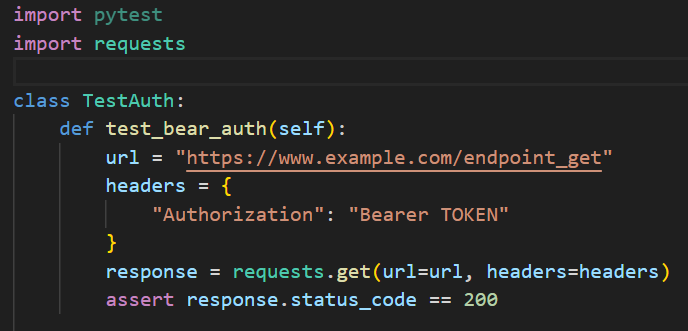
Python Request supports various kinds of authentication method like basic authentication or bearer token,etc. You can follow the below example for adding authentication into the request.
Basic Authentication:
Using parameter “auth” and HTTPBasicAuth import from requests.auth

Bearer Token Authentication:
X-Auth-Token Authentication:

4. Validating JSON response payloads, response data and status codes with Pytest assertions
Pytest supports “assert” function so that we can validate the response from the API.
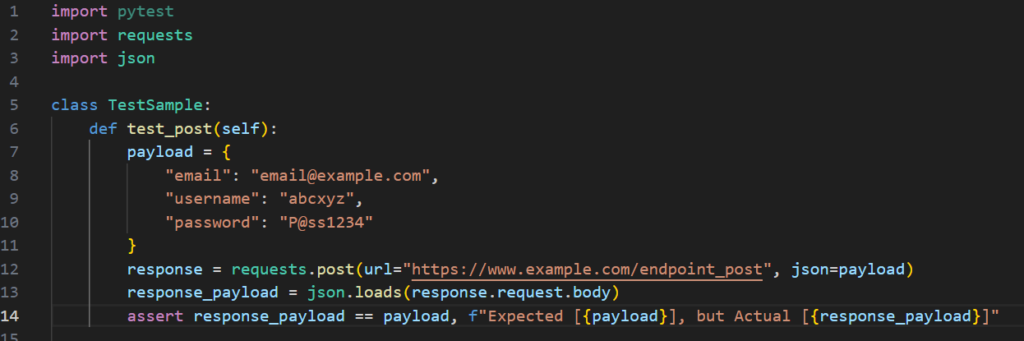
4.1. Validating JSON response payloads
We can get the JSON response payload by using “json.loads(response.request.body)” and use “assert” to validate response payload with payload
4.2. Validating status codes
Status code can be validated with below script.

4.3. Validating response data
We can validate the JSON value with below script.

4.4. Validating schema
For validating the Json schema of the response, we need to install jsonschema package with the following command.
pip install jsonschemaAfter that, we need to import “validate” from jsonschema to validate the JSON response as below script.

5. Run tests
With Pytest, its supports us to run test with a specific file/folder.
# Run test with specific folder
pytest .\tests
# Run test with API test case
pytest .\tests\test_api.pyWe can also run test by test case title with Pytest.
III. Data-Driven API Testing with Pytest and Requests
Data-driven tests for APIs allows you to run the same test with multiple sets of data and enables the opportunity to combine positive and negative test cases into a single test, enhancing test coverage. We can write reusable test cases with dynamic data by passing different datasets to API tests via Pytest fixtures and parameters.
The @pytest.fixture decorator in Pytest is used to create fixtures, which are functions that provide a fixed baseline for tests. Fixtures are used to set up preconditions or data needed for tests and can also handle cleanup after tests. They help make your tests more modular, reusable, and easier to maintain
The @pytest.mark.parametrize decorator in Pytest is a powerful tool that allows you to run a test function multiple times with different sets of arguments. This is particularly useful for testing functions with a variety of inputs and expected outputs

IV. Conclusion
If you want to start a project for API testing, Pytest and Python Request should be the good choice. They’re easy to learn and use. Moreover, they have huge community, so we can get the supports easily with their issues.