


Nowadays, a number of open-source automation tools are used for testing both web-based and mobile applications. However, some automation tools that support Windows applications should not be overlooked. They offer UI automation actions that allow users to interact with Windows applications and their components.
But how do you determine which open-source automation tool is right for your project?
In this article, we will explore the Robot Framework, a prominent open-source tool, for testing both web-based and Windows desktop applications. Due to the scope of this article, we will focus solely on the aspects related to Windows desktop applications. Let’s dive in!
1. What is Robot Frameworks?
Its human-friendly and versalite syntax uses keywords and supports extending through libraries in Python, Java, and other languages.
Robot Framework is an open source automation framework for test automation and robotic process automation (RPA). It is supported by the Robot Framework Foundation and widely used in the RPA industry.
2. What is RPA Framework?
RPA Framework is a collection of open-source libraries and tools for Robotic Process Automation (RPA), and it is designed to be used with both Robot Framework and Python. It is usable in all cases – from small processes to complex solutions and easy to integrate into larger automation flows.
3. Advantage of Robot Frameworks
Robot Framework is open-source, making it accessible to anyone who wants to try it out.
It is easy to install and simplifies the process of creating and executing test cases. Beginners can quickly understand and start using Robot Framework without requiring advanced knowledge of testing.
The framework supports keyword-driven, behavior-driven, and data-driven styles for writing test cases.
It also offers strong support for external libraries, with the most popular being the Selenium Library and the RPA Library, both of which are easy to install and use in Robot Framework.
Additionally, it integrates seamlessly with popular CI/CD tools such as Jenkins, GitLab CI, and Azure Pipelines.
4. Disadvantages of Robot Frameworks
An Automation Test Engineer may struggle with large test suites or highly complex test cases when using Robot Framework, compared to more code-centric frameworks.
The high-level abstraction of keywords can sometimes limit the tester’s ability to control specific details of the execution flow.
Additionally, tests in Robot Framework can become verbose, as even simple operations often require multiple keywords and arguments. This can result in longer test scripts that may be harder to manage.
5. Setup Robot Frameworks Environment
a. Prerequisites
- Windows 10 or above.
- Development IDEs like Visual Studio Code, PyCharm
- Inspect tool such as FlaUInspect
- Python 3.11.9
- RPA Framework Libraries including rpaframework-windows or rpaframework
- Robot Framework
b. Robot Framework Installation
The Robot Framework run on the Python platform. Therefore, we need to install the python before setting up the robot framework. Executing the command below to get robot framework from the pypi.org portal.
$py –m pip install robotframework
c. Install relevant modules for Robot Framework
In order to perform automation testing for Win Desktop application, Robot framework must be go with other vital libraries. They consist of rpaframework-windows, robotframework-datadriver.
rpaframework-windows library is used for interacting with Win Form elements
robotframework-datadriver library has support for data-driven framework
Note: Until now library rpaframework (28.6.2) only has support for the python with version 3.11.9. The higher version of python may not be suitable for this library
On the other hand, we can download all the required libraries by listing them in the requirements.txt file and executing the following command.
$py –m pip install -r /path/to/requirements.txt
6.FlaUInspect Tools
Launch FlaUISpect to inspect Win Form elements of Windows desktop applications under test. The common attributes used for interaction with Win Form elements include AutomationId, Name, ClassName

7. Element Locator
Locator is a way to identify control type on the Desktop applications. We can reply on some attribute AutomationId, Name, ClassName to search for locators on the Win form. The following will show how to find locators on Calculator Application
*** Variables ***
${CALCULATOR_WINDOW}                   name:Calculator
${ALL_BUTTONS}                         type:Group and name:"Number pad" > type:Button
${RESULT_TEXTBOX}                      id:CalculatorResults
${DIVIDE_BUTTON}                       id:divideButton
${MULTIPLY_BUTTON}                     id:multiplyButton
${MINUS_BUTTON}                        id:minusButton
${PLUS_BUTTON}                         id:plusButton
${EQUAL_BUTTON}                        id:equalButton
${CLEAR_BUTTON}                        id:clearButton
8. Sample Code
Here’s a concise example demonstrating how to launch the Calculator app and perform a basic calculation
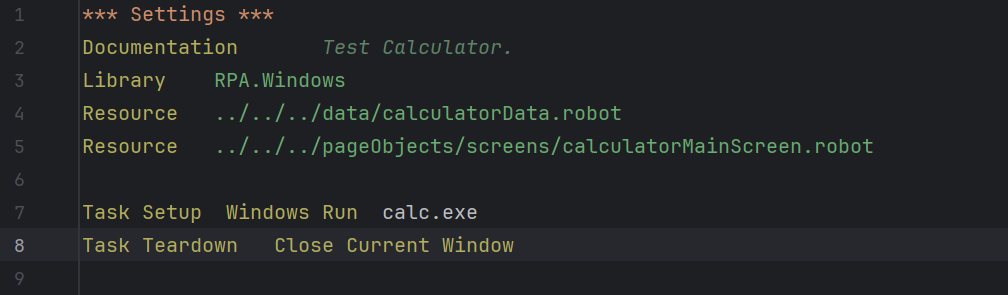

9. Conclusion
Overall, RPA combined with Robot Framework offer a strong option to automate the Win Desktop applications effectively. It also provides transformative solution for businesses seeking to enhance efficiency, reduce costs, and streamline operations
The importance of RPA in today’s competitive landscape cannot be overstated. By embracing RPA, businesses can gain a competitive edge, drive innovation, and position themselves for long-term success.