



Introduction
Automated testing is a crucial aspect of software development where tests are executed automatically to ensure the quality, functionality, and reliability of software products.
Automated testing involves writing scripts or programs that execute test cases automatically, simulating user interactions, and verifying expected outcomes.
Types of Automated Testing
- Unit Testing: Tests individual components or units of code in isolation.
- Integration Testing: Tests the interaction between different modules or components.
- Functional Testing: Tests the functionality of the software against specified requirements.
- Regression Testing: Ensures that new changes don’t break existing functionalities.
- Performance Testing: Evaluates the performance and responsiveness of the software under various conditions.
- UI Testing: Tests the user interface for usability and consistency.
Importance
- Faster Feedback: Automated tests provide quick feedback to developers, allowing them to catch bugs early in the development cycle.
- Continuous Integration and Deployment (CI/CD): Automated testing facilitates seamless integration with CI/CD pipelines, enabling rapid and frequent releases.
- Cost-Effective: While initial setup may require investment, automated testing ultimately saves time and resources by reducing manual testing efforts.
- Improved Quality: Automated tests increase test coverage and reduce human error, leading to higher quality software.
- Regression Prevention: By running regression tests automatically, developers can prevent the introduction of new bugs while making changes to the codebase.
- Supports Agile Development: Automated testing aligns well with agile methodologies by enabling rapid iterations and frequent releases.
Introduction to NUnit and xUnit as popular testing frameworks for .NET applications
NUnit
NUnit is one of the oldest and most widely-used unit testing frameworks for .NET applications. It is an open-source framework that provides a simple and intuitive syntax for writing tests in C#, VB.NET, or any other .NET language.
Features
- Supports various test attributes such as [Test], [SetUp], [TearDown] for organizing and executing tests.
- Provides rich assertion library for making assertions about expected outcomes.
- Supports parameterized tests, allowing the same test method to be executed with different input values.
- Integrates seamlessly with Visual Studio and other development environments.
- Extensible through custom extensions and plugins.
Usage
Developers typically write test classes containing methods annotated with [Test] attribute to define individual tests. These tests can then be executed using NUnit test runners either within the IDE or through command-line interfaces.
xUnit
xUnit is a newer testing framework that was inspired by NUnit but designed with a cleaner, more modern architecture. It is also open-source and has gained popularity for its simplicity and extensibility.
Features
- Follows a convention-over-configuration approach, reducing the need for attributes and providing a more straightforward test structure.
- Supports parallel test execution out-of-the-box, improving test execution time.
- Promotes better isolation of test cases through the use of fixtures and test class instantiation for each test method.
- Provides extensibility through custom test runners and plugins.
Usage
Similar to NUnit, developers write test classes containing methods annotated with [Fact] attribute to define tests. xUnit also supports theories, which are similar to NUnit’s parameterized tests. Tests are executed using xUnit’s test runner, which can be integrated with various development environments or executed via command-line interfaces.
Importance of selecting the right testing framework based on project requirements and preferences
Selecting the appropriate testing framework is critical for project success. It should align with project objectives, team proficiency, and development tools. Community support, scalability, and suitability for specific testing requirements are essential factors to consider. Moreover, the framework’s cost-effectiveness and adaptability to changing project needs should also be evaluated. By prioritizing these considerations, teams can ensure efficient testing processes and reliable software outcomes.
Introduction to NUnit and xUnit
NUnit and xUnit are open-source testing frameworks designed for .NET developers to write and execute automated tests efficiently. Here’s an overview of both:
NUnit
- Maturity: NUnit is one of the oldest and most mature testing frameworks for .NET, with a strong community and extensive documentation.
- Flexibility: It provides a wide range of features, including support for parameterized tests, test fixtures, setup/teardown methods, and custom assertions.
- Integration: NUnit integrates seamlessly with various development environments like Visual Studio, JetBrains Rider, and others, making it a popular choice among .NET developers.
- Extensibility: Developers can extend NUnit’s functionality through custom extensions and plugins, tailoring it to specific project requirements.
- Rich Assertion Library: NUnit offers a rich set of assertion methods for validating test outcomes, making it versatile for different testing scenarios.
xUnit
- Simplicity: xUnit follows a simpler and more modern design philosophy, focusing on convention over configuration and eliminating unnecessary ceremony.
- Cleaner Test Structure: It encourages cleaner test code with a straightforward test structure, reducing boilerplate code and improving readability.
- Parallel Execution: xUnit supports parallel test execution out-of-the-box, improving overall test performance and speed.
- Isolation: Tests in xUnit are isolated from each other by default, enhancing test reliability and reducing dependencies between test cases.
- Community Support: While xUnit is relatively newer compared to NUnit, it has gained popularity for its simplicity and modern approach, backed by an active and growing community.
Comparison of features, syntax, and philosophies of NUnit and xUnit
1. Features
NUnit
- Provides a rich set of features including support for parameterized tests, test fixtures, setup/teardown methods, and custom assertions.
- Offers extensive integration with various development environments and CI/CD tools.
- Supports extensibility through custom extensions and plugins.
xUnit
- Emphasizes simplicity and modern testing practices, with fewer built-in features compared to NUnit.
- Supports parallel test execution out-of-the-box, improving overall test performance.
- Encourages cleaner test code with a straightforward test structure and convention over configuration approach.
2. Syntax
NUnit
- Uses attributes extensively to define test methods, setup, teardown, and other test-related functionalities.

xUnit
- Follows a convention-based approach, relying less on attributes and more on method names to define test behaviour.

Philosophies
NUnit
-
-
- Traditional and mature testing framework with a focus on flexibility and versatility.
- Offers a wide range of features and customization options, suitable for various testing scenarios.
-
xUnit
-
-
- Modern and minimalist testing framework that promotes simplicity and clean test code.
- Advocates for convention over configuration, encouraging developers to write tests that are easy to understand and maintain.
-
Writing Test Cases with NUnit
Explanation of NUnit’s attributes and conventions for defining test cases
NUnit provides several attributes and conventions for defining test cases and configuring test behavior. Here’s an explanation of some key attributes and conventions:
TestFixtureAttribute
[TextFixture] : This attribute marks a class as containing NUnit tests. All test methods within a class annotated with [TextFixture] are considered part of the same test fixture.
TestAttribute
[Test] : Applied to a method, this attribute denotes that the method is a test case. NUnit will discover and execute methods annotated with [Test].
SetUpAttribute and TearDownAttribute
[SetUp] and [TearDown] : These attributes are used to define methods that are run before and after each test method, respectively. The [SetUp] method is executed before each test method, while the [TearDown] method is executed after each test method. They are used for common setup and teardown operations, such as initializing resources or cleaning up after tests.
TestCaseAttribute
[TestCase] : This attribute allows you to define parameterized tests by providing different sets of input parameters. Each set of parameters is specified as arguments to the attribute, and NUnit generates individual test cases for each set.
TestCaseSourceAttribute
[TestCaseSource] : Similar to [TestCase], this attribute is used for parameterized tests. However, instead of providing parameter sets directly, you specify a method that returns the parameter sets. NUnit then dynamically generates test cases based on the data returned by the method.
CategoryAttribute
[Category] : Allows you to categorize tests for easier organization and filtering. You can assign one or more categories to a test method or class. Categories can be used to selectively run tests based on their classification.
IgnoreAttribute
[Ignore] : Marks a test method or class as ignored, causing NUnit to skip its execution. This is useful for temporarily disabling tests that are failing or for excluding certain tests from the test run.
Examples of writing unit tests, parameterized tests, and test fixtures using NUnit
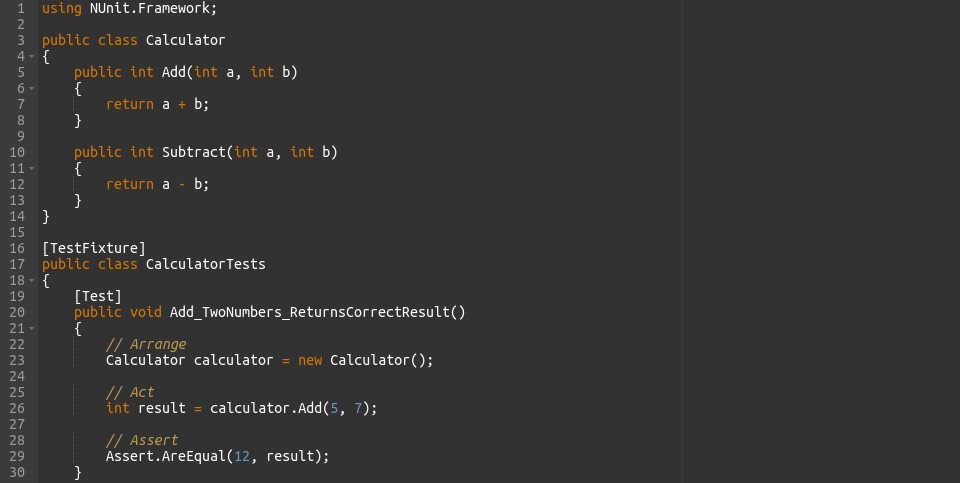
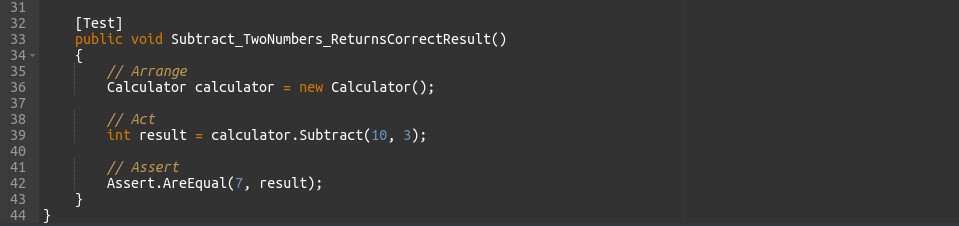
1. Unit Tests
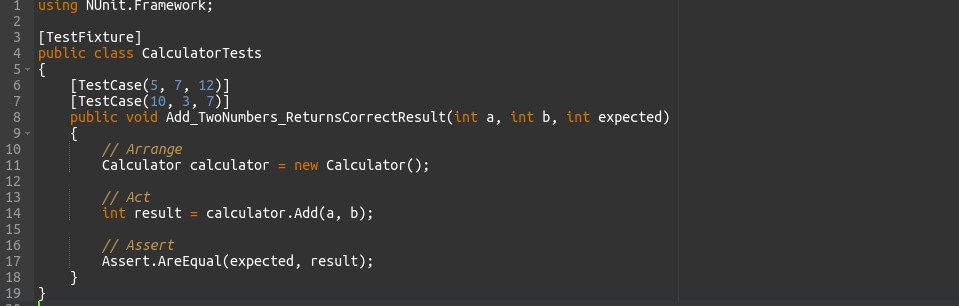
2. Parameterized Tests
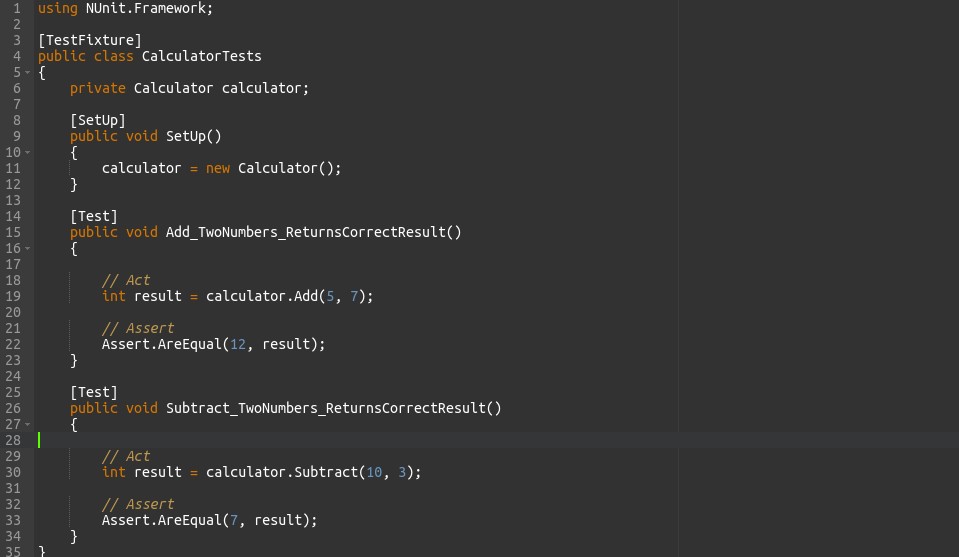
3. Test Fixtures
- Unit Tests: Each test method tests a specific method of the Calculator class.
- Parameterized Tests: The Add_TwoNumbers_ReturnsCorrectResult test method is parameterized using the [TestCase] attribute, allowing multiple inputs and expected outputs to be tested with a single test method.
- Test Fixtures: The CalculatorTests class is annotated with [TestCases], and the SetUp method is annotated with [SetUp]. The SetUp method is executed before each test method, providing a clean state for each test.
Writing Test Cases with xUnit
Explanation of xUnit’s attributes and conventions for defining test cases.
xUnit follows a convention-based approach, relying on method naming conventions rather than attributes to define test cases. Here’s an explanation of xUnit’s conventions:
Test Methods
-
- Test methods are regular methods defined within test classes.
- Method names must start with “Fact” or “Theory” to be recognized as test methods.
- A “Fact” is a test method that asserts a specific behavior under given conditions.
- A “Theory” is a test method that is parameterized, allowing multiple sets of input data to be tested with the same test logic.
Test Classes
-
- Test classes are regular classes containing test methods.
- There is no specific attribute required to mark a class as a test class in xUnit.
- Test classes may contain multiple test methods, organized based on test scenarios or functionality being tested.
FactAttribute
-
- Test methods marked with the [Fact] attribute are considered as individual test cases.
- A test method annotated with [Fact] is executed once, representing a single assertion or behaviour.
TheoryAttribute
-
- Test methods marked with the [Thoery] attribute are parameterized tests.
- The [Thoery] attribute allows multiple sets of input data to be provided to a test method, enabling testing of various scenarios with different inputs.
InlineDataAttribute and MemberDataAttribute
-
- Used to provide input data for parameterized tests.
- [InlineData] attribute allows you to specify data inline directly within the test method’s attribute.
- [MemberData] attribute allows you to specify a method that returns the input data for parameterized tests.
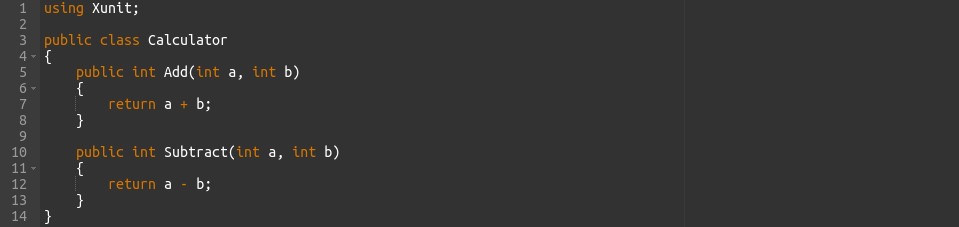
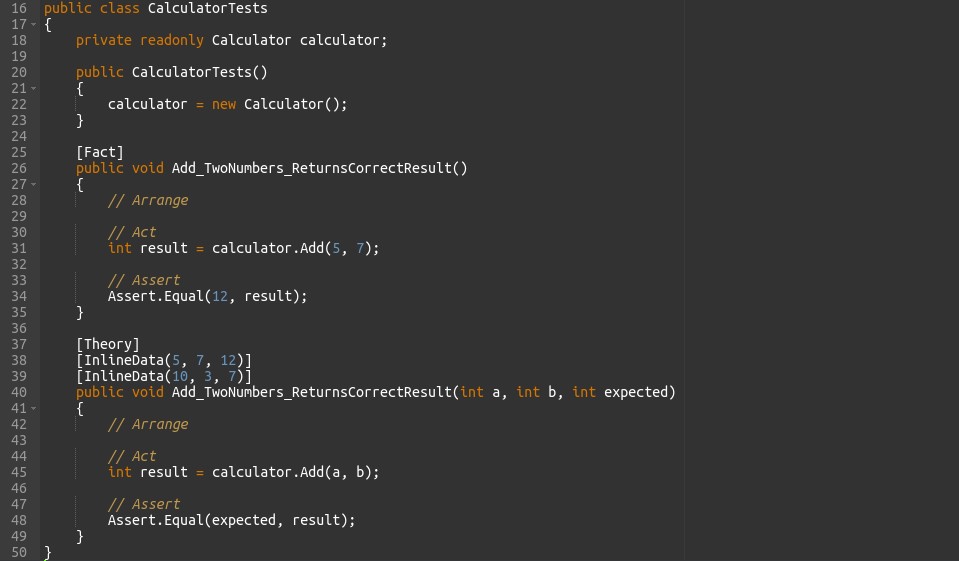
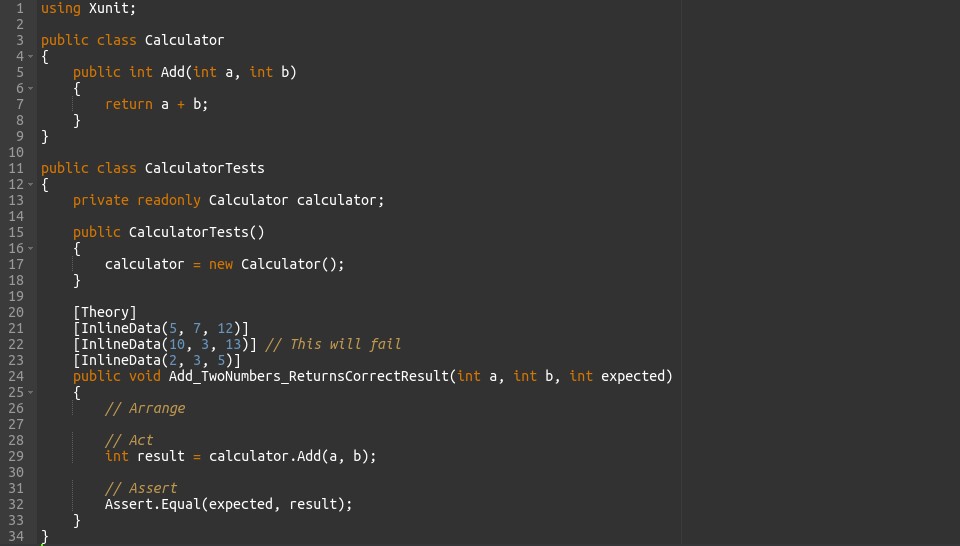
In this example, test methods follow the naming convention of starting with “Fact” or “Theory” to indicate test cases. Parameterized tests use the [InlineData] attribute to provide multiple sets of input data for testing different scenarios. Overall, xUnit’s conventions aim to provide a simple and intuitive way to define and execute test cases without the need for extensive attribute usage.
Examples of writing test methods, theories, and test fixtures using xUnit.
1. Test Methods
2. Theories
3. Test Fixtures
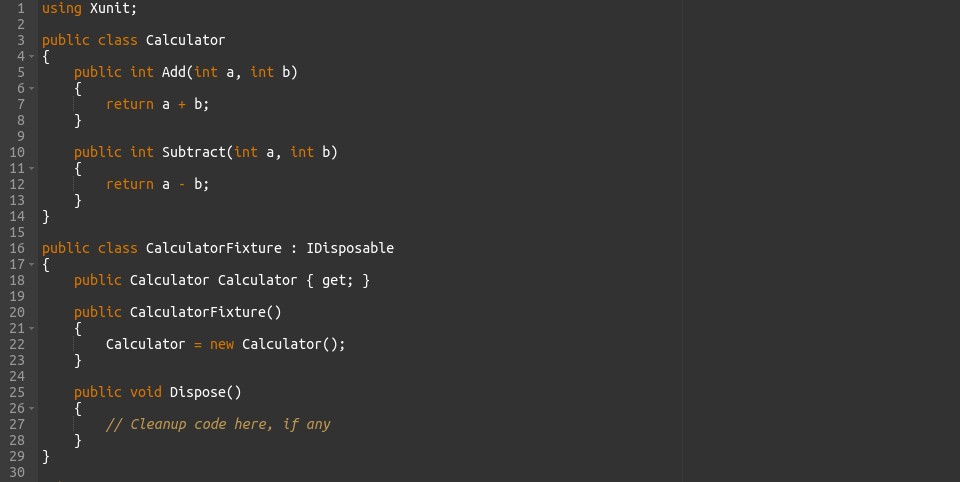
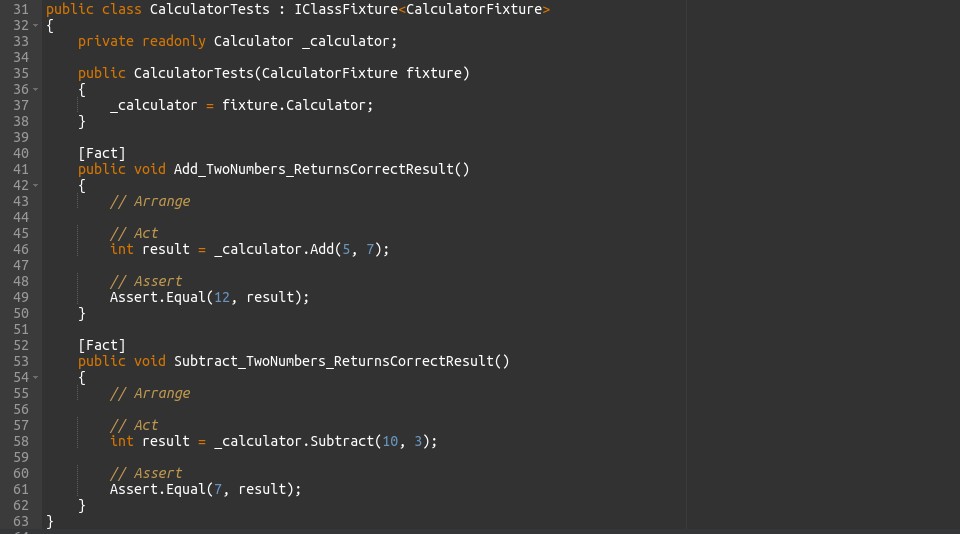
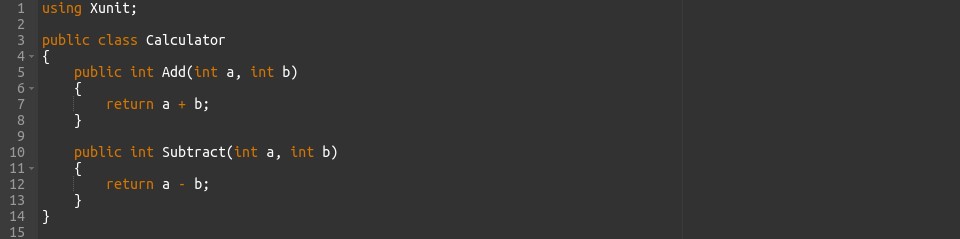
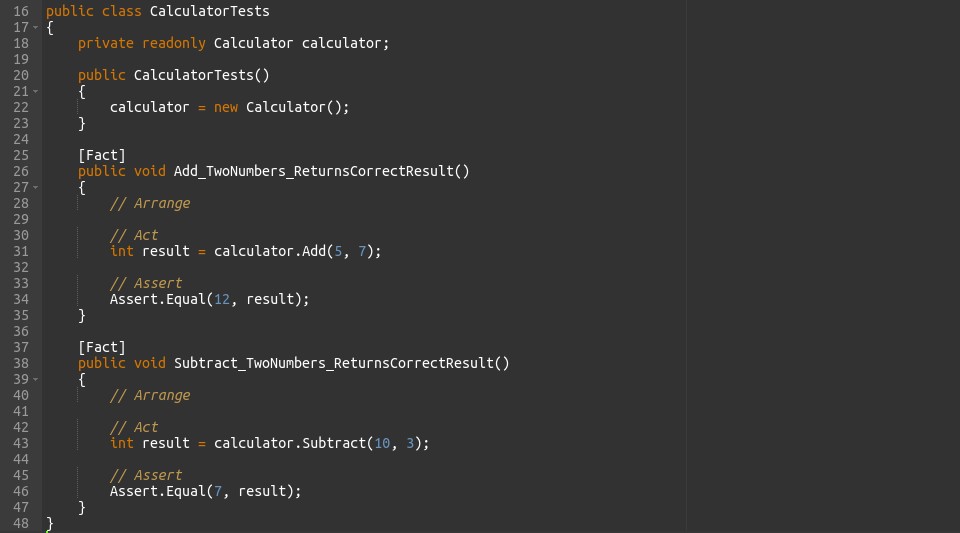
In these examples
Test Methods: Each test method is a regular method defined within the test class and annotated with [Fact]. These methods represent individual test cases.
Theories: The test method is parameterized using the [Theory] attribute, and input data is provided using [InlineData]. The test method is executed multiple times, once for each set of input data.
Test Fixtures: The CalculatorFixture class is a fixture that provides a shared instance of Calculator across test methods. It implements IDisoposable for cleanup operations. The CalculatorTests class uses this fixture via IClassFixture<CalculatorFixture> to share the Calculator instance among its test methods.
Choosing the Right Testing Strategy
1.Unit Testing
Unit testing involves testing individual units or components of a software system independently to ensure their correct behaviour. This technique focuses on the smallest testable parts of the codebase, ensuring isolation from external dependencies. Unit tests are characterized by their determinism, fast execution, and focused scope. The process includes writing test cases, executing tests, analysing results, debugging and fixing issues, and possibly refactoring code. Benefits of unit testing include early bug detection, improved code quality, regression prevention, and documentation of code behaviour. Overall, unit testing is a fundamental practice in software development, contributing to the creation of robust and reliable software systems.
2. Integration Testing
Integration testing verifies the interaction and integration between different modules or components of a software system. This technique validates the communication and data flow between these modules to ensure that they work together correctly. Integration tests focus on testing the interfaces and interactions between components, rather than their internal behaviour. Integration tests are typically performed after unit testing and before system testing. They ensure that individual units, when combined, function as intended and produce the expected outcomes. Integration testing helps uncover defects that may arise due to interactions between components and ensures the overall integrity and reliability of the software system.
3. Acceptance Testing
Acceptance testing is a crucial phase in software development where the software is tested for its compliance with business requirements and user expectations. This type of testing validates whether the software meets the acceptance criteria set by stakeholders and users. Acceptance tests are typically performed after integration testing and before the software is released to production. They focus on evaluating the software’s functionality, usability, and performance from the perspective of end users. Acceptance testing may involve various techniques such as user acceptance testing (UAT), alpha testing, and beta testing. Its primary goal is to ensure that the software meets the needs of its intended users and delivers value to the stakeholders.
Best Practices for Automated Testing
1. Test Organization and Maintainability
- Clear Structure: Arrange tests logically into groups based on functionality.
- Descriptive Names: Use clear and meaningful names for tests and groups.
- Modular Approach: Break tests into smaller units for reusability.
- Separation of Concerns: Keep test code separate from production code.
- Grouping: Group related tests together for cohesion.
- Documentation: Document tests to explain complex scenarios.
- Consistent Setup: Ensure consistent setup and teardown procedures.
- Avoid Dependencies: Minimize dependencies between tests.
- Regular Review: Conduct regular reviews and refactor test code.
- Version Control: Store test code in version control for tracking changes.
2. Mocking and Stubbing
Mocking and stubbing are techniques used in automated testing to create controlled environments for testing code that depends on external components or services. Here’s a brief overview with transient words:
Mocking
-
- Definition: Mocking involves creating fake objects that mimic the behaviour of real objects or components.
- Purpose: Mock objects simulate the behaviour of external dependencies, allowing tests to focus on the specific behaviour of the code under test.
- Explanation: Mocking creates simulated objects to stand in for real ones, enabling controlled testing scenarios.
Stubbing
-
- Definition: Stubbing is a form of mocking where predefined responses are provided to specific method calls or inputs.
- Purpose: Stubs allow developers to define expected behaviour for method calls without executing the actual implementation.
- Transient Explanation: Stubbing provides predefined responses to method calls, guiding the flow of execution in tests.
Test Coverage and Continuous Integration
Test coverage and continuous integration (CI) are essential practices in software development that contribute to the quality, reliability, and efficiency of the development process. Here’s a brief overview with transient words:
Test Coverage
-
- Definition: Test coverage measures the extent to which code is exercised by automated tests.
- Purpose: Test coverage helps identify areas of the codebase that lack test coverage, allowing developers to ensure that critical functionalities and code paths are tested thoroughly.
- Transient Explanation: Test coverage measures how much of the code is tested by automated tests, helping developers identify areas needing more testing.
Continuous Integration (CI)
-
- Definition: Continuous Integration is a development practice where code changes are frequently integrated into a shared repository and verified through automated builds and tests.
- Purpose: CI ensures that code changes are integrated and tested continuously, enabling early detection of integration issues and ensuring that the software remains in a deployable state at all times.
- Transient Explanation: Continuous Integration involves frequently integrating code changes and running automated tests to detect issues early, ensuring the software is always deployable.
Conclusion
Automated testing is crucial in software development for its efficiency, consistency, regression prevention, improved code quality, and faster feedback loops. It speeds up testing, ensures reliability, prevents regressions, improves code, and provides rapid feedback to developers. By automating tests, teams can deliver high-quality software efficiently, meeting user expectations and accelerating development.