


Introduction
Azure Event Hubs ingests millions of events per second and manages real-time data ingestion. It handles massive amounts of streaming data from various sources, making it available for real-time processing or analytics. Unlike traditional messaging systems, it decouples event publishers from event consumers, allowing for flexible scaling and optimal performance.
Key Features
- Scalability: Azure Event Hubs scales seamlessly to handle high throughput of events, making it suitable for applications ranging from small-scale deployments to enterprise-level solutions.
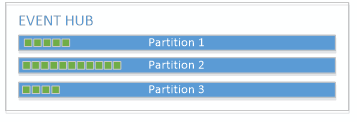
- Partitioning: Events are organized into partitions, allowing for parallel processing and efficient handling of large event streams.
- Integration: It integrates seamlessly with other Azure services like Azure Functions, Azure Stream Analytics, and Azure Blob Storage, enabling a wide range of data processing and analytics scenarios.
Use Cases
Azure Event Hubs finds application in various industries and use cases:
- IoT Telemetry: Collecting and processing telemetry data from IoT devices in real-time.
- Financial Services: Processing high-frequency trading data and financial transactions.
- Gaming: Analyzing player actions and events in real-time to enhance gaming experiences.

Example
Event Hubs supports multiple SDKs and programming languages, making it easy to integrate into your existing applications. Here’s a basic example in C# for sending events to an Event Hub:
using Azure.Messaging.EventHubs;
using Azure.Messaging.EventHubs.Producer;
using System;
using System.Text;
using System.Threading.Tasks;

class Program
{
    // Replace with your Event Hubs namespace connection string and event hub name
    private const string connectionString = "<your_event_hub_connection_string>";
    private const string eventHubName = "<your_event_hub_name>";

    static async Task Main(string[] args)
    {
        await SendEventAsync();
    }

    static async Task SendEventAsync()
    {
        // Create a producer client
        await using (var producerClient = new EventHubProducerClient(connectionString, eventHubName))
        {
            // Create a batch of events
            using (var eventBatch = await producerClient.CreateBatchAsync())
            {
                // Add events to the batch
                eventBatch.TryAdd(new EventData(Encoding.UTF8.GetBytes("First event")));
                eventBatch.TryAdd(new EventData(Encoding.UTF8.GetBytes("Second event")));
                eventBatch.TryAdd(new EventData(Encoding.UTF8.GetBytes("Third event")));

                // Send the batch of events to the event hub
                await producerClient.SendAsync(eventBatch);
                Console.WriteLine("Events sent successfully!");
            }
        }
    }
}
Explanation
- Azure SDK for Event Hubs: This example uses the
Azure.Messaging.EventHubspackage, which is the latest Azure SDK for Event Hubs in .NET. - Connection String and Event Hub Name: Replace
<your_event_hub_connection_string>and<your_event_hub_name>with the namespace connection string and event hub name. - Creating Event Hub Producer Client:
EventHubProducerClientis used to create a client for sending events to the Event Hub. - Creating Event Batch:
CreateBatchAsync()method creates a batch of events (EventBatch) that will be sent together to the Event Hub. - Adding Events to Batch:
TryAdd()method adds individual events (in this case, strings converted to byte arrays) to the batch. - Sending Events:
SendAsync()method sends the batch of events to the Event Hub asynchronously. - Output: Once the application successfully sends events, it prints a message confirming the successful transmission.
Monitoring and Management
It provides built-in monitoring through Azure Monitor, enabling you to track metrics such as ingress/egress rates, throughput units, and partition counts. It also supports integration with Azure CLI for management tasks and automation.
Security and Compliance
Data security is paramount in Event Hubs, with support for encryption both in transit and at rest. It also adheres to industry standards and compliance certifications, ensuring your data meets regulatory requirements.
Conclusion
It is a robust solution for real-time data streaming, offering unparalleled scalability, reliability, and integration capabilities. Whether we’re handling IoT data streams, financial transactions, or gaming analytics, Azure Event Hubs empowers us to build responsive and data-driven applications at scale.