



Azure Load Testing is a fully managed load-testing service that enables you to generate high-scale loads. The service simulates traffic for your applications, regardless of where they’re hosted so I would like to share a walkthrough Azure Load Testing in this post.
1. Preconditions to set up Azure Load Testing
- Azure Subscription: Basically, you should have an Azure account with an active subscription. If you don’t have an Azure subscription, you can create a free account. Ensure you have the necessary permissions within your Azure subscription and Azure DevOps project to create and manage resources. This includes permissions to create and manage load tests.

- Load Testing Resource: Because Azure Load Testing uses cloud-based load test agents. These agents need to be provisioned and configured. The resource will take the associated costs and the agent locations for your testing scenarios.
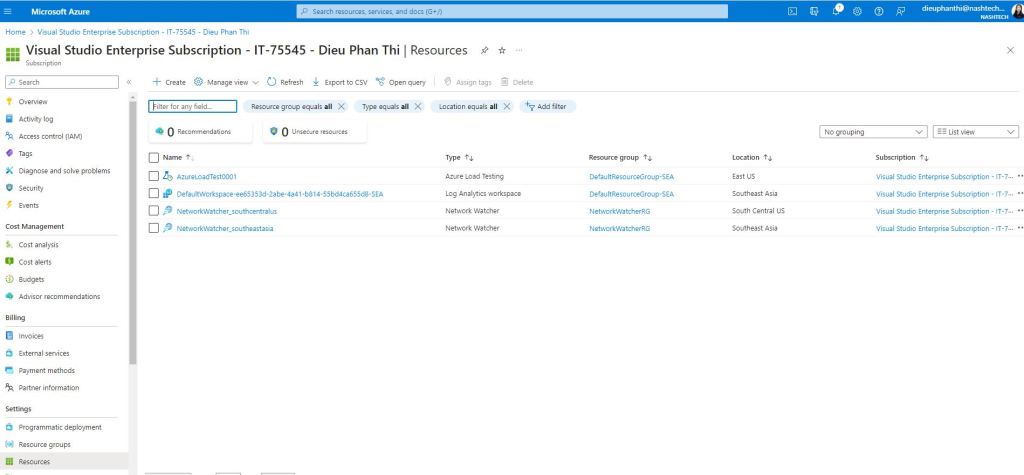
- Web Performance Tests: Surely prepare web performance tests you want to include in your load test. These tests simulate user interactions with your application, a JMeter script with all dependencies if you want to run existing test scripts.
- Azure DevOps Organization and Project: If you want to integrate load testing into CI/CD workflow Azure Load Testing is typically associated with Azure DevOps Services surely you have an Azure DevOps organization. If not, you certainly can create one. Similarly, you can create or use an existing Azure DevOps project within your Azure DevOps organization.

2. Walkthrough Azure Load Testing
- Create an Azure account with an active subscription. If you don’t have an Azure subscription, you can create a free account.
- Create an Azure Load Testing resource in the Azure portal. You can use this resource to manage your load tests and view the results. To create a load testing resource.
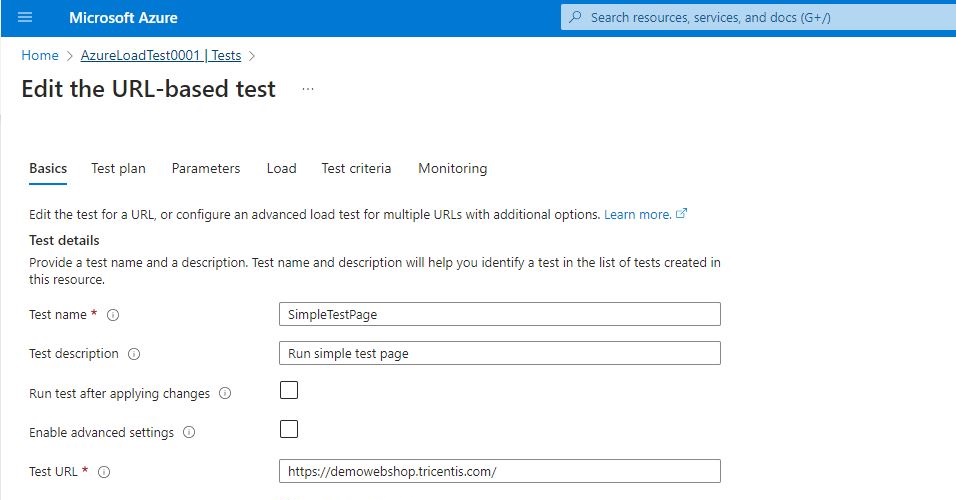
- Create a load test with the two below options
– By specifying the target URL and the load parameters, such as the number of users, the duration, and the location.
– By uploading your existing Apache JMeter scripts to run more complex tests

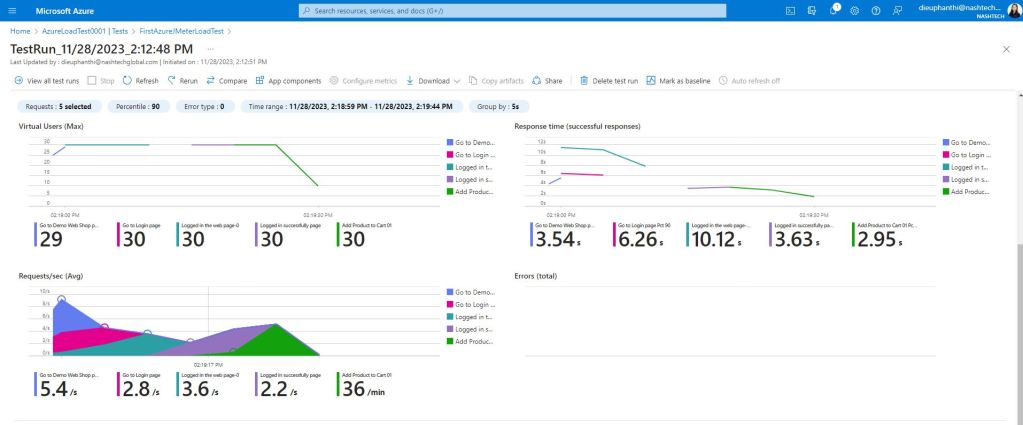
- Run the load test and monitor the performance metrics on the dashboard. You can also compare the load tests and get recommendations to improve your app’s scalability and capacity.
3. Integrate Azure Load Testing with CI/CD & JMeter-based Tests
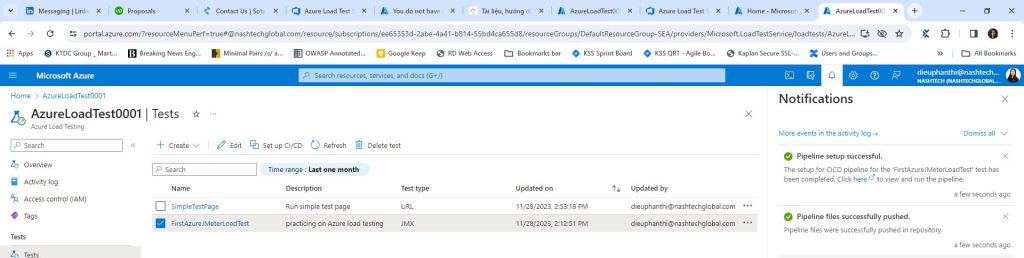
- It can integrate your existing Azure load test with the CI/CD pipeline by selecting the checkbox, and then selecting Set up CI/CD In the Azure portal > Testing resource > Tests that generated the test files like JMeter script and test configuration YAML will be committed to your repository
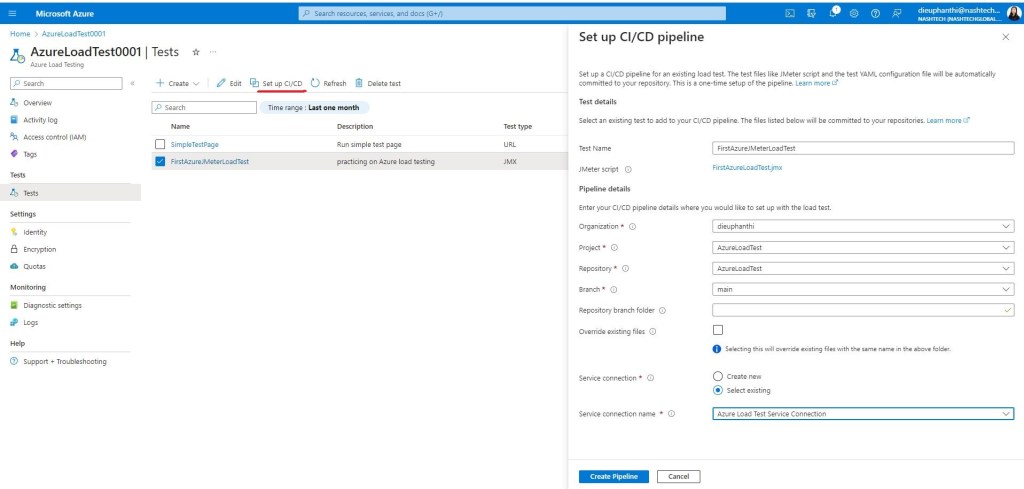
- If you’re getting an error with connecting your Azure DevOps organization to Microsoft Entra ID, you should make sure the new or selected existing service connection of type Azure Resource Manager in the Azure DevOps project. You should assign the service principal as the Load Test Contributor role on the Azure load testing resource.
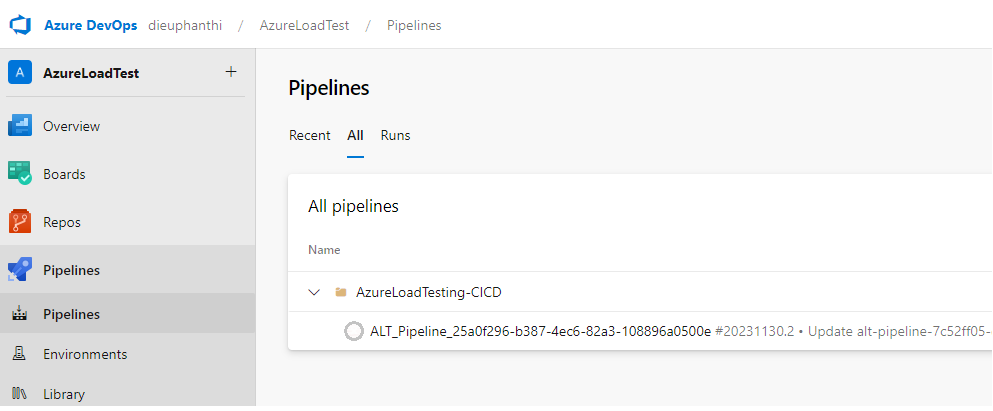
- When the pipeline creation finishes later you receive a notification in the Azure portal with a link to the pipeline then you can open the pipeline definition and modify the pipeline steps or change the triggered pipeline
4. Advantages & Disadvantages of Azure Load Testing
The Advantages of Azure Load Testing
- You can generate high-scale loads without the need for complex infrastructure or prior knowledge of load-testing tools
- You can reuse your existing Apache JMeter scripts to run more complex tests with high-fidelity support for Apache JMeter. Azure Load Testing supports not only a wide range of application types but also communication protocols
- You can get deep, actionable insights and recommendations from a comprehensive view of curated client and server metrics to understand and improve app performance at scale. Besides Azure Load Testing collects detailed resource metrics for your applications hosted on Azure and helps you identify performance bottlenecks across your Azure application components
- You can easily build load testing into automated CI/CD workflows to help catch and block performance regressions early in the development lifecycle. You can establish a performance baseline, set clear pass and fail criteria, and view load test summaries in GitHub and Azure Pipelines

The Disadvantages of Azure Load Testing
- It has certain service limits and quotas on the number of concurrent engine instances, test runs, test duration, data retention, and other resources. The maximum number of virtual users depends on the type of load test and the number of test engine instances. For URL-based tests, the maximum number of virtual users is 100,000, using up to 400 engine instances. For JMeter-based tests, the maximum number of virtual users is determined by the formula: Total virtual users = (virtual users in the JMX file) * (number of test engine instances). To request an increase in the default limit, you need to contact Azure Support
- It only supports Apache JMeter as the load testing tool, which requires some technical knowledge and scripting skills. You cannot use other load testing tools or frameworks with Azure Load Testing
- It may not provide accurate results or reliable performance metrics if the load test is set up incorrectly or the application is not properly configured. You need to follow the best practices and troubleshoot any issues that may arise during the load test
5. Conclusion
In conclusion, Azure Load Testing is a powerful, flexible, and easy-to-use service that can help you test and optimize your applications at scale. We should consider choosing Azure Load Testing to do load tests because it offers the above disadvantages and advantages. It can support to reuse of your existing Apache JMeter scripts to run more complex tests with easily integrating CI/CD workflows to help catch and block performance regressions early in the development lifecycle. Specially, it is a frictionless, cost-effective testing service that builds on other Azure services
Reference:
- Integrate Testing with CI/CD & JMeter-based Tests
- https://learn.microsoft.com/en-us/azure/devops/pipelines/tasks/reference/azure-load-test-v1?view=azure-pipelines
- https://learn.microsoft.com/en-us/azure/load-testing/tutorial-identify-performance-regression-with-cicd?tabs=portal#set-up-the-cicd-workflow-from-the-azure-portal
- https://learn.microsoft.com/en-us/azure/load-testing/resource-limits-quotas-capacity
- https://learn.microsoft.com/en-us/azure/load-testing/overview-what-is-azure-load-testing
1 thought on “Azure Load Testing Walkthrough”
Pingback: Trying out Azure Load Testing – Curated SQL