



Introduction
Hello, readers! Welcome to our blog post on best practices for cluster isolation in Azure Kubernetes Service (AKS). As AKS continues to grow in popularity as a platform for deploying and managing containerized applications, understanding how to effectively isolate teams and workloads within the platform is crucial for security, efficiency, and resource management.
In this guide, we’ll walk you through the key aspects of isolation in AKS, from planning for multi-tenancy and scheduling strategies to securing networking and containers. We’ll also cover logical and physical isolation approaches and their benefits and drawbacks, helping you make informed decisions when managing your AKS clusters.
Let’s dive in and explore how you can optimize your AKS environments for multi-tenancy and isolation!
When managing Azure Kubernetes Service (AKS) clusters, isolation is a key aspect for security, resource management, and efficiency. Let’s delve deeper into best practices for achieving optimal isolation in AKS:
Planning for Multi-Tenancy
Multi-tenancy in AKS involves managing multiple teams and workloads within the same cluster. Logical isolation with Kubernetes namespaces allows you to separate workloads and resources based on different teams’ requirements. This approach minimizes the privileges each team receives and restricts access to only the necessary resources.
- Namespace Strategies: Create namespaces to separate teams and projects. Each namespace acts as a logical boundary, containing its own resources like pods, services, and configurations.
- Resource Quotas: Implement resource quotas within namespaces to allocate resources (CPU, memory, storage) appropriately and prevent overuse by any single team or workload.
Scheduling
Proper scheduling in AKS ensures efficient use of resources and optimal performance.
- Taints and Tolerations: Define conditions (taints) on nodes to restrict the scheduling of certain pods unless they have specific tolerations. This helps manage node usage based on workload requirements.
- Node Selectors: Specify node attributes (e.g., labels) to control where pods are scheduled. For example, pods can be directed to nodes with specific hardware or configurations.
- Affinity and Anti-Affinity: Use these rules to control the placement of pods based on their relationships with other pods or nodes. This can help optimize performance and resource utilization.
Networking
Networking in AKS focuses on securing and managing traffic flow within the cluster.
- Network Policies: Implement policies to control ingress and egress traffic to and from pods. This ensures secure communication and prevents unauthorized access.
- Service Mesh: Consider using a service mesh like Istio for advanced networking capabilities, including traffic management and security features such as mTLS.
Authentication and Authorization
Effective authentication and authorization are critical for securing AKS clusters.
- Role-based Access Control (RBAC): Use RBAC to manage permissions and access control within the cluster. Assign roles to users or service accounts to control who can perform specific actions.
- Microsoft Entra Integration: Integrate AKS with Microsoft Entra for streamlined identity management, enabling single sign-on and fine-grained access control.
- Pod Identities: Use managed identities for pods to securely access Azure services without needing to manage credentials.
- Azure Key Vault: Store and manage secrets (e.g., passwords, API keys) securely in Azure Key Vault and access them from your AKS cluster.
Containers
Improving container security and management is essential for a well-functioning AKS cluster.
- Azure Policy Add-on: Utilize the Azure Policy add-on for AKS to enforce pod security by defining and applying security policies to your workloads.
- Pod Security Admission: Configure pod security admission policies to ensure that pods meet specific security requirements before being scheduled.
- Image and Runtime Scanning: Regularly scan container images and runtime environments for vulnerabilities and address issues promptly.
- AppArmor or Seccomp: Implement these tools to restrict container access to the underlying node and minimize potential attack surfaces.
Logically Isolated Clusters
Using logical isolation allows you to manage multiple workloads, teams, or environments within a single AKS cluster.
- Benefits: Logical isolation offers higher pod density and efficient resource utilization. It allows you to dynamically scale nodes based on demand, saving on costs.
- Considerations: Plan for security risks associated with multi-tenant usage and ensure appropriate security measures, such as RBAC and network policies, are in place.
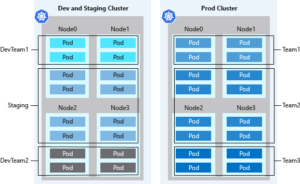
In AKS, using logical separation for clusters often leads to higher pod density compared to physical isolation. This approach reduces excess compute capacity and idle resources within the cluster. When paired with the Kubernetes cluster autoscaler, you can dynamically adjust the number of nodes based on demand, minimizing costs by maintaining only the necessary nodes.
However, Kubernetes environments may not be entirely secure for hostile multi-tenant usage. In a shared infrastructure, where multiple tenants coexist, extra precautions are necessary if trust is an issue. Proper planning can help prevent tenants from affecting the security and performance of other users.
Security measures such as Kubernetes RBAC for nodes can effectively mitigate exploitation risks. Nevertheless, for ultimate security in hostile multi-tenant scenarios, using a hypervisor is recommended. This shifts the security domain from individual nodes to the entire cluster for comprehensive protection.
Physically Isolated Clusters
Physical isolation involves deploying separate AKS clusters for each team or application.
- Benefits: Physical isolation can provide a higher level of security, as each cluster is completely independent from others, reducing the risk of cross-tenant interference.
- Drawbacks: Managing multiple clusters can be complex and costly due to individual resource provisioning, maintenance, and billing for each cluster. This approach may also lead to lower pod density and underutilized compute resources.
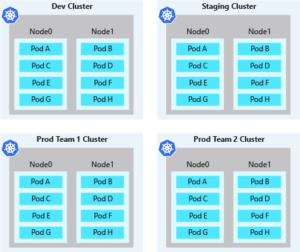
A common approach to cluster isolation in AKS is to separate clusters physically. This model assigns each team or workload its own AKS cluster. Although physical isolation may seem like a straightforward way to keep workloads or teams apart, it can lead to increased management and financial overhead. Managing multiple clusters requires handling permissions and access on an individual basis, and you incur costs for each node.
Physically isolated clusters tend to have lower pod density. With each team or workload operating its own AKS cluster, clusters are often over-provisioned with compute resources. As a result, only a few pods may be scheduled on each node. This unclaimed node capacity can’t be shared across teams for development purposes, leading to higher costs due to underutilized resources.
Conclusion
In summary, balancing logical and physical isolation in AKS is essential for efficient cluster management. Logical isolation through namespaces is generally more resource-efficient and cost-effective, while physical isolation offers heightened security for sensitive or high-risk workloads. Choose the right approach based on your specific requirements and follow these best practices to achieve secure and efficient multi-tenant environments in AKS.