


Introduction
Hello, readers! Welcome to our blog post on best practices for storage and backups in Azure Kubernetes Service (AKS). Proper management of storage and reliable backup strategies are essential for ensuring the smooth operation of your AKS clusters and safeguarding your data. In this guide, we’ll delve into various key aspects of storage and backups in AKS, providing you with the knowledge to optimize your cluster operations.
Let’s dive into the essential topics:
Choosing the Right Storage Type for AKS
To effectively manage storage, you must first understand your application’s performance requirements and access methods. High-performance SSD-backed storage is ideal for production workloads, while network-based storage is suitable when you need multiple concurrent connections.
To choose the right storage type for your application, consider the following questions:
- Do your applications require storage that connects to individual pods?
- Do your applications need shared storage across multiple pods?
- Is the storage primarily for read-only access?
- Will the storage be used to write large volumes of structured data?
| Use case | Volume plugin | Read/write once | Read-only many | Read/write many | Windows Server container support |
|---|---|---|---|---|---|
| Shared configuration | Azure Files | Yes | Yes | Yes | Yes |
| Structured app data | Azure Disks | Yes | No | No | Yes |
| Unstructured data, file system operations | BlobFuse | Yes | Yes | Yes | No |
By evaluating these questions, you can make an informed decision on the most appropriate storage type for your application needs.
Sizing the Nodes for Storage Needs
Every AKS node size supports a specific maximum number of disks and provides varying amounts of local storage and network bandwidth. To ensure optimal performance, you must carefully plan your node selection based on your application’s storage and performance needs.
AKS nodes can be configured with different Azure VM types and sizes, each offering a distinct set of core resources such as CPU and memory, a maximum number of attachable disks, and varying levels of storage performance. This includes different rates of input/output operations per second (IOPS) for both local and attached storage.
If your applications utilize Azure Disks as their storage solution, choosing the appropriate node VM size is essential. Consider the storage capabilities, CPU, and memory when making your decision.
For instance, while both the Standard_B2ms and Standard_DS2_v2 VM sizes have similar CPU and memory resources, their storage performance differs significantly. The Standard_DS2_v2 offers higher potential storage performance, with twice the number of attachable disks and three to four times the IOPS and throughput compared to the Standard_B2ms.
| Node type and size | vCPU | Memory (GiB) | Max data disks | Max uncached disk IOPS | Max uncached throughput (MBps) |
|---|---|---|---|---|---|
| Standard_B2ms | 2 | 8 | 4 | 1,920 | 22.5 |
| Standard_DS2_v2 | 2 | 7 | 8 | 6,400 | 96 |
Dynamic Provisioning of Volumes in AKS
To streamline storage management and enable scalability, it’s best to avoid manually creating and assigning persistent volumes. Instead, use dynamic provisioning. Define the appropriate reclaim policy in your storage classes to minimize unnecessary storage costs once pods are deleted.
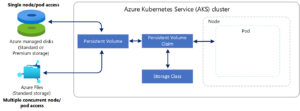
Persistent volume claims (PVCs) allow you to create storage dynamically as needed. As pods request volumes, underlying Azure disks are created and attached to designated mount paths. This approach simplifies storage management and allows your applications to grow and scale efficiently.
When defining your storage classes, set an appropriate reclaimPolicy to control the behavior of the underlying Azure storage resource when the pod is deleted. The reclaimPolicy can either delete the resource or retain it for future use. You can choose either option based on your application needs.
Securing and Backing Up Your Data
Regular backups and snapshots of your data are essential for ensuring its integrity and security. For persistent volumes, you can use tools like Velero or Azure Backup. Ensure that you verify the integrity of your backups and test restore operations to confirm data recovery.
Applications that persist data on disks or in files should take regular backups and test the restore process. Understand the limitations of different backup approaches and whether you need to quiesce data before taking snapshots.
When your applications use data stored on disks or files, it’s essential to perform regular backups or snapshots of that data. Azure Disks support built-in snapshot technologies, though you may need to ensure applications flush data to disk before starting a snapshot operation. Velero can back up persistent volumes as well as other cluster resources and configurations. If you can’t eliminate state from your applications, back up data from persistent volumes and frequently test restore operations to confirm data integrity and the efficacy of the process.
Be aware of the limitations of various data backup approaches, including whether you need to quiesce data before creating a snapshot. It’s important to note that data backups don’t always allow you to restore your entire application environment or cluster deployment. For additional details on these topics, refer to the Best Practices for Business Continuity and Disaster Recovery in AKS guide.
Conclusion
In conclusion, managing storage and backups in Azure Kubernetes Service (AKS) requires careful planning and consideration to ensure optimal performance, scalability, and data integrity. By understanding your application’s storage needs and choosing the appropriate storage types and configurations, you can provide efficient and reliable storage solutions. Implement dynamic provisioning of storage to support the growth and scaling of your applications.
Regular backups and snapshots are essential for protecting your data and ensuring business continuity. Leverage built-in Azure features and third-party tools like Velero to streamline backup processes and verify restore operations. By following these best practices for storage and backups in AKS, you can create a robust, secure, and efficient environment for your applications to thrive.