


Building API Integration Tests in .NET #1: A Test Fidelity Ladder (Mock to Aspire)
1. First act: The dilemma
Picture this: you ship a pull request for a Catalog API endpoint. Unit tests pass. You run integration tests locally — they pass too. CI is green. You merge.
Two days later, staging breaks. A price update publishes the wrong integration event. A pagination query returns different results on PostgreSQL than in your test environment. A semantic search endpoint fails because pgvector behaves differently from whatever database your tests used.
Sound familiar?
The problem is rarely “we don’t have enough tests.” More often, we have tests at the wrong level of reality.
Some teams run only unit tests with mocked dependencies — fast, but blind to SQL, migrations, and messaging. Others jump straight to Docker-heavy end-to-end suites — realistic, but slow, flaky, and painful on a laptop without Docker running.
There is a better way: choose the right level of fidelity for the question you are asking, and run the same API tests at multiple levels when it makes sense.
That is what this blog series is about.
2. What is an API integration test?
Before we talk about tools, let’s align on terminology.
For this series, an API integration test means:
- Start (or host) the real ASP.NET Core application — not a hand-written controller test with manually constructed dependencies.
- Send a real HTTP request (
GET,POST,PUT, …) to an endpoint. - Assert on the HTTP response and, when it matters, on persisted state or side effects (database rows, outbox entries, published events).
This is different from:
| Test type | What it validates | Typical speed |
|---|---|---|
| Unit test | One class/method in isolation | Milliseconds |
| API integration test | HTTP pipeline + DI + handlers + persistence | Seconds |
| End-to-end test | Full user journey across UI and multiple services | Minutes |
We are focused on the middle row: integration tests that exercise the API as a black box, while still controlling what sits behind it (database, message bus, external AI service, etc.).
That “control what sits behind it” part is where test doubles meet a real HTTP host — we unpack that in Sections 3–5 before climbing the fidelity ladder.
3. Stub, mock, fake — and why the word “mock” confuses everyone
In testing literature, these words mean different things. In daily conversation, we say “mock” for all of them. That causes real confusion when someone says “we integration test with mocks.”
Here is a practical cheat sheet:
| Term | What it does | Example in eShop |
|---|---|---|
| Stub | Returns canned answers | A fake ICatalogAI that always returns a fixed embedding vector |
| Mock | Records interactions and verifies they happened | NSubstitute verifying SaveChangesAsync was called once |
| Fake | Working implementation with shortcuts | An in-memory ICatalogRepository backed by a List<CatalogItem> |
| Test double | Umbrella term for all of the above | Any replacement for a production dependency in tests |
When we say RepositoryMock mode in eShop, we are really using a fake — a real in-memory repository implementation, not NSubstitute. The test still hits the real API pipeline; only persistence is swapped.
When we say unit test with mock, we usually mean NSubstitute/Moq stubs verifying one handler method.
Same word. Different boundary. Keep that distinction in mind for the rest of the series.
Section 2 defined an API integration test as “start the real app, send HTTP, assert.” Section 3 explained the test doubles you might swap in. The missing piece is how those two ideas connect — without collapsing back into a unit test that manually wires a controller.
4. The integration test host — real pipeline, swappable dependencies
An API integration test is not “call the handler method with a mocked DbContext.” That is a unit test with extra steps.
Instead, you need a test host that:
- Boots the real application — the same
Program.cs, middleware order, endpoint routing, model binding, validation filters, and DI container your production app uses. - Accepts real HTTP — your test sends
GET /api/catalog/items, nothandler.Handle(query). - Opens a controlled side door — before the first request, you replace selected services in DI (repository, event bus, auth, external AI) with the stubs, mocks, or fakes from Section 3.
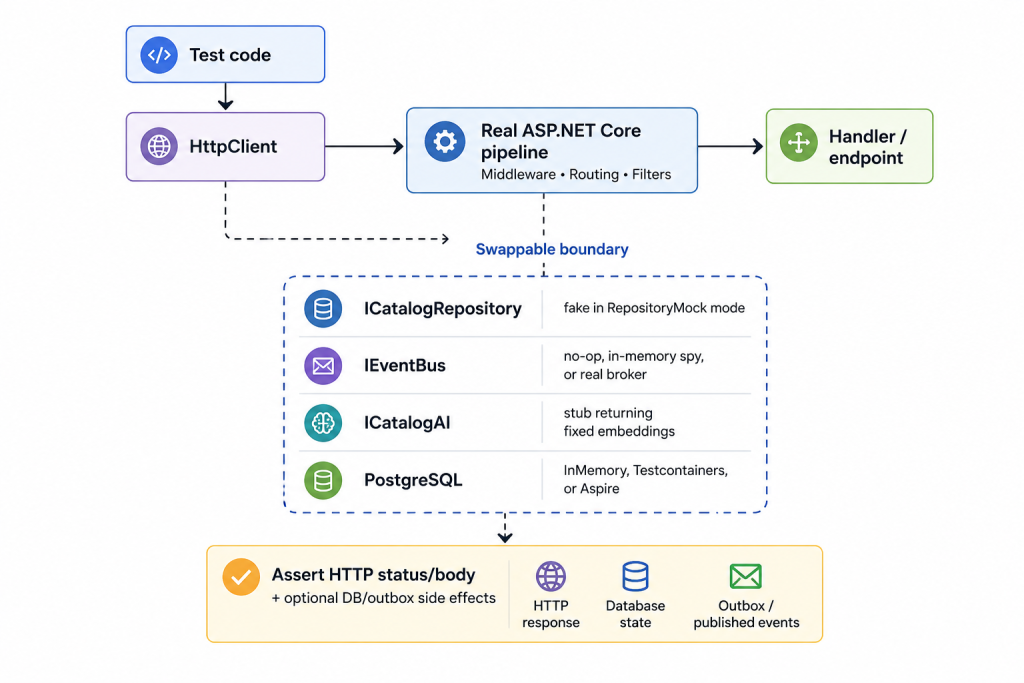
The host stays the same. What changes is what sits behind the API — that is the fidelity ladder in Section 6.
What you do not replace
Keep the real things that define “integration” for your question:
- HTTP routing and serialization
- Request validation and auth middleware (unless you deliberately bypass auth for speed, as eShop does in some modes)
- Application handlers and domain logic
- The production repository implementation when you want to test EF queries (InMemory / Testcontainers / Aspire modes)
What you do replace
Swap only the dependencies whose realism you are controlling for this run:
| Dependency | RepositoryMock | EfCoreInMemory | Testcontainers / Aspire |
|---|---|---|---|
ICatalogRepository | In-memory fake | Real CatalogRepository | Real CatalogRepository |
| Database provider | None | EF InMemory | Real PostgreSQL |
IEventBus | No-op, or in-memory spy | No-op, or in-memory spy | No-op, in-memory spy, or real RabbitMQ |
Messaging is orthogonal to persistence. Repository Mock mode swaps the database for an in-memory fake, but you can still register an in-memory spy on IEventBus (recording published events without RabbitMQ) when you want to assert side effects without climbing the whole ladder. No-op is the default when messaging is out of scope for that test run.
This is why the same test class can run at multiple fidelity levels: the HTTP contract and handler code stay identical; only the fixture’s DI wiring changes.
The next section introduces the built-in .NET type that gives you this host.
5. What is WebApplicationFactory?
If you are new to ASP.NET Core integration testing, WebApplicationFactory<TEntryPoint> is the front door to the pattern above.
WebApplicationFactory (from Microsoft.AspNetCore.Mvc.Testing) spins up your application in-process for testing. It is not a separate dotnet run process and it does not require you to bind a real TCP port on your machine.
What it gives you
| Capability | Why it matters |
|---|---|
| In-process hosting | Fast startup; debugger steps through test and app code in one process |
HttpClient via CreateClient() | Sends requests through an in-memory test server (TestServer), not over the network |
ConfigureWebHost / ConfigureTestServices | The “side door” — replace services, connection strings, and config before the app handles traffic |
Same Program entry point | You test the app you ship, not a simplified test-only startup class |
Think of it as: the real app, hosted inside your test process, with hooks for test-only wiring.
The two configuration hooks
Most swapping happens in one of these callbacks on your fixture:
ConfigureWebHost— change configuration (UseSetting,ConfigureAppConfiguration), environment, or register services before the app builds.ConfigureTestServices— run after productionProgram.csregistration; use this to replace already-registered services (e.g.services.AddScoped<ICatalogRepository, InMemoryCatalogRepository>()).
A practical pattern: keep the fixture thin and move each mode’s ConfigureTestServices logic into a dedicated configuration class (one per rung). The fixture then only selects which configuration to apply — we show that structure when we meet the demo app in Section 7.
Minimal mental model
// 1. Fixture inherits WebApplicationFactory<Program>
public sealed class CatalogApiFixture : WebApplicationFactory<Program>, IAsyncLifetime
{
    protected override void ConfigureWebHost(IWebHostBuilder builder)
    {
        builder.ConfigureTestServices(services =>
        {
            // 2. Side door: swap persistence for this test mode
            services.AddScoped<ICatalogRepository, InMemoryCatalogRepository>();
        });
    }
}

// 3. Test uses HttpClient like a real client
var response = await client.PutAsJsonAsync("/api/catalog/items", updateDto);
response.StatusCode.Should().Be(HttpStatusCode.OK);
The test never references InMemoryCatalogRepository directly. It talks HTTP; DI resolves the fake behind the endpoint.
Used in every mode in this series
We will use WebApplicationFactory in every rung — RepositoryMock, EF InMemory, Testcontainers, and Aspire. The factory always hosts Catalog.API or Ordering.API. What changes per mode is:
- which
ConfigureTestServicesclass runs, - whether Docker starts (Testcontainers / Aspire),
- and whether messaging is no-op, spied, or backed by real RabbitMQ.
Aspire mode is a hybrid: WebApplicationFactory still hosts the API under test, while a separate DistributedApplication provisions databases and other dependencies alongside the test. The [messaging article] goes deep on that split.
For official documentation, see Integration tests in ASP.NET Core.
6. The test fidelity ladder
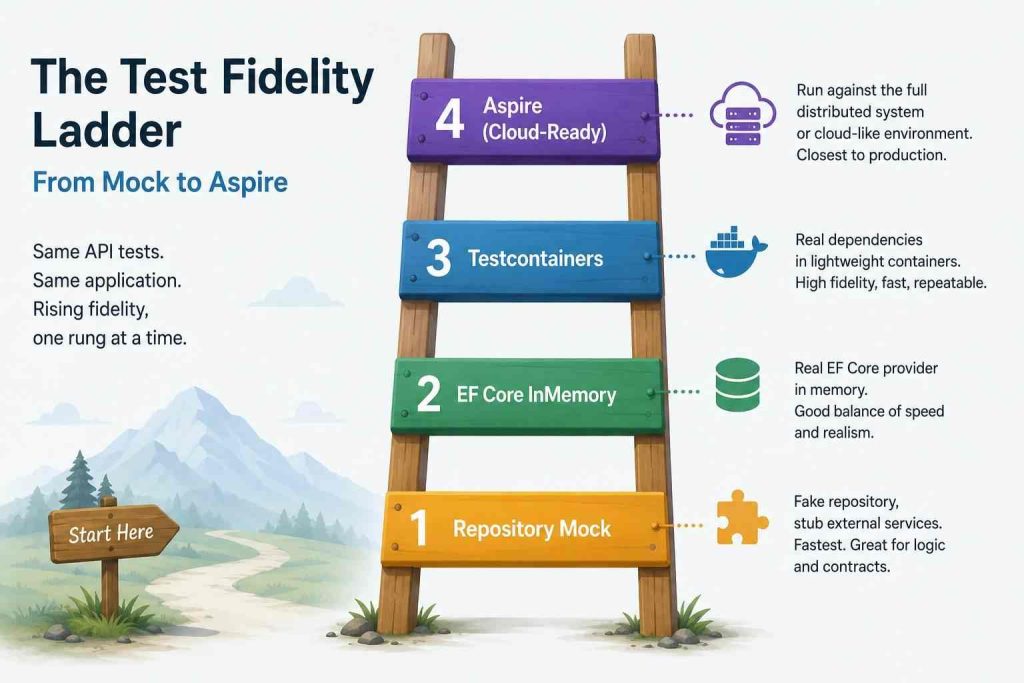
Here is the mental model for the entire series — a fidelity ladder. Each rung adds realism. Each rung costs more time and infrastructure.
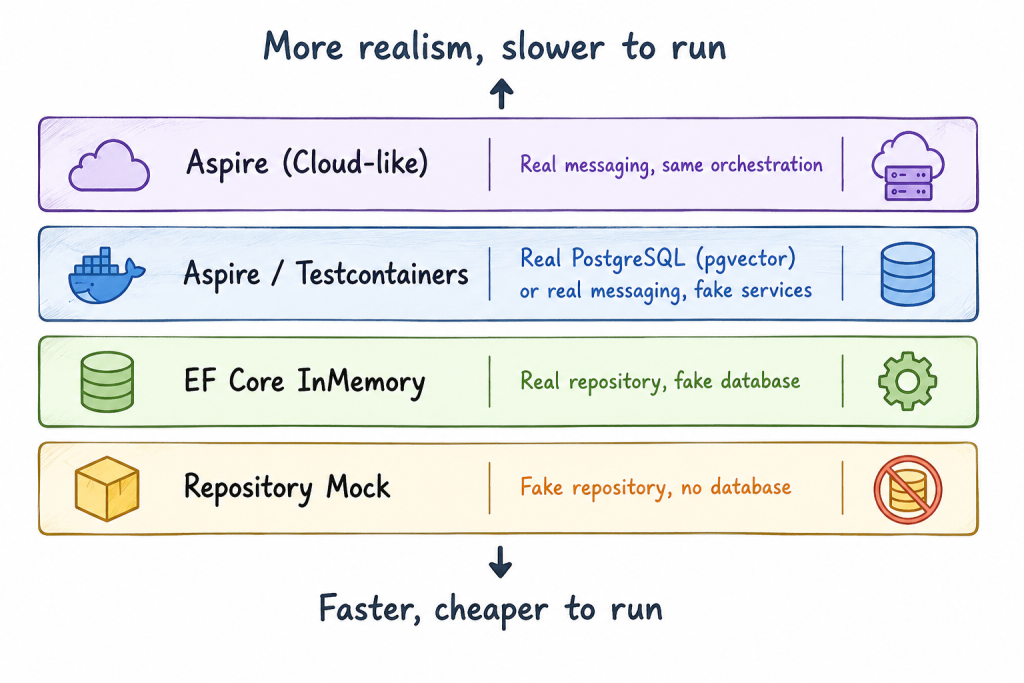
Read it like a ladder: bottom = speed, top = realism. Climb up when a failure proves you need more production-like behavior; climb down when you need fast feedback on API contracts and handler wiring.
Rung 1 — Repository Mock
- Persistence: In-memory store behind
ICatalogRepository. - Infrastructure: None. No Docker. No database.
- Best for: API contract tests, validation, handler wiring, local dev loops.
- Blind spots: SQL dialect, migrations, pgvector, EF provider quirks.
Rung 2 — EF Core InMemory
- Persistence: Real
CatalogRepository+ EF Core InMemory provider. - Infrastructure: None.
- Best for: Testing repository/query code without PostgreSQL.
- Blind spots: Provider-specific SQL (pgvector cosine distance), transaction semantics.
Rung 3 — Testcontainers
- Persistence: Real PostgreSQL in a Docker container (pgvector image for Catalog).
- Infrastructure: Docker only — no Aspire AppHost.
- Extensible: PostgreSQL is the starting point, not the ceiling. Testcontainers can spin up any dependency your test needs — Redis, RabbitMQ, Elasticsearch, Azurite, a second Postgres for Identity, and so on — each as its own container with a connection string injected into
ConfigureTestServices. - Best for: Real infrastructure in tests when you want direct control — start containers imperatively, inject connection strings, and optionally wrap repeated setup in your own shared test library.
- Blind spots: Nothing stops you from orchestrating many containers — teams often build a reusable bootstrap helper for that. The cost is you maintain that layer: startup order, health waits, connection strings, and wiring between services stay custom code that can drift from production unless you discipline it.
Rung 4 — Aspire (in tests)
- Persistence: Real PostgreSQL via Aspire’s
DistributedApplication. - Infrastructure: Docker + Aspire resource orchestration inside the test fixture.
- Best for: Apps already modeled with Aspire in development — tests reuse the same orchestration vocabulary (
AddPostgres,AddRabbitMQ,AddProject,WithReference) instead of a parallel Testcontainers framework you own. - Aspire vs a Testcontainers framework: Both can run multiple databases and brokers. The gap is not “can Testcontainers do it?” — it is who ships the assembly layer. Testcontainers starts containers; Aspire also coordinates readiness, connection strings, resource references, and live .NET sibling services with endpoints. You can replicate much of that in a shared Testcontainers helper; Aspire provides it out of the box and keeps test topology aligned with AppHost.
- When Testcontainers wins: No Aspire AppHost to mirror; dependencies are mostly container images rather than in-process .NET projects; you want fewer Aspire hosting packages in test projects; or you already have a team-standard Testcontainers bootstrap and prefer maintaining that over adopting Aspire in tests.
- Optional messaging rungs: RabbitMQ + outbox verification (spy bus or real broker).
Comparison table
| Mode | Docker? | Real DB? | Real EF repo? | Real RabbitMQ? | Typical local run |
|---|---|---|---|---|---|
| RepositoryMock | No | No | No (fake repo) | No | < 1 s startup |
| EfCoreInMemory | No | No (InMemory) | Yes | No | ~1–2 s |
| Testcontainers | Yes | Yes | Yes | No | ~10–30 s cold start |
| Aspire | Yes | Yes | Yes | Optional | ~15–45 s cold start |
The goal is not to pick one winner. The goal is to run the right rung for the job — and climb the ladder when a bug proves you need more fidelity.
7. Meet eShop — our demo application
Throughout this series we use eShop, Microsoft’s reference microservices application. The code for these posts lives in trainer1234/eShop-test — a fork that adds the pluggable functional test modes below. The official dotnet/eShop repo does not include them.
We do not need the full solution map here — eShop has many services (Basket, WebApp, Payment, and more). For this series, only the pieces that our functional tests exercise matter:
| Piece | Role | Why it matters for testing |
|---|---|---|
| Catalog.API | Product catalog, semantic search | pgvector embeddings, CRUD, price-change events |
| Ordering.API | Order placement | Identity dependency, transactional outbox, multiple integration events |
| IntegrationEventLogEF | Transactional outbox | Events written in the same DB transaction as business data |
| EventBus (RabbitMQ) | Async messaging | Optional real-broker tests |
Functional tests in this repo support pluggable modes via attributes and environment variables:
[CatalogFunctionalTestMode(CatalogFunctionalTestMode.RepositoryMock)]
public sealed class CatalogApiTests(CatalogApiTestSession session) { ... }
Run only mock-mode tests:
dotnet test tests/Catalog.FunctionalTests --filter-trait FunctionalTestMode=mockOr force a mode for all tests via runsettings:
dotnet test tests/Catalog.FunctionalTests --settings eShop.FunctionalTests.RepositoryMock.runsettingsDeeper fixture layout (session, lazy fixture per mode, mode-specific DI) lives in docs/multi-mode-functional-testing.md for readers who want implementation detail — we unpack it post by post in the series.
8. How the series will work
Each post builds on the last. You do not need Docker until Post 3.
| Post | Title | What you will learn |
|---|---|---|
| 1 (This article) | A Test Fidelity Ladder | Concepts, vocabulary, eShop intro |
| 2 Mock and InMemory | Repository Mock + EF InMemory | Bottom two ladder rungs — repository fake vs EF InMemory |
| 3 Testcontainers | Testcontainers | Docker-backed dependencies; Postgres/pgvector case study |
| 4 Aspire | Aspire in tests | Hybrid WAF + DistributedApplication, Identity.API, resource control |
| 5 Messaging | EventBus & outbox | Spy bus vs real RabbitMQ, outbox assertions |
For broader introductions to Aspire and Testcontainers (beyond the testing angle), see References.
9. Conclusion
Integration testing is not a binary choice between “all mocked” and “full production clone.”
It is a ladder:
- Need speed while refactoring an endpoint? Repository Mock.
- Need to exercise EF queries? EF Core InMemory.
- Need real PostgreSQL semantics? Testcontainers.
- Need orchestrated dependencies and messaging? Aspire.
Same API. Same tests. Different levels of reality.
From here, the series climbs one rung at a time. In the next article, we will build sub-second Catalog API tests without Docker — first with a repository fake, then with EF Core InMemory and the production repository — so you can choose the right no-Docker rung for the bug you are chasing.
10. References
This series
- Part 1 — A Test Fidelity Ladder — this article
- Part 2 — Repository Mock and EF InMemory
- Part 3 — Testcontainers on the Fidelity Ladder
- Part 4 — Aspire on the Fidelity Ladder
- Part 5 — Messaging, Outbox, and RabbitMQ on the Fidelity Ladder
eShop demo
- trainer1234/eShop-test on GitHub — demo repo for this series; includes pluggable functional test modes
- dotnet/eShop on GitHub — upstream reference application (test modes not included)
docs/multi-mode-functional-testing.md— architecture reference in the trainer1234/eShop-test repo
Microsoft docs
NashTech blogs