


Building API Integration Tests in .NET #2: Repository Mock and EF InMemory (The Bottom Two Rungs)
1. Introduction
In the series introduction, we introduced the test fidelity ladder — a way to run the same API integration tests at different levels of realism. This post climbs the bottom two rungs.
That matters more than it sounds. If integration tests only run in CI with containers, developers skip them locally. Green PRs ship with untested HTTP paths. The ladder only works when the fast rungs are genuinely fast — and these two require no Docker.
| Rung | What you gain | What you still defer |
|---|---|---|
| Repository Mock | Fast feedback on API behavior — HTTP, validation, handler wiring | Real repository code, SQL, database semantics |
| EF Core InMemory | Everything above, plus production repository logic | PostgreSQL dialect, pgvector, migrations |
Same host. Same HTTP tests. Different answer to the question: “How much of the persistence stack do we exercise?”
2. A quick review — the series introduction
| Term | Summary |
|---|---|
| API integration test | Host the real app, send HTTP, assert on response and side effects |
| Stub / mock / fake / test double | Replacements for production dependencies — Moq/NSubstitute mocks verify interactions; fakes provide working behavior (see the series introduction, Section 3) |
| Integration test host | Real pipeline with a side door to swap dependencies via DI |
WebApplicationFactory | The built-in .NET type that provides that host in-process |
| Test fidelity ladder | Climb from fast substitutes toward production-like infrastructure as your question demands more realism |
If that is still fresh, skip ahead to Section 3.
3. Two no-Docker rungs at a glance
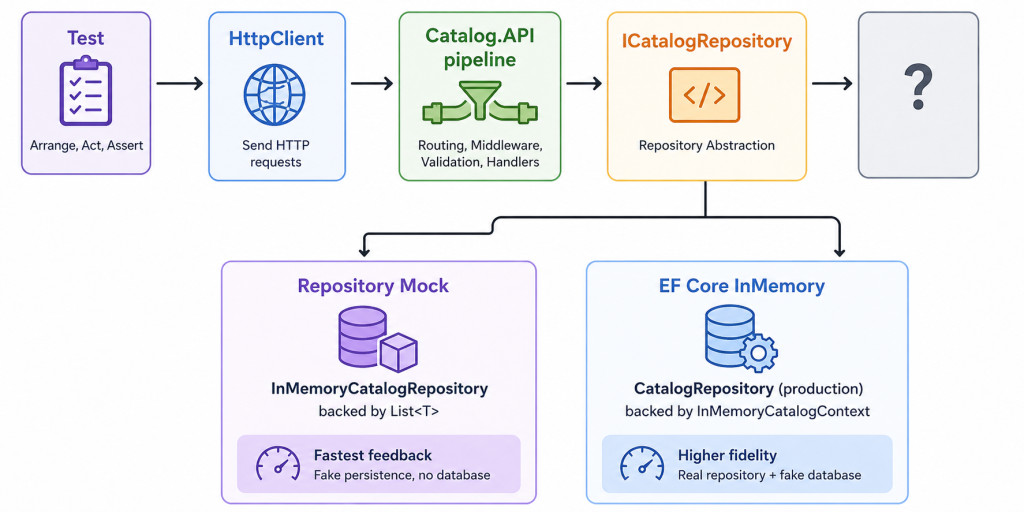
| Question | Repository Mock | EF Core InMemory |
|---|---|---|
| Does the test hit real HTTP routing? | Yes | Yes |
| Does the test run production repository code? | No | Yes |
Does the test run EF SaveChanges / LINQ queries? | No | Yes |
| Startup time | Fastest | Fast (~1–2 s) |
| Catches pgvector / PostgreSQL SQL issues? | No | No |
Repository Mock is the feedback loop rung: endpoint contracts, validation, handler wiring, CRUD happy paths.
EF Core InMemory is the repository rung: LINQ filters, pagination queries, Add/Update/Remove through the real CatalogRepository — still without PostgreSQL.
4. Repository Mock — fake persistence, real API pipeline
When to use it
- Tightening the edit-run-test loop while you refactor an endpoint.
- Verifying HTTP status codes, request/response shapes, and API versioning.
- Asserting that create/update/delete changed persisted state — without a database process.
- Running on a laptop with no Docker daemon and no local Postgres install.
Blind spots
- SQL dialect differences (PostgreSQL vs anything else).
- EF migrations, constraints, and provider-specific types (pgvector embeddings).
- Transaction semantics and concurrency behavior.
- Bugs that live inside
CatalogRepositoryLINQ — the fake reimplements query logic in memory.
Why not Moq or NSubstitute?
The series introduction drew the vocabulary line: in a unit test, a mock (Moq, NSubstitute) stubs one dependency and verifies an interaction — “was SaveChangesAsync called once?” In Repository Mock mode, we use a fake — a working in-memory implementation of ICatalogRepository, not a generated proxy.
That distinction matters because an API integration test hosts the real pipeline:
HttpClient → routing → validation → handler → ICatalogRepositoryIf you register Substitute.For<ICatalogRepository>() in ConfigureTestServices, you can make the HTTP call return 200 OK — but only because you programmed every stubbed answer. You are not exercising how the handler actually uses the repository. Worse, verification-style mocks encourage assertions like “the handler called GetItemByIdAsync“ — which is a unit-test question dressed in HTTP clothing.
A fake answers a different question: given realistic in-memory behavior, does the full request path produce the right response and side effects? The handler, model binding, and DI resolution all run for real. Only the persistence backing store is simplified.
| Approach | Boundary tested | Typical assertion |
|---|---|---|
Moq/NSubstitute on ICatalogRepository | One interface call from a handler you invoke directly | Received(1).SaveChangesAsync() |
Repository fake via WebApplicationFactory | HTTP through to an in-memory store | PUT /api/catalog/items → 200 OK + item persisted |
Use Moq and NSubstitute in unit tests. Use fakes (or real implementations with substituted infrastructure) behind WebApplicationFactory. The rule from the introduction article still applies: an API integration test is not “call the handler with a mocked DbContext.”
Step 1 — Extract a repository abstraction (production)
Swapping persistence in integration tests requires a seam — a deliberate boundary in production code where tests can plug in a substitute without changing the callers above it. Handlers talk to an interface; tests provide a different implementation of that interface.
In the eShop demo Catalog feature, that seam is ICatalogRepository:
public interface ICatalogRepository
{
    Task<PaginatedItems<CatalogItem>> GetItemsAsync(
        int pageIndex, int pageSize, string? name, int? type, int? brand,
        CancellationToken cancellationToken = default);
    Task<CatalogItem?> GetItemByIdAsync(int id, bool includeBrand = false,
        CancellationToken cancellationToken = default);
    Task AddAsync(CatalogItem item, CancellationToken cancellationToken = default);
    void Remove(CatalogItem item);
    Task SaveChangesAsync(CancellationToken cancellationToken = default);
    // ... brands, types, semantic search, etc.
}
Production registers the real implementation:
builder.Services.AddScoped<ICatalogRepository, CatalogRepository>();Handlers and minimal APIs depend on the interface ICatalogRepository, not the real concrete implementation CatalogContext directly. That one refactor is what makes Repository Mock mode possible without changing API code.
Step 2 — Implement an in-memory fake
InMemoryCatalogRepository implements ICatalogRepository against a CatalogRepositoryMockStore — plain lists seeded from the same catalog JSON eShop uses elsewhere:
internal sealed class InMemoryCatalogRepository(CatalogRepositoryMockStore store) : ICatalogRepository
{
    public Task<CatalogItem?> GetItemByIdAsync(int id, bool includeBrand = false,
        CancellationToken cancellationToken = default) =>
        Task.FromResult(store.GetItemById(id));

    public Task AddAsync(CatalogItem item, CancellationToken cancellationToken = default)
    {
        store.Upsert(item);
        return Task.CompletedTask;
    }

    public Task SaveChangesAsync(CancellationToken cancellationToken = default) =>
        Task.CompletedTask;

    // ... pagination, filters, simplified semantic search stubs
}
Semantic search methods return deterministic stub results — enough for API contract tests, not enough to validate pgvector ranking.
Step 3 — Swap via ConfigureTestServices
CatalogTestServiceConfiguration.ConfigureRepositoryMock removes EF and registers the fake:
public static void ConfigureRepositoryMock(IServiceCollection services, CatalogRepositoryMockStore store)
{
    RemoveSharedExternalServices(services);
    services.RemoveAll<ICatalogRepository>();
    services.RemoveAll<CatalogContext>();
    services.RemoveAll<DbContextOptions<CatalogContext>>();

    services.AddSingleton(store);
    services.AddSingleton<ICatalogRepository, InMemoryCatalogRepository>();
    AddSharedTestDoubles(services);
}
RemoveSharedExternalServices also strips RabbitMQ hosted services, Ollama/ICatalogAI, and integration-event outbox workers — messaging is out of scope for standard API tests here. AddSharedTestDoubles registers FakeCatalogAI and no-op event services so the API pipeline starts cleanly.
The fixture selects this configuration when mode is RepositoryMock:
case CatalogFunctionalTestMode.RepositoryMock:
    builder.UseEnvironment("Build");
    builder.ConfigureTestServices(services =>
        CatalogTestServiceConfiguration.ConfigureRepositoryMock(services, _repositoryMockStore));
    break;
On initialize, the mock store reloads catalog items from JSON. EF is not registered in this mode — there is no database schema to build and no migration step to run:
case CatalogFunctionalTestMode.RepositoryMock:
    await _repositoryMockStore.ResetAsync();
    _ = Services;
    break;
Compare that with EF Core InMemory mode (Section 5), where the fixture must create an in-memory schema before seeding.
Step 4 — Assert persistence without a database
HTTP assertions alone miss silent write failures. The fixture exposes mode-aware helpers:
public async Task<CatalogItem?> LoadPersistedCatalogItemAsync(int id)
{
    return _mode switch
    {
        CatalogFunctionalTestMode.RepositoryMock => _repositoryMockStore.GetItemById(id),
        CatalogFunctionalTestMode.EfCoreInMemory =>
            await CatalogDatabaseHelper.LoadItemFromScopedContextAsync(Services, id),
        // ... Postgres modes use scoped context or raw connection
        _ => throw new ArgumentOutOfRangeException()
    };
}
A test can verify both the HTTP response and the stored entity:
var persistedItem = await host.Fixture.LoadPersistedCatalogItemAsync(id);
Assert.NotNull(persistedItem);
Assert.Equal(bodyContent.Name, persistedItem.Name);
Assert.Equal(bodyContent.Price, persistedItem.Price);
5. EF Core InMemory — real repository, fake database
What EF Core InMemory is — and is not
EF Core InMemory is a database provider that stores entities in memory inside the test process. It is useful for exercising EF mappings, DbContext configuration, and repository code that builds LINQ queries.
It is not a faithful PostgreSQL simulator. Microsoft explicitly recommends against using it to test behaviors that depend on a relational database — constraints, transactions, raw SQL, stored procedures, and provider-specific types will diverge.
In the eShop demo, Catalog.API uses semantic search: product text is converted into an embedding (a numeric vector) and stored in PostgreSQL using the pgvector extension — a database feature for similarity search over vectors. EF Core InMemory knows nothing about vector columns, so it cannot validate that part of the stack. Use InMemory when repository logic is the question. Climb to Testcontainers when PostgreSQL semantics are.
Step 1 — Make CatalogContext substitutable
Production CatalogContext accepts non-generic DbContextOptions so a test-specific subclass can substitute:
public CatalogContext(DbContextOptions options, IConfiguration configuration) : base(options)
{
}
CatalogItem has an Embedding property typed as Vector — the pgvector column described above. The InMemory provider cannot map that type, so InMemoryCatalogContext tells EF to skip it when building the test model:
internal sealed class InMemoryCatalogContext : CatalogContext
{
    public InMemoryCatalogContext(DbContextOptions<InMemoryCatalogContext> options, IConfiguration configuration)
        : base(options, configuration) { }

    protected override void OnModelCreating(ModelBuilder builder)
    {
        base.OnModelCreating(builder);
        builder.Entity<CatalogItem>().Ignore(item => item.Embedding);
    }
}
Semantic search endpoints still run in this mode (via FakeCatalogAI), but vector storage and CosineDistance queries are out of scope until Post 3.
Step 2 — Register InMemory provider + production repository
The key difference from Repository Mock: Real CatalogRepository implementation stays registered.
public static void ConfigureEfCoreInMemory(IServiceCollection services)
{
    RemoveSharedExternalServices(services);
    services.RemoveAll<ICatalogRepository>();
    services.RemoveAll<CatalogContext>();
    services.RemoveAll<InMemoryCatalogContext>();
    services.RemoveAll<DbContextOptions<CatalogContext>>();
    services.RemoveAll<DbContextOptions<InMemoryCatalogContext>>();

    services.AddDbContext<InMemoryCatalogContext>(options =>
        options.UseInMemoryDatabase(
            InMemoryDatabaseOptions.DatabaseName,
            InMemoryDatabaseOptions.DatabaseRoot));
    services.AddScoped<CatalogContext>(sp => sp.GetRequiredService<InMemoryCatalogContext>());
    services.AddScoped<ICatalogRepository, CatalogRepository>();
    AddSharedTestDoubles(services);
}
The API calls the same repository code paths as production. Only the EF provider changes.
Step 3 — Seed through EF
InMemory mode must create the in-memory schema before loading data. EnsureInMemorySeededAsync calls EF’s EnsureDeletedAsync and EnsureCreatedAsync — built-in helpers that drop and recreate tables from the current model — then inserts brands, types, and items through CatalogContext:
case CatalogFunctionalTestMode.EfCoreInMemory:
    _ = Services;
    await CatalogDatabaseHelper.EnsureInMemorySeededAsync(Services);
    break;
That is the initialization step Repository Mock mode skips (Section 4, Step 3): here EF is active, so the fixture prepares a fresh in-memory database on each run.
Persistence assertions use a scoped CatalogContext query instead of the mock store:
CatalogFunctionalTestMode.EfCoreInMemory =>
    await CatalogDatabaseHelper.LoadItemFromScopedContextAsync(Services, id),
6. In Action: the same test, two levels of fidelity
CatalogApiTests is annotated with a mode attribute – CatalogFunctionalTestMode. Change one line to switch rungs for each tests or all tests in a test suites:
[FlushTestLogs]
[CatalogFunctionalTestMode(CatalogFunctionalTestMode.RepositoryMock)]  // or EfCoreInMemory
public sealed class CatalogApiTests(CatalogApiTestSession session)
{
    private Task<CatalogApiTestHost> CreateHostAsync(
        ApiVersion apiVersion, [CallerMemberName] string testMethod = "")
    {
        var handler = new ApiVersionHandler(new QueryStringApiVersionWriter(), apiVersion);
        return _session.CreateHostAsync(GetType(), testMethod, handler);
    }
}
CatalogApiTestSession resolves the mode, lazily creates one CatalogApiFixture per mode, and returns a logged HttpClient. The test method itself stays unchanged.
Walkthrough: AddCatalogItem
[Theory]
[InlineData(1.0)]
[InlineData(2.0)]
public async Task AddCatalogItem(double version)
{
    var host = await CreateHostAsync(new ApiVersion(version));

    var bodyContent = new CatalogItem("TestCatalog1") { Id = 10015, Price = 11000.08m, /* ... */ };

    var response = await host.Client.PostAsJsonAsync("/api/catalog/items", bodyContent);
    response.EnsureSuccessStatusCode();

    response = await host.Client.GetAsync($"/api/catalog/items/{bodyContent.Id}");
    response.EnsureSuccessStatusCode();

    var persistedItem = await host.Fixture.LoadPersistedCatalogItemAsync(bodyContent.Id);

    Assert.NotNull(persistedItem);
    Assert.Equal(bodyContent.Name, persistedItem.Name);
    Assert.Equal(bodyContent.Price, persistedItem.Price);
}| Mode | What this test actually validates |
|---|---|
| RepositoryMock | POST/GET HTTP contract, handler wiring, fake store upsert |
| EfCoreInMemory | All of the above plus CatalogRepository.AddAsync, EF tracking, SaveChanges through production code |
Try to run it twice — swap the attribute or runsettings file — and also compare failure messages when you introduce a bug in CatalogRepository. Only the InMemory run catches it.
7. Choosing between them
| Scenario | Start here |
|---|---|
| Endpoint refactor, DTO mapping, validation rules | Repository Mock |
Pagination/filter LINQ in CatalogRepository | EF Core InMemory |
| pgvector semantic search correctness | Testcontainers |
| PR gate on a laptop without Docker | Both — Mock for breadth, InMemory for repository-heavy changes |
| CI only runs containers | Still add Mock/InMemory targets for local dev |
Pros and cons
Repository Mock
| Pros | Cons |
|---|---|
| Fastest startup | Fake must mirror repository behavior manually |
| Simplest mental model | Semantic search is stubbed, not queried |
| No EF provider quirks | Drift risk if fake and real repo diverge |
EF Core InMemory
| Pros | Cons |
|---|---|
| Exercises production repository code | Slower than pure fake |
| Catches EF mapping mistakes | Not PostgreSQL — no pgvector, no real constraints |
| Same DI shape as Testcontainers/Aspire modes | InMemory transaction semantics differ from relational DB |
Rule of thumb: Mock answers “Does the API behave correctly?” InMemory answers “Does our repository code behave correctly?” When staging breaks on SQL, climb to Testcontainers article.
8. Running from CLI and Visual Studio
Per-mode runsettings (repo root)
Repository Mock:
<EnvironmentVariables>
  <ESHOP_CATALOG_FUNCTIONAL_TEST_MODE>RepositoryMock</ESHOP_CATALOG_FUNCTIONAL_TEST_MODE>
</EnvironmentVariables>
EF Core InMemory:
<EnvironmentVariables>
  <ESHOP_CATALOG_FUNCTIONAL_TEST_MODE>EfCoreInMemory</ESHOP_CATALOG_FUNCTIONAL_TEST_MODE>
</EnvironmentVariables>
CLI
dotnet test tests/Catalog.FunctionalTests --settings eShop.FunctionalTests.RepositoryMock.runsettings
dotnet test tests/Catalog.FunctionalTests --settings eShop.FunctionalTests.EfCoreInMemory.runsettings
Filter by xUnit trait
dotnet test tests/Catalog.FunctionalTests --filter-trait FunctionalTestMode=mock
dotnet test tests/Catalog.FunctionalTests --filter-trait FunctionalTestMode=inmemory
Visual Studio
Test → Configure Run Settings → Select Solution Wide runsettings File → pick eShop.FunctionalTests.RepositoryMock.runsettings or eShop.FunctionalTests.EfCoreInMemory.runsettings.
No Docker daemon required for either command.
9. Conclusion
The bottom two ladder rungs are not interchangeable — they answer different questions at the same speed tier.
- Repository Mock swaps the repository for an in-memory fake. Fastest feedback on HTTP and handler behavior.
- EF Core InMemory keeps the production repository and swaps only the database provider. Real LINQ and EF paths, still no Docker.
Both use WebApplicationFactory, ConfigureTestServices, and the same CatalogApiTests class. The fixture’s mode switch is the only difference.
When InMemory passes but staging breaks on PostgreSQL semantics — pgvector, migrations, constraint violations — it is time to climb to Testcontainers. That is the next article.
10. References
This series
- Part 1 — A Test Fidelity Ladder
- Part 2 — Repository Mock and EF InMemory — this article
- Part 3 — Testcontainers on the Fidelity Ladder
- Part 4 — Aspire on the Fidelity Ladder
- Part 5 — Messaging, Outbox, and RabbitMQ on the Fidelity Ladder
eShop
- trainer1234/eShop-test on GitHub — demo repo for this series; includes pluggable functional test modes
- dotnet/eShop on GitHub — upstream reference application (test modes not included)
tests/Catalog.FunctionalTests/—CatalogApiTests,CatalogTestServiceConfiguration,Mocks/RepositoryMock/
Microsoft docs
- Integration tests in ASP.NET Core
- EF Core InMemory provider — including guidance on what not to test with InMemory
NashTech blogs
- Integration Testing in .NET with Test Containers — PostgreSQL in Docker (Post 3 builds on this for eShop)