


Introduction
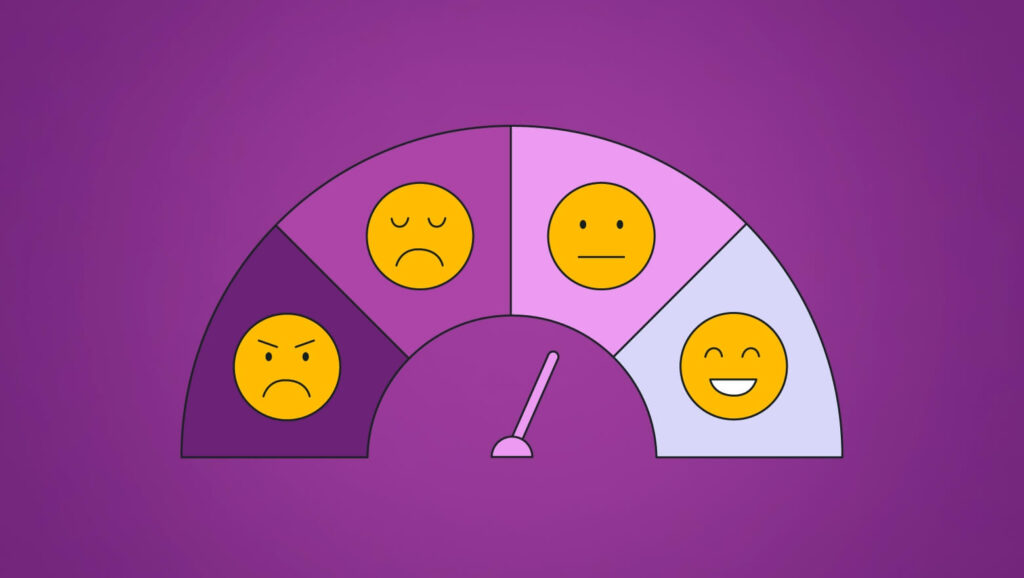
A sentiment analysis tool is a software application that uses natural language processing (NLP) techniques to determine the sentiment or emotional tone behind a piece of text. Sentiment analysis, also known as opinion mining, involves analyzing text data to classify the expressed sentiment as positive, negative, or neutral. These tools are capable of processing large volumes of text data from various sources, such as social media, customer reviews, surveys, and more, to extract meaningful insights about public opinion and sentiment.
Key Components of Sentiment Analysis Tools
- Text Preprocessing: This involves preparing the text by removing noise, dividing it into sentences, and normalizing words.
- Feature Extraction: It includes extracting relevant characteristics from the text that indicate sentiment, like specific words, phrases, or linguistic patterns.
- Model Training: This step uses machine learning or deep learning algorithms to train a model on labelled data, where the sentiment of each text is known.
- Sentiment Classification: The trained model is applied to new, unseen text to classify the sentiment.
- Output Interpretation: This step provides a clear output, such as sentiment labels (positive, negative, neutral) and confidence scores.
Why Sentiment Analysis is Important?
1. Understanding Customer Sentiment
- Customer Feedback: Businesses need to analyze customer reviews, feedback, and support tickets to gauge customer satisfaction and identify areas for improvement.
- Brand Perception: Monitoring social media and online discussions helps companies understand public perception of their brand and products.
2. Market Research
- Trend Analysis: By analyzing sentiment trends over time, businesses can identify emerging market trends and consumer preferences.
- Competitor Analysis: Sentiment analysis can be used to compare public sentiment towards competitors, providing insights into market positioning.
3. Improving Products and Services
- Product Development: Insights from sentiment analysis can guide product development by highlighting features that customers love or dislike.
- Service Enhancement: Companies can improve customer service by addressing common issues identified through sentiment analysis.
4. Monitoring Public Opinion
- Political Analysis: Sentiment analysis can be applied to political speeches, news articles, and social media to understand public opinion on political issues and candidates.
- Crisis Management: During a crisis, organizations can monitor sentiment to manage public relations and respond appropriately.
5. Enhancing Marketing Strategies
- Targeted Marketing: By understanding the sentiment of different customer segments, businesses can tailor their marketing strategies to specific audiences.
- Campaign Evaluation: Sentiment analysis helps evaluate the effectiveness of marketing campaigns by analyzing public reaction.
6. Academic and Research Applications
- Social Science Research: Researchers use sentiment analysis to study social phenomena, public opinion, and communication patterns.
- Psychological Studies: Analyzing sentiment in text data can provide insights into emotional and psychological states.
Tools and Technologies
1. Python
Definition: Python is a high-level, interpreted programming language known for its readability and ease of use. It supports multiple programming paradigms, including procedural, object-oriented, and functional programming.
Role in Code: The entire script is written in Python, leveraging its powerful libraries for natural language processing and data manipulation.
2. Hugging Face Transformers
Definition: Hugging Face Transformers is an open-source library that provides pre-trained models for natural language processing (NLP) tasks such as text classification, question answering, and sentiment analysis.
Role in Code: The transformers library is used to load a pre-trained sentiment analysis model through the pipeline function. This model is then used to analyze the sentiment of the provided sentence.
3. Pandas
Definition: Pandas is an open-source data manipulation and analysis library for Python. It provides data structures like DataFrame and Series for handling and analyzing structured data.
Role in Code: Although not explicitly used in the provided code, Pandas is typically used in data analysis tasks to manage, clean, and analyze data efficiently. In a more extended version of the sentiment analysis tool, Pandas could be used to handle datasets containing multiple sentences for batch sentiment analysis.
4. LangChain
Definition: LangChain is a framework designed for developing applications that utilize language models. It provides tools and components to manage interactions with language models, streamline workflows, and build robust NLP applications.
Role in Code: The LangChain framework, though not explicitly shown in the provided code, could be integrated to manage more complex workflows and interactions with the language model, particularly in more advanced or production-level implementations.
5. Spyder IDE
Definition: Spyder is an open-source integrated development environment (IDE) for scientific programming in Python. It features an interactive console, a powerful editor, and tools for data exploration and visualization.
Role in Code: The code is intended to be run in the Spyder IDE, providing a user-friendly interface for writing, debugging, and executing Python scripts.
6. Anaconda
Definition: Anaconda is a free and open-source distribution of Python and R for scientific computing. It simplifies package management and deployment. Anaconda comes with a collection of over 1,500 packages and a package manager called conda.
Role in Code: The entire development environment, including Python, Pandas, and Spyder, is managed through Anaconda. It ensures that all dependencies are correctly installed and compatible with each other.
Sentiment Analysis Code Explanation:
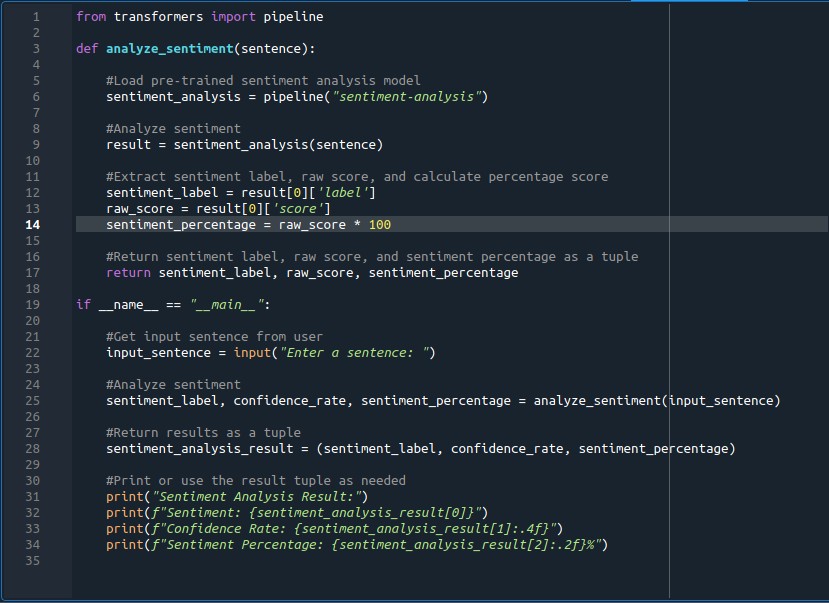
Here is the code breakdown of the sentiment analysis tool with proper tools and technologies as follows:
Step-by-Step Explanation
Setting Up the Anaconda Environment
- Download and Install Anaconda
- Create a New Environment (Use Linux, ‘terminal’)
conda create -n sentiment_analysis python=3.8
- Activate the Environment (Use Linux, ‘terminal’)
conda activate sentiment_analysis
- Install Required Libraries (Use Linux, ‘terminal’)
conda install pandas
conda install -c conda-forge transformers
conda install spyder
- Run Spyder (Use Linux, ‘terminal’)
spyder
Importing the ‘pipeline’ function

- This imports the
pipelinefunction from the Hugging Face Transformers library, which is used to load pre-trained models for various NLP tasks.
Defining the ‘analyze_sentiment’ function
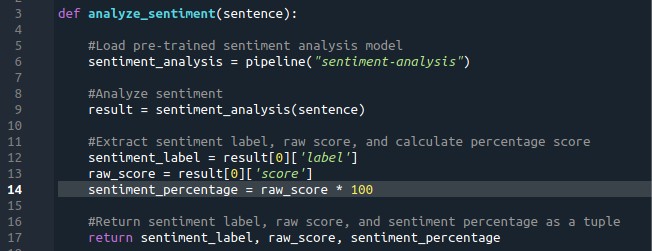
- This function takes a text string (
sentence) as input and uses a pre-trained sentiment analysis model to classify the sentiment. - It returns the sentiment label, raw confidence score, and the sentiment percentage.
Running the sentiment analysis if the script is executed directly:
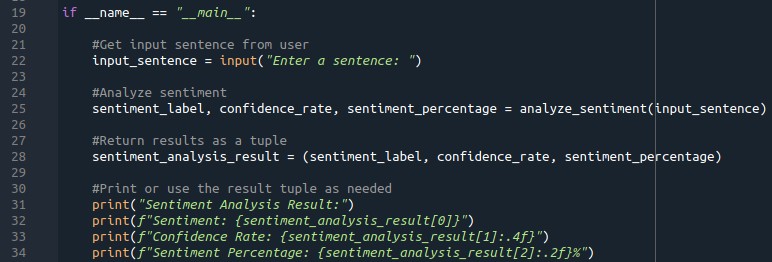
- This block ensures that the sentiment analysis is performed when the script is run directly.
- It takes user input, analyses the sentiment, and prints the results.
Conclusion
This sentiment analysis tool leverages Python and Hugging Face Transformers to analyze the sentiment of a given text. While Pandas and LangChain are not explicitly used in the provided code, they offer valuable functionalities for more advanced data manipulation and language model interactions. The Spyder IDE, managed through the Anaconda environment, facilitates the development and debugging of this Python script, ensuring all dependencies are properly handled.