


Have you ever wondered what happens to all objects you create in your C# applications? Where do they go when you’re done with them? And more importantly, I don’t have to manually allocate and free memory, so who’s cleaning up the mess?
The answer is Garbage Collection!
What is Garbage Collection?
Garbage Collection is like having an automatic cleaning service for your application’s memory. When you create objects in C#, they take up space in memory. When you’re done with them, the Garbage Collector automatically removes them and frees up that space.
The beauty of GC is that you don’t have to worry about memory leaks or forgetting to clean up. The .NET runtime handles it for you!
How Garbage Collection Works in C#
When you create an object with new, it’s stored on the managed heap. The GC keeps track of which objects are still in use. Once an object is no longer reachable — meaning your code has no reference to it — the GC can reclaim that memory.
The GC runs in the background (or when necessary) and follows a simple principle:
“If nothing references an object, it’s garbage.”
void Example()
{
    var user = new User("Harry"); // allocated on heap
    Console.WriteLine(user.Name);
} // user is no longer referenced -> GC will clean it up eventually
What Happens During a GC Cycle
When the garbage collector runs, it performs three main steps:
- Mark : The GC starts from roots — variables on the stack, static fields, and CPU registers — and marks all reachable objects.
Anything not reachable after this step is considered garbage. - Relocate (Update References) : If the GC decides to compact the heap, it moves surviving objects together to remove gaps. All references to moved objects are then updated automatically by the runtime.
- Compact :Memory left behind by dead objects is reclaimed and added back to the free space. Compaction keeps memory contiguous, improving cache performance.
Before GC: [live][dead][live][dead][dead]
After GC: [live][live]__________
The Three Generations
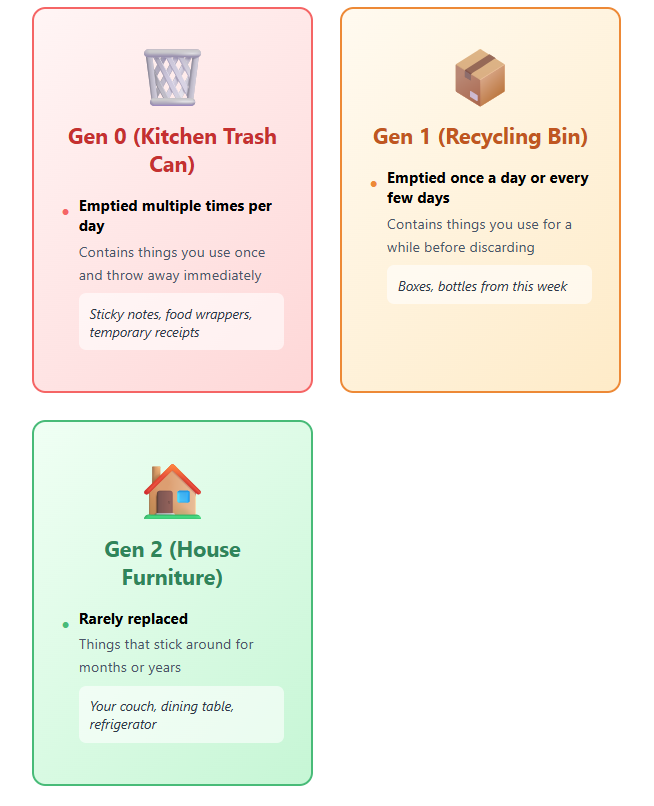
To make garbage collection efficient, Objects are divided into three generations based on the frequency of their garbage collection to achieve automatic memory management.
- Generation 0 : This generation is the youngest and contains short-lived objects. An example of a short-lived object is a temporary variable. Garbage collection occurs most frequently in this generation. Objects that survive after a collection of Generation 0 will be promoted to Generation 1
- Generation 1 : This generation contains short-lived objects and serves as a buffer between short-lived objects and long-lived objects. If a collection of generation 0 doesn’t reclaim enough memory for the application to create a new object, the garbage collector can perform a collection of generation 1 and then generation 2. Objects in generation 1 that survive collections are promoted to generation 2.
- Generation 2 : This generation contains long-lived objects. An example of a long-lived object is an object in a server application that contains static data that’s live for the duration of the process. Objects in generation 2 that survive a collection remain in generation 2 until they’re determined to be unreachable in a future collection.
| Generation | Collection Frequency | Examples |
| Generation 0 | Very frequent | Loop variables, temp strings, calculations |
| Generation 1 | Moderate | Session data, request objects, temporary caches |
| Generation 2 | Rare | Static fields, singletons, app configuration |
Hope that the simple visual diagram below will give you an overview about three generations :
Let that sink in!
Obviously, the code will be indispensable. I will show you some basic examples of GC and memory changes
Generation 0: In this example, I create 10,000 temporary string objects that are used once and discarded.
Watch how efficiently the GC reclaims this memory!
    static void DemonstrateGCGen0()
    {
        Console.WriteLine("--- Gen 0 Examples (Short-lived) ---");

        for (int i = 0; i < 10000; i++)
        {
            var temp = $"Temporary string {i}";
            if(i == 9999)
            {
                Console.WriteLine("Created 10,000 temporary objects");
                Console.WriteLine($"Total amount of memory currently allocated {GC.GetTotalMemory(false)}");
            }
        }
        GC.Collect(0);
        GC.WaitForPendingFinalizers();
        Console.WriteLine("Collection for Generation 0 completed.");
        Console.WriteLine($"Total amount of memory currently allocated {GC.GetTotalMemory(false)}");
        Console.WriteLine($"The number of time GC has occurred for Gen 0 collections: {GC.CollectionCount(0)}");
    }

Generation 1: In this example, I create a SessionData object that survives Gen 0 collection and gets promoted to Gen 1, while thousands of temporary objects are collected.
    class SessionData
    {
        public List<string> Items { get; set; } = [];
        public DateTime Created { get; set; } = DateTime.Now;
    }

    static void DemonstrateGCGen1()
    {
        Console.WriteLine("--- Gen 1 Examples (Medium-lived) ---");

        // Create an object that will survive Gen 0 collection
        var sessionData = new SessionData();
        sessionData.Items.Add("Item 1");
        Console.WriteLine("Add session data items for Generation 1");

        // Create lots of Gen 0 garbage
        for (int i = 0; i < 5000; i++)
        {
            var temp = $"Temporary string {i}";
            if(i == 4999)
            {
                Console.WriteLine("Created 5,000 temporary objects");
                Console.WriteLine($"Total amount of memory currently allocated {GC.GetTotalMemory(false)}");
            }
        }

        // Force Gen 0 collection - sessionData survives and moves to Gen 1
        GC.Collect(0);
        Console.WriteLine("Collection for Generation 0 completed.");
        GC.WaitForPendingFinalizers();
        Console.WriteLine($"Total amount of memory currently allocated {GC.GetTotalMemory(false)}");

        // Check which generation sessionData is in
        int generation = GC.GetGeneration(sessionData);
        Console.WriteLine($"SessionData is now in Generation: {generation}");

        // Continue using sessionData
        sessionData.Items.Add("Item 2");
        Console.WriteLine("Session Data Items:");
        foreach (var item in sessionData.Items)
        {
            Console.WriteLine(item);
        }
    }
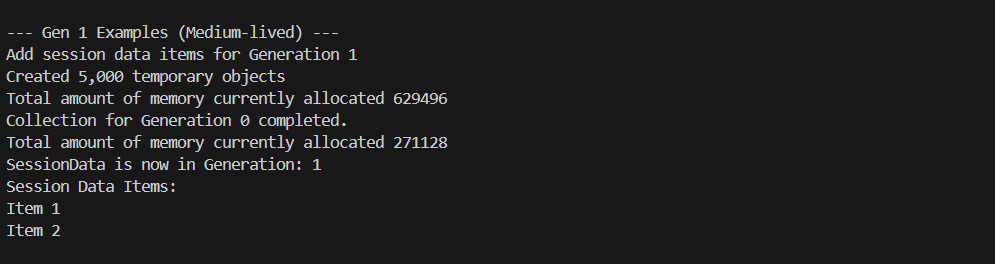
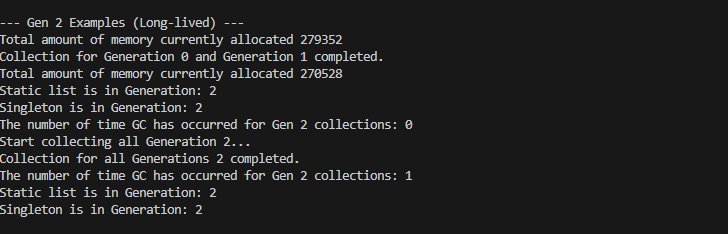
Generation 2: In this example, I demonstrate static data and singleton patterns that become Gen 2 objects. Notice that even after a full Gen 2 collection, these objects remain because they’re still in use – the GC only collects unreachable objects!
    private static List<string> _applicationData = [];
    class AppConfiguration
    {
        private static AppConfiguration? _instance;
        public static AppConfiguration Instance => _instance ??= new AppConfiguration();

        public Dictionary<string, string> Settings { get; }

        private AppConfiguration()
        {
            Settings = new Dictionary<string, string>();
        }
    }
    static void DemonstrateGCGen2()
    {
            Console.WriteLine("--- Gen 2 Examples (Long-lived) ---");

            // Static data survives all collections
            _applicationData.Add("Application started");
            _applicationData.Add("Configuration loaded");

            // Create a singleton-like object
            var appConfig = AppConfiguration.Instance;
            appConfig.Settings["MaxUsers"] = "1000";

            Console.WriteLine($"Total amount of memory currently allocated {GC.GetTotalMemory(false)}");
            // Force multiple collections
            GC.Collect(0);
            GC.Collect(1);
            GC.WaitForPendingFinalizers();
            Console.WriteLine("Collection for Generation 0 and Generation 1 completed.");
            Console.WriteLine($"Total amount of memory currently allocated {GC.GetTotalMemory(false)}");

            int staticGeneration = GC.GetGeneration(_applicationData);
            int singletonGeneration = GC.GetGeneration(appConfig);

            Console.WriteLine($"Static list is in Generation: {staticGeneration}");
            Console.WriteLine($"Singleton is in Generation: {singletonGeneration}");
            Console.WriteLine($"The number of time GC has occurred for Gen 2 collections: {GC.CollectionCount(2)}");
            Console.WriteLine("Start collecting all Generation 2...");
            GC.Collect(2);
            GC.WaitForPendingFinalizers();
            Console.WriteLine("Collection for all Generations 2 completed.");
            Console.WriteLine($"The number of time GC has occurred for Gen 2 collections: {GC.CollectionCount(2)}");
            staticGeneration = GC.GetGeneration(_applicationData);
            singletonGeneration = GC.GetGeneration(appConfig);
            Console.WriteLine($"Static list is in Generation: {staticGeneration}");
            Console.WriteLine($"Singleton is in Generation: {singletonGeneration}");
    }
Conclusion
Don’t obsess over GC optimization unless you have a proven performance problem. Write clean, readable code first. Let the garbage collector do its job. And when you do need to optimize, you now have the knowledge to understand what’s happening under the hood.
The beauty of modern C# is that you can build amazing applications without ever manually managing memory. But knowing how the garbage collector works? That’s what separates good developers from great ones.
Now go forth and create – your garbage collector has your back!