


INTRODUCTION
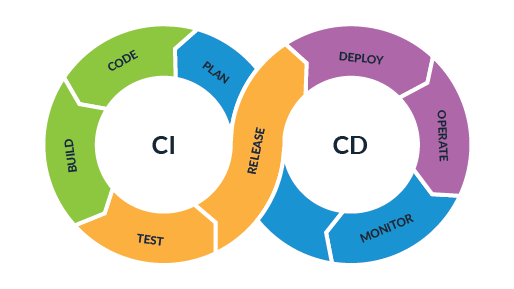
CI/CD, or continuous integration and continuous delivery is a set of practices that automate the software development process, from code development to production deployment:
- Continuous integration (CI): Developers frequently merge code changes into a shared repository, and automated tests ensure the reliability of the merged code.
- Continuous delivery (CD): The application is automatically released to its intended environment.
DevOps Principles and CI/CD for .NET
DevOps is a cultural and operational shift that bridges development (Dev) and operations (Ops) teams, promoting collaboration, automation, and continuous feedback. For .NET developers, implementing CI/CD aligns with these principles by:
- Automating the build, test, and deployment processes.
- Reducing manual effort and human error.
- Enabling faster delivery cycles and reliable releases.
Key DevOps Goals with GitHub Actions in .NET:
- Collaboration: Integrate workflows to trigger notifications, update deployment statuses, and ensure transparency among teams.
- Consistency: Automate repetitive tasks like builds and deployments to achieve predictable outcomes.
- Scalability: Use workflows to handle growing project complexities.
- Feedback: Run tests early and often to identify and fix issues before deployment.
Role of GitHub Actions in DevOps for .NET
GitHub Actions acts as the automation engine for DevOps workflows, handling:
- Continuous Integration (CI): Automating builds and tests for .NET applications.
- Continuous Delivery/Deployment (CD): Deploying .NET apps to environments like Azure, AWS, or on-premises servers.
- Infrastructure as Code (IaC): Managing infrastructure configurations using tools like Terraform or Azure ARM templates.
- Monitoring and Notifications: Integrating with monitoring tools and communication platforms to track workflow outcomes.
GitHub Actions makes it easy to:
- Securely manage secrets and credentials.
- Define workflows using YAML files.
- Integrate with .NET ecosystem tools like NuGet, MSBuild, and Azure Pipelines.
Building CI/CD Pipelines for .NET Applications
In DevOps, CI/CD pipelines ensure that every code change is automatically:
- Integrated: Merged and built.
- Tested: Validated for quality.
- Deployed: Released to the desired environment.
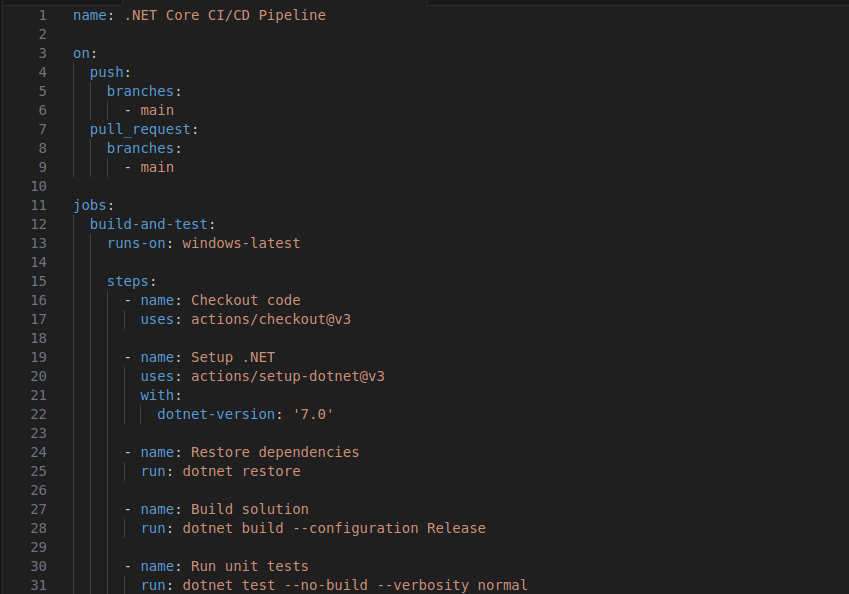
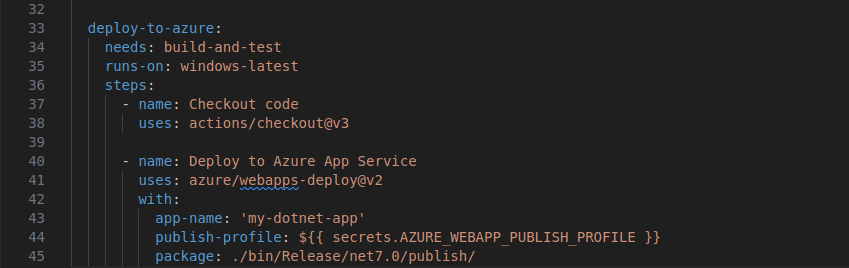
Example: End-to-End CI/CD Pipeline for a .NET Core API ( in yaml)
Workflow File: .github/workflows/dotnet-ci-cd.yml
How It Aligns with DevOps:
- Automation: The workflow automates building, testing, and deploying a .NET Core API.
- Transparency: Logs provide visibility into each pipeline step, fostering team collaboration.
- Quality Assurance: Tests ensure only validated code progresses to deployment.
- Scalability: Easily adapt workflows for larger projects or multiple environments.
DevOps Practices with GitHub Actions for .NET
1. Infrastructure as Code (IaC)
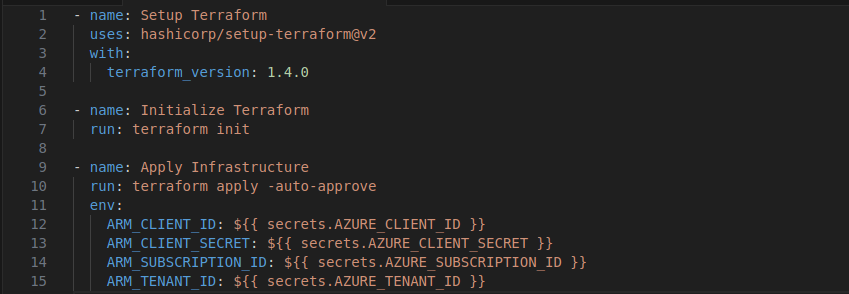
Using tools like Terraform, ARM templates, or Bicep, you can define and provision Azure infrastructure for .NET apps directly from GitHub Actions.
Example: Provisioning Azure Resources with Terraform (in yaml)
2. Automated Testing
Automating testing is a key DevOps practice. For .NET, GitHub Actions supports:
- Unit Tests: Using
dotnet test. - Integration Tests: Running tests that simulate real-world scenarios.
- Code Coverage: Analyzing test coverage with tools like Coverlet.
Example: Test Coverage with Coverlet ( in yaml)

3. Artifact Management
In DevOps, build artifacts (e.g., binaries, Docker images) must be stored and reused. GitHub Actions integrates with NuGet and Docker registries to store and manage .NET build artifacts.
Example: Publishing a NuGet Package ( in yaml)

Secure Deployment with GitHub Actions
Security is a core DevOps concern. GitHub Actions provides:
- Secrets Management: Store sensitive data like API keys, connection strings, and publish profiles securely.
- Environment Permissions: Restrict deployment access to specific branches or environments.
Example: Using Secrets for Secure Deployments ( in yaml)

Monitoring and Feedback in DevOps
DevOps emphasizes continuous feedback. GitHub Actions can integrate with monitoring tools like Azure Monitor, Slack, or Teams to provide real-time updates on pipeline status.
Example: Notifications via Slack( in yaml)

DevOps Best Practices for .NET with GitHub Actions
- Version Control for Workflows: Store and version control workflow files alongside application code.
- Keep Pipelines Modular: Divide workflows into reusable components.
- Optimize Builds: Use caching for dependencies, such as NuGet packages.
- Environment Parity: Maintain consistency across development, staging, and production.
Real-World Example: .NET Core API Deployment
A typical DevOps workflow for a .NET Core API:
- Developers push code to a feature branch.
- GitHub Actions runs CI workflows to build and test the code.
- Upon approval, the code merges into
main, triggering the CD workflow. - The application is deployed to Azure App Service, and monitoring tools provide feedback.
Conclusion
In DevOps, GitHub Actions for .NET streamlines CI/CD, automates routine tasks, and ensures collaboration and consistency across teams. Whether deploying to Azure, running tests, or provisioning infrastructure, GitHub Actions aligns perfectly with DevOps principles, enabling faster and more secure delivery pipelines.