


Service and Resource Management in the Cloud ensures we know what we use and why. Afterward, we will have strategies to optimize our resources based on our business needs.
Lifecycle Management
Lifecycle management refers to creating, maintaining, and retiring cloud resources in cloud computing. It’s essentially taking care of your cloud infrastructure from the cradle to the grave, ensuring it runs smoothly and efficiently throughout its lifespan.
Resource’s lifecycle
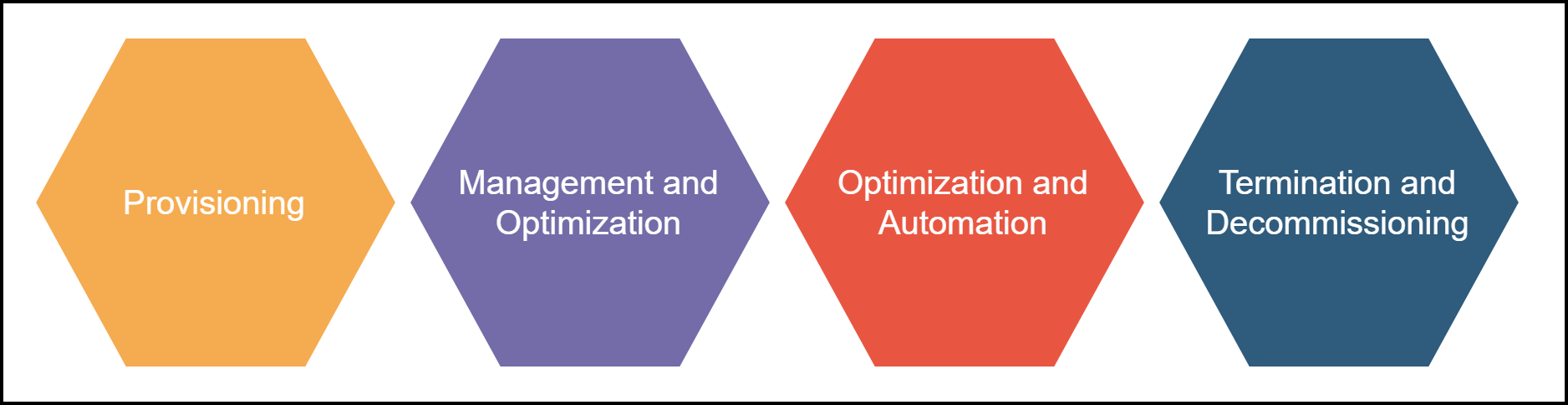
1. Provisioning:
This is the initial stage where you define and request the cloud resources you need. This stage in service and resource management could involve tasks like:
- Selecting the type of cloud service (IaaS, PaaS, SaaS) based on your requirements.
- Choosing the appropriate instance type, storage capacity, and network bandwidth.
- Configuring security settings and access controls.
- Automating provisioning workflows to streamline repetitive tasks.
2. Management and Optimization:
Once your resources run, we must focus on ongoing management and optimization. So, we can consider the key aspects below:
- Monitoring resource utilization: Keeping track of cloud resources to identify potential bottlenecks or underutilized resources.
- Performance optimization: Fine-tuning configurations and scaling resources (up or down) to ensure optimal application performance.
- Cost management: Utilizing tools and strategies to identify and eliminate wasteful spending, like rightsizing or leveraging spot instances.
- Security management: Regularly patch vulnerabilities, apply best practices, and maintain compliance with relevant regulations.
3. Optimization and Automation:
A key aspect of lifecycle management is incorporating automation wherever possible. So, this can involve:
- Automating scaling based on predefined rules to handle surges in workload.
- Automating patching and security updates to ensure timely protection.
- Automating resource provisioning and configuration for faster deployment.
4. Termination and Decommissioning:
When a cloud resource is no longer needed, proper decommissioning is crucial. Thus, we need to have a plan in service and resource management to follow below:
- Identifying resources that are no longer in use.
- Backing up any critical data before deletion.
- Terminating or deleting the cloud resource to avoid unnecessary costs.
- Maintaining an audit log of decommissioned resources for compliance purposes.
Benefits of Effective Cloud Lifecycle Management
- Cost Optimization: You can significantly reduce cloud spending by identifying underutilized resources and automating processes.
- Improved Performance: Proactive monitoring and optimization ensure resources are allocated efficiently, leading to smoother application performance.
- Enhanced Security: Automated patching and security best practices minimize vulnerabilities and improve overall cloud security posture.
- Increased Agility: Automation streamlines resource provisioning and decommissioning, allowing faster scaling and adaptation to changing needs.
- Simplified Management: Lifecycle management tools provide a centralized view of your cloud resources, simplifying monitoring and governance.
Tools for Cloud Lifecycle Management
- Most cloud providers offer built-in tools for managing and monitoring resources.
- Cloud management platforms (CMPs) provide multiple providers with a unified resource management interface.
- Infrastructure as code (IaC) tools allow you to define your cloud infrastructure in code, enabling automated provisioning and configuration.
By implementing a robust cloud lifecycle management strategy, you can ensure your cloud resources are used effectively, delivering the performance and security you need while keeping your cloud costs in check.
Managed Services

In cloud computing, managed services refer to outsourcing the management and maintenance of your cloud environment to a third-party provider. Therefore, your internal IT staff focus on more strategic tasks while ensuring your cloud infrastructure runs smoothly and efficiently.
Finally, service and resource management will become easier for your company and team.
What Managed Services Include
- Provisioning and Configuration: Managed service providers (MSPs) can help you set up your cloud infrastructure, including selecting the right services, configuring resources, and ensuring everything runs according to your needs.
- Ongoing Management and Monitoring: MSPs continuously monitor your cloud environment, taking care of tasks like:
- Patching and updating software to address security vulnerabilities.
- Optimizing resource allocation to ensure efficient performance.
- Backing up your data and applications for disaster recovery purposes.
- Troubleshooting any issues that may arise.
- Security Management: Managed security services can provide advanced security expertise, including:
- Implementing security best practices and controls.
- Threat detection and incident response to mitigate security risks.
- Compliance management to ensure adherence to relevant data privacy regulations.
- Support and Help Desk: MSPs typically offer 24/7 support, assisting with any technical issues you encounter in your cloud environment.
Benefits of Managed Services
- Reduced Costs: Managed services can be cost-effective, especially for businesses with limited IT resources. The provider handles routine tasks, allowing your internal IT staff to focus on higher-value activities.
- Improved Performance and Security: MSPs have expertise in optimizing cloud environments and maintaining robust security measures. This can lead to improved performance, stability, and reduced security risks.
- Faster Time to Market: Managed services can help you deploy cloud solutions quicker by handling complex setup and configuration processes.
- Increased Scalability: MSPs can help you scale your cloud resources up or down as your business needs change.
- Access to Expertise: You gain access to the MSP’s expertise in cloud technologies and best practices.
Things to Consider When Choosing a Managed Service Provider
- Experience and Expertise: Look for an MSP with a proven track record and experience in your industry and cloud platform.
- Service Offerings: Ensure the MSP offers the needed services, such as infrastructure management, security services, or application management.
- Scalability: Choose an MSP that can scale its services to meet your growing needs.
- Security and Compliance: Select an MSP with a strong security posture and compliance with relevant regulations.
- Cost Transparency: Get clear pricing information upfront and understand the managed services’ cost structure.
Managed services can be a valuable asset for businesses looking to leverage the cloud without the burden of managing it themselves. By carefully considering your needs and choosing the right MSP, you can gain the expertise, resources, and peace of mind to optimize your cloud environment and focus on your core business objectives.
Rightsizing Resources
Rightsizing resources in cloud computing is optimizing the amount of cloud resources you use to match your workload requirements perfectly. It’s essentially balancing having enough resources to ensure smooth operation and avoiding unnecessary costs by using more than you need. Here’s a breakdown of the critical aspects of rightsizing:
Why Rightsizing Matters:
- Cost Optimization: Cloud bills can balloon quickly if you’re overprovisioning resources. Rightsizing helps eliminate waste and keeps your cloud costs under control.
- Improved Performance: Underprovisioned resources can lead to sluggish application performance and bottlenecks. Rightsizing ensures you have the resources needed for optimal performance.
- Increased Efficiency: By efficiently allocating resources, you can ensure your cloud environment is operating at peak effectiveness.
- Flexibility and Scalability: Rightsizing allows you to quickly scale resources up or down to accommodate changing workloads.
How Rightsizing Works
- Assessment: The first step involves analyzing your cloud resource usage. This includes monitoring metrics like CPU utilization, memory usage, network bandwidth, and storage consumption.
- Identification: Based on the analysis, you can identify opportunities for rightsizing. This could involve:
- Downsizing: Scaling down underutilized resources to a more appropriate size.
- Upsizing: Scaling up resources that are consistently overloaded.
- Reallocation: Reallocating resources from underutilized instances to busier ones.
- Implementation: Once you’ve identified opportunities, you can implement the changes. Cloud providers typically offer tools for easy resource scaling.
- Monitoring and Continual Improvement: Rightsizing is an ongoing process. It’s essential to continuously monitor your resource usage and adjust your allocation as needed.
Strategies for Effective Rightsizing
- Utilize Cloud Monitoring Tools: Most cloud providers offer built-in monitoring tools that provide insights into resource utilization. These tools can help you identify trends and potential areas for optimization.
- Leverage Automation: Automate scaling rules to adjust resource allocation based on predefined thresholds. This helps ensure efficient resource utilization even during fluctuating workloads.
- Consider Different Instance Types: Cloud providers offer various instance types with CPU, memory, and storage configurations. Choose the type that best suits your specific workload requirements.
- Explore Reserved Instances and Spot Instances: Reserved instances offer discounts for committing to upfront payment for resources. Spot instances are unused compute capacities available at a lower price but can be interrupted. Evaluate these options for cost savings if they align with your needs.
Benefits of Rightsizing
- Reduced Cloud Costs: Rightsizing can significantly lower your cloud bill by eliminating wasted spending on unused resources.
- Improved Application Performance: Ensuring adequate resources can prevent performance bottlenecks and maintain a smooth user experience.
- Enhanced Scalability and Agility: Rightsizing allows you to quickly scale resources up or down as your needs evolve.
- Increased Sustainability: Efficient resource utilization reduces energy consumption, creating a more sustainable cloud environment.
Summary
By implementing effective service and resource management practices, you can ensure your cloud environment performs at its peak while controlling your cloud costs. Finally, this allows you to focus on your core business objectives and leverage the full potential of the cloud.
References:
- Cloud Optimization – Overall
- Cloud Optimization – Cloud Provider and Technology Selection
- Cloud Optimization – Cost Management
- Cloud Optimization – Performance Tuning
- Cloud Optimization – Security and Compliance
- How the top 10 emerging technologies of 2023 will affect us | World Economic Forum (weforum.org)
- Innovation and Emerging Technologies (worldscientific.com)
- NIST Cloud Computing Reference Architecture | NIST
- NIST Cloud Computing Standards Roadmap
- Why is Cloud Optimization Important? (densify.com)
- Cloud Optimization: How to Take Control of Your Cloud Spend (intellias.com)
- What is Cloud Optimization? Performance + Management (couchbase.com)
- Introduction To Cloud Optimization (bunnyshell.com)
- Cloud Security Compliance: 5 Frameworks and 4 Best Practices – Spot.io
- Cloud Security Optimization: A Process for Continuous Improvement | Tripwire
- Cloud Optimization: Why It’s Important & 6 Critical Best Practices (anodot.com)