



Introduction
In today’s world, effective data management is very important for businesses to harness the power of their data. Google Cloud Platform (GCP) offers a comprehensive suite of tools and services designed to handle various aspects of data management. This blog will explore the key tools and techniques for managing data in GCP.
Overview
GCP provides a suite of tools to manage, process, and analyze data. These tools cater to various needs. The scalability and flexibility of GCP make it suitable for businesses of all sizes.
The key components of data management in GCP include:
- Data auditing: Reviewing data access and usage, promoting transparency and accessibility.
- Access control: Managing who has access to data.
- Data quality: Ensuring the accuracy and integrity of data throughout its lifecycle.
- Data governance: Overseeing the security and quality of data in accordance with organizational policies and regulations.
- Encryption and key management: Protecting data at rest and managing encryption keys via services like Cloud Key Management Service.
- Datastore and Memory Store: Utilizing databases for caching, real-time analytics, or session storage.
- Data discovery and classification: Identifying and categorizing data for better management and protection.
Data Storage Solutions
In this section, we will explore multiple data storage options made available to GCP. Lets explore each solution in detail with the code implementation

Cloud Storage

Google Cloud Storage is a scalable object storage service for storing and retrieving any amount of data. It offers multiple storage classes to manage your data efficiently.
Storage Classes:
- Standard: For frequently accessed data.
- Nearline: For data accessed less than once a month.
- Coldline: For data accessed less than once a year.
- Archive: For long-term storage and data archiving.
Creating a Storage Bucket:
To create a storage bucket in GCP, you can use the following Python code:
from google.cloud import storage

def create_bucket(bucket_name):
    client = storage.Client()
    bucket = client.bucket(bucket_name)
    bucket.location = 'US'
    bucket = client.create_bucket(bucket)
    print(f'Bucket {bucket.name} created.')
Uploading and Downloading Files:
Here are functions to upload and download files to and from Google Cloud Storage:
def upload_blob(bucket_name, source_file_name, destination_blob_name):
    client = storage.Client()
    bucket = client.bucket(bucket_name)
    blob = bucket.blob(destination_blob_name)
    blob.upload_from_filename(source_file_name)
    print(f'File {source_file_name} uploaded to {destination_blob_name}.')

def download_blob(bucket_name, source_blob_name, destination_file_name):
    client = storage.Client()
    bucket = client.bucket(bucket_name)
    blob = bucket.blob(source_blob_name)
    blob.download_to_filename(destination_file_name)
    print(f'Blob {source_blob_name} downloaded to {destination_file_name}.')
Cloud SQL

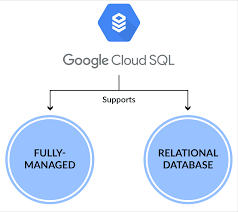
Google Cloud SQL is a fully-managed relational database service for MySQL, PostgreSQL, and SQL Server. It offers automated backups, replication, and scaling, making it an ideal choice for managing relational databases in the cloud.
Key Features:
- Managed Service: Automated backups, replication, and updates.
- Integration: Easily integrates with other GCP services.
- Security: Provides built-in security and compliance.
Example: Setting Up a Cloud SQL Instance:
- Create a Cloud SQL instance:
gcloud sql instances create my-instance --database-version=POSTGRES_13 --cpu=2 --memory=7680MB --region=us-central1- Connecting to Cloud SQL: Here is a Python function to connect to a Cloud SQL instance:
import sqlalchemy

def connect_to_cloud_sql(instance_connection_name, db_user, db_pass, db_name):
    pool = sqlalchemy.create_engine(
        sqlalchemy.engine.url.URL(
            drivername='mysql+pymysql',
            username=db_user,
            password=db_pass,
            database=db_name,
            query={
                'unix_socket': f'/cloudsql/{instance_connection_name}'
            }
        )
    )
return pool- Create a database and a table:
-- Connect to the Cloud SQL instance
gcloud sql connect my-instance --user=postgres

-- Create a new database
CREATE DATABASE example_db;

-- Switch to the new database
\c example_db

-- Create a new table
CREATE TABLE example_table (
    id SERIAL PRIMARY KEY,
    name VARCHAR(50),
    created_at TIMESTAMP DEFAULT CURRENT_TIMESTAMP
);

-- Insert data
INSERT INTO example_table (name) VALUES ('Sample Data');
Cloud Bigtable
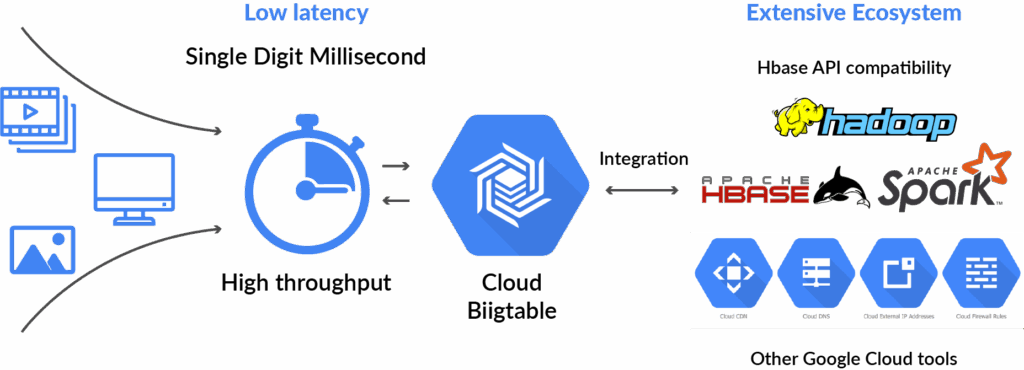
Cloud Bigtable is a high-performance NoSQL database service for large analytical and operational workloads.
Key Features:
- Scalability: Scales to handle petabytes of data.
- Performance: Optimized for low latency.
- Example: Writing Data to Bigtable; Following is a C# code snippet to write data to Bigtable. You need to add the required nuget packages for GCP to be able to perform Bigtable operations.
using Google.Cloud.Bigtable.V2;
using Google.Protobuf;
using System;

public class BigtableSample
{
    public static void WriteRow(string projectId, string instanceId, string tableId)
    {
        BigtableClient client = BigtableClient.Create();
        TableName tableName = new TableName(projectId, instanceId, tableId);
        Mutation mutation = new Mutation { SetCell = new Mutation.Types.SetCell { FamilyName = "cf1", ColumnQualifier = ByteString.CopyFromUtf8("greeting"), Value = ByteString.CopyFromUtf8("Hello World!"), TimestampMicros = -1 } };
        client.MutateRow(tableName, ByteString.CopyFromUtf8("rowKey1"), mutation);
        Console.WriteLine("Row written successfully.");
    }
}
Data Processing & Analysis
Dataflow
Dataflow is a fully-managed service for stream and batch data processing.
Key Features:
- Unified Programming Model: Supports both stream and batch processing.
- Autoscaling: Automatically scales resources based on load.
- Integrated Monitoring: Provides built-in monitoring and logging.
BigQuery
BigQuery is a fully-managed, serverless data warehouse that enables super-fast SQL queries using the processing power of Google’s infrastructure. It is designed for large-scale data analysis and offers features like real-time analytics, machine learning integration etc.
Setting Up BigQuery: To create a dataset in BigQuery, use the following Python code:
from google.cloud import bigquery

def create_dataset(dataset_name):
    client = bigquery.Client()
    dataset_id = f'{client.project}.{dataset_name}'
    dataset = bigquery.Dataset(dataset_id)
    dataset.location = 'US'
    dataset = client.create_dataset(dataset)
    print(f'Dataset {dataset.dataset_id} created.')
Running Queries:
def run_query(query):
    client = bigquery.Client()
    query_job = client.query(query)
    results = query_job.result()
    for row in results:
        print(row)
Best Practices
- Design for Scalability: Ensure your data architecture can scale with your business needs. Utilize GCP services that automatically scale, such as BigQuery and Cloud Bigtable.
- Use Managed Services: Leverage GCP’s managed services to reduce operational overhead. Managed services like Cloud SQL, Cloud Dataproc, and Cloud Storage provide built-in scalability, security, and maintenance.
- Implement Data Governance: Establish policies and procedures to manage data access, quality, and security. Use tools like Data Catalog to manage and discover data, and Cloud IAM to enforce access controls.
- Monitor and Optimize: Continuously monitor your data systems and optimize for performance and cost. Use tools like Stackdriver for monitoring and logging, and set up alerts for unusual activity.
- Optimize Cost: Use GCP’s cost management tools to track spending and optimize resource usage. Utilize budget alerts and reports to stay within budget and reduce unnecessary expenses.
Conclusion
In this blog, we explored various tools and techniques for data management in Google Cloud Platform. We covered Google Cloud Storage for object storage, BigQuery for data warehousing, Cloud SQL for relational databases, and Cloud Datastore for NoSQL databases. Each of these tools offers unique features and capabilities, making GCP a powerful platform for managing data at scale.
References
For further reading, you can refer to the following links:
- Official Google Cloud documentation: https://cloud.google.com/free/?utm_content=text-ad-none-none-DEV_c-CRE_-ADGP_Hybrid+%7C+BKWS+-+PHR+%7C+Txt+~+GCP_General_gcp_main
- GCP Data Governance: https://cloud.google.com/blog/products/data-analytics/data-governance-in-the-cloud-part-2-tools
- GCP Data Analytics: https://cloud.google.com/docs/data