


Azure Durable Functions extend the capabilities of Azure Functions to handle stateful workflows, offering significant advantages for managing long-running, complex processes. This blog delves into what sets Azure Durable Functions apart from standard Azure Functions and explores how they utilize Azure Storage accounts internally.
Introduction to Azure Durable Functions
Azure Durable Functions provide a framework for writing stateful functions in a serverless compute environment. They enable developers to define workflows that include long-running operations, human interactions, and external system calls, with the state automatically managed by the Azure platform.
Azure Durable Functions Vs Azure Functions ⚔️
1. Stateful vs. Stateless
- Azure Functions: These are stateless by nature, meaning each function execution is independent, and no state is maintained between invocations. They are best suited for simple, short-lived operations.
- Azure Durable Functions: These are inherently stateful, allowing the preservation of state between function calls. This makes them ideal for orchestrating complex workflows that require state management over time.
2. Workflow Orchestration
- Azure Functions: Typically execute individual tasks and rely on external systems or services to manage workflow orchestration.
- Azure Durable Functions: Include built-in workflow orchestration capabilities, allowing developers to define workflows directly in code using the orchestrator function. This function coordinates the execution of multiple activity functions and manages their state.
3. Long-Running Operations
- Azure Functions: Not designed for long-running operations due to their stateless nature and execution time limits.
- Azure Durable Functions: Specifically designed to handle long-running operations by maintaining state, enabling workflows that can span hours, days, or even months.
4. Error Handling and Retries
- Azure Functions: Require custom implementation for error handling and retry logic.
- Azure Durable Functions: Provide built-in support for error handling and retries, simplifying the management of workflow reliability.
Components of Azure Durable Functions🧩
- Orchestrator Function: Defines the workflow and coordinates the calling of activity functions. It manages state transitions and ensures the workflow progresses correctly.
- Activity Function: Represents the individual tasks or actions within the workflow. These are the workhorses that perform specific operations.
- Client Function: Triggers the orchestrator function. This can be initiated by an HTTP request, timer, or other supported triggers.
- Durable Entities: Allow for the modeling and management of complex state objects that persist beyond the lifetime of the orchestration.
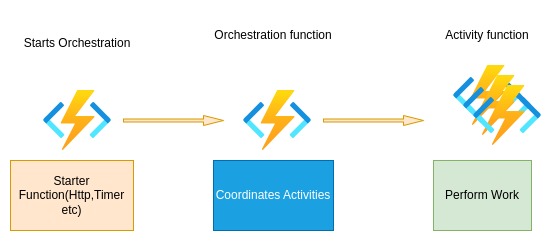
How Azure Durable Functions Utilize Azure Storage Accounts to Perform Operations
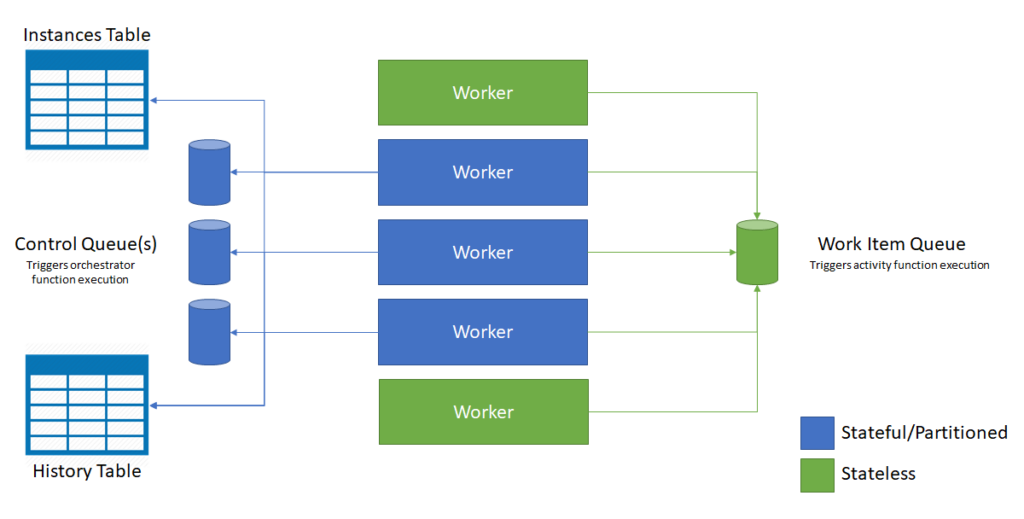
Azure Durable Functions rely heavily on Azure Storage accounts to manage state, checkpoints, and communication between functions. Here’s a detailed look at how they use storage accounts internally:
1. Task Hubs
Durable Functions utilize a concept called Task Hubs, which are logical containers for orchestrations and activities. Task Hubs are backed by Azure Storage queues, tables, and blobs.
2. Storage Queues
- Orchestration State: Azure Storage queues are used to manage the state of orchestrations. When an activity function completes, a message is placed on a queue to notify the orchestrator function of the result.
- Activity Execution: Activity functions also use queues to receive execution requests from the orchestrator.
3. Storage Tables


- State Persistence: The state of orchestrator functions is stored in Azure Table storage. Each orchestration instance is represented as a row in a table, with the current state, history, and inputs/outputs persisted as properties.
- History Tracking: Table storage keeps a detailed history of each orchestration instance, including the status of activity function executions, errors, and retries.
4. Storage Blobs
- Large Data Handling: For workflows that involve large data payloads, Azure Storage blobs are used to store these payloads, ensuring efficient handling of data that would be too large to fit in table storage.
- Checkpointing: Blobs can also be used for checkpointing state information to ensure resilience and continuity in case of failures or restarts.
Conclusion
Azure Durable Functions offer a powerful framework for building stateful, long-running workflows in a serverless environment. By leveraging Azure Storage accounts, they efficiently manage state, checkpoints, and communication between functions. Understanding the differences between Azure Functions and Azure Durable Functions, along with their internal use of storage, allows developers to build robust, scalable, and reliable applications.