



Introduction
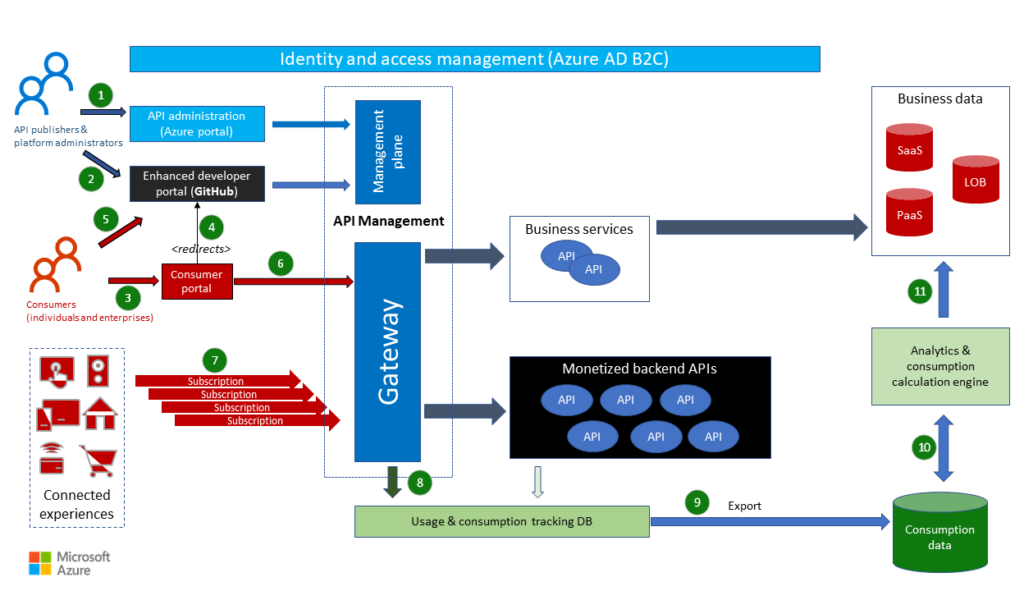
In today’s digital ecosystem, APIs (Application Programming Interfaces) serve as the backbone for seamless integration and communication between different software systems. A well-designed API not only provides functionality but also ensures a smooth and intuitive experience for developers who use it. By leveraging API Management tools and GitHub, you can enhance the developer experience, streamline collaboration, and ensure the reliability of your APIs. This blog will delve into how to design great API developer experiences using these tools.
The Importance of a Great API Developer Experience
A great API developer experience (DX) is crucial for several reasons:
- Adoption: A well-documented and easy-to-use API is more likely to be adopted by developers.
- Efficiency: Good DX minimizes the time and effort developers need to integrate and use the API.
- Satisfaction: A pleasant experience can lead to positive feedback, community support, and advocacy.
- Maintenance: Clear and consistent API design simplifies maintenance and updates.
Key Elements of a Great API Developer Experience
- Clear Documentation: Comprehensive and easy-to-understand documentation is essential.
- Intuitive Design: The API should follow common design patterns and principles.
- Consistent Responses: Consistency in response formats and error handling improves usability.
- Robust Security: Secure APIs protect both the provider and the consumer.
- Support and Community: Providing support channels and fostering a community can greatly enhance the experience.
Leveraging API Management Tools
API Management tools provide a range of functionalities that can significantly improve the developer experience. These tools typically include features for designing, deploying, securing, and monitoring APIs. Popular API Management solutions include:
- Azure API Management: Offers a full-fledged platform for creating consistent and modern API gateways for existing back-end services.
- Amazon API Gateway: Allows developers to create, publish, maintain, monitor, and secure APIs at any scale.
- Google Cloud Endpoints: Provides a simple and flexible way to deploy, protect, and monitor APIs on Google Cloud.
Benefits of API Management
- Centralized Control: Manage all APIs from a single interface.
- Security: Implement security measures such as OAuth, API keys, and rate limiting.
- Analytics: Gain insights into API usage and performance.
- Documentation: Auto-generate and maintain up-to-date API documentation.
Best Practices for Using API Management Tools
- Versioning: Implement API versioning to manage changes and avoid breaking existing integrations.
- Rate Limiting: Protect your APIs from abuse by setting rate limits.
- Monitoring: Continuously monitor API performance and usage.
- Security: Enforce strong authentication and authorization mechanisms.
Enhancing Collaboration with GitHub
GitHub is a powerful platform for code collaboration and version control. It also offers several features that can enhance the API developer experience:
Documentation with GitHub
- GitHub Pages: Host your API documentation directly from your GitHub repository using GitHub Pages. This ensures that your documentation is always up-to-date and easily accessible.
- Markdown Support: Use Markdown files in your repository to create rich, readable documentation.
- Wikis: Create a wiki for your repository to provide additional context and support materials.
Collaboration and Feedback
- Issues and Discussions: Use GitHub Issues and Discussions to track bugs, feature requests, and general feedback from your developer community.
- Pull Requests: Encourage contributions and improvements from the community through pull requests.
- Actions: Automate workflows such as testing, deployment, and documentation updates with GitHub Actions.
Example Workflow
- Repository Setup: Create a GitHub repository for your API. Include a
README.mdfile with an overview and setup instructions. - Documentation: Use GitHub Pages or Markdown files to document your API endpoints, request/response formats, and examples.
- Issues: Track and manage bugs, feature requests, and questions using GitHub Issues.
- Continuous Integration: Set up GitHub Actions to automate testing and deployment.
- Community Engagement: Foster a community around your API through Discussions and encourage contributions via Pull Requests.
Integrating API Management with GitHub
Combining the strengths of API Management tools and GitHub can create a seamless and powerful developer experience. Here’s how you can integrate these tools effectively:
Automated Documentation
- Use tools like Swagger or OpenAPI to generate API documentation automatically.
- Host the generated documentation on GitHub Pages for easy access and version control.
Continuous Integration and Deployment (CI/CD)
- Use GitHub Actions to automate the deployment of your API to your chosen API Management platform.
- Set up automated tests to run on every pull request to ensure code quality and functionality.
Monitoring and Feedback
- Integrate API monitoring tools with GitHub to automatically create issues for detected problems.
- Use GitHub Webhooks to trigger events in your API Management platform, such as updating rate limits or deploying new versions.
Conclusion
Designing a great API developer experience is critical for the success and adoption of your API. By leveraging API Management tools and GitHub, you can provide a seamless, efficient, and enjoyable experience for developers. This not only enhances the usability and reliability of your API but also fosters a thriving developer community around it. Focus on clear documentation, intuitive design, robust security, and active community engagement to create APIs that developers love to use.
By combining the capabilities of API Management tools and GitHub, you can create a robust ecosystem that supports developers at every stage of their journey. Whether they are exploring your API for the first time, integrating it into their applications, or contributing improvements, a well-designed developer experience ensures they have the tools and support they need to succeed.