


Hi folks,
Welcome again! I hope you are doing well. I am thrilled to see you here. In this post, we’ll explore how Storybook can be integrated with Angular projects to improve component-driven development, enhance collaboration, and streamline testing.
Introduction
In the fast-moving world of web development, maintaining a consistent, efficient, and scalable UI can be challenging, especially in large Angular projects. Storybook offers a powerful solution by allowing devs to build, test, and document UI components in isolation. By adding Storybook to your Angular project, you can simplify component development, improve collaboration between teams, and ensure a more efficient testing process. In this blog, we’ll explore how Storybook enhances Angular development and why it’s a must-have tool for your frontend toolkit.
What is a Storybook?
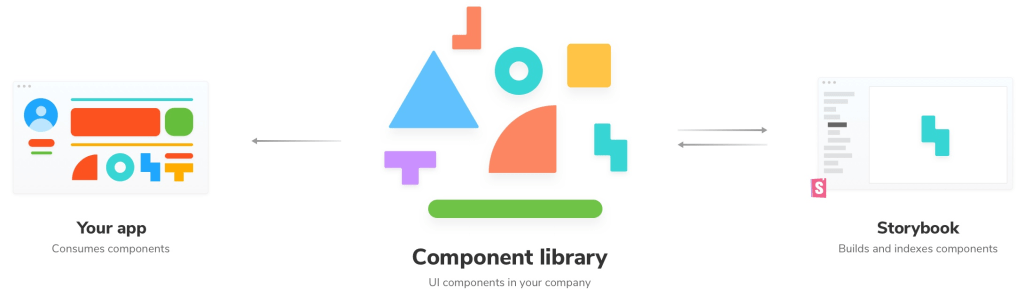
Storybook is an open-source frontend workshop for developing UI components in isolation. It supports many popular frameworks, including React, Vue, and, of course, Angular. It allows you to view each component in a controlled environment, which helps in visual and interaction testing. In essence, Storybook enables you to focus on building one component at a time without worrying about how it interacts with other components in your application. In the end, it also provides help to develop edge cases without running the whole app.
Why Storybook?
Isolation of Components:
In very large and complex angular applications, sometimes components can get entangled with each other, making it difficult to debug. Storybook resolves this issue by allowing you to work with individual components outside the app, providing a clean environment for project development.
Enhanced Collaboration:
Designers and developers can work side by side with Storybook. It provides a visual reference of all the components in the app, making collaboration more efficient, especially when discussing UI/UX.
Improved Testing:
Storybook provides different types of testing like snapshot testing, regression testing and accessibility testing because it’s seamlessly integrated with tools like Jest and Cypress.
Documentation:
It automatically generates documentation for your components. This is particularly useful in larger teams where onboarding new developers and maintaining consistency are important.
Integrating Storybook with Angular
Install Storybook via NPM
npx storybook@latest init --type angularCreate Stories
Stories are the heart of Storybook. A “story” defines how a component should look and behave. These stories are written in a .stories.ts file, and they describe different states or variations of your components.
For example, if you have a button component, you could create a story like this:
import { moduleMetadata } from '@storybook/angular';
import { ButtonComponent } from './button.component';

export default {
  title: 'Button',
  component: ButtonComponent,
  decorators: [
    moduleMetadata({
      declarations: [ButtonComponent],
    }),
  ],
};

export const Primary = () => ({
  template: ``,
});
Run Project
npm run storybookThis will start a local development server at localhost:6006, where you can view and interact with your components.
Add Addons
Storybook’s functionality extends with add-ons, and some popular ones for Angular include:
- Knobs: Allows you to dynamically edit component properties via a UI.
- Actions: Tracks events triggered by user actions.
- Accessibility: Automatically tests components for accessibility issues.
Conclusion
Angular, it is a great tool that provides a structured and efficient way to develop UI components. This isolates each component, it ensures consistency, reusability, and testability across your project. Whether you’re part of a big team or working on your own, Storybook can simplify your development process and help you focus on creating high-quality frontend components.
Try Storybook in your next Angular project, and see how it transforms your development process!
Hey, let’s stay in touch!
If you liked this blog, please share it with your friends and colleagues. Connect with FE competency on LinkedIn to read more about such topics.