


Data aggregation and grouping are crucial for data analysis, allowing us to calculate summaries and find patterns in data. Pandas makes these tasks easy and powerful with its built-in grouping and aggregation functions.
Introduction
In this blog, we’ll cover how to:
- Use the
groupbyfunction for grouping data. - Perform basic aggregations like
sum,mean, andcount. - Work with multiple aggregations on multiple columns.
- Use custom aggregation functions.
- Leverage advanced grouping with
pd.Grouperand hierarchical indexing.
We’ll be using a sample dataset to work through each of these concepts.
Setting Up Your Environment and Dataset
Start by importing Pandas and loading a sample dataset:
import pandas as pd

# Sample sales data
data = {
    'Date': pd.date_range(start='2023-01-01', periods=12, freq='ME'),
    'Store': ['Store A', 'Store B', 'Store A', 'Store B', 'Store A', 'Store B', 'Store A', 'Store B', 'Store A', 'Store B', 'Store A', 'Store B'],
    'Category': ['Electronics', 'Groceries', 'Groceries', 'Electronics', 'Groceries', 'Electronics', 'Electronics', 'Groceries', 'Groceries', 'Electronics', 'Electronics', 'Groceries'],
    'Revenue': [2300, 1500, 2000, 2600, 2100, 2300, 2800, 2400, 2700, 2200, 1900, 2100],
    'Quantity': [100, 85, 90, 120, 95, 110, 130, 115, 105, 90, 80, 100]
}

df = pd.DataFrame(data)
print("Sample Data:\n", df)
This dataset represents sales data across different stores and categories over time.
Step 1: Basic Grouping with groupby
The groupby function splits your DataFrame into groups based on some criteria. Let’s start with grouping by Store and calculating the total Revenue for each store.
# Group by 'Store' and calculate total revenue
store_revenue = df.groupby('Store')['Revenue'].sum()
print("Total Revenue by Store:\n", store_revenue)
This outputs the total revenue for each store, giving us an overview of sales per store.
Step 2: Grouping by Multiple Columns
You can group by multiple columns to get more granular insights. Let’s calculate total Revenue by Store and Category.
# Group by 'Store' and 'Category' and calculate total revenue
store_category_revenue = df.groupby(['Store', 'Category'])['Revenue'].sum()
print("Total Revenue by Store and Category:\n", store_category_revenue)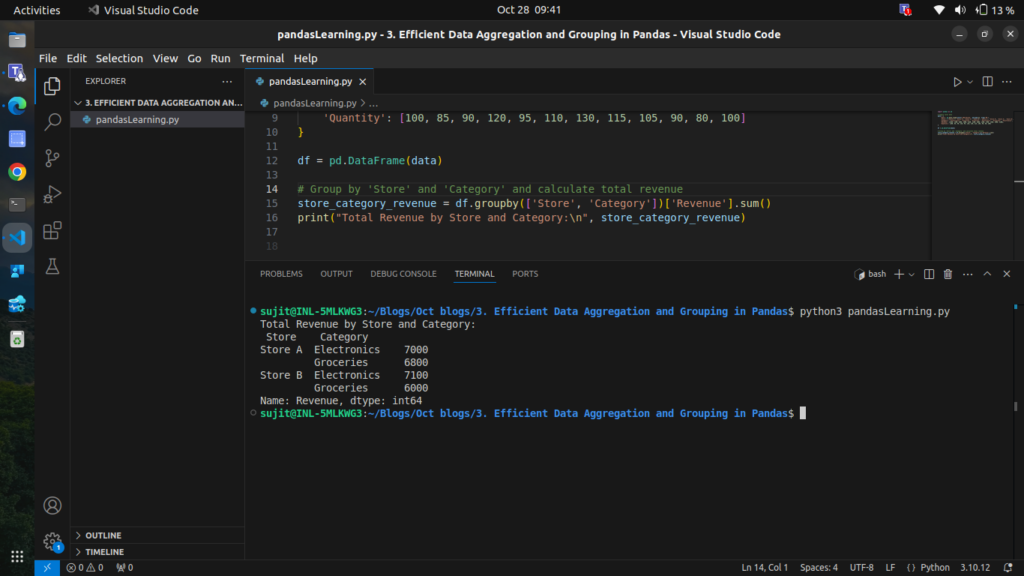
This gives the revenue split not only by store but also by category, letting us see which categories perform well at each store.
Step 3: Using Aggregate Functions on Multiple Columns
We can perform multiple aggregations on different columns simultaneously. Let’s find both the total and average Revenue and Quantity for each store.
# Group by 'Store' and aggregate 'Revenue' and 'Quantity' with sum and mean
store_aggregates = df.groupby('Store').agg({
    'Revenue': ['sum', 'mean'],
    'Quantity': ['sum', 'mean']
})
print("Aggregated Revenue and Quantity by Store:\n", store_aggregates)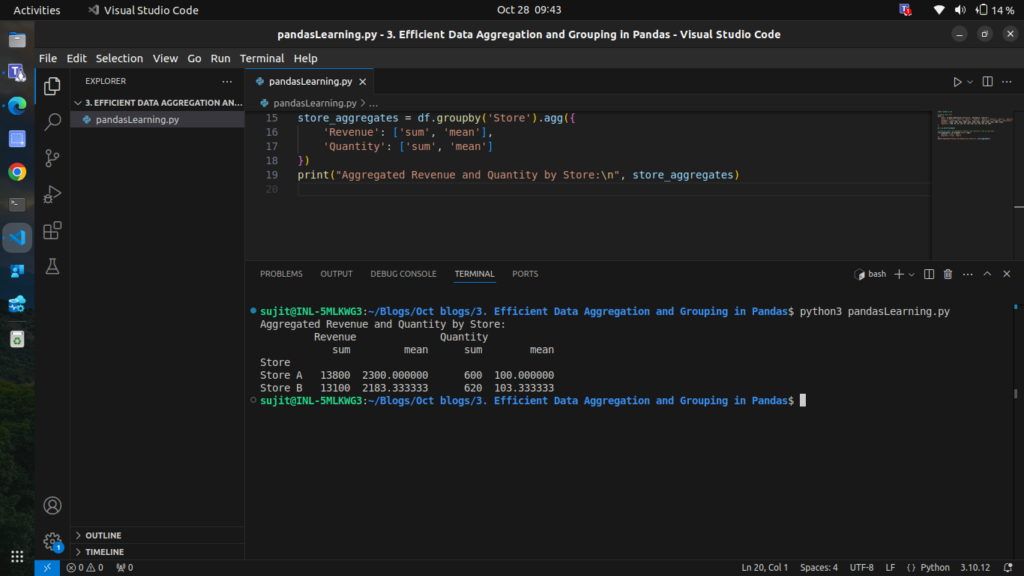
Here, we get the total and average revenue and quantity per store, providing a more detailed picture of performance.
Step 4: Custom Aggregation Functions
You can apply custom functions within agg to perform specialized calculations. Let’s use a custom function to calculate the range (max – min) for Revenue
# Define a custom function to calculate range
def calculate_range(x):
    return x.max() - x.min()

# Group by 'Store' and apply custom aggregation for revenue range
store_revenue_range = df.groupby('Store').agg({'Revenue': calculate_range})
print("Revenue Range by Store:\n", store_revenue_range)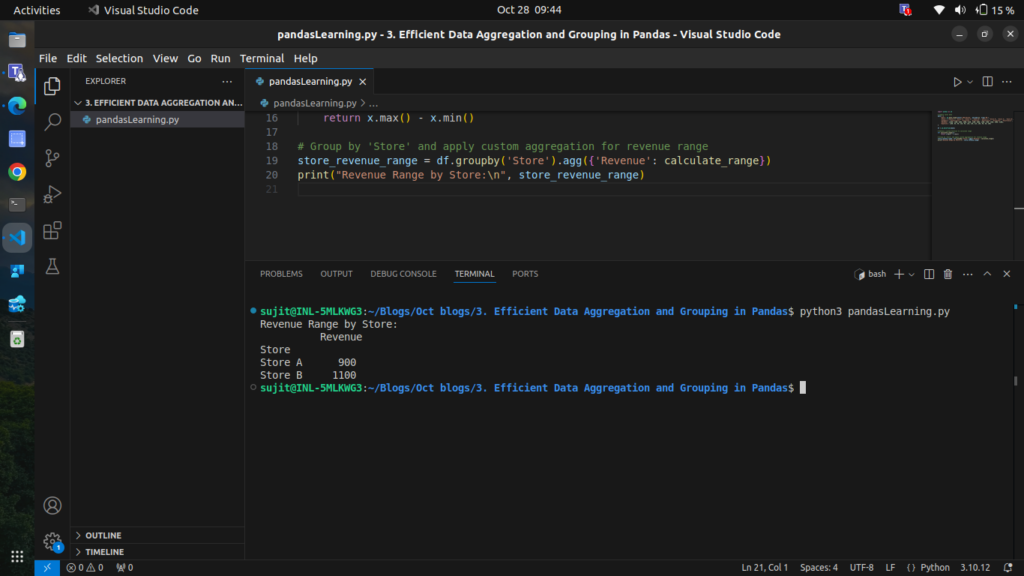
This custom aggregation allows us to see the fluctuation in revenue for each store
Step 5: Grouping by Date with pd.Grouper
pd.Grouper helps group by time-based data. For instance, let’s calculate monthly total Revenue across all stores.
# Set 'Date' as the index to enable time-based grouping
df.set_index('Date', inplace=True)

# Group by month and calculate total revenue
monthly_revenue = df.groupby(pd.Grouper(freq='ME'))['Revenue'].sum()
print("Monthly Total Revenue:\n", monthly_revenue)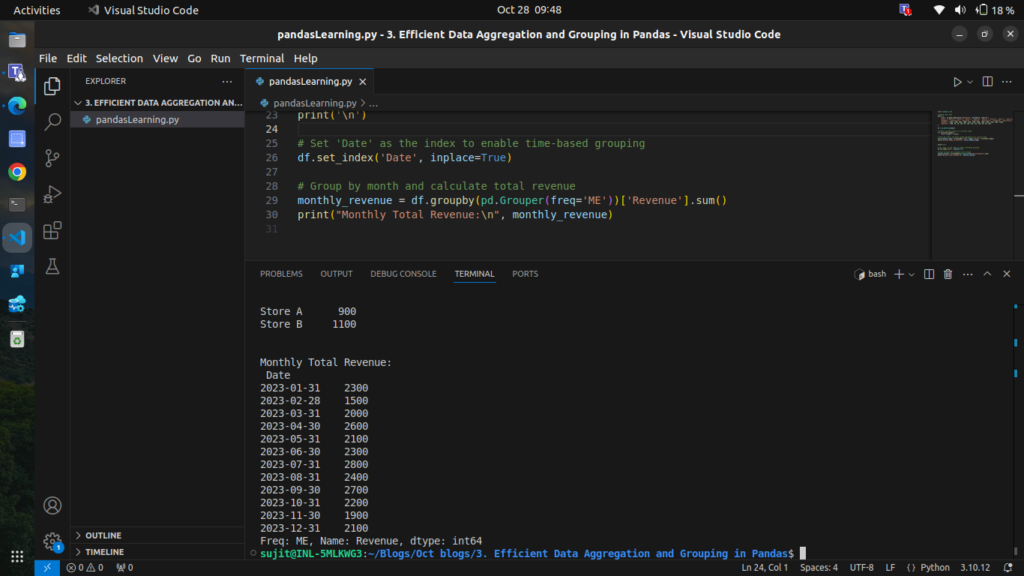
This aggregates the data on a monthly basis, providing insight into revenue trends over time.
Step 6: Grouping with Hierarchical Indexing
When grouping by multiple columns, Pandas returns a DataFrame with a multi-level index, also known as a hierarchical index. Let’s explore how to handle this by grouping Store and Category, then performing aggregation.
# Group by 'Store' and 'Category' and calculate total and average revenue
hierarchical_group = df.groupby(['Store', 'Category']).agg({
    'Revenue': ['sum', 'mean'],
    'Quantity': 'sum'
})
print("Hierarchical Grouping by Store and Category:\n", hierarchical_group)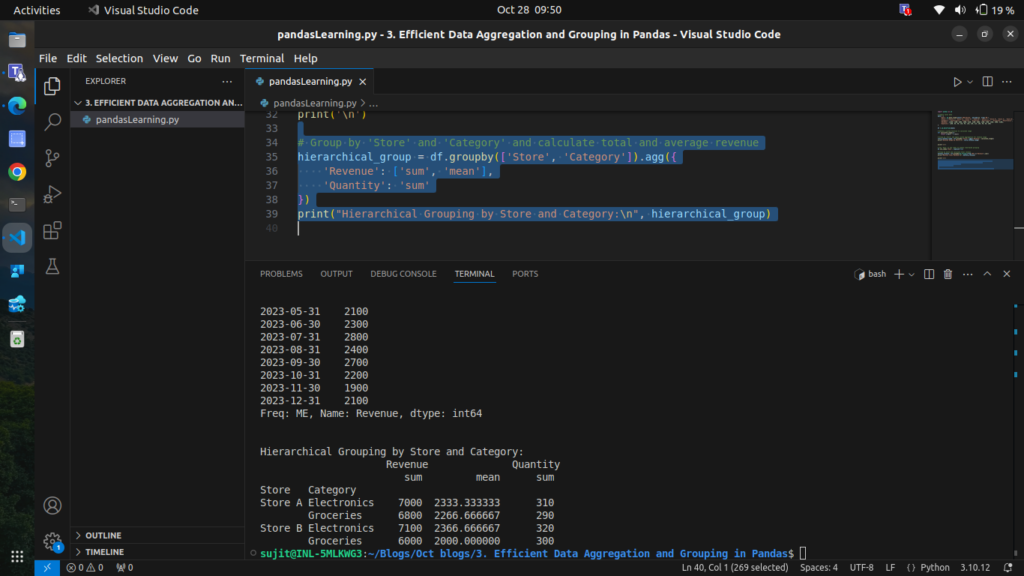
The result is a DataFrame with a multi-level index (Store and Category), allowing us to drill down into specific group details.
Step 7: Transforming Grouped Data
transform allows you to apply a function to each group independently and return a result that aligns with the original DataFrame. For instance, let’s normalize Revenue within each store.
# Group by 'Store' and normalize 'Revenue' within each store
df['Normalized_Revenue'] = df.groupby('Store')['Revenue'].transform(lambda x: (x - x.mean()) / x.std())
print("DataFrame with Normalized Revenue by Store:\n", df)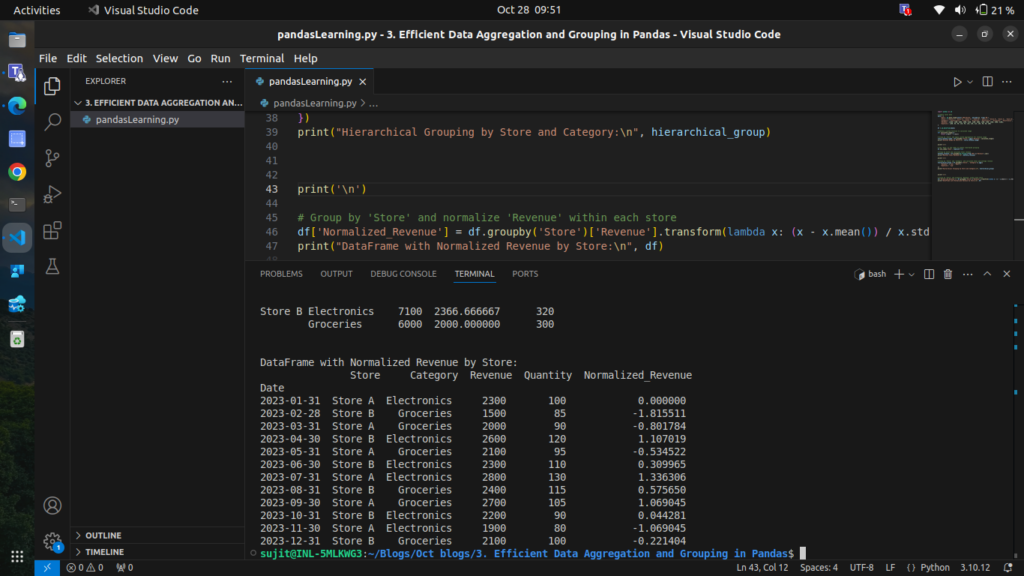
This gives each store’s revenue a relative scale, making it easier to compare performance within each store.
Step 8: Filtering Groups with filter
Sometimes, you may want to filter groups based on a condition. For example, let’s keep only those stores with an average Revenue above 2000.
# Filter groups to keep only stores with average revenue > 2000
filtered_df = df.groupby('Store').filter(lambda x: x['Revenue'].mean() > 2000)
print("Filtered DataFrame (Stores with Avg Revenue > 2000):\n", filtered_df)
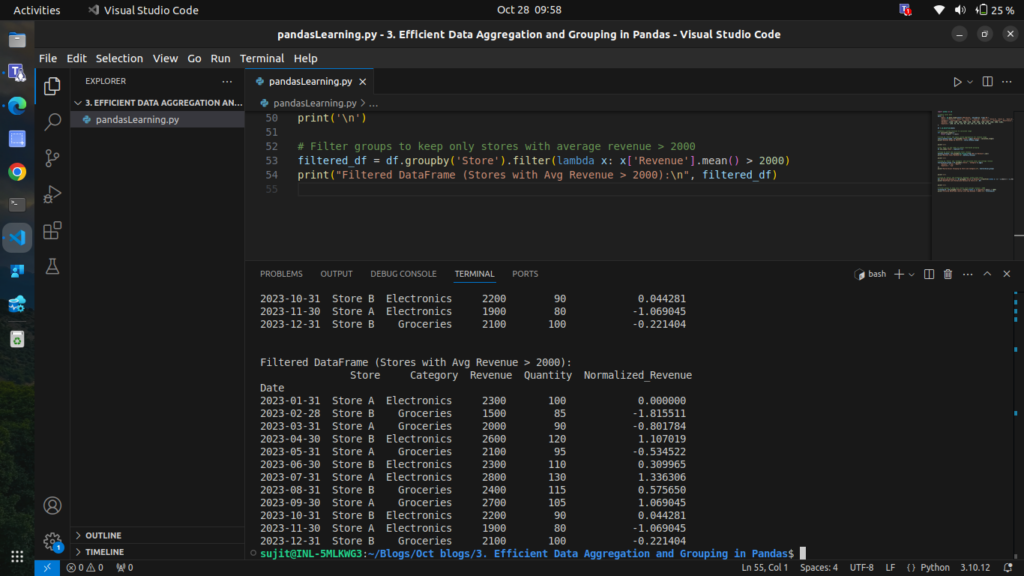
This filters out any groups where the condition isn’t met, leaving only the data we want.
you can access complete code of this blog from here:
import pandas as pd

# Sample sales data
data = {
    'Date': pd.date_range(start='2023-01-01', periods=12, freq='ME'),
    'Store': ['Store A', 'Store B', 'Store A', 'Store B', 'Store A', 'Store B', 'Store A', 'Store B', 'Store A', 'Store B', 'Store A', 'Store B'],
    'Category': ['Electronics', 'Groceries', 'Groceries', 'Electronics', 'Groceries', 'Electronics', 'Electronics', 'Groceries', 'Groceries', 'Electronics', 'Electronics', 'Groceries'],
    'Revenue': [2300, 1500, 2000, 2600, 2100, 2300, 2800, 2400, 2700, 2200, 1900, 2100],
    'Quantity': [100, 85, 90, 120, 95, 110, 130, 115, 105, 90, 80, 100]
}

# Create DataFrame
df = pd.DataFrame(data)
print("Sample Data:\n", df)

# Step 1: Basic Grouping with `groupby`
store_revenue = df.groupby('Store')['Revenue'].sum()
print("\nTotal Revenue by Store:\n", store_revenue)

# Step 2: Grouping by Multiple Columns
store_category_revenue = df.groupby(['Store', 'Category'])['Revenue'].sum()
print("\nTotal Revenue by Store and Category:\n", store_category_revenue)

# Step 3: Using Aggregate Functions on Multiple Columns
store_aggregates = df.groupby('Store').agg({
    'Revenue': ['sum', 'mean'],
    'Quantity': ['sum', 'mean']
})
print("\nAggregated Revenue and Quantity by Store:\n", store_aggregates)

# Step 4: Custom Aggregation Functions
def calculate_range(x):
    return x.max() - x.min()

store_revenue_range = df.groupby('Store').agg({'Revenue': calculate_range})
print("\nRevenue Range by Store:\n", store_revenue_range)

# Step 5: Grouping by Date with `pd.Grouper`
df.set_index('Date', inplace=True)
monthly_revenue = df.groupby(pd.Grouper(freq='ME'))['Revenue'].sum()
print("\nMonthly Total Revenue:\n", monthly_revenue)

# Step 6: Grouping with Hierarchical Indexing
hierarchical_group = df.groupby(['Store', 'Category']).agg({
    'Revenue': ['sum', 'mean'],
    'Quantity': 'sum'
})
print("\nHierarchical Grouping by Store and Category:\n", hierarchical_group)

# Step 7: Transforming Grouped Data
df['Normalized_Revenue'] = df.groupby('Store')['Revenue'].transform(lambda x: (x - x.mean()) / x.std())
print("\nDataFrame with Normalized Revenue by Store:\n", df)

# Step 8: Filtering Groups with `filter`
filtered_df = df.groupby('Store').filter(lambda x: x['Revenue'].mean() > 2000)
print("\nFiltered DataFrame (Stores with Avg Revenue > 2000):\n", filtered_df)
Conclusion
This blog covers efficient data aggregation and grouping techniques in Pandas, from basic grouping to advanced methods like custom aggregations, hierarchical indexing, and time-based grouping. Mastering these techniques will enable you to analyze large datasets efficiently and extract valuable insights.